High-performance parameter templates
PolarDB for MySQL supports the high-performance parameter template feature. This chapter describes the parameter settings in the high-performance parameter template for PolarDB for MySQL, how to enable it, and the performance improvements after it is enabled.
Overview
Tuning PolarDB's numerous parameters for specific scenarios can be challenging. To simplify performance optimization, PolarDB provides high-performance parameter templates. You can apply a template directly to a cluster or use it as a baseline for customization. These templates improve database performance in most cases.
The high-performance parameter templates for PolarDB for MySQL modify the following key parameters.
|
Parameter |
Description |
Template value |
Default value |
|
innodb_flush_log_at_trx_commit |
When set to 0, the log buffer is written to the log file and flushed to disk once per second. This improves performance but reduces durability, as up to one second of transactions may be lost in a crash. |
0 |
1 |
|
query_cache_type |
Specifies whether to enable the Fast Query Cache feature. Enabling this feature can significantly improve query performance. |
1 |
0 |
|
Parameter |
Description |
Template value |
Default value |
|
innodb_flush_log_at_trx_commit |
When set to 0, the log buffer is written to the log file and flushed to disk once per second. This improves performance but reduces durability, as up to one second of transactions may be lost in a crash. |
0 |
1 |
|
loose_innodb_primary_purge_max_id_lag |
When this parameter is set to 18446744073709551104, the read views on read-only nodes no longer restrict the primary node. |
18446744073709551104 |
N/A |
|
Parameter |
Description |
Template value |
Default value |
|
innodb_flush_log_at_trx_commit |
When set to 0, the log buffer is written to the log file and flushed to disk once per second. This improves performance but reduces durability, as up to one second of transactions may be lost in a crash. |
0 |
1 |
|
loose_innodb_lock_sys_rec_partition |
Specifies the number of partitions for the transaction lock system. Partitioning this system, which manages both row and table locks, reduces contention overhead. |
64 |
1 |
|
loose_query_cache_type |
Specifies whether to enable the Fast Query Cache feature. Enabling this feature can significantly improve query performance. |
ON |
OFF |
Limitations
High-performance parameter templates are supported for both Standard Edition and Cluster Edition of PolarDB. For Cluster Edition, your cluster must run one of the following versions:
-
PolarDB for MySQL 5.6 with a revision version of 5.6.1.0.30 or later.
-
PolarDB for MySQL 5.7 with a revision version of 5.7.1.0.11 or later.
-
PolarDB for MySQL 8.0.1 with a revision version of 8.0.1.1.21 or later.
-
PolarDB for MySQL 8.0.2 with a revision version of 8.0.2.2.6.1 or later.
You can check your cluster version by following the instructions in Query the engine version.
Use cases and potential risks
While high-performance parameter templates generally improve database performance, they prioritize speed over durability. Applying a template introduces the following risks:
-
Data durability is reduced. Because the innodb_flush_log_at_trx_commit parameter is set to
0, if the database crashes, data that has not been flushed to disk within the last second may be lost. -
Primary/secondary replication latency may increase. Because the innodb_flush_log_at_trx_commit parameter is set to
0, physical replication between the primary and secondary nodes may be delayed by about 1 second.
To avoid these risks, you can set innodb_flush_log_at_trx_commit to 1.
If your workload can tolerate a slight reduction in stability in exchange for higher performance, you can apply a high-performance parameter template to your cluster.
Before applying a high-performance parameter template, we recommend consulting with Alibaba Cloud technical support by submitting a ticket.
Apply a high-performance parameter template
You can apply a high-performance parameter template to your cluster by using one of the following two methods.
After applying a template, the cluster must be restarted for the changes to take effect. This restart causes a transient connection interruption. We recommend performing this operation during off-peak hours and ensuring your application has an automatic reconnection mechanism.
Method 1:
-
Log on to the PolarDB console.
-
In the upper-left corner of the console, select the region where your cluster is deployed.
-
In the left-side navigation pane, click Parameter Template.
-
On the Parameter Template page, click the System Parameter Templates tab.
-
Find the template named mysql_innodb_5.6_high-performance, mysql_innodb_5.7_high-performance, or mysql_innodb_8.0_high-performance, and then click Actions > Apply to Cluster.
-
In the Apply to instance panel, select the target cluster and click > to add it to the Selected Instances list.
After you select a cluster, you can review the parameter differences in the Parameter Comparison section.
-
Click OK.
NoteAfter applying the template, the cluster must be restarted for the changes to take effect.
Method 2:
-
Log on to the PolarDB console.
-
In the upper-left corner of the console, select the region where your cluster is deployed.
-
Find the target cluster and click its ID.
-
In the left-side navigation pane, choose .
-
Click Apply Template.
-
In the Apply Template dialog box, select the appropriate high-performance template from the Template Name drop-down list. You can view details such as Number of parameters, Includes restart-required parameters, and Restart Required. If needed, select the Ignore duplicate parameter values checkbox.
After you select a template, review the parameter differences in the Parameter Comparison section.
-
Click OK.
NoteAfter applying the template, the cluster must be restarted for the changes to take effect.
Performance comparison
This section compares the performance of a PolarDB for MySQL 8.0 cluster before and after applying a high-performance parameter template. The comparison uses results from the Sysbench and TPC-C benchmarks.
-
Sysbench is a modular, cross-platform, and multi-threaded benchmark tool used to evaluate system performance under high-load database workloads.
-
TPC-C is an industry-standard benchmark from the Transaction Processing Performance Council (TPC) that measures the online transaction processing (OLTP) performance of a database system.
-
The TPC-C implementation used here is based on the official benchmark but is not fully compliant. Therefore, these results are not comparable to officially published TPC-C benchmark results.
-
Test environment
-
PolarDB for MySQL cluster:
-
Specifications: 88 cores, 720 GB memory
-
Kernel version: 8.0.1.1.21 or later
-
-
Stress test client:
-
The ping latency between the stress client and the database is approximately 1 ms.
-
The client has sufficient computing and network resources.
-
-
-
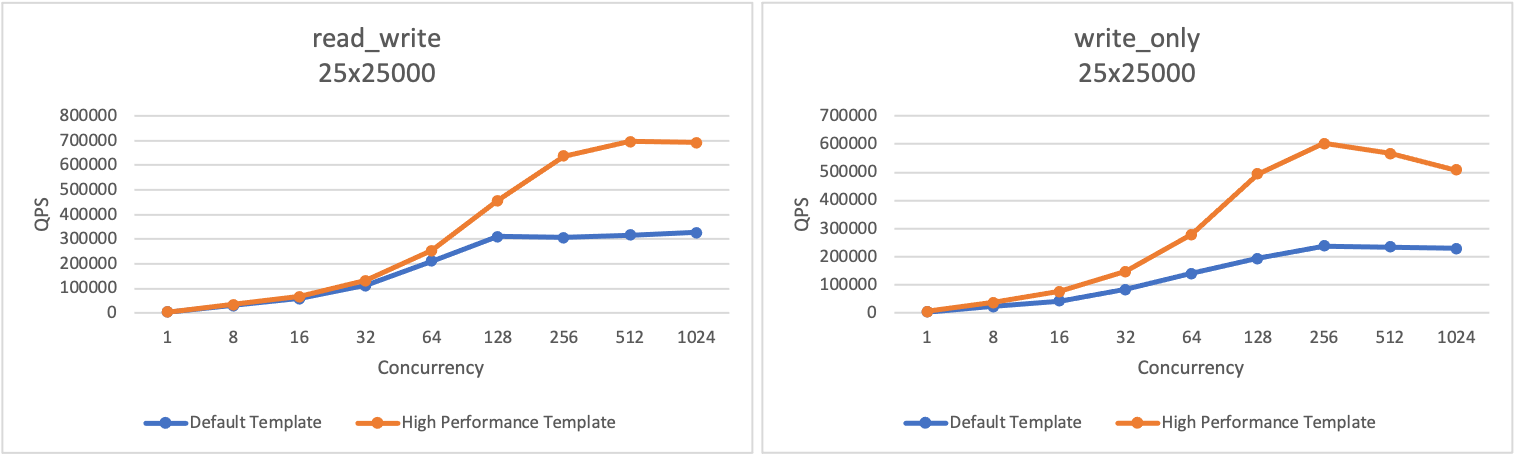
Sysbench test procedure
-
Test suite: read_write, write_only
-
Initial dataset: 25 tables, each with 25,000 rows
-
Performance metric: QPS (queries per second), which measures the number of SQL statements (including INSERT, SELECT, UPDATE, and DELETE) executed per second at different levels of concurrent requests: 1, 8, 16, 32, 64, 128, 256, 512, and 1024.
-
-
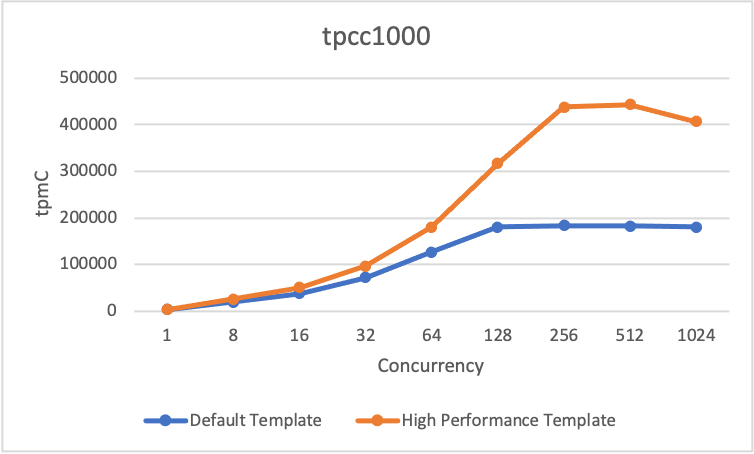
TPC-C test procedure
-
Tool: TPCC-MySQL
-
Initial dataset: 1,000 warehouses
-
Performance metric: tpmC (transactions per minute C), which measures the maximum qualified throughput (MQTh) of the database at different levels of concurrent requests: 1, 8, 16, 32, 64, 128, 256, 512, and 1024.
-
-
Test results
-
Sysbench test
-
TPC-C test
-
-
Conclusion: The high-performance parameter template significantly improves cluster performance as concurrency increases. Based on Sysbench and TPC-C tests, performance more than doubles at 256 or more concurrent requests compared to the default settings.