Load balancing
PolarDB supports two load balancing policies to distribute the load across multiple read-only nodes: Connections-based Load Balancing and Active Request-based Load Balancing.
Load balancing policies
Connections-based Load Balancing: This policy is ideal for high-performance scenarios that do not require advanced features such as consistency levels or transaction splitting.
Active Request-based Load Balancing: Read requests are automatically routed among multiple read-only nodes within a cluster endpoint based on the number of active requests. This policy supports advanced features such as consistency levels, transaction splitting, and connection persistence, and it balances load based on the real-time status of each node.
PolarDB cluster endpoints in Read-only mode support both Connections-based Load Balancing and Active Request-based Load Balancing. Cluster endpoints in Read/Write (Automatic Read/Write Splitting) mode support only Active Request-based Load Balancing.
The following table compares the two policies.
Policy name | Differences | Similarities |
Connections-based Load Balancing |
| For a cluster endpoint in Read-only mode, no requests are forwarded to the primary node, regardless of the load balancing policy used. |
Active Request-based Load Balancing |
|
Primary node accepts read requests
If you set Primary Node Accepts Read Requests to No, PolarProxy no longer sends regular read requests to the primary node. However, read requests within a transaction that require consistency are still sent to the primary node to meet business requirements. Additionally, if all read-only nodes fail, read requests are also sent to the primary node. If your business has low consistency requirements, you can set the consistency level to eventual consistency to reduce read requests to the primary node. You can also use the transaction splitting feature to reduce read requests that are sent to the primary node before the actual transaction starts. Broadcast requests, such as SET or PREPARE, are still sent to the primary node.
You can configure the Primary Node Accepts Read Requests setting only when the Read/Write is set to Read/Write (Automatic Read/Write Splitting). For information about how to modify the Primary Node Accepts Read Requests setting, see Configure the database proxy.
If your PolarProxy version is 1.x.x or 2.5.1 or later, changes to the Primary Node Accepts Read Requests setting take effect immediately.
If your PolarProxy version is 2.x.x and earlier than 2.5.1, changes to the Primary Node Accepts Read Requests setting take effect only after you re-establish persistent connections. For short-lived connections, the changes take effect immediately.
Transaction splitting
When you use a PolarDB cluster endpoint in Read/Write (Automatic Read/Write Splitting) mode, PolarProxy distributes read and write requests to the primary node and read-only nodes. To ensure transactional consistency within a session, PolarProxy sends all in-transaction requests to the primary node. For example, some database client drivers, such as JDBC, wrap requests in transactions by default. As a result, all application requests are sent to the primary node, which can lead to high load on the primary node while read-only nodes are underutilized, as shown in the following figure:

To address this issue, PolarDB provides the transaction splitting feature at the Read Committed isolation level. This feature sends read requests within a transaction to read-only nodes to reduce the load on the primary node, while ensuring read/write consistency for your services. You can offload read pressure from the primary node to read-only nodes and improve the stability of the primary node without changing your application code or configurations. For detailed instructions on how to enable transaction splitting, see Configure the database proxy.
PolarDB for MySQL provides two levels of transaction splitting: Read request splitting before first write request (default, the original transaction splitting feature) and Full transaction splitting (read request splitting before and after first write request).
Read request splitting before first write request
PolarProxy sends read requests that precede the first write request in a transaction to read-only nodes, which reduces the load on the primary node.

Full transaction splitting (read request splitting before and after first write request)
With read request splitting before the first write request, read requests that occur after a write are still routed to the primary node, which can result in an imbalanced load. To fully address the load balancing issues caused by transactions, PolarDB for MySQL introduces full transaction splitting. This feature allows all read operations within a transaction to be routed to read-only nodes while ensuring correct results, further reducing the pressure on the primary node.

A read-after-write request can be routed to a read-only node only if the data from the preceding write operation in the transaction has been synchronized to that node. If you have configured session consistency, PolarProxy first checks if the read-only node for the current session has synchronized the previous writes before routing the read-after-write request. If it has, the request is routed to the read-only node; otherwise, it is routed to the primary node. Similarly, if you have configured global consistency, PolarProxy checks if the transactions from all current sessions have been synchronized to the read-only node. If they have, the request is routed there; otherwise, it is routed to the primary node. Full transaction splitting does not support eventual consistency.
Versions and limitations
To use the full transaction splitting feature, your PolarDB for MySQL cluster must meet the following requirements:
Engine version:
PolarDB for MySQL 5.6, revision 5.6.1.0.29 or later.
PolarDB for MySQL 5.7, revision 5.7.1.0.9 or later.
PolarDB for MySQL 8.0.1, revision 8.0.1.1.18 or later.
PolarDB for MySQL 8.0.2, any revision.
Engine parameter:
The
loose_query_cache_typeparameter must be set to OFF. PolarDB for MySQL 5.6, 5.7, and 8.0.1 use OFF by default. Version 8.0.2 uses ON by default. Changing this parameter requires a restart of the PolarDB cluster.
NoteTransaction splitting is supported only for sessions at the Read Committed isolation level and is enabled by default.
Due to read/write consistency constraints, read requests are not routed to a read-only node if its consistency level does not meet the requirements.
If your PolarProxy version is earlier than 2.4.14, only read request splitting before the first write request is supported. Full transaction splitting is not supported.
If your PolarProxy version is 2.4.14 or later and transaction splitting is configured for full transaction splitting, you must re-establish persistent connections for the change to take effect. For short-lived connections, the change takes effect immediately.
Disable transaction splitting
When transaction splitting is disabled, all requests within a transaction are routed to the primary node.
Weight-based load balancing
By default, the PolarDB for MySQL PolarProxy routes requests to the node with the fewest active (concurrent) requests. This policy generally balances traffic across backend nodes based on their load. It also performs well when backend nodes have different specifications. However, production workloads and traffic distribution requirements vary.
To better meet these needs, PolarDB for MySQL introduces weight-based load balancing. You can configure different weights for each node. During the routing process, both the weight and the number of concurrent requests are used as criteria to dynamically adjust the final routing decision. Currently, weights can be configured at the following two levels:
Global dimension
This configuration applies to all endpoints.
Endpoint dimension
The weight at the endpoint dimension applies only to the load balancing of that endpoint and overrides the global setting. For example, if you first configure a weight at the global dimension and then configure a separate weight for a specific endpoint, the load balancing for that endpoint will be based on the endpoint-level configuration.
Notes
This feature requires PolarProxy 2.8.3 or later.
Because the routing policy considers both the current node load and the user-defined weight, the overall traffic ratio may deviate slightly from the configured ratio. Over time, it will gradually converge towards the configured ratio.
Serverless clusters do not support weight configuration at the endpoint dimension.
How it works
During the request routing process, the final weight of each node is dynamically calculated based on the configured weight and the current number of concurrent requests on the node. The simplified formula is as follows:
Dynamic weight = Configured weight / Number of concurrent requests
The higher the dynamic weight, the higher the priority of the node. The dynamic weight load balancing policy provides a flexible routing method. In practice, traffic gradually shifts according to the configured weights, which may take more time than a simple weighted round-robin approach.
Procedure
Initially, each backend node has the same default weight of 1.
The configurable range for weights is 0 to 100.
When a weight is set to 0, PolarProxy does not route requests to that node under normal circumstances. The node is selected only if all other nodes are unavailable.
If a cluster has only one read-only column store node, its weight can be ignored. If a cluster has multiple read-only column store nodes, column-store requests are load-balanced based on the weights of those nodes.
Configure weights in the global dimension
Log in to the PolarDB console。
-
In the upper-left corner, select the region where the cluster is deployed.
-
Find the target cluster and click its ID.
On the Basic Information page, in the Standard Enterprise Edition or Dedicated Enterprise Edition section, click Database Proxy Settings.
In the Database Proxy Settings dialog box, set a weight for each node based on your business requirements.
The dialog box displays each node’s Role (primary node or read-only node) and a Weight input box. A message at the top indicates that routing decisions are dynamically adjusted based on both weights and concurrent requests. After you finish setting the weights, click OK.
After you configure the weights, click OK.
Configure weights in the endpoint dimension
Log in to the PolarDB console。
-
In the upper-left corner, select the region where the cluster is deployed.
-
Find the target cluster and click its ID.
On the Basic Information page, in the Standard Enterprise Edition or Dedicated Enterprise Edition section, click Configure in the upper-right corner of the cluster endpoint or custom endpoint.
On the Modify Endpoint Settings page, in the service node area, turn on Configure Node Weight and set a weight for each node.
Move the target node, such as a read-only column store node, from the Available Nodes list to the Selected Nodes list. Then, set a weight for the selected node, such as
1, and click OK.After you set the weights, click OK.
Test data
The following shows the actual test data after configuring node weights.
The weight ratio of the three nodes used in the test is 1:2:3 (the primary node has a weight of 1). The stress test results meet expectations (using the Sysbench oltp_read_only test suite).
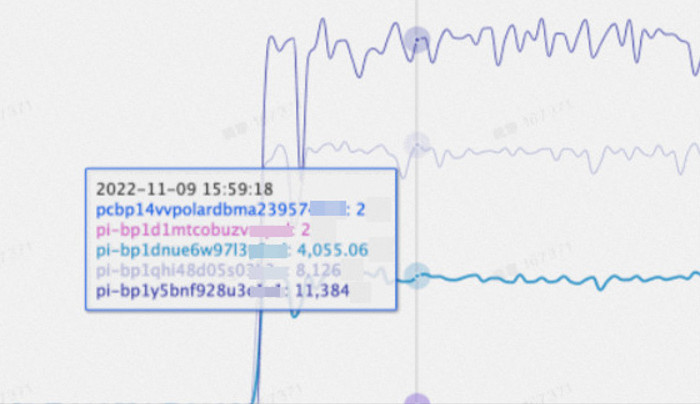
The two internal nodes, pi-bp1d1mtcobuzv** and pcbp14vvpolardbma23957**, are not involved in routing, so their metrics can be ignored.
On-demand connections
Background
For endpoints that use Active Request-based Load Balancing, PolarProxy creates full connections by default. After a client session is established through PolarProxy, PolarProxy establishes a session (connection) with all database nodes within that endpoint, creating a 1:N connection relationship. Normal read requests in this session are routed to various database nodes based on their current active load, while broadcast requests (such as SET statements) are routed to all database nodes. When there are many database nodes, the overall efficiency is significantly reduced due to the overhead of connection establishment and broadcasting.
How it works
With on-demand connections, PolarProxy establishes connections with backend databases only as needed. It minimizes the number of backend connections while meeting consistency and read/write load requirements. This reduces database overhead caused by proxy connections and broadcast execution. In most cases, a session establishes connections with at most one primary node and one read-only node (assuming eventual consistency). This can significantly improve performance for short-lived connections or workloads with many broadcast statements.

As shown in the figure above, assume a PolarDB cluster has one primary node (RW) and three read-only nodes (RO). If consistency is not a factor, the request routing and data reading efficiency in the three scenarios are as follows:
Full connections
A single user session through PolarProxy establishes connections with all four database nodes, and broadcast statements are routed to all four nodes.
On-demand connections, read-only session
A single user session through PolarProxy establishes a connection with only one RO node. Read requests (including broadcasts) are routed only to this single RO node, significantly improving data reading efficiency.
On-demand connections, read/write session
A single user session through PolarProxy establishes connections with only one RO node and one RW node. Broadcast requests are routed only to these two database nodes, also significantly improving data reading efficiency.
Use cases
Clusters with a large number of RO nodes.
Short-lived connections.
Scenarios with many broadcast statements (for example, in PHP short-lived connection scenarios, the first statement of a session is often similar to
set names utf8mb4).Workloads with many queries that use short PREPARE statements.
Limitations
PolarProxy 2.8.34 or later is required. For instructions on how to check your cluster's PolarProxy version, see Check the version number.
When you use
SHOW PROCESSLISTSto view the number of database connections, it may not display the total number of connections to all databases.When you use the KILL command to terminate a specific connection, the command may not terminate the specified connection in all databases.
Performance test
Test environment
Database nodes: one read/write (RW) node, seven read-only (RO) nodes
SQL used for testing:
SET NAMES utf8mb4,SELECT 1Test tool: Sysbench, with the same number of concurrent connections for each test
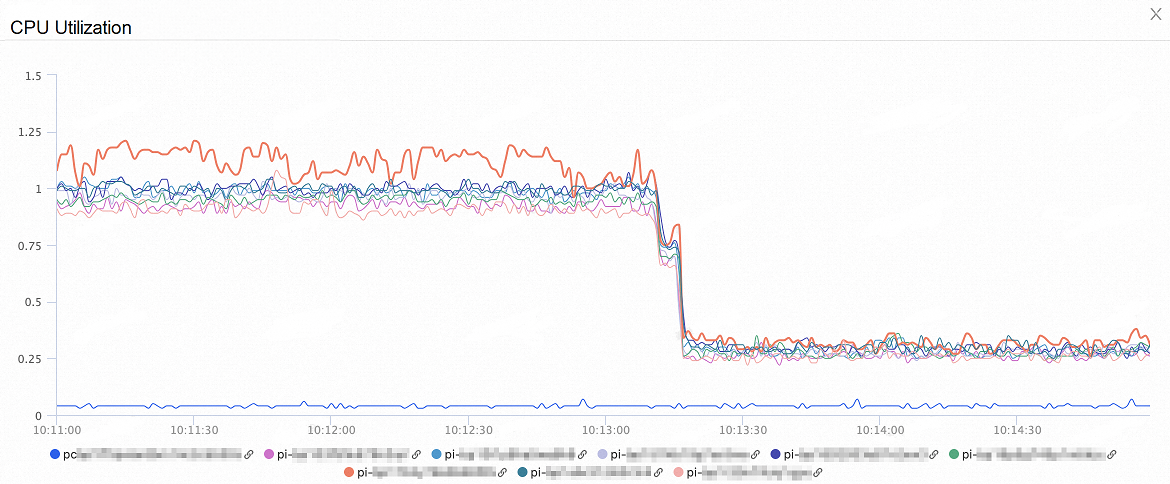
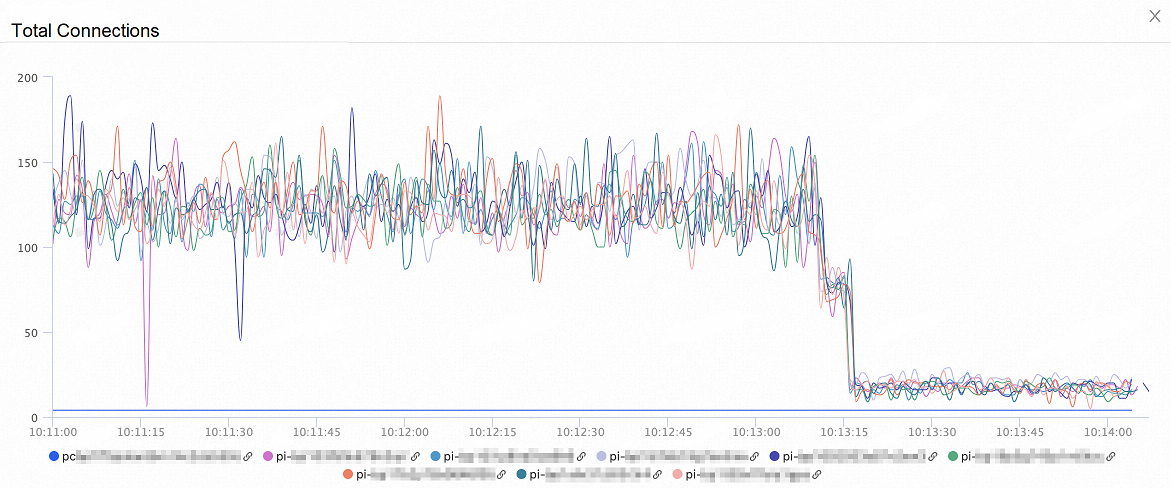
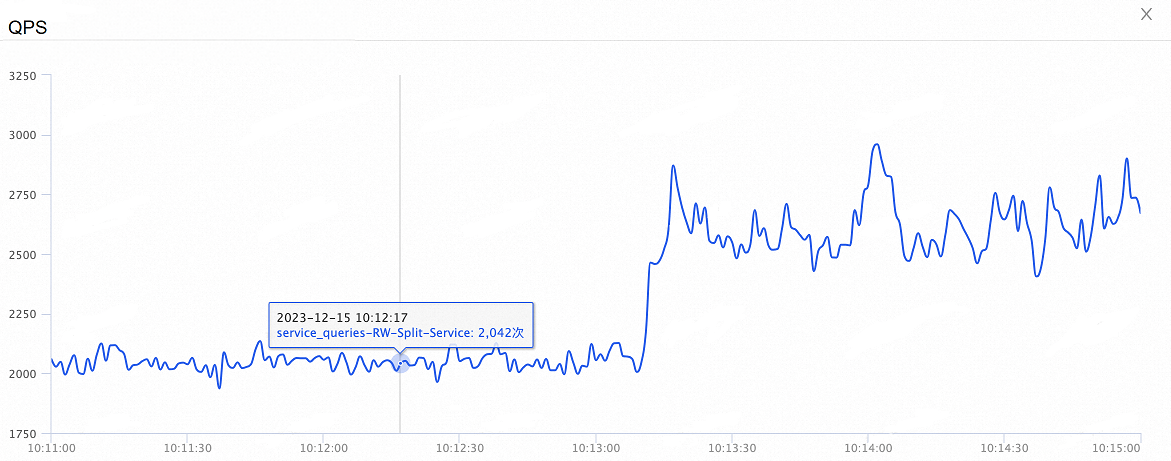
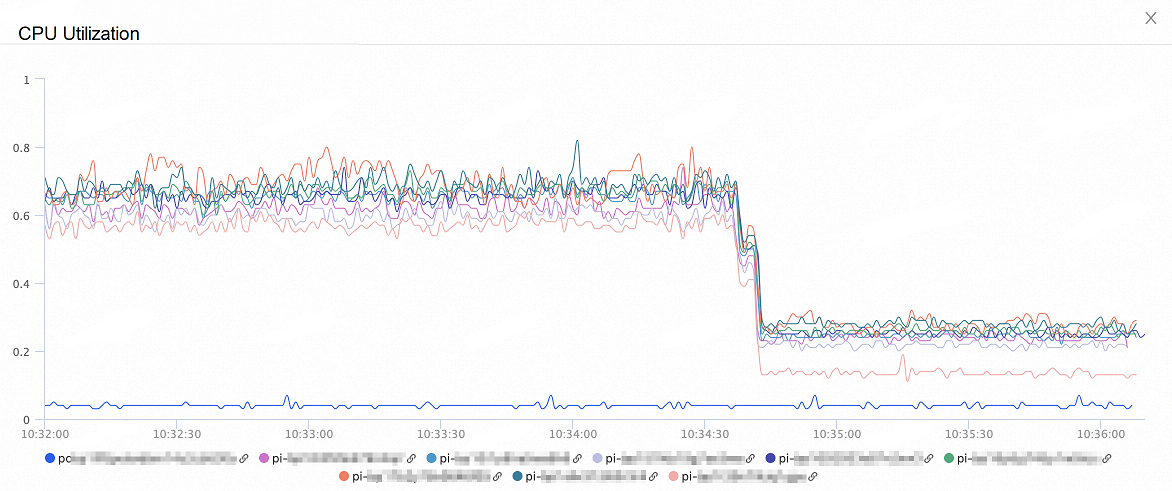
Test scenarios: The test covered three scenarios: with no connection pool, with a session-level connection pool, and with a transaction-level connection pool. Each test was divided into two parts: the first half without on-demand connections enabled, and the second half with on-demand connections enabled.
Test results
Performance test results for the no connection pool scenario:
The figure below shows the CPU consumption of the database nodes. After enabling on-demand connections, the database CPU consumption decreased by more than 60%:

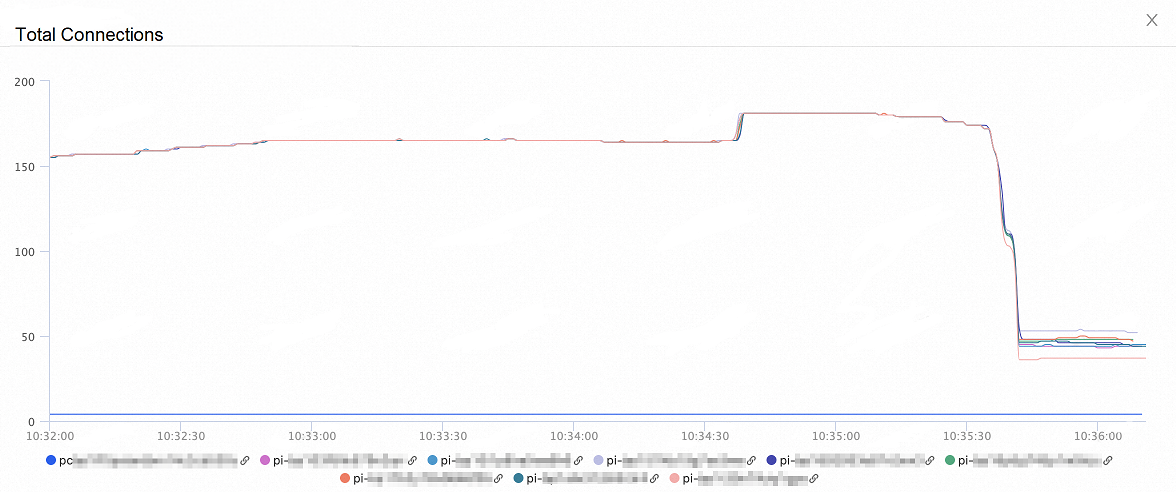
The figure below shows the change in the total number of connections to the database nodes. After enabling on-demand connections, the total number of connections decreased by more than 80%:
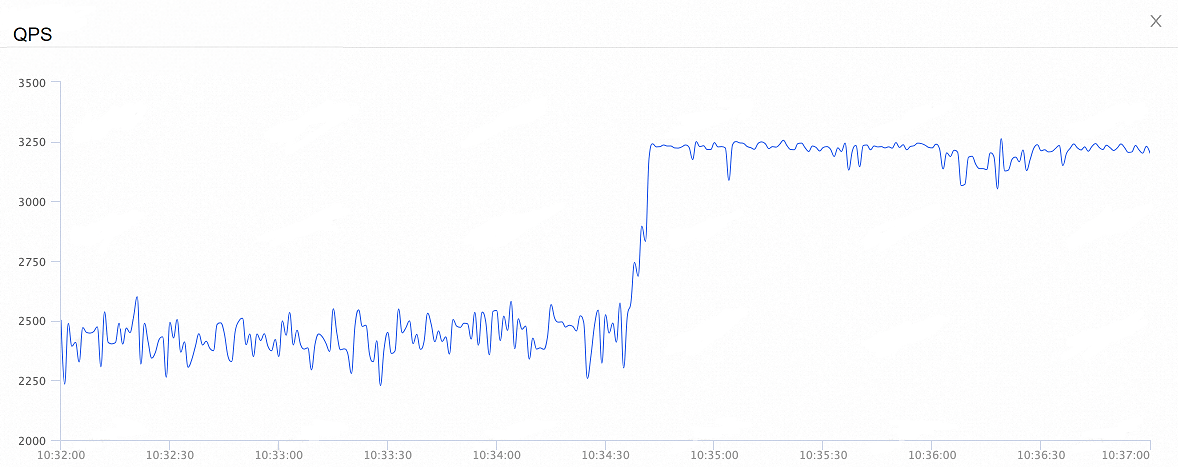
The figure below shows the change in the overall QPS. After enabling on-demand connections, the overall QPS increased by 35%:
Performance test results for the session-level connection pool scenario:
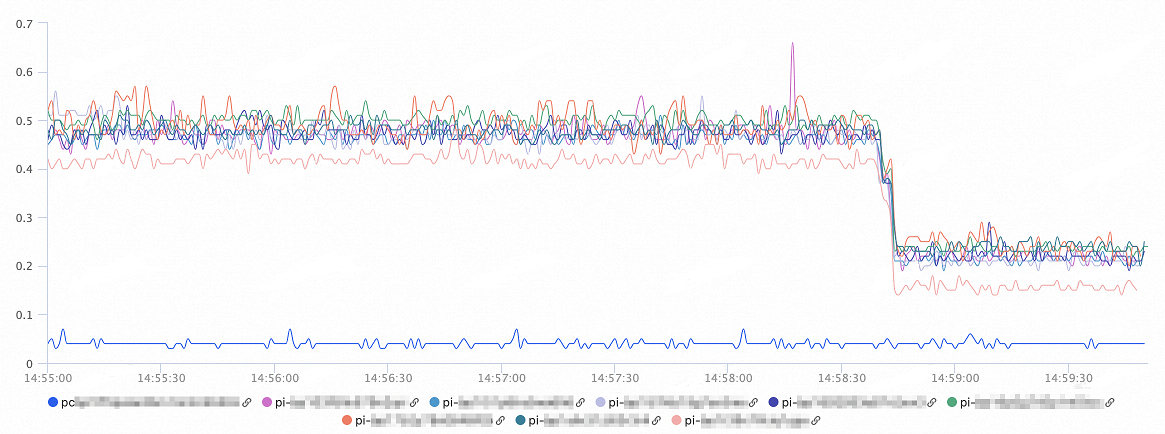
The figure below shows the CPU consumption of the database nodes. After enabling on-demand connections, the database CPU consumption decreased by more than 50% to 60%:
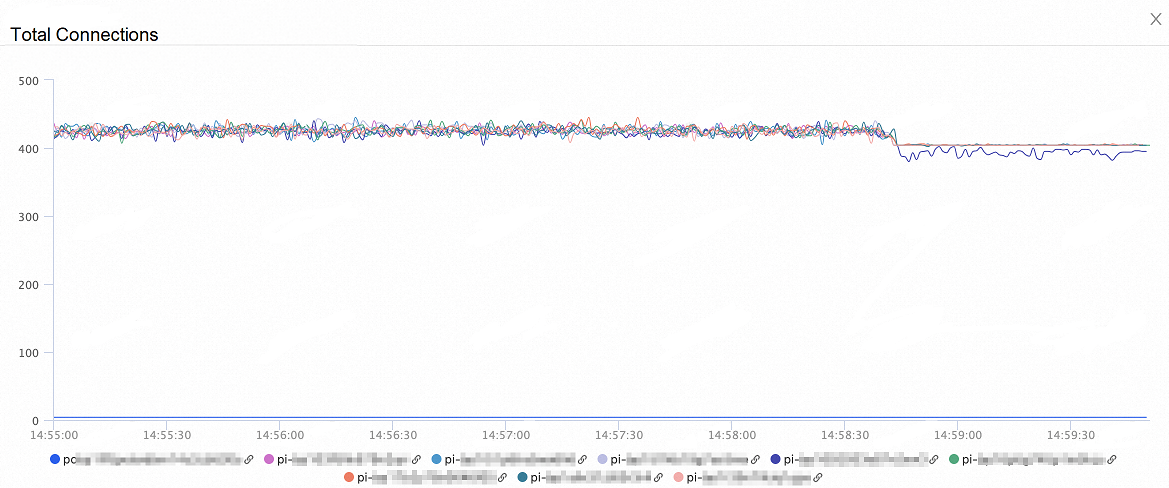
The figure below shows the change in the total number of connections to the database nodes. After enabling on-demand connections, the total number of connections decreased by 60%:
The figure below shows the change in the overall QPS. After enabling on-demand connections, the QPS increased by 30%:
Performance test results for the transaction-level connection pool scenario:
The figure below shows the CPU consumption of the database nodes. After enabling on-demand connections, the database CPU consumption decreased by 60%:
The figure below shows the change in the total number of connections to the database nodes. After enabling on-demand connections, the total number of connections decreased by 50%:
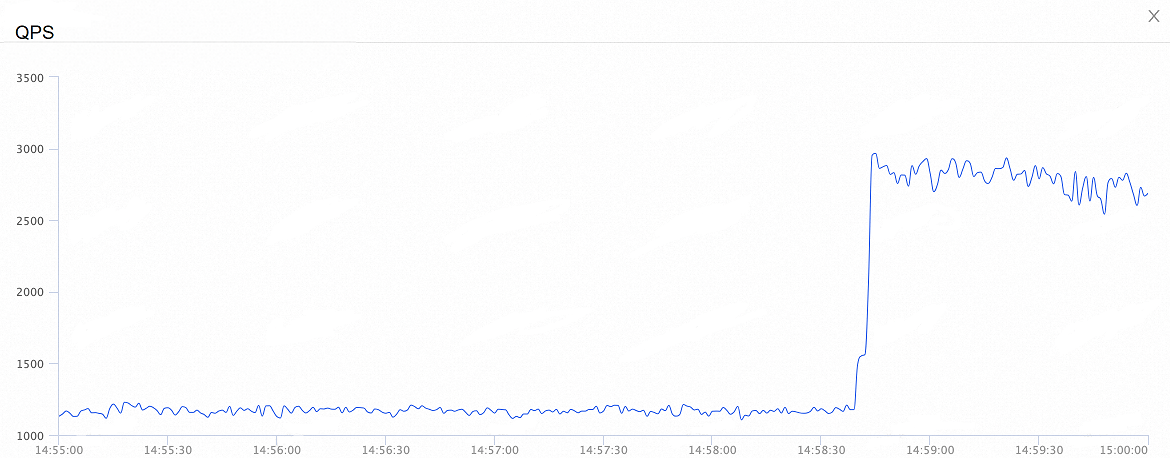
The figure below shows the change in the overall QPS. After enabling on-demand connections, the QPS increased by 260%: