Subquery unnesting
Subquery unnesting is a key database optimization for correlated subqueries. This topic describes how to unnest subqueries using window functions and the GROUP BY clause.
Prerequisites
Your cluster must be a PolarDB for MySQL 8.0 cluster with revision version 8.0.2.2.1 or later. You can query the version number to confirm your cluster version.
Background
Correlated subqueries are widely used in analytical workloads. For example, over one-third of the 22 queries in the TPC-H benchmark contain a correlated subquery. Without unnesting, the subquery is executed for each row processed by the outer query. This repeated execution can lead to long query execution times, especially when the outer query returns a large number of rows or when the subquery lacks an appropriate index. Subquery unnesting transforms a correlated subquery into an equivalent JOIN statement. This transformation avoids repeated subquery execution and allows the optimizer to apply further join optimizations.
Unnesting with window functions
Overview
In this structure, T1, T2, and T3 each represent a set of one or more tables and views. The dotted line between T2 and T3 indicates that T2 in the subquery is correlated with T3 in the outer query. T1 appears in the outer query but is not correlated with T2 in the subquery.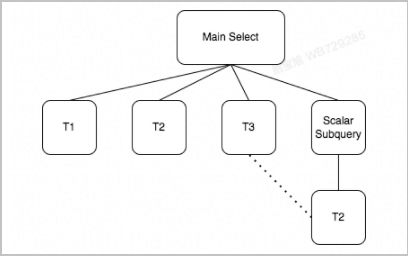
This optimization is applicable only when the correlated subquery meets the following conditions:
-
The scalar subquery consists of an aggregate function and does not contain a
LIMITorDISTINCTclause. -
The tables in the subquery must be a subset of the tables in the outer query.
-
The correlation condition in the subquery must be an equi-join. The outer query must contain join conditions with the same semantics and include filter conditions on the common tables from the subquery.
-
The columns used in the correlation condition of the subquery must be a primary key or a unique key.
-
Neither the subquery nor the outer query contains user-defined functions (UDFs) or non-deterministic functions.
After the optimizer unnests the subquery using a window function, the query is transformed as follows: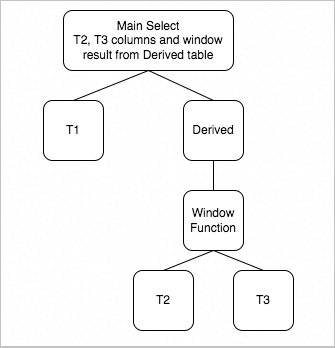
Usage
-
Use the loose_polar_optimizer_switch system parameter to enable subquery unnesting with a window function. For instructions, see Set cluster and node parameters.
Parameter
Scope
Description
loose_polar_optimizer_switch
Global, Session
Controls query optimization features. The options include:
-
unnest_use_window_function: Controls subquery unnesting that uses a window function.
-
ON (Default): Enables this feature.
-
OFF: Disables this feature.
-
-
unnest_use_group_by: Controls subquery unnesting that uses a GROUP BY clause. This query transformation is subject to cost-based query optimization.
-
ON (Default): Enables this feature.
-
OFF: Disables this feature.
-
-
derived_merge_cost_based: Specifies whether the derived merge feature is subject to cost-based query optimization.
-
OFF (Default): The derived merge feature is not subject to cost-based query optimization.
-
ON: The derived merge feature is subject to cost-based query optimization.
-
Example: The following example uses the TPC-H Q2 query, which finds the supplier that offers the lowest supply cost for a specific part type and size within a given region. In MySQL Community Edition, the execution engine first runs the outer query to find suppliers for the specified part. Then, for each returned row, it executes the subquery to calculate the minimum supply cost for that part from all suppliers in the specified region. Finally, it compares the supplier's supply cost with the minimum supply cost from the subquery.
SELECT s_acctbal, s_name, n_name, p_partkey, p_mfgr,
 s_address, s_phone, s_comment
FROM part, supplier, partsupp, nation, region
WHERE p_partkey = ps_partkey
   AND s_suppkey = ps_suppkey
   AND p_size = 30
   AND p_type LIKE '%STEEL'
   AND s_nationkey = n_nationkey
   AND n_regionkey = r_regionkey
   AND r_name = 'ASIA'
   AND ps_supplycost = (
       SELECT MIN(ps_supplycost)
       FROM partsupp, supplier, nation, region
       WHERE p_partkey = ps_partkey
           AND s_suppkey = ps_suppkey
           AND s_nationkey = n_nationkey
           AND n_regionkey = r_regionkey
           AND r_name = 'ASIA'
   )
ORDER BY s_acctbal DESC, n_name, s_name, p_partkey
LIMIT 100;
A window function allows the query to calculate the aggregate function over a specified partition and add the result to the original rows. For TPC-H Q2, this allows the system to retrieve suppliers for the specified parts while simultaneously calculating the minimum supply cost grouped by part. The results are then filtered by comparing the supply cost in each row with the calculated minimum for its group. After this query transformation, the Q2 query becomes equivalent to the following:
SELECT s_acctbal, s_name, n_name, p_partkey, p_mfgr, s_address, s_phone, s_comment FROM ( SELECT MIN(ps_supplycost) OVER(PARTITION BY ps_partkey) as win_min, ps_partkey, ps_supplycost, s_acctbal, n_name, s_name, s_address, s_phone, s_comment FROM part, partsupp, supplier, nation, region WHERE p_partkey = ps_partkey AND s_suppkey = ps_suppkey AND s_nationkey = n_nationkey AND n_regionkey = r_regionkey AND p_size = 30 AND p_type LIKE '%STEEL' AND r_name = 'ASIA') as derived WHERE ps_supplycost = derived.win_min ORDER BY s_acctbal DESC, n_name, s_name, p_partkey LIMIT 100; -
-
Use hints to control subquery unnesting for specific queries.
Use the
UNNESThint to control this query transformation. The formats are as follows:UNNEST([@query_block_name] [strategy [, strategy] ...]) # Unnests the subquery by using a window function or a GROUP BY clause, overriding the loose_polar_optimizer_switch setting. NO_UNNEST([@query_block_name] [strategy [, strategy] ...]) # Prevents the subquery from being unnested, overriding the loose_polar_optimizer_switch setting.The
strategyoption supportsWINDOW_FUNCTIONandGROUP_BY.Example:
# Force unnesting with a window function.
SELECT ... FROM ... WHERE ... = (SELECT /*+UNNEST(WINDOW_FUNCTION)*/ agg FROM ...)
SELECT /*+UNNEST(@`select#2` WINDOW_FUNCTION)*/ ... FROM ... WHERE ... = (SELECT agg FROM ...)

# Prevent unnesting with a window function.
SELECT ... FROM ... WHERE ... = (SELECT /*+NO_UNNEST(WINDOW_FUNCTION)*/ agg FROM ...)
SELECT /*+NO_UNNEST(@`select#2` WINDOW_FUNCTION)*/ ... FROM ... WHERE ... = (SELECT agg FROM ...)
Performance
Performance tests using a 10 GB TPC-H standard dataset show significant speed improvements. With this optimization, Q2 is 1.54 times faster and Q17 is 4.91 times faster, as shown in the following figure: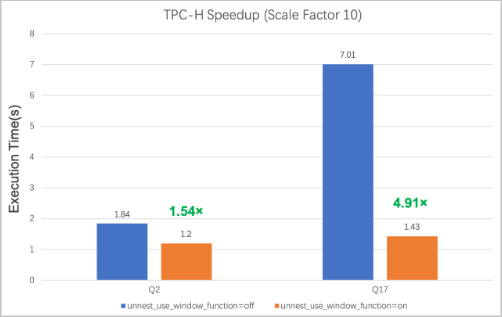
Unnesting with the GROUP BY clause
Overview
The original query has the following general form: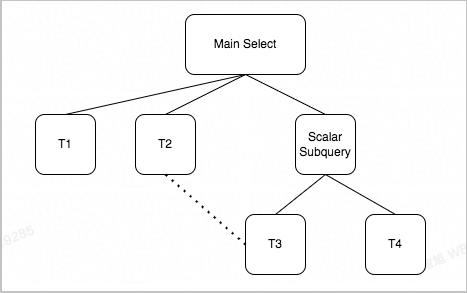
This subquery unnesting optimization is applicable only when the correlated subquery meets the following conditions:
-
The scalar subquery consists of an aggregate function and does not contain an explicit
GROUP BYorLIMITclause. -
The scalar subquery is located in a
JOINcondition, aWHEREcondition, or theSELECTlist. -
The correlation between the scalar subquery and the outer query must be an equi-join, and all conditions must be connected by
AND. -
The scalar subquery does not contain UDFs or non-deterministic functions.
After the optimizer unnests the subquery using a GROUP BY clause, the query is transformed as follows: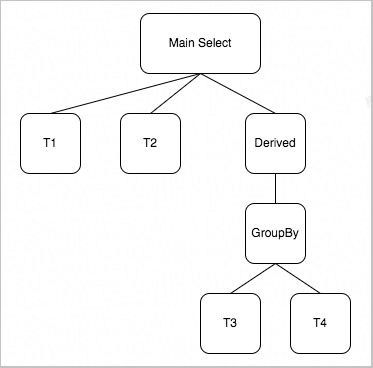
Usage
-
Use the loose_polar_optimizer_switch system parameter to enable subquery unnesting with a GROUP BY clause. For instructions, see Set cluster and node parameters .
Parameter
Scope
Description
loose_polar_optimizer_switch
Global, Session
Controls query optimization features. The options include:
-
unnest_use_window_function: Controls subquery unnesting that uses a window function.
-
ON (Default): Enables this feature.
-
OFF: Disables this feature.
-
-
unnest_use_group_by: Controls subquery unnesting that uses a GROUP BY clause. This query transformation is subject to cost-based query optimization.
-
ON (Default): Enables this feature.
-
OFF: Disables this feature.
-
-
derived_merge_cost_based: Specifies whether the derived merge feature is subject to cost-based query optimization.
-
OFF (Default): The derived merge feature is not subject to cost-based query optimization.
-
ON: The derived merge feature is subject to cost-based query optimization.
-
Example: The following query finds sales order line items where the quantity is greater than 10% of the total purchased quantity for the corresponding item.
SELECT *
FROM sale_lineitem sl
WHERE sl.sl_quantity >
    (SELECT 0.1 * SUM(pl.pl_quantity)
     FROM purchase_lineitem pl
     WHERE pl.pl_objectkey = sl.sl_objectkey);
Without this query transformation, the execution engine iterates through each row of the
sale_lineitemtable. For each row, it takes thesl_objectkey, inserts it into the subquery, and executes the subquery to calculate 10% of the total purchased quantity. This result is then compared with the quantity in the current row. In this scenario, the subquery is executed once for each row in thesale_lineitemtable. Even with an index on thepl_objectkeycolumn, this process leads to repetitive scans and calculations on thepurchase_lineitemtable because thesl_objectkeycolumn often contains many duplicate values. To optimize such inefficient correlated subqueries, PolarDB unnests them using a GROUP BY clause. The original query is transformed into the following:SELECT * FROM sale_lineitem sl LEFT JOIN (SELECT (0.1 * sum(pl.pl_quantity)) AS Name_exp_1, pl.pl_objectkey AS Name_exp_2 FROM purchase_lineitem pl GROUP BY pl.pl_objectkey) derived ON derived.Name_exp_2 = sl.sl_objectkey WHERE sl.sl_quantity > derived.name_exp_1;After the transformation, the system first calculates the aggregate for each purchased item and then joins the result with the
sale_lineitemtable. This ensures thepurchase_lineitemtable is scanned only once, avoiding repetitive scans and calculations. The optimizer can further optimize the transformed statement by eliminating the outer join and adjusting the join order to improve execution efficiency. -
-
Use hints to control subquery unnesting for specific queries.
Use the
UNNESThint to control this query transformation. The formats are as follows:UNNEST([@query_block_name] [strategy [, strategy] ...]) # Unnests the subquery by using a window function or a GROUP BY clause, overriding the loose_polar_optimizer_switch setting. NO_UNNEST([@query_block_name] [strategy [, strategy] ...]) # Prevents the subquery from being unnested, overriding the loose_polar_optimizer_switch setting.The
strategyoption supportsWINDOW_FUNCTIONandGROUP_BY.Example:
# Force unnesting with a GROUP BY clause.
SELECT ... FROM ... WHERE ... = (SELECT /*+UNNEST(GROUP_BY)*/ agg FROM ...)
SELECT /*+UNNEST(@`select#2` GROUP_BY)*/ ... FROM ... WHERE ... = (SELECT agg FROM ...)

# Prevent unnesting with a GROUP BY clause.
SELECT ... FROM ... WHERE ... = (SELECT /*+NO_UNNEST(GROUP_BY)*/ agg FROM ...)
SELECT /*+NO_UNNEST(@`select#2` GROUP_BY)*/ ... FROM ... WHERE ... = (SELECT agg FROM ...)