Serverless is a dynamic scaling feature of cloud-native database PolarDB. Cluster nodes scale elastically within seconds to handle workload surges without affecting your business. During low-load periods, resources scale down automatically to reduce costs.
Background
Databases are critical to modern IT systems. Creating a database requires careful resource configuration — CPU, memory, storage, and connections — to handle both peak and off-peak hours. Fixed provisioning wastes resources during low demand and risks insufficient capacity during spikes. Serverless databases solve this by automatically scaling resources based on current workload, eliminating complex capacity planning and O&M overhead.
The following figure compares resource usage between common clusters and Serverless clusters under fluctuating workloads.
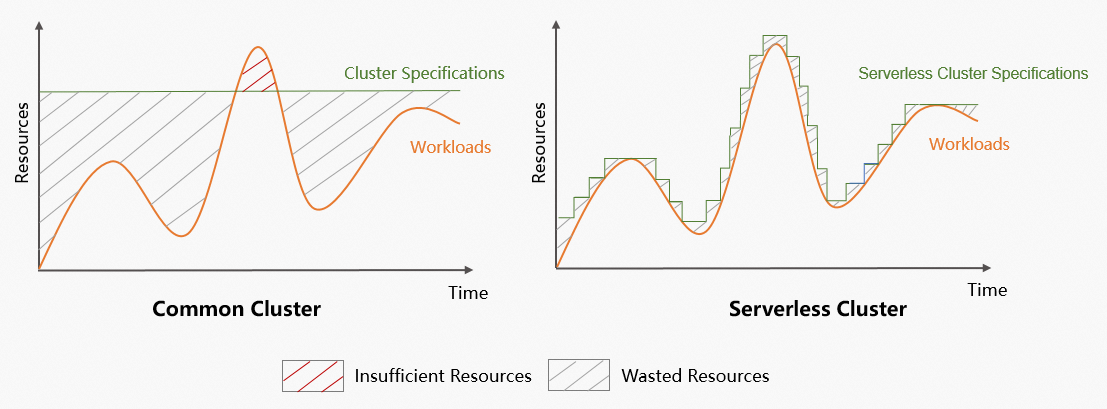
Key differences under fluctuating workloads:
Common clusters: Resources are wasted during off-peak periods and insufficient during peak periods, which impacts business continuity.
Serverless clusters:
Adjust specifications based on demand, reducing resource waste and improving utilization.
Scale cluster resources quickly during peak hours to ensure business continuity and system stability.
Replace fixed-resource billing with pay-as-you-go, dynamically matching resources to workloads for significant cost savings.
Provide elastic scaling optimized for high-throughput writes and high concurrency, suitable for large data volumes and fluctuating access patterns.
Eliminate manual configuration adjustments, improving O&M efficiency and reducing labor costs.
Overview
The Serverless feature provides real-time elasticity for CPU, memory, storage, and network resources with vertical resource isolation for network resources, namespaces, and storage space. On-demand billing for compute and storage lets you independently adjust capacity to match business changes, optimizing costs and efficiency.
|
Item |
Description |
|
Implementation model |
|
|
Scaling method |
|
|
PCU (PolarDB Capacity Unit) |
PCUs are the unit for second-level billing and resource scaling for the serverless feature. One PCU is approximately equal to 1 core and 2 GB of memory. The PCUs of a node is dynamically adjusted within the specified range based on the workloads. The minimum granularity for scaling is 0.5 PCUs. |
Types
Serverless feature for a cluster with defined specifications | Serverless cluster |
 |  |
Note After you enable the Serverless feature for a cluster with defined specifications, the maximum number of connections and the maximum IOPS for the cluster are proportional to the value of the Serverless Maximum Resources for Single Node parameter. |
Note A serverless cluster supports a maximum of 100,000 connections and a maximum IOPS of 84,000. |
Auto scaling
Triggers for scaling up and scaling out
Scale-up (upgrading nodes)
PolarDB monitors CPU usage, memory usage, and other kernel-level metrics of compute nodes. A scale-up is triggered during a monitoring period if any of the following conditions is met:
The CPU usage is higher than the preset threshold (default: 85%).
The memory usage is higher than 85%.
The specifications of a read-only node are less than half of the primary node's specifications.
For example, if a read-only node is 4 PCU and the primary node is 10 PCU, the read-only node is scaled up to at least 5 PCU.
Scale-out (adding nodes)
If a read-only node reaches its configured scaling limit but still meets scale-up conditions (for example, CPU usage exceeds the threshold), a scale-out adds more read-only nodes.
Triggers for scaling down and scaling in
Scale-down (downgrading nodes)
A scale-down is triggered when CPU usage falls below the preset threshold (default: 55%) and memory usage drops below 40%.
Scale-in (removing nodes)
A scale-in removes a read-only node if its CPU usage stays below 15% and all other read-only nodes stay below 60% for 15 to 30 minutes.
NoteTo prevent node jitter, only one read-only node is removed at a time. The cool-down period between consecutive scale-in events is 15 to 30 minutes.
To immediately remove all read-only nodes, modify the Serverless Configuration. Set both the Maximum Read-only Nodes and Minimum Read-only Nodes to 0. This action immediately triggers the removal of all read-only nodes.
The thresholds described are default values. They may vary depending on the cluster's kernel parameters and Serverless configuration policies.
Benefits
Serverless dynamically scales cluster resources in seconds based on workload. Core benefits:
High availability
Multi-node architecture ensures high availability and stability of Serverless clusters.
High elasticity
Wide scaling range: Supports automatic vertical and horizontal scaling.
Scaling within seconds: Detects workload spikes in 5 seconds and completes a scale-out in 1 second. When workload decreases, resources are released in tiers.
Strong data consistency
Supports global consistency to ensure data written to the cluster is immediately readable on read-only nodes, with performance nearly identical to weak consistency.
NoteGlobal consistency is disabled by default. You can enable it for cluster endpoints. Global Consistency.
Cost-effectiveness
Serverless clusters are billed in PCUs on a pay-as-you-go basis. This can reduce your costs by up to 80%.
Fully managed
Alibaba Cloud handles all O&M work — version upgrades, system deployments, scaling, and alert processing — without affecting your services. This delivers a fully managed experience that lets you focus on your business.
Use cases
Serverless clusters
Workloads with significant fluctuations.
Infrequent database use, such as in development and staging environments.
Intermittent scheduled tasks, such as for academic instruction and student experiments.
Unpredictable workloads, such as in Internet of Things (IoT) and edge computing.
The need to reduce O&M costs and improve O&M efficiency.
Serverless feature for clusters with defined specifications
Workloads with significant fluctuations.
Unpredictable workloads, such as in Internet of Things (IoT) and edge computing.
The need to reduce O&M costs and improve O&M efficiency.
Handling fluctuating business needs for existing PolarDB clusters.
Supported versions
Serverless clusters
The following versions of PolarDB for PostgreSQL are supported:
PostgreSQL 14: Enterprise Edition and Standard Edition.
PostgreSQL 15: Enterprise Edition.
PostgreSQL 16: Enterprise Edition.
Serverless feature for clusters with defined specifications
PolarDB for PostgreSQL supports the following versions:
Edition: Enterprise Edition.
Sub-family: Dedicated.
Database engine:
PostgreSQL 14 with minor engine version 2.0.14.13.27.0 or later.
PostgreSQL 15 with minor engine version 2.0.15.14.6.0 or later.
PostgreSQL 16 with minor engine version 2.0.16.9.6.0 or later.
Limitations
Serverless clusters do not support custom cluster endpoints, manually adding nodes, or manual upgrades and downgrades.
Maximum connection limit: To prevent connection spikes from exhausting cluster resources within the resource detection window, the actual maximum number of available connections in a Serverless cluster scales dynamically with the real-time PCU. The rules vary by Serverless type:
Serverless cluster (elastic mode): The maximum number of connections depends only on the current PCU. The values are 150 when PCU<1, 200 when PCU=1,
PCU × 187.5when 1<PCU<17, and a fixed 3200 when PCU≥17.Fixed-specification cluster with Serverless enabled (stable mode): The maximum number of connections consists of a fixed base part and an elastic part, and the formula varies by total memory. The base formulas are:
BaseConn = (BaseCPU + BaseMEM) × 100TotalMEM = BaseMEM + PCU × 2
where BaseCPU is the base CPU count, BaseMEM is the base memory size in GB, and TotalMEM is the total memory size.
Billing
Serverless clusters
Fees include compute node fees, storage fees, backup storage fees (charged only for usage exceeding the free quota), and SQL Explorer fees (optional). Serverless billing.
NoteWith the official launch of PolarDB for PostgreSQL Serverless, each Alibaba Cloud account can use up to 10 new Serverless clusters free of charge for the first three months. After the initial three months, or if a cluster's data volume exceeds 100 GB, you will receive a 60% discount. [Launch] PolarDB for PostgreSQL Serverless: Public Preview Ends, Official Version Launched.
Serverless-enabled clusters with defined specifications
Fees include charges for the cluster with defined specifications and for the serverless feature. For cluster billing, see Billable items. For Serverless feature billing, see Serverless billing.
Free trial
Alibaba Cloud offers a database solutions experience center where you can try the dynamic elasticity of PolarDB for PostgreSQL Serverless online without purchasing any resources.
Go to PolarDB for PostgreSQL Serverless: Elasticity and Price-Performance Assessment to start your trial. Free trial: Experience the elasticity of PolarDB for PostgreSQL Serverless.