,
Use an ROS public template to create complete multi-environment infrastructure for development, test, and production with one click. The template automatically configures Resource Access Management (RAM) users, RAM user groups, RAM roles, and access policies, helping enterprise teams manage permissions by environment and responsibility.
Solution overview
This solution uses an ROS public template to create complete multi-environment infrastructure for development, test, and production with one click. It automatically configures RAM users, RAM user groups, RAM roles, and access policies for teams that need to isolate resources by environment and grant permissions by responsibility.
Business scenario
A project requires three isolated environments for development, test, and production. Different team members, such as operations engineers, developers, and testers, can access only the resources of their assigned environments. This solution uses ROS to automate the following governance tasks:
Resource isolation: Each environment uses an independent VPC, ECS instance, RDS instance where applicable, and OSS bucket, and resources are grouped by resource group.
Permission isolation: Operations, development, and test members obtain different permissions through RAM user groups.
Secure access: RAM roles and STS tokens provide temporary authorization instead of long-term AccessKey pairs.
Core concepts of RAM permission management
Concept | Description | Usage in this solution |
RAM user | A person or application in an organization that needs to access cloud resources. | Creates three RAM users: |
RAM user group | A group that contains RAM users with the same responsibilities and receives permissions in a centralized manner. | Creates six RAM user groups: operations ( |
RAM role | An identity that issues temporary STS tokens and is more secure than a long-term AccessKey pair. | Creates three roles that correspond to temporary access permissions for the three environments. |
Resource group | A logical group for cloud resources in different environments, used for resource-level access control. | Uses one resource group each for the development, test, and production environments. |
Permission model architecture
The permission model architecture of this solution is as follows:
                    Alibaba Cloud account
                            │
            ┌───────────────┼───────────────┐
            ↓               ↓               ↓
     Operations group   Development group   Test group
          (sa)              (dev)             (test)
            │               │                 │
            ↓               ↓                 ↓
     ┌──────────┐     ┌──────────┐     ┌──────────┐
     │Development│    │  Test    │     │Production│
     │environment│    │environment│    │environment│
     │resource   │    │resource   │    │resource   │
     │group      │    │group      │    │group      │
     │ VPC       │    │ VPC       │    │ VPC       │
     │ ECS       │    │ ECS       │    │ ECS       │
     │ OSS       │    │ OSS       │    │ OSS       │
     │ RDS       │    │           │    │           │
     └──────────┘     └──────────┘     └──────────┘
            ↑               ↑                 ↑
        RAM role        RAM role          RAM role
   (STS temporary authorization for each environment)
List of created resources
No. | Resource | ROS resource type | Quantity | Description |
1 | VPC |
| 3 | One independent VPC each for development, test, and production. |
2 | vSwitch |
| 3 | One vSwitch each for the three environments. |
3 | Security group |
| 3 | One security group each for the three environments. |
4 | ECS instance |
| 3 | One ECS instance each for the three environments. |
5 | RDS MySQL database |
| 1 | One database instance. |
6 | OSS bucket |
| 5 | Five buckets for development, test, production, code release, and other purposes. |
7 | RAM user group |
| 6 | User groups for operations, development, test, and three environment-specific application user groups. |
8 | RAM user |
| 3 | One RAM user each for development, test, and production. |
9 | RAM role |
| 3 | One STS temporary authorization role each for the three environments. |
Results after deployment
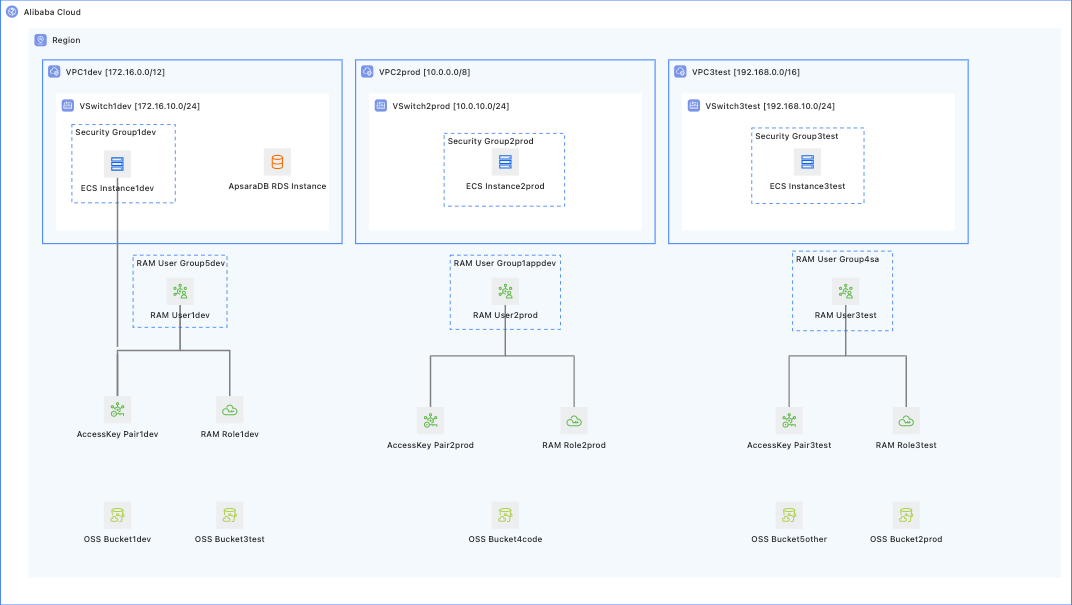
After the template is executed, you obtain:
Three isolated network environments. Each development, test, and production environment has an independent VPC, vSwitch, security group, and ECS instance.
One RDS MySQL database instance.
Five OSS buckets for development, test, production, code release, and other purposes.
Six RAM user groups for operations, development, test, and three environment-specific application user groups, each with corresponding access policies.
Three RAM users,
sts_dev,sts_prod, andsts_test, assigned to the corresponding RAM user groups.Three RAM roles for STS temporary authorization.
AccessKey IDs and AccessKey secrets for each environment in the stack Outputs.
Prerequisites
Before you use this template, make sure that the following conditions are met:
Account permissions: Your Alibaba Cloud account has permissions to create ECS, VPC, RDS, OSS, and RAM resources.
Resource group preparation: Create a resource group for each of the development, test, and production environments in advance, and obtain the corresponding resource group IDs. For resource group creation steps, see Create a resource group.
Deployment
Deployment parameters
There are many parameters. They are divided into the following groups by resource type.
Resource group parameters (create in advance)
Parameter | Type | Description | Example |
Development Resource Group ID | String | The resource group ID for resources in the development environment. |
|
Production Resource Group ID | String | The resource group ID for resources in the production environment. |
|
Test Resource Group ID | String | The resource group ID for resources in the test environment. |
|
VPC parameters
Parameter | Type | Description | Example |
Development Environment VPC CIDR Block | String | The CIDR block of the VPC for the development environment. |
|
Production Environment VPC CIDR Block | String | The CIDR block of the VPC for the production environment. |
|
Test Environment VPC CIDR Block | String | The CIDR block of the VPC for the test environment. |
|
VSwitch Availability zone | String | The availability zone ID shared by vSwitches in the three environments. | China (Hangzhou) Zone K |
Development VSwitch CIDR Block | String | The vSwitch CIDR block of the development environment. The CIDR block must be a subset of the VPC CIDR block. |
|
Production VSwitch CIDR Block | String | The vSwitch CIDR block of the production environment. The CIDR block must be a subset of the VPC CIDR block. |
|
Test VSwitch CIDR Block | String | The vSwitch CIDR block of the test environment. The CIDR block must be a subset of the VPC CIDR block. |
|
ECS parameters
Parameter | Type | Description | Example |
Instance Type | String | The instance type shared by ECS instances in the three environments. |
|
Image | String | The operating system image of the ECS instance. The default image is |
|
System Disk Type | String | Valid values: |
|
System Disk Space | Number | The system disk size. Valid values: 40 to 500. Unit: GB. |
|
Instance Password | String | The logon password of the ECS instance. The password must be 8 to 30 characters in length and contain uppercase letters, lowercase letters, digits, and special characters. | - |
RDS parameters
Parameter | Type | Description | Example |
Type And Version | String | The database engine type and version of the RDS instance. |
|
Specifications | String | The instance type of the RDS instance. |
|
Storage Space | Number | The RDS storage capacity. Valid values: 5 to 1000. The value must be a multiple of 5. Unit: GB. |
|
OSS parameters
Parameter | Type | Description | Example |
Access Control | String | Valid values: |
|
Storage Type | String | Valid values: |
|
Develop Bucket Name | String | The OSS bucket name for the development environment. |
|
Production Bucket Name | String | The OSS bucket name for the production environment. |
|
Test Bucket Name | String | The OSS bucket name for the test environment. |
|
Code Release Bucket Name | String | The OSS bucket name for code releases. |
|
Other Bucket Name | String | The OSS bucket name for other purposes. |
|
Publish Directory | String | The OSS directory for code releases. |
|
Production Directory | String | The OSS directory for production deployments. |
|
RAM parameters
Parameter | Type | Description | Example |
Operation User Group Name | String | The name of the RAM user group for the operations team. |
|
Develop User Group Name | String | The name of the RAM user group for the development team. |
|
Test User Group Name | String | The name of the RAM user group for the test team. |
|
Development Environment User Group Name | String | The name of the application user group for the development environment. |
|
Production Environment User Group Name | String | The name of the application user group for the production environment. |
|
Test Environment User Group Name | String | The name of the application user group for the test environment. |
|
Development Permission User Name | String | The name of the RAM user for the development environment. |
|
Production Permission User Name | String | The name of the RAM user for the production environment. |
|
Test Permission User Name | String | The name of the RAM user for the test environment. |
|
Deployment methods
Method 1: Use an ROS public template (recommended)
Log on to the ROS console.
In the left-side navigation pane, choose .
Enter RAM in the search box and find the Use RAM to Manage Account Permissions
Click Create Stack.
On the Configure Parameters page, enter a Stack Name and configure the parameters in the preceding tables.
Click Next: Check and Confirm, and then click Create.
In the left-side navigation pane, choose . On the Stacks page, click the ID of the stack that you created, and then check the stack status on the Stack Information tab. Wait until the status changes to
CREATE_COMPLETE.Click the Output tab of the stack to obtain the
AccessKey IDandAccessKey Secretfor each environment.
Method 2: Use ROS IaC Code
IaC Code is an AI infrastructure-as-code assistant for cloud infrastructure. It generates ROS templates from natural language descriptions and deploys them. For more information, see IaC Code quick start.
# Prompt
Help me build a multi-environment permission management system that includes development, test, and production environments.
Requirements:
1. Create three independent VPC networks: development 172.16.0.0/12, test 192.168.0.0/16, and production 10.0.0.0/8.
2. Create one ECS instance for each environment.
3. Create one RDS MySQL 5.7 database instance.
4. Create five OSS buckets for development, test, production, code release, and other purposes.
5. Create six RAM user groups: operations (sa), development (dev), test (test), and three environment-specific application user groups (app-dev, app-prod, and app-test).
6. Create three RAM users (sts_dev, sts_prod, and sts_test) and assign them to the corresponding user groups.
7. Create three RAM roles for STS temporary authorization.
8. Output the AccessKey ID and AccessKey secret of each environment from the stack.
Post-deployment operations
Verify the permission configuration
On the Output tab of the stack, obtain the AccessKey pair of each environment.
Use the AccessKey pair of the development environment to verify permission isolation.
The following commands require Alibaba Cloud CLI. If you have not installed it, install Alibaba Cloud CLI first. For more information, see Install Alibaba Cloud CLI.
# Configure the AccessKey pair of the development environment.
aliyun configure --profile dev

# Verify that the development user can access ECS resources in the development resource group.
aliyun ecs DescribeInstances --RegionId cn-hangzhou

# Verify that the development user can view only ECS resources in the development resource group.
FAQ
OSS bucket creation fails with a name already exists message
Cause: OSS bucket names are globally unique. The example name may already be used by another user.
Solution:
Change the OSS bucket name by adding a project prefix or a random suffix, such as
myproject-dev-2024.Follow the bucket naming rules. A bucket name must be 3 to 63 characters in length, and can contain only lowercase letters, digits, and hyphens (-).
How do I use a RAM user after it is created?
On the Output tab of the stack, obtain the AccessKey pair of each RAM user.
A RAM user can log on to the console from the RAM User Logon page by using the Alibaba Cloud account ID, username, and password.
An application can use the AccessKey pair to access cloud resources in the corresponding environment through an SDK or the CLI.