Create an ECS instance group and attach it to a CLB instance
This solution shows how to use Alibaba Cloud Resource Orchestration Service (ROS) to create a complete web service cluster with a single YAML template. The template provisions a VPC, an ECS instance group with Nginx installed, a Classic Load Balancer (CLB), and an elastic IP address (EIP) in one stack creation. This solution is ideal for scenarios that require rapid deployment of high-availability (HA) web service clusters.
Solution overview
Business scenario
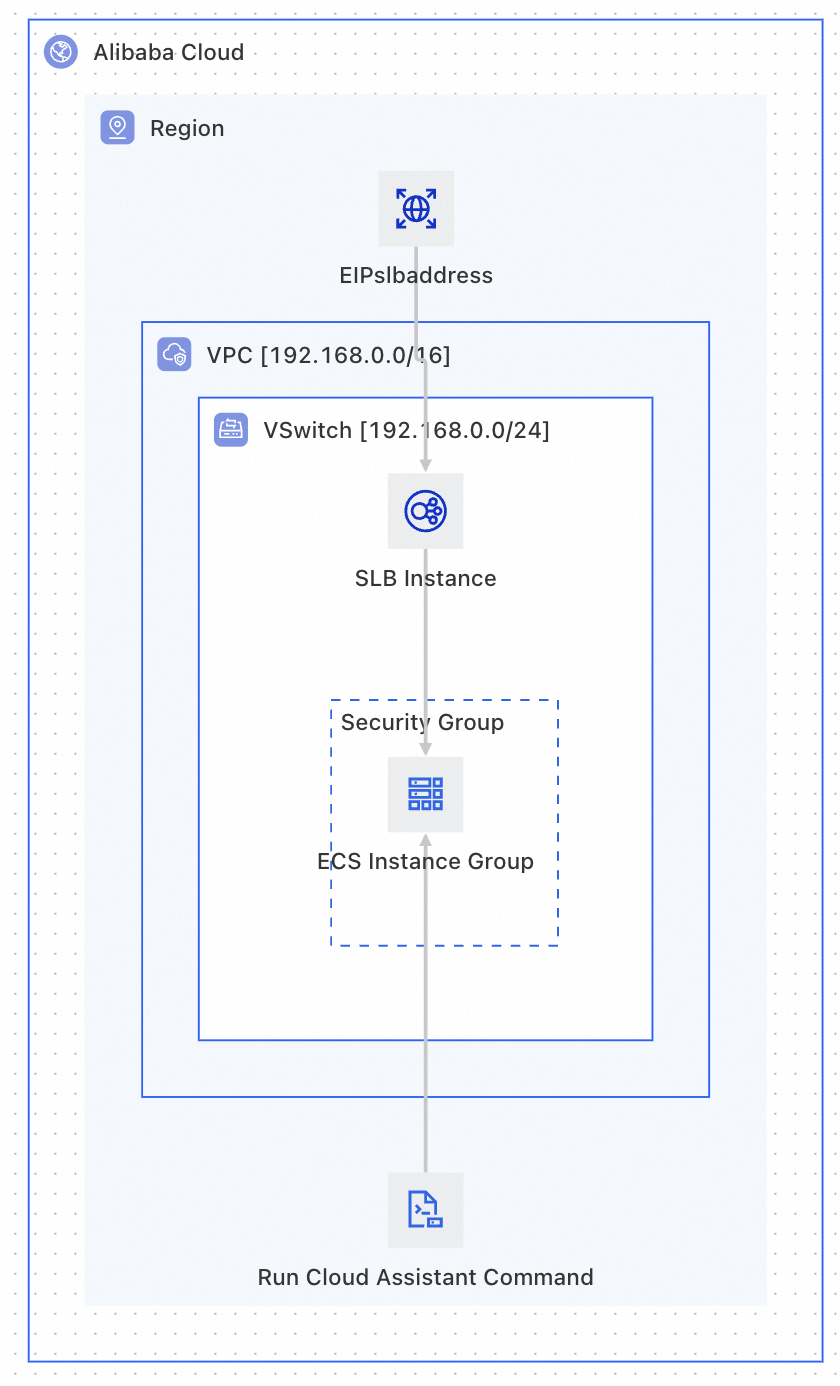
Within an Alibaba Cloud virtual private cloud (VPC), create ECS instances in bulk. Use ECS Cloud Assistant to automatically install and start Nginx. After initialization, attach the ECS instances to a CLB instance for traffic distribution, and expose the HTTP access endpoint via an EIP.
Resource Created
No. | Resource | ROS Resource Type | Purpose |
1 | VPC |
| Provides an isolated network environment. |
2 |
|
| Divides subnets within the VPC and specifies zones. |
3 | Security Group |
| Opens inbound HTTP port 80 and allows all outbound traffic. |
4 | ECS Instance Group |
| Creates multiple ECS instances and automatically deploys Nginx via |
5 | CLB Instance |
| Classic Load Balancer instance that distributes traffic to backend ECS instances. |
6 | CLB Listener |
| Configures the CLB TCP/HTTP listener port and health checks. |
7 | Backend Server Attachment |
| Attaches the ECS instance group to the CLB as backend servers. |
8 | EIP |
| Provides a public network access entry point. |
9 | EIP Association |
| Associates the EIP with the CLB instance. |
Expected results after deployment
After the template deploys successfully, you will have:
A complete VPC network environment (including VPC,
vSwitch, and security group with port 80 open).An ECS instance group (2 instances by default) with data disk mounting and Nginx deployed automatically.
A CLB instance configured with a TCP port 80 listener and health checks.
All ECS instances attached to the CLB backend server group, with traffic distribution by weight.
An EIP associated with the CLB, accessible via
http://<EIP address>.
Architecture diagram
Prerequisites
Before using this template, confirm the following:
Account permissions: Your Alibaba Cloud account must have creation permissions for ECS, CLB, VPC, and EIP.
Basic knowledge: Familiarity with the basic syntax and structure of ROS templates. For more information, see ROS Template Getting Started.
Template writing tutorial
This tutorial demonstrates the template writing process in two phases:
Phase 1 (Basic Template): Uses fixed parameter values to focus on understanding resource definitions and CLB attachment relationships.
Phase 2 (Advanced Template): Parameterizes all variable configurations and adds dynamic parameter filtering, conditional display for billing type, and parameter grouping.
Phase 1: Basic template — Define resources and dependencies
Step 1: Define basic network resources (VPC + vSwitch + security group)
Network resources are the foundation for all other resources and must be created first. The security group must open inbound HTTP port 80 to allow external access to Nginx.
Resources:
  # ============================================================
  # Network Layer: VPC → vSwitch → SecurityGroup
  # ============================================================

  Vpc:
    Type: ALIYUN::ECS::VPC  # Create a VPC
    Properties:
      CidrBlock: 192.168.0.0/16
      VpcName:
        Ref: ALIYUN::StackName  # Pseudo parameter: use the stack name as the VPC name

  VSwitch:
    Type: ALIYUN::ECS::VSwitch  # Create a vSwitch (subnet) within the VPC
    Properties:
      VSwitchName:
        Ref: ALIYUN::StackName
      VpcId:
        Ref: Vpc  # Implicit dependency: ROS creates Vpc first
      ZoneId: cn-beijing-h  # This example uses Beijing zone H
      CidrBlock: 192.168.0.0/24

  EcsSecurityGroup:
    Type: ALIYUN::ECS::SecurityGroup  # Create a security group
    Properties:
      SecurityGroupName:
        Ref: ALIYUN::StackName
      VpcId:
        Ref: Vpc
      SecurityGroupIngress:  # Inbound rule: open HTTP port 80 for Nginx
        - PortRange: 80/80
          Priority: 1
          SourceCidrIp: 0.0.0.0/0
          IpProtocol: tcp
          NicType: internet
Key Concepts
For customized names such as
VpcName,VSwitchName, andSecurityGroupName, use pseudo parameters so that after deployment you can quickly locate resources belonging to this stack.Security group rules can be customized based on your requirements:
To allow external access to a web service, open inbound HTTP port 80 or 8080.
To allow SSH login, open inbound port 22.
In production environments, restrict
SourceCidrIpto known IP ranges instead of0.0.0.0/0.
Step 2: Define CLB and EIP resources
The CLB instance distributes incoming traffic to multiple backend ECS instances. The EIP provides the public entry point.
Resources:
  # ============================================================
  # Load Balancing Layer: CLB + Listener + EIP
  # ============================================================

  Slb:
    Type: ALIYUN::SLB::LoadBalancer  # Create a Classic Load Balancer instance
    Properties:
      VpcId:
        Ref: Vpc
      VSwitchId:
        Ref: VSwitch
      LoadBalancerName:
        Fn::Sub: slb-${ALIYUN::StackName}  # Fn::Sub concatenates strings
      AddressType: intranet  # Internal network CLB (public access via EIP)
      LoadBalancerSpec: slb.s1.small
      AutoPay: true

  SlbListener:
    Type: ALIYUN::SLB::Listener  # Configure CLB listener
    DependsOn:
      - Slb  # Explicit dependency: CLB must be created before adding a listener
    Properties:
      LoadBalancerId:
        Ref: Slb
      ListenerPort: 80          # Frontend listener port
      BackendServerPort: 80     # Backend server port (Nginx default: 80)
      Protocol: tcp             # Layer 4 TCP forwarding
      Bandwidth: -1             # -1 = unlimited; adjust based on CLB spec
      Persistence:              # Session persistence configuration
        StickySession: 'on'
        StickySessionType: insert  # Cookie insertion
        CookieTimeout: 60
        PersistenceTimeout: 180
      HealthCheck:              # Health check configuration
        HealthCheckType: tcp    # TCP port probe
        Port: 80
        Interval: 2             # Check interval: 2 seconds
        HealthyThreshold: 3     # 3 successes = healthy
        UnhealthyThreshold: 3   # 3 failures = unhealthy
        Timeout: 5              # Probe timeout: 5 seconds

  EipSlbAddress:
    Type: ALIYUN::VPC::EIP  # Create an EIP
    Properties:
      Name:
        Ref: ALIYUN::StackName
      InternetChargeType: PayByTraffic  # Pay by traffic
      Bandwidth: 10             # Bandwidth cap: 10 Mbps

  EipSlbAddressAssociation:
    Type: ALIYUN::VPC::EIPAssociation  # Associate EIP with CLB
    Properties:
      InstanceId:
        Ref: Slb                # Target: CLB instance
      AllocationId:
        Ref: EipSlbAddress      # EIP resource ID
Key Concepts:
Implicit vs. explicit dependencies:
When you reference a resource using
ReforFn::GetAtt, ROS automatically determines the dependency (implicit).Use
DependsOnonly when there is no direct reference between two resources but the business logic requires a specific creation order.
The CLB uses
AddressType: intranet(internal network) and is bound to an EIP viaALIYUN::VPC::EIPAssociationto provide public access. This is the recommended architecture pattern.
Step 3: Define the ECS instance group and use Cloud Assistant to isntall Nginx
ECS instances run an initialization script via Cloud Assistant to mount the data disk and install Nginx.
Resources:
  EcsInstanceGroup:
    Type: ALIYUN::ECS::InstanceGroup
    Properties:
      VpcId:
        Ref: Vpc
      SecurityGroupId:
        Ref: EcsSecurityGroup
      VSwitchId:
        Ref: VSwitch
      ZoneId: cn-beijing-h
      ImageId: centos_7
      InstanceType: ecs.c5.large
      MaxAmount: 2       # Create 2 ECS instances
      AllocatePublicIP: false  # No public IP (access via CLB + EIP)
      IoOptimized: optimized
      SystemDiskCategory: cloud_essd
      SystemDiskSize: 40
      DiskMappings:      # Data disk configuration
        - Category: cloud_essd
          Size: 100
      Password: <YourPassword>  # Replace with actual password during deployment

  RunSetup:
    Type: ALIYUN::ECS::RunCommand
    DependsOn: EcsInstanceGroup
    Properties:
      InstanceIds:
        Fn::GetAtt:
          - EcsInstanceGroup
          - InstanceIds
      Type: RunShellScript
      Sync: true
      Timeout: 300
      ContentEncoding: PlainText
      CommandContent: |
        #!/bin/bash
        # === Data disk initialization: partition, format, mount to /disk1 ===
        cat >> /root/InitDataDisk.sh << 'EOF'
        #!/bin/bash
        echo "p
        n
        p
        w
        " |  fdisk -u /dev/vdb
        EOF
        /bin/bash /root/InitDataDisk.sh
        rm -f /root/InitDataDisk.sh
        mkfs -t ext4 /dev/vdb1
        cp /etc/fstab /etc/fstab.bak
        mkdir /disk1
        echo `blkid /dev/vdb1 | awk '{print $2}' | sed 's/\"//g'` /disk1 ext4 defaults 0 0 >> /etc/fstab
        mount -a

        # === Install and start Nginx ===
        yum install -y nginx
        systemctl start nginx.service
Key Concepts
Refvs.Fn::GetAtt:Ref→ returns the primary identifier of the resource (for example, theVpcIdof a VPC).Fn::GetAtt→ returns other attributes of the resource (for example, theInstanceIdsof an ECS instance group).
Step 4: Define CLB backend server attachment — Connect ECS instances to CLB
Use ALIYUN::SLB::BackendServerAttachment to attach the ECS instance group to the CLB backend.
Resources:
  # ============================================================
  # Binding Layer: Attach ECS instance group to CLB backend servers
  # ============================================================

  SlbBackendServerAttachment:
    Type: ALIYUN::SLB::BackendServerAttachment
    DependsOn:
      - EcsInstanceGroup  # Explicit dependency: wait for ECS creation
    Properties:
      LoadBalancerId:
        Ref: Slb
      BackendServerList:
        # Get all instance IDs from the ECS instance group
        Fn::GetAtt:
          - EcsInstanceGroup
          - InstanceIds
      BackendServerWeightList:  # Backend server weight list
        - 100  # ECS instance 1: weight 100
        - 100  # ECS instance 2: weight 100
Key Concepts: BackendServerWeightList Rules
Weight values range from 0 to 100. More traffic will be allocated to the instance with higher weight.
If
BackendServerWeightListhas fewer entries thanBackendServerList, the remaining ECS instances use the last weight value in the list.
Complete basic template
The following is the complete, ready-to-deploy template that combines all steps above:
ROSTemplateFormatVersion: '2015-09-01'
Description:
  zh-cn: Create VPC, deploy ECS with Nginx, attach to CLB, expose via EIP
  en: Create VPC, deploy ECS group with Nginx, attach to CLB, expose via EIP

Resources:
  # === Network Layer ===
  Vpc:
    Type: ALIYUN::ECS::VPC
    Properties:
      CidrBlock: 192.168.0.0/16
      VpcName:
        Ref: ALIYUN::StackName
  VSwitch:
    Type: ALIYUN::ECS::VSwitch
    Properties:
      VSwitchName:
        Ref: ALIYUN::StackName
      VpcId:
        Ref: Vpc
      ZoneId: cn-beijing-h
      CidrBlock: 192.168.0.0/24
  EcsSecurityGroup:
    Type: ALIYUN::ECS::SecurityGroup
    Properties:
      SecurityGroupName:
        Ref: ALIYUN::StackName
      VpcId:
        Ref: Vpc
      SecurityGroupIngress:
        - PortRange: 80/80
          Priority: 1
          SourceCidrIp: 0.0.0.0/0
          IpProtocol: tcp
          NicType: internet
      SecurityGroupEgress:
        - PortRange: '-1/-1'
          Priority: 1
          IpProtocol: all
          DestCidrIp: 0.0.0.0/0
          NicType: internet
        - PortRange: '-1/-1'
          Priority: 1
          IpProtocol: all
          DestCidrIp: 0.0.0.0/0
          NicType: intranet

  # === Compute Layer ===
  EcsInstanceGroup:
    Type: ALIYUN::ECS::InstanceGroup
    Properties:
      VpcId:
        Ref: Vpc
      SecurityGroupId:
        Ref: EcsSecurityGroup
      VSwitchId:
        Ref: VSwitch
      ImageId: centos_7
      InstanceType: ecs.c5.large
      MaxAmount: 2
      AllocatePublicIP: false
      IoOptimized: optimized
      SystemDiskCategory: cloud_essd
      SystemDiskSize: 40
      DiskMappings:
        - Category: cloud_essd
          Size: 100
      Password: <YourPassword>  # Replace with actual password during deployment
  RunSetup:
    Type: ALIYUN::ECS::RunCommand
    DependsOn: EcsInstanceGroup
    Properties:
      InstanceIds:
        Fn::GetAtt:
          - EcsInstanceGroup
          - InstanceIds
      Type: RunShellScript
      Sync: true
      Timeout: 300
      ContentEncoding: PlainText
      CommandContent: |
        #!/bin/bash
        # === Data disk initialization: partition, format, mount to /disk1 ===
        cat >> /root/InitDataDisk.sh << 'EOF'
        #!/bin/bash
        echo "p
        n
        p
        w
        " |  fdisk -u /dev/vdb
        EOF
        /bin/bash /root/InitDataDisk.sh
        rm -f /root/InitDataDisk.sh
        mkfs -t ext4 /dev/vdb1
        cp /etc/fstab /etc/fstab.bak
        mkdir /disk1
        echo `blkid /dev/vdb1 | awk '{print $2}' | sed 's/\"//g'` /disk1 ext4 defaults 0 0 >> /etc/fstab
        mount -a

        # === Install and start Nginx ===
        yum install -y nginx
        systemctl start nginx.service

  # === Load Balancing Layer ===
  Slb:
    Type: ALIYUN::SLB::LoadBalancer
    Properties:
      VpcId:
        Ref: Vpc
      VSwitchId:
        Ref: VSwitch
      LoadBalancerName:
        Fn::Sub: slb-${ALIYUN::StackName}
      AddressType: intranet
      LoadBalancerSpec: slb.s1.small
      AutoPay: true
  SlbListener:
    DependsOn:
      - Slb
    Type: ALIYUN::SLB::Listener
    Properties:
      LoadBalancerId:
        Ref: Slb
      ListenerPort: 80
      BackendServerPort: 80
      Protocol: tcp
      Bandwidth: -1
      Persistence:
        StickySession: 'on'
        StickySessionType: insert
        CookieTimeout: 60
        PersistenceTimeout: 180
      HealthCheck:
        HealthCheckType: tcp
        Port: 80
        Interval: 2
        HealthyThreshold: 3
        UnhealthyThreshold: 3
        Timeout: 5
  EipSlbAddress:
    Type: ALIYUN::VPC::EIP
    Properties:
      Name:
        Ref: ALIYUN::StackName
      InternetChargeType: PayByTraffic
      Bandwidth: 10
  EipSlbAddressAssociation:
    Type: ALIYUN::VPC::EIPAssociation
    Properties:
      InstanceId:
        Ref: Slb
      AllocationId:
        Ref: EipSlbAddress

  # === Binding Layer ===
  SlbBackendServerAttachment:
    DependsOn:
      - EcsInstanceGroup
    Type: ALIYUN::SLB::BackendServerAttachment
    Properties:
      BackendServerList:
        Fn::GetAtt:
          - EcsInstanceGroup
          - InstanceIds
      LoadBalancerId:
        Ref: Slb
      BackendServerWeightList:
        - 100
        - 100

Outputs:
  Endpoint:
    Description:
      zh-cn: Public HTTP endpoint
      en: Public HTTP endpoint
    Value:
      Fn::Sub:
        - http://${ServerAddress}
        - ServerAddress:
            Fn::GetAtt:
              - EipSlbAddress
              - EipAddress
Key Concepts:
After the template creates resources, use the Outputs section to query resource attributes such as the EIP address bound to the CLB.
Phase 2: Advanced template — Parameterization and dynamic configuration
The basic template uses fixed values for ECS InstanceType, SystemDiskCategory, and CLB LoadBalancerSpec. Parameterizing these values significantly improves template flexibility.
This template introduces the following advanced features:
Parameterization (Parameters) : Extract variable configurations as parameters that are filled in dynamically at deployment time.
Dynamic parameter filtering (AssociationProperty): Let the ROS console automatically filter available options based on selected parameters.
Parameter grouping (Metadata): Group parameters by logical category in the console to improve the configuration experience.
Parameter dependency diagram
The following shows the dependency chain among ECS instance type, system disk type, and CLB instance specification:
ZoneId (zone — core filter parameter)
  ├── EcsInstanceType (filtered by zone + billing type)
  │     ├── SystemDiskCategory (filtered by zone + instance type)
  │     └── DataDiskCategory (filtered by zone + instance type)
  └── LoadBalancerSpec (filtered by zone)

PayType (billing type)
  ├── PayPeriodUnit (shown only when PrePaid)
  ├── PayPeriod (shown only when PrePaid)
  └── EcsInstanceType (filtered by zone + billing type)
Core logic: Select the zone and ECS billing type first, then filter ECS instance types and CLB specifications accordingly. When subscription billing is selected, provide the billing period unit and duration. Finally, filter disk types based on zone and ECS instance type. Each step shows only the options valid under current conditions, preventing invalid parameter combinations.
AssociationProperty explained
1. ZoneId — Availability Zone (Base Parameter)
Set AssociationProperty to ALIYUN::ECS::ZoneId to list all zones in the current region:
ZoneId:
    Type: String
    Label:
      zh-cn: VSwitch Zone
      en: VSwitch Availability Zone
    Description:
      zh-cn: Select zone for VSwitch, ECS and CLB
      en: Select the availability zone for VSwitch, ECS and CLB will be deployed here
    AssociationProperty: ALIYUN::ECS::ZoneId
This parameter is the filter basis for all subsequent parameters. After a zone is selected, the option lists for all other parameters are automatically updated.
2. PayType — ECS Billing Type
Define the PayType parameter and use AssociationPropertyMetadata.Visible.Condition to show billing duration parameters only when Subscription (PrePaid) is selected:
Parameters:
  PayType:
    Type: String
    Label:
      zh-cn: 付费类型
      en: Charge Type
    Default: PostPaid
    AllowedValues:
      - PostPaid
      - PrePaid
    AssociationProperty: ChargeType
    AssociationPropertyMetadata:
      LocaleKey: InstanceChargeType
  PayPeriodUnit:
    Type: String
    Default: Month
    AssociationProperty: PayPeriodUnit
    AssociationPropertyMetadata:
      Visible:  # Conditional display: show only when PayType is not PostPaid
        Condition:
          Fn::Not:
            Fn::Equals:
              - ${PayType}
              - PostPaid
  PayPeriod:
    Type: Number
    Label:
      zh-cn: 购买资源时长
      en: Period
    Default: 1
    AllowedValues:
      - 1
      - 2
      - 3
      - 4
      - 5
      - 6
      - 7
      - 8
      - 9
    AssociationProperty: PayPeriod
    AssociationPropertyMetadata:
      Visible:
        Condition:
          Fn::Not:
            Fn::Equals:
              - ${PayType}
              - PostPaid
When Subscription (PostPaid) is selected in the ROS console, the billing duration parameters are automatically hidden. They appear only when the user selects Subscription (PrePaid).
3. EcsInstanceType — ECS Instance Type
Set AssociationProperty to ALIYUN::ECS::Instance::InstanceType to list available ECS instance types, filtered by ${ZoneId} and ${PayType}:
EcsInstanceType:
    Type: String
    Label:
      zh-cn: ECS实例规格
    AssociationProperty: ALIYUN::ECS::Instance::InstanceType
    AssociationPropertyMetadata:
      ZoneId: ${ZoneId}
      InstanceChargeType: ${PayType}
Instance type availability varies by zone. Without filtering, users might select an instance type with no available inventory in the selected zone, causing stack creation to fail.
4. SystemDiskCategory — System Disk Type
Set AssociationProperty to ALIYUN::ECS::Disk::SystemDiskCategory to list available system disk types, filtered by ${ZoneId} and ${EcsInstanceType}:
SystemDiskCategory:
    Type: String
    Label:
      zh-cn: 系统盘类型
      en: System Disk Category
    Description:
      zh-cn: 选择系统盘类型。可选值:cloud_essd(ESSD云盘)、cloud_ssd(SSD云盘)、cloud_efficiency(高效云盘)
      en: "System disk type. Options: cloud_essd, cloud_ssd, cloud_efficiency"
    AssociationProperty: ALIYUN::ECS::Disk::SystemDiskCategory
    AssociationPropertyMetadata:
      ZoneId: ${ZoneId}
      InstanceType: ${EcsInstanceType}
System disk type availability depends on both the zone (some zones do not support ESSD) and the instance type (some instance types only support specific disk types).
5. LoadBalancerSpec — CLB Instance Specification
Set AssociationProperty to ALIYUN::SLB::Instance::InstanceType to list available CLB specifications, filtered by ${ZoneId}:
LoadBalancerSpec:
    Type: String
    Label:
      zh-cn: CLB实例规格
      en: CLB Instance Spec
    Description:
      zh-cn: 选择CLB实例规格,根据可用区自动过滤
      en: Select CLB instance specification
    AssociationProperty: ALIYUN::SLB::Instance::InstanceType
    AssociationPropertyMetadata:
      ZoneId: ${ZoneId}
Dynamic parameter filtering template
Parameters:
  ZoneId:
    Type: String
    Label:
      zh-cn: 交换机可用区
      en: VSwitch Availability Zone
    Description:
      zh-cn: 选择交换机所在的可用区,ECS和CLB将部署在此可用区
      en: Select the availability zone for deployment
    AssociationProperty: ALIYUN::ECS::ZoneId
  PayType:
    Type: String
    Label:
      zh-cn: 付费类型
      en: Charge Type
    Default: PostPaid
    AllowedValues:
      - PostPaid
      - PrePaid
    AssociationProperty: ChargeType
    AssociationPropertyMetadata:
      LocaleKey: InstanceChargeType
  PayPeriodUnit:
    Type: String
    Default: Month
    AssociationProperty: PayPeriodUnit
    AssociationPropertyMetadata:
      Visible:
        Condition:
          Fn::Not:
            Fn::Equals:
              - ${PayType}
              - PostPaid
  PayPeriod:
    Type: Number
    Label:
      zh-cn: 购买资源时长
      en: Period
    Default: 1
    AllowedValues:
      - 1
      - 2
      - 3
      - 4
      - 5
      - 6
      - 7
      - 8
      - 9
    AssociationProperty: PayPeriod
    AssociationPropertyMetadata:
      Visible:
        Condition:
          Fn::Not:
            Fn::Equals:
              - ${PayType}
              - PostPaid
  EcsInstanceType:
    Type: String
    Label:
      zh-cn: ECS实例规格
      en: ECS Instance Type
    Description:
      zh-cn: 选择ECS实例规格。列表已根据可用区和付费类型自动过滤。
      en: Select ECS instance type, filtered by zone and charge type.
    AssociationProperty: ALIYUN::ECS::Instance::InstanceType
    AssociationPropertyMetadata:
      ZoneId: ${ZoneId}
      InstanceChargeType: ${PayType}
  SystemDiskCategory:
    Type: String
    Label:
      zh-cn: 系统盘类型
      en: System Disk Category
    Description:
      zh-cn: 选择系统盘类型。可选值:cloud_essd(ESSD云盘)、cloud_ssd(SSD云盘)、cloud_efficiency(高效云盘)
      en: System disk type
    AssociationProperty: ALIYUN::ECS::Disk::SystemDiskCategory
    AssociationPropertyMetadata:
      ZoneId: ${ZoneId}
      InstanceType: ${EcsInstanceType}
  DataDiskCategory:
    Type: String
    Label:
      zh-cn: 数据盘类型
      en: Data Disk Category
    Description:
      zh-cn: 选择数据盘类型。可选值:cloud_essd、cloud_ssd、cloud_efficiency
      en: Data disk type
    AssociationProperty: ALIYUN::ECS::Disk::DataDiskCategory
    AssociationPropertyMetadata:
      ZoneId: ${ZoneId}
      InstanceType: ${EcsInstanceType}
  LoadBalancerSpec:
    Type: String
    Label:
      zh-cn: CLB实例规格
      en: CLB Instance Spec
    Description:
      zh-cn: 选择CLB实例规格,根据可用区自动过滤
      en: Select CLB instance specification
    AssociationProperty: ALIYUN::SLB::Instance::InstanceType
    AssociationPropertyMetadata:
      ZoneId: ${ZoneId}
How AssociationProperty works
When a user creates a stack in the ROS console, parameter selection is triggered in a cascade:
A zone (
ZoneId) is selected.The ECS billing type (
PayType) is selected.The ECS instance type dropdown refreshes automatically, showing only types with available inventory in the selected zone that support the selected billing type.
The CLB instance specification dropdown refreshes automatically, showing only specifications supported in the selected zone.
After selecting an ECS instance type, the system disk type and data disk type dropdowns refresh automatically, showing only types supported by both the selected zone and instance type.
This approach ensures each selection shows only valid options under the current conditions, preventing deployment failures from invalid parameter combinations at the source.
Parameter grouping with Metadata
Using ALIYUN::ROS::Interface in Metadata, you can organize parameters into logical groups with labels. The ROS console displays parameters in groups, significantly improving the configuration experience.
Metadata Syntax
Metadata:
  ALIYUN::ROS::Interface:
    ParameterGroups:           # Parameter group list (required)
      - Parameters:            # List of parameter names in this group (required)
          - paramName1
          - paramName2
        Label:                 # Group label (required)
          default:
            zh-cn: Chinese label
            en: English label
Metadata syntax rules:
ParameterGroups,Parameters, andLabelare all required.Parameter names listed in
Metadata.ALIYUN::ROS::Interface.ParameterGroups.Parametersmust match exactly the names defined in the templateParameterssection.Parameters not included in any group are displayed in the ungrouped area of the console.
Parameter Group Design for This Template
This template organizes 14 parameters into 4 groups:
┌─────────────────────────────────────────────────┐
│  Network Configuration                          │
│  ├── VSwitch Availability Zone (ZoneId)         │
│  ├── VPC CIDR Block (VpcCidrBlock)              │
│  └── vSwitch CIDR Block (VSwitchCidrBlock)      │
├─────────────────────────────────────────────────┤
│  Billing Configuration                          │
│  ├── Charge Type (PayType)                      │
│  ├── Pay Period Unit (PayPeriodUnit)             │
│  └── Period (PayPeriod)                         │
├─────────────────────────────────────────────────┤
│  ECS Instance Configuration                     │
│  ├── ECS Instance Type (EcsInstanceType)        │
│  ├── System Disk Category (SystemDiskCategory)  │
│  ├── System Disk Size (SystemDiskSize)          │
│  ├── Data Disk Category (DataDiskCategory)      │
│  ├── Data Disk Size (DataDiskSize)              │
│  └── ECS Instance Password (InstancePassword)  │
├─────────────────────────────────────────────────┤
│  CLB Configuration                              │
│  ├── CLB Instance Spec (LoadBalancerSpec)       │
│  └── EIP Bandwidth (Bandwidth)                  │
└─────────────────────────────────────────────────┘
Metadata Parameter Group Template
Metadata:
  ALIYUN::ROS::Interface:
    ParameterGroups:
      - Parameters:
          - ZoneId
          - VpcCidrBlock
          - VSwitchCidrBlock
        Label:
          default:
            zh-cn: Network Configuration
            en: Network Configuration
      - Parameters:
          - PayType
          - PayPeriodUnit
          - PayPeriod
        Label:
          default:
            zh-cn: Charge Type
            en: Billing Configuration
      - Parameters:
          - EcsInstanceType
          - SystemDiskCategory
          - SystemDiskSize
          - DataDiskCategory
          - DataDiskSize
          - InstancePassword
        Label:
          default:
            zh-cn: ECS Instance Configuration
            en: ECS Instance Configuration
      - Parameters:
          - LoadBalancerSpec
          - Bandwidth
        Label:
          default:
            zh-cn: CLB Configuration
            en: CLB Configuration
Complete advanced template
ROSTemplateFormatVersion: '2015-09-01'
Description:
zh-cn: >-
参数化模板:创建ECS实例组部署Nginx服务,挂载到CLB负载均衡器,通过EIP对外提供HTTP服务。
支持动态选择可用区、实例规格、磁盘类型和CLB规格,支持按量/包年包月付费模式切换。
en: >-
Parameterized template: Create ECS group with Nginx, attach to CLB, expose via EIP.
Supports dynamic selection and PayAsYouGo/Subscription billing switch.
Parameters:
# ─── 基础网络参数 ───
ZoneId:
Type: String
Label:
zh-cn: 交换机可用区
en: VSwitch Availability Zone
Description:
zh-cn: 选择交换机所在的可用区,ECS和CLB将部署在此可用区
en: Select the availability zone for deployment
AssociationProperty: ALIYUN::ECS::ZoneId
VpcCidrBlock:
Type: String
Label:
zh-cn: VPC网段
en: VPC CIDR Block
Description:
zh-cn: VPC的IP地址段范围。推荐使用 10.0.0.0/8、172.16.0.0/12 或 192.168.0.0/16
en: VPC IP address range
Default: 192.168.0.0/16
VSwitchCidrBlock:
Type: String
Label:
zh-cn: 交换机网段
en: VSwitch CIDR Block
Description:
zh-cn: 必须是VPC网段的子网段,且不能与同VPC下其他交换机网段重叠
en: Must be a subnet of VPC CIDR
Default: 192.168.0.0/24
# ─── 付费类型参数 ───
PayType:
Type: String
Label:
zh-cn: 付费类型
en: Charge Type
Default: PostPaid
AllowedValues:
- PostPaid
- PrePaid
AssociationProperty: ChargeType
AssociationPropertyMetadata:
LocaleKey: InstanceChargeType
PayPeriodUnit:
Type: String
Label:
zh-cn: 购买资源时长周期
en: Pay Period Unit
Description:
zh-cn: 包年包月的周期单位。Month为月,Year为年。仅包年包月时有效。
en: Subscription period unit. Only valid for PrePaid.
Default: Month
AllowedValues:
- Month
- Year
AssociationProperty: PayPeriodUnit
AssociationPropertyMetadata:
Visible:
Condition:
Fn::Not:
Fn::Equals:
- ${PayType}
- PostPaid
PayPeriod:
Type: Number
Label:
zh-cn: 购买资源时长
en: Period
Default: 1
AllowedValues:
- 1
- 2
- 3
- 4
- 5
- 6
- 7
- 8
- 9
AssociationProperty: PayPeriod
AssociationPropertyMetadata:
Visible:
Condition:
Fn::Not:
Fn::Equals:
- ${PayType}
- PostPaid
# ─── ECS实例参数 ───
EcsInstanceType:
Type: String
Label:
zh-cn: ECS实例规格
en: ECS Instance Type
Description:
zh-cn: 选择ECS实例规格。列表已根据可用区和付费类型自动过滤。
en: Select ECS instance type, filtered by zone and charge type.
AssociationProperty: ALIYUN::ECS::Instance::InstanceType
AssociationPropertyMetadata:
ZoneId: ${ZoneId}
InstanceChargeType: ${PayType}
SystemDiskCategory:
Type: String
Label:
zh-cn: 系统盘类型
en: System Disk Category
Description:
zh-cn: 选择系统盘类型。可选值:cloud_essd(ESSD云盘)、cloud_ssd(SSD云盘)、cloud_efficiency(高效云盘)
en: System disk type
AssociationProperty: ALIYUN::ECS::Disk::SystemDiskCategory
AssociationPropertyMetadata:
ZoneId: ${ZoneId}
InstanceType: ${EcsInstanceType}
SystemDiskSize:
Type: Number
Label:
zh-cn: 系统盘大小(GB)
en: System Disk Size (GB)
Description:
zh-cn: 系统盘大小,取值范围40~500 GB
en: System disk size, range 40-500 GB
Default: 40
MinValue: 40
MaxValue: 500
DataDiskCategory:
Type: String
Label:
zh-cn: 数据盘类型
en: Data Disk Category
Description:
zh-cn: 选择数据盘类型。可选值:cloud_essd、cloud_ssd、cloud_efficiency
en: Data disk type
AssociationProperty: ALIYUN::ECS::Disk::DataDiskCategory
AssociationPropertyMetadata:
ZoneId: ${ZoneId}
InstanceType: ${EcsInstanceType}
DataDiskSize:
Type: Number
Label:
zh-cn: 数据盘大小(GB)
en: Data Disk Size (GB)
Description:
zh-cn: ECS数据盘大小,取值范围20~32768 GB
en: Data disk size, range 20-32768 GB
Default: 100
MinValue: 20
MaxValue: 32768
InstancePassword:
Type: String
NoEcho: true
Label:
zh-cn: ECS实例密码
en: ECS Instance Password
Description:
zh-cn: 长度8-30位,需包含大写字母、小写字母、数字、特殊字符中的至少三种
en: Length 8-30, must contain at least three character types
MinLength: 8
MaxLength: 30
AssociationProperty: ALIYUN::ECS::Instance::Password
# ─── 负载均衡参数 ───
LoadBalancerSpec:
Type: String
Label:
zh-cn: CLB实例规格
en: CLB Instance Spec
Description:
zh-cn: 选择CLB实例规格,根据可用区自动过滤
en: Select CLB instance specification
AssociationProperty: ALIYUN::SLB::Instance::InstanceType
AssociationPropertyMetadata:
ZoneId: ${ZoneId}
Bandwidth:
Type: Number
Label:
zh-cn: EIP带宽(Mbps)
en: EIP Bandwidth (Mbps)
Description:
zh-cn: 弹性公网IP的带宽上限,取值范围1~1000 Mbps
en: EIP bandwidth cap, range 1-1000 Mbps
Default: 10
MinValue: 1
MaxValue: 1000
Resources:
# === 基础网络层 ===
Vpc:
Type: ALIYUN::ECS::VPC
Properties:
CidrBlock:
Ref: VpcCidrBlock
VpcName:
Ref: ALIYUN::StackName
VSwitch:
Type: ALIYUN::ECS::VSwitch
Properties:
VSwitchName:
Ref: ALIYUN::StackName
VpcId:
Ref: Vpc
ZoneId:
Ref: ZoneId
CidrBlock:
Ref: VSwitchCidrBlock
EcsSecurityGroup:
Type: ALIYUN::ECS::SecurityGroup
Properties:
SecurityGroupName:
Ref: ALIYUN::StackName
VpcId:
Ref: Vpc
SecurityGroupIngress:
- PortRange: 80/80
Priority: 1
SourceCidrIp: 0.0.0.0/0
IpProtocol: tcp
NicType: internet
SecurityGroupEgress:
- PortRange: '-1/-1'
Priority: 1
IpProtocol: all
DestCidrIp: 0.0.0.0/0
NicType: internet
- PortRange: '-1/-1'
Priority: 1
IpProtocol: all
DestCidrIp: 0.0.0.0/0
NicType: intranet
# === 计算层 ===
EcsInstanceGroup:
Type: ALIYUN::ECS::InstanceGroup
Properties:
InstanceChargeType:
Ref: PayType
PeriodUnit:
Ref: PayPeriodUnit
Period:
Ref: PayPeriod
IoOptimized: optimized
SystemDiskCategory:
Ref: SystemDiskCategory
SystemDiskSize:
Ref: SystemDiskSize
DiskMappings:
- Category:
Ref: DataDiskCategory
Size:
Ref: DataDiskSize
VpcId:
Ref: Vpc
SecurityGroupId:
Ref: EcsSecurityGroup
VSwitchId:
Ref: VSwitch
MaxAmount: 2
ImageId: centos_7
InstanceType:
Ref: EcsInstanceType
Password:
Ref: InstancePassword
AllocatePublicIP: false
RunSetup:
Type: ALIYUN::ECS::RunCommand
DependsOn: EcsInstanceGroup
Properties:
InstanceIds:
Fn::GetAtt:
- EcsInstanceGroup
- InstanceIds
Type: RunShellScript
Sync: true
Timeout: 300
ContentEncoding: PlainText
CommandContent: |
#!/bin/bash
# === 数据盘初始化:分区、格式化、挂载到/disk1 ===
cat >> /root/InitDataDisk.sh << 'EOF'
#!/bin/bash
echo "p
n
p
w
" | fdisk -u /dev/vdb
EOF
/bin/bash /root/InitDataDisk.sh
rm -f /root/InitDataDisk.sh
mkfs -t ext4 /dev/vdb1
cp /etc/fstab /etc/fstab.bak
mkdir /disk1
echo `blkid /dev/vdb1 | awk '{print $2}' | sed 's/\"//g'` /disk1 ext4 defaults 0 0 >> /etc/fstab
mount -a
# === 安装并启动Nginx ===
yum install -y nginx
systemctl start nginx.service
# === 负载均衡层 ===
Slb:
Type: ALIYUN::SLB::LoadBalancer
Properties:
VpcId:
Ref: Vpc
VSwitchId:
Ref: VSwitch
LoadBalancerName:
Fn::Sub: slb-${ALIYUN::StackName}
PayType:
Ref: PayType
PricingCycle:
Ref: PayPeriodUnit
Duration:
Ref: PayPeriod
AddressType: intranet
LoadBalancerSpec:
Ref: LoadBalancerSpec
AutoPay: true
EipSlbAddress:
Type: ALIYUN::VPC::EIP
Properties:
Name:
Ref: ALIYUN::StackName
InternetChargeType: PayByTraffic
Bandwidth:
Ref: Bandwidth
EipSlbAddressAssociation:
Type: ALIYUN::VPC::EIPAssociation
Properties:
InstanceId:
Ref: Slb
AllocationId:
Ref: EipSlbAddress
SlbBackendServerAttachment:
DependsOn:
- EcsInstanceGroup
Type: ALIYUN::SLB::BackendServerAttachment
Properties:
BackendServerList:
Fn::GetAtt:
- EcsInstanceGroup
- InstanceIds
LoadBalancerId:
Ref: Slb
BackendServerWeightList:
- 100
- 100
SlbListener:
DependsOn:
- Slb
Type: ALIYUN::SLB::Listener
Properties:
LoadBalancerId:
Ref: Slb
ListenerPort: 80
BackendServerPort: 80
Protocol: tcp
Bandwidth: -1
Persistence:
StickySession: 'on'
StickySessionType: insert
CookieTimeout: 60
PersistenceTimeout: 180
HealthCheck:
HealthCheckType: tcp
Port: 80
Interval: 2
HealthyThreshold: 3
UnhealthyThreshold: 3
Timeout: 5
Outputs:
Endpoint:
Description:
zh-cn: 对外暴露的公网访问地址
en: Public HTTP endpoint
Value:
Fn::Sub:
- http://${ServerAddress}
- ServerAddress:
Fn::GetAtt:
- EipSlbAddress
- EipAddress
# === 元数据:控制台参数分组配置 ===
Metadata:
ALIYUN::ROS::Interface:
ParameterGroups:
- Parameters:
- ZoneId
- VpcCidrBlock
- VSwitchCidrBlock
Label:
default:
zh-cn: 基础网络配置
en: Network Configuration
- Parameters:
- PayType
- PayPeriodUnit
- PayPeriod
Label:
default:
zh-cn: 付费类型
en: Billing Configuration
- Parameters:
- EcsInstanceType
- SystemDiskCategory
- SystemDiskSize
- DataDiskCategory
- DataDiskSize
- InstancePassword
Label:ROSTemplateFormatVersion: '2015-09-01'
Description:
zh-cn: >-
参数化模板:创建ECS实例组部署Nginx服务,挂载到CLB负载均衡器,通过EIP对外提供HTTP服务。
支持动态选择可用区、实例规格、磁盘类型和CLB规格,支持按量/包年包月付费模式切换。
en: >-
Parameterized template: Create ECS group with Nginx, attach to CLB, expose via EIP.
Supports dynamic selection and PayAsYouGo/Subscription billing switch.
Parameters:
# ─── Basic network parameters ───
ZoneId:
Type: String
Label:
zh-cn: 交换机可用区
en: VSwitch Availability Zone
Description:
zh-cn: 选择交换机所在的可用区,ECS和CLB将部署在此可用区
en: Select the availability zone for deployment
AssociationProperty: ALIYUN::ECS::ZoneId
VpcCidrBlock:
Type: String
Label:
zh-cn: VPC网段
en: VPC CIDR Block
Description:
zh-cn: VPC的IP地址段范围。推荐使用 10.0.0.0/8、172.16.0.0/12 或 192.168.0.0/16
en: VPC IP address range
Default: 192.168.0.0/16
VSwitchCidrBlock:
Type: String
Label:
zh-cn: 交换机网段
en: VSwitch CIDR Block
Description:
zh-cn: 必须是VPC网段的子网段,且不能与同VPC下其他交换机网段重叠
en: Must be a subnet of VPC CIDR
Default: 192.168.0.0/24
# ─── Paytype Paramters ───
PayType:
Type: String
Label:
zh-cn: 付费类型
en: Charge Type
Default: PostPaid
AllowedValues:
- PostPaid
- PrePaid
AssociationProperty: ChargeType
AssociationPropertyMetadata:
LocaleKey: InstanceChargeType
PayPeriodUnit:
Type: String
Label:
zh-cn: 购买资源时长周期
en: Pay Period Unit
Description:
zh-cn: 包年包月的周期单位。Month为月,Year为年。仅包年包月时有效。
en: Subscription period unit. Only valid for PrePaid.
Default: Month
AllowedValues:
- Month
- Year
AssociationProperty: PayPeriodUnit
AssociationPropertyMetadata:
Visible:
Condition:
Fn::Not:
Fn::Equals:
- ${PayType}
- PostPaid
PayPeriod:
Type: Number
Label:
zh-cn: 购买资源时长
en: Period
Default: 1
AllowedValues:
- 1
- 2
- 3
- 4
- 5
- 6
- 7
- 8
- 9
AssociationProperty: PayPeriod
AssociationPropertyMetadata:
Visible:
Condition:
Fn::Not:
Fn::Equals:
- ${PayType}
- PostPaid
# ─── ECS instance parameters ───
EcsInstanceType:
Type: String
Label:
zh-cn: ECS实例规格
en: ECS Instance Type
Description:
zh-cn: 选择ECS实例规格。列表已根据可用区和付费类型自动过滤。
en: Select ECS instance type, filtered by zone and charge type.
AssociationProperty: ALIYUN::ECS::Instance::InstanceType
AssociationPropertyMetadata:
ZoneId: ${ZoneId}
InstanceChargeType: ${PayType}
SystemDiskCategory:
Type: String
Label:
zh-cn: 系统盘类型
en: System Disk Category
Description:
zh-cn: 选择系统盘类型。可选值:cloud_essd(ESSD云盘)、cloud_ssd(SSD云盘)、cloud_efficiency(高效云盘)
en: System disk type
AssociationProperty: ALIYUN::ECS::Disk::SystemDiskCategory
AssociationPropertyMetadata:
ZoneId: ${ZoneId}
InstanceType: ${EcsInstanceType}
SystemDiskSize:
Type: Number
Label:
zh-cn: 系统盘大小(GB)
en: System Disk Size (GB)
Description:
zh-cn: 系统盘大小,取值范围40~500 GB
en: System disk size, range 40-500 GB
Default: 40
MinValue: 40
MaxValue: 500
DataDiskCategory:
Type: String
Label:
zh-cn: 数据盘类型
en: Data Disk Category
Description:
zh-cn: 选择数据盘类型。可选值:cloud_essd、cloud_ssd、cloud_efficiency
en: Data disk type
AssociationProperty: ALIYUN::ECS::Disk::DataDiskCategory
AssociationPropertyMetadata:
ZoneId: ${ZoneId}
InstanceType: ${EcsInstanceType}
DataDiskSize:
Type: Number
Label:
zh-cn: 数据盘大小(GB)
en: Data Disk Size (GB)
Description:
zh-cn: ECS数据盘大小,取值范围20~32768 GB
en: Data disk size, range 20-32768 GB
Default: 100
MinValue: 20
MaxValue: 32768
InstancePassword:
Type: String
NoEcho: true
Label:
zh-cn: ECS实例密码
en: ECS Instance Password
Description:
zh-cn: 长度8-30位,需包含大写字母、小写字母、数字、特殊字符中的至少三种
en: Length 8-30, must contain at least three character types
MinLength: 8
MaxLength: 30
AssociationProperty: ALIYUN::ECS::Instance::Password
# ─── CLB paramters ───
LoadBalancerSpec:
Type: String
Label:
zh-cn: CLB实例规格
en: CLB Instance Spec
Description:
zh-cn: 选择CLB实例规格,根据可用区自动过滤
en: Select CLB instance specification
AssociationProperty: ALIYUN::SLB::Instance::InstanceType
AssociationPropertyMetadata:
ZoneId: ${ZoneId}
Bandwidth:
Type: Number
Label:
zh-cn: EIP带宽(Mbps)
en: EIP Bandwidth (Mbps)
Description:
zh-cn: 弹性公网IP的带宽上限,取值范围1~1000 Mbps
en: EIP bandwidth cap, range 1-1000 Mbps
Default: 10
MinValue: 1
MaxValue: 1000
Resources:
# === Network Layer ===
Vpc:
Type: ALIYUN::ECS::VPC
Properties:
CidrBlock:
Ref: VpcCidrBlock
VpcName:
Ref: ALIYUN::StackName
VSwitch:
Type: ALIYUN::ECS::VSwitch
Properties:
VSwitchName:
Ref: ALIYUN::StackName
VpcId:
Ref: Vpc
ZoneId:
Ref: ZoneId
CidrBlock:
Ref: VSwitchCidrBlock
EcsSecurityGroup:
Type: ALIYUN::ECS::SecurityGroup
Properties:
SecurityGroupName:
Ref: ALIYUN::StackName
VpcId:
Ref: Vpc
SecurityGroupIngress:
- PortRange: 80/80
Priority: 1
SourceCidrIp: 0.0.0.0/0
IpProtocol: tcp
NicType: internet
SecurityGroupEgress:
- PortRange: '-1/-1'
Priority: 1
IpProtocol: all
DestCidrIp: 0.0.0.0/0
NicType: internet
- PortRange: '-1/-1'
Priority: 1
IpProtocol: all
DestCidrIp: 0.0.0.0/0
NicType: intranet
# === Computing layer ===
EcsInstanceGroup:
Type: ALIYUN::ECS::InstanceGroup
Properties:
InstanceChargeType:
Ref: PayType
PeriodUnit:
Ref: PayPeriodUnit
Period:
Ref: PayPeriod
IoOptimized: optimized
SystemDiskCategory:
Ref: SystemDiskCategory
SystemDiskSize:
Ref: SystemDiskSize
DiskMappings:
- Category:
Ref: DataDiskCategory
Size:
Ref: DataDiskSize
VpcId:
Ref: Vpc
SecurityGroupId:
Ref: EcsSecurityGroup
VSwitchId:
Ref: VSwitch
MaxAmount: 2
ImageId: centos_7
InstanceType:
Ref: EcsInstanceType
Password:
Ref: InstancePassword
AllocatePublicIP: false
RunSetup:
Type: ALIYUN::ECS::RunCommand
DependsOn: EcsInstanceGroup
Properties:
InstanceIds:
Fn::GetAtt:
- EcsInstanceGroup
- InstanceIds
Type: RunShellScript
Sync: true
Timeout: 300
ContentEncoding: PlainText
CommandContent: |
#!/bin/bash
# === 数据盘初始化:分区、格式化、挂载到/disk1 ===
cat >> /root/InitDataDisk.sh << 'EOF'
#!/bin/bash
echo "p
n
p
w
" | fdisk -u /dev/vdb
EOF
/bin/bash /root/InitDataDisk.sh
rm -f /root/InitDataDisk.sh
mkfs -t ext4 /dev/vdb1
cp /etc/fstab /etc/fstab.bak
mkdir /disk1
echo `blkid /dev/vdb1 | awk '{print $2}' | sed 's/\"//g'` /disk1 ext4 defaults 0 0 >> /etc/fstab
mount -a
# === install and start Nginx ===
yum install -y nginx
systemctl start nginx.service
# === CLB layer ===
Slb:
Type: ALIYUN::SLB::LoadBalancer
Properties:
VpcId:
Ref: Vpc
VSwitchId:
Ref: VSwitch
LoadBalancerName:
Fn::Sub: slb-${ALIYUN::StackName}
PayType:
Ref: PayType
PricingCycle:
Ref: PayPeriodUnit
Duration:
Ref: PayPeriod
AddressType: intranet
LoadBalancerSpec:
Ref: LoadBalancerSpec
AutoPay: true
EipSlbAddress:
Type: ALIYUN::VPC::EIP
Properties:
Name:
Ref: ALIYUN::StackName
InternetChargeType: PayByTraffic
Bandwidth:
Ref: Bandwidth
EipSlbAddressAssociation:
Type: ALIYUN::VPC::EIPAssociation
Properties:
InstanceId:
Ref: Slb
AllocationId:
Ref: EipSlbAddress
SlbBackendServerAttachment:
DependsOn:
- EcsInstanceGroup
Type: ALIYUN::SLB::BackendServerAttachment
Properties:
BackendServerList:
Fn::GetAtt:
- EcsInstanceGroup
- InstanceIds
LoadBalancerId:
Ref: Slb
BackendServerWeightList:
- 100
- 100
SlbListener:
DependsOn:
- Slb
Type: ALIYUN::SLB::Listener
Properties:
LoadBalancerId:
Ref: Slb
ListenerPort: 80
BackendServerPort: 80
Protocol: tcp
Bandwidth: -1
Persistence:
StickySession: 'on'
StickySessionType: insert
CookieTimeout: 60
PersistenceTimeout: 180
HealthCheck:
HealthCheckType: tcp
Port: 80
Interval: 2
HealthyThreshold: 3
UnhealthyThreshold: 3
Timeout: 5
Outputs:
Endpoint:
Description:
zh-cn: 对外暴露的公网访问地址
en: Public HTTP endpoint
Value:
Fn::Sub:
- http://${ServerAddress}
- ServerAddress:
Fn::GetAtt:
- EipSlbAddress
- EipAddress
# === Metadata ===
Metadata:
ALIYUN::ROS::Interface:
ParameterGroups:
- Parameters:
- ZoneId
- VpcCidrBlock
- VSwitchCidrBlock
Label:
default:
zh-cn: 基础网络配置
en: Network Configuration
- Parameters:
- PayType
- PayPeriodUnit
- PayPeriod
Label:
default:
zh-cn: 付费类型
en: Billing Configuration
- Parameters:
- EcsInstanceType
- SystemDiskCategory
- SystemDiskSize
- DataDiskCategory
- DataDiskSize
- InstancePassword
Label:
default:
zh-cn: ECS实例配置
en: ECS Instance Configuration
- Parameters:
- LoadBalancerSpec
- Bandwidth
Label:
default:
zh-cn: 负载均衡配置
en: CLB Configuration
default:
zh-cn: ECS实例配置
en: ECS Instance Configuration
- Parameters:
- LoadBalancerSpec
- Bandwidth
Label:
default:
zh-cn: 负载均衡配置
en: CLB ConfigurationROS built-in functions quick reference
Function | Syntax Example | Purpose in This Template | Notes |
|
| References parameter values or primary resource identifiers. | Returns parameter value when referencing a Parameter; returns primary ID when referencing a Resource. |
|
| Gets the instance ID list from the ECS instance group. | Returns resource output attributes (non-primary identifiers) after creation. |
|
| Concatenates the CLB name. | References variables with |
|
| Conditional display of billing duration parameters. | Logical negation + equality comparison, used for Visible conditions. |
Deployment
Deployment parameters
Required parameters (must be specified during deployment)
Parameter | Type | Description | Constraints |
| String | Zone ID. | Dynamically selected in the console. |
| String | ECS instance type. | Automatically filtered by zone + billing type. |
| String | System disk type. | Automatically filtered by zone + instance type. |
| String | Data disk type. | Automatically filtered by zone + instance type. |
| String | CLB instance specification. | Automatically filtered by zone. |
Optional parameters (have default values, can be left empty)
Parameter | Default | Description |
| 192.168.0.0/16 | VPC CIDR block. |
| 192.168.0.0/24 |
|
|
| Billing type (pay-as-you-go / subscription). |
| Month | Billing period unit (shown only when |
| 1 | Billing duration (shown only when |
| 40 | System disk size (GB), range: 40–500. |
| 100 | Data disk size (GB), range: 20–32768. |
| 10 | EIP bandwidth cap (Mbps), range: 1–1000. |
| — | ECS instance logon password. Length 8–30 characters, must contain at least three character types: uppercase letters, lowercase letters, digits, special characters. |
Deployment methods
Method 1: Deploy via the ROS console
Log in to the ROS console.
In the left-side navigation pane, choose Stacks > Create Stack.
Select Select an Existing Template > Enter Template Content and paste the complete template into the editor.
Click Next, and configure parameters by group.
After confirming the configuration, click Create and wait for the stack status to change to
CREATE_COMPLETE.
Method 2: Deploy through ROS IaC Code
IaC Code is an AI infrastructure-as-code assistant for cloud infrastructure. It helps cloud resource users and O&M engineers generate, deploy, and manage infrastructure templates through a terminal workflow.
# Prompt
Help me deploy a group of ECS instances and attach them to a CLB load balancer with the following requirements:
1. Use a newly created VPC and vSwitch
2. Create 2 ECS instances and install and start Nginx via CommandContent
3. Use WaitCondition to wait for Nginx installation to complete before attaching to CLB
4. Configure CLB with TCP port 80 listener and health checks
5. Create an EIP and associate it with the CLB to provide HTTP access
6. Open inbound port 80 in the security group
7. Configure ECS with a 100 GB data disk and auto-partition and mount it in CommandContent
8. Configure ZoneId, EcsInstanceType, SystemDiskCategory, DataDiskCategory, LoadBalancerSpec with AssociationProperty for dynamic console filtering
9. Support switching between pay-as-you-go and subscription billing, with subscription parameters using conditional display
FAQ
Q1: CLB health check keeps failing, and backend ECS instances show "Unhealthy"
Cause: The Nginx service on the ECS instance is not running correctly, or the security group does not open port 80.
Troubleshooting steps:
Log on the ECS instances and run
systemctl status nginxto confirm Nginx is running.Verify that the security group inbound rule opens port 80 (
PortRange: 80/80).Check that the
Portin the CLB health check configuration matches the Nginx listener port.Increase
HealthyThreshold(healthy threshold) andInterval(check interval) as appropriate.
Q2: How do I adjust the traffic distribution ratio among backend servers?
Solution: Modify BackendServerWeightList in SlbBackendServerAttachment:
BackendServerWeightList:
  - 100  # ECS instance 1: receives approximately 67% of traffic
  - 50   # ECS instance 2: receives approximately 33% of traffic
The weight ratio is 100:50, meaning ECS instance 1 handles approximately 2/3 of requests. To temporarily take an ECS instance out of service (gray-scale decommission), set its weight to 0.
Q3: How do I replace the Nginx deployment script in ECS::RunCommand with a custom application?
Solution: Modify the install-and-start section of the CommandContent script while keeping the data disk initialization logic:
CommandContent:
  Fn::Sub:
    - |
      #!/bin/bash
      # ... Data disk initialization code (keep as is) ...

      # === Replace with your application deployment script ===
      # Example: Deploy a Java Spring Boot application
      yum install -y java-11-openjdk
      wget -P /disk1 https://your-oss-bucket.oss-cn-hangzhou.aliyuncs.com/app.jar
      nohup java -jar /disk1/app.jar --server.port=80
Q4: How do I replace CLB with ALB (Application Load Balancer)?
Migration steps:
Replace
ALIYUN::SLB::LoadBalancerwithALIYUN::ALB::LoadBalancer.Use
ALIYUN::ALB::ServerGroupto create a server group and add backend ECS instances.Use
ALIYUN::ALB::Listener+ALIYUN::ALB::Ruleto configure Layer 7 HTTP/HTTPS routing.ALB natively supports public network access — no need to associate an EIP separately.
Q5: How do I use an existing VPC instead of creating a new one?
Solution: Remove VPC and vSwitch from Resources and pass them as parameters instead:
Parameters:
  ExistingVpcId:
    Type: String
    Label:
      zh-cn: Existing VPC ID
      en: Existing VPC ID
    AssociationProperty: ALIYUN::ECS::VPC::VPCId
  ExistingVSwitchId:
    Type: String
    Label:
      zh-cn: Existing VSwitch ID
      en: Existing vSwitch ID
    AssociationProperty: ALIYUN::VPC::VSwitch::VSwitchId
    AssociationPropertyMetadata:
      VpcId: ${ExistingVpcId}
For more common deployment issues, see the FAQ.