Deploy NGINX on an ECS instance by using Terraform
Alibaba Cloud Resource Orchestration Service (ROS) uses a Terraform template to automatically create a complete cloud network infrastructure and an ECS instance, and install and start NGINX on the instance in a single operation. This solution is suitable for scenarios where you need to quickly and repeatedly build web server environments.
Solution overview
This solution runs a Terraform template through Alibaba Cloud Resource Orchestration Service (ROS) to automatically create a complete cloud network infrastructure and an ECS instance in one operation, and to install and start the NGINX service on the ECS instance automatically. It applies to scenarios in which a web server environment must be built quickly and repeatedly.
Business scenario
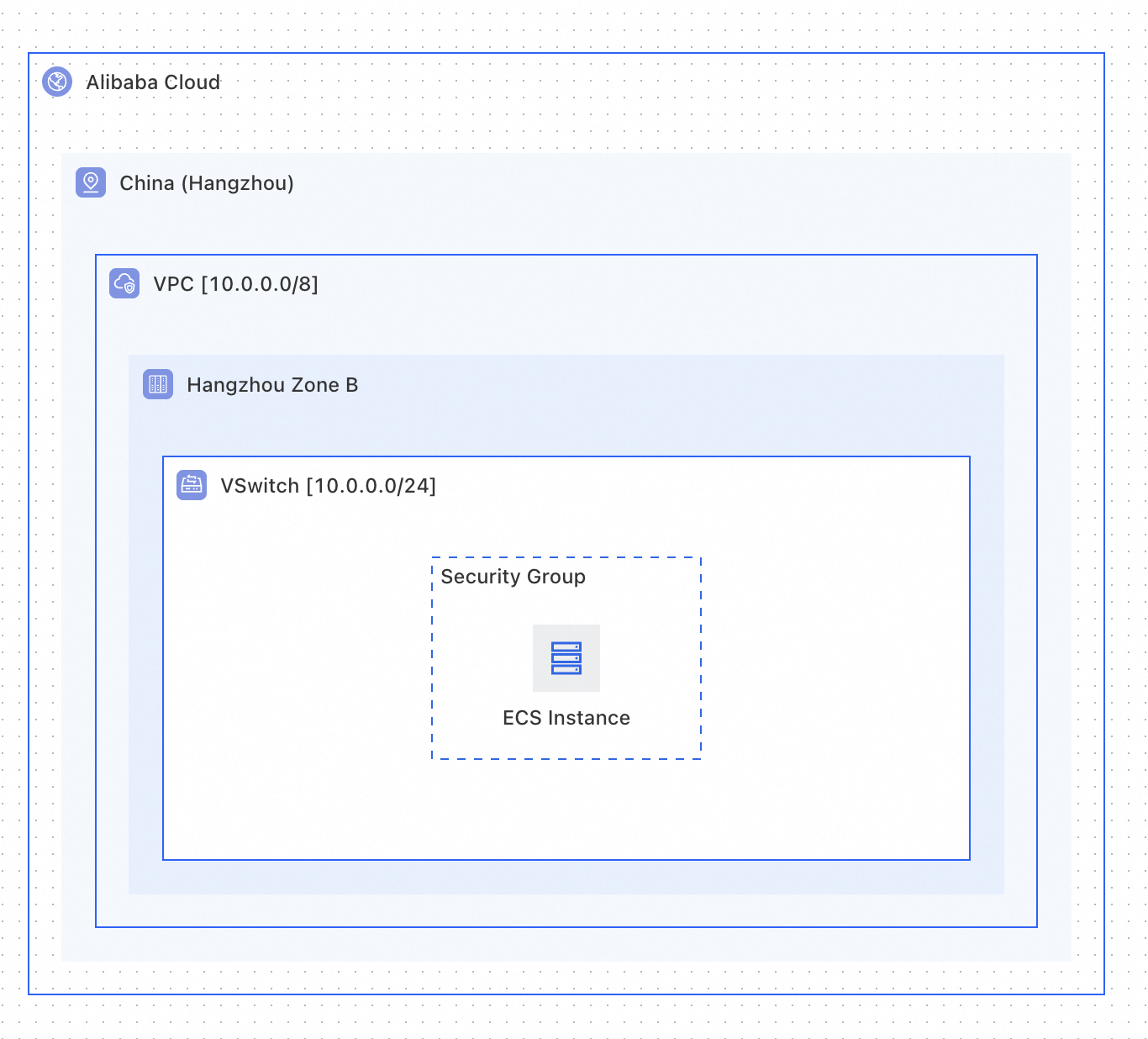
Create an ECS instance in an Alibaba Cloud VPC, configure a security group that allows Secure Shell (SSH) access on port 22 and HTTP/HTTPS access on ports 80 to 443, attach a data disk, and use a user_data initialization script to install and start the NGINX service automatically.
Resources created by the template
No. | Resource | Terraform resource type | Description |
1 | VPC |
| Provides an isolated network environment |
2 |
|
| Allocates a subnet within the VPC and specifies the zone |
3 | Security group |
| Controls the network access rules of the ECS instance |
4 | Security group rule (SSH) |
| Allows inbound access on port 22 |
5 | Security group rule (Web) |
| Allows inbound access on ports 80 to 443 |
6 | Security group rule (outbound) |
| Allows all outbound traffic |
7 | ECS instance |
| The compute node that runs NGINX, with a data disk |
Results after deployment
After the template runs successfully, you obtain the following resources:
A complete VPC network environment, which includes the VPC, the
vSwitch, the security group, and the security group rulesOne ECS instance with a 100 GB data disk and an assigned public IP address
The NGINX service installed and started automatically on the ECS instance
Access to the default NGINX page through the public IP address returned in the output
Architecture diagram
Prerequisites
Before you use this template, make sure that the following conditions are met:
Account permissions: The Alibaba Cloud account has the permissions to create ECS and VPC resources.
Basic knowledge: You are familiar with the basic syntax and structure of Terraform templates. For more information, see Structure of Terraform templates.
View resource types: You can view the details of Terraform resource properties in the Terraform Provider alicloud resource index. Each property is marked as
OptionalorRequired.
Template authoring tutorial
This tutorial demonstrates the Terraform template authoring process in two stages:
Stage 1 (basic): Uses fixed parameter values and focuses on Terraform resource definitions and dependencies.
Stage 2 (advanced): Adds
AssociationPropertydynamic parameter filtering, parameter grouping, and parameter constraints to improve the console experience.
Stage 1: Basic template — define resources and their dependencies
Step 1: Define the basic network resources
The basic network resources include alicloud_vpc, alicloud_vswitch, and alicloud_security_group, which all other resources are based on. Terraform establishes dependencies automatically through property references between resources.
# ============================================================
# Basic network-layer resources: VPC → VSwitch → SecurityGroup
# ============================================================

resource "alicloud_vpc" "vpc" {
  cidr_block = "192.168.0.0/16"  # VPC CIDR block, which holds up to 65,534 private IP addresses
}

resource "alicloud_vswitch" "vsw" {
  vpc_id     = alicloud_vpc.vpc.id  # References the VPC ID. Terraform establishes the dependency automatically
  cidr_block = "192.168.0.0/24"    # Subnet CIDR block, which must be a subset of the VPC CIDR block
  zone_id    = "cn-beijing-h"      # This scenario uses zone H in the China (Beijing) region as an example
}

resource "alicloud_security_group" "security_group" {
  name   = "sg-for-nginx"           # Security group name
  vpc_id = alicloud_vpc.vpc.id      # Binds the security group to the same VPC
}
Key points:
Implicit dependency versus explicit dependency (
depends_on):The
vpc_idproperty ofalicloud_vswitch.vswreferencesalicloud_vpc.vpc.id. Terraform recognizes this dependency automatically and makes sure that the VPC is created before thevSwitch.depends_on(explicit dependency) is required only when two resources have no direct reference between them but the business logic requires a specific order.
Step 2: Define the security group rules
alicloud_security_group_rule controls the network traffic in and out of the ECS instance. This scenario requires the SSH remote connection port and the web access ports to be open.
# ============================================================
# Security group rules: inbound SSH + inbound Web + all outbound traffic allowed
# ============================================================

# Inbound rule 1: opens SSH port 22 (for remote management)
resource "alicloud_security_group_rule" "allow_ssh" {
  security_group_id = alicloud_security_group.security_group.id  # Associates the rule with the security group
  type              = "ingress"     # Inbound direction
  cidr_ip           = "0.0.0.0/0"  # Allows access from all IP addresses (restrict the IP range in production environments)
  policy            = "accept"      # Accept policy
  ip_protocol       = "tcp"         # TCP protocol
  port_range        = "22/22"       # Port range: port 22 only
  priority          = 1             # Priority: 1 (highest)
}

# Inbound rule 2: opens web ports 80 to 443 (HTTP/HTTPS access to NGINX)
resource "alicloud_security_group_rule" "allow_web" {
  security_group_id = alicloud_security_group.security_group.id
  type              = "ingress"
  cidr_ip           = "0.0.0.0/0"
  policy            = "accept"
  ip_protocol       = "tcp"
  port_range        = "80/443"      # Port range: 80 to 443
  priority          = 1
}

# Outbound rule: allows all outbound traffic (the ECS instance can access external networks such as yum repositories)
resource "alicloud_security_group_rule" "allow_egress" {
  security_group_id = alicloud_security_group.security_group.id
  type              = "egress"      # Outbound direction
  cidr_ip           = "0.0.0.0/0"
  policy            = "accept"
  ip_protocol       = "tcp"
  port_range        = "1/65535"     # All ports
  priority          = 1
}
Key points:
The port range format in Terraform is
"start port/end port". For example,"80/443"indicates all ports from 80 to 443, and a single port is written as"22/22".In production environments, restrict the
cidr_ipof the SSH rule to office IP addresses to avoid malicious scanning.To open another port, such as 8080, add another
alicloud_security_group_ruleresource.
Step 3: Define the ECS instance and the initialization script
alicloud_instance is the compute node that runs NGINX. The user_data property specifies the initialization script that is run at first startup.
user_data initialization script (user-data.sh):
#!/bin/bash -v
# ---- Format and mount the data disk ----
cat >> /root/InitDataDisk.sh << "EOF"
#!/bin/bash
echo "p
n
p
w
" |  fdisk -u /dev/vdb
EOF
/bin/bash /root/InitDataDisk.sh
rm -f /root/InitDataDisk.sh
mkfs -t ext4 /dev/vdb1
cp /etc/fstab /etc/fstab.bak
mkdir /disk1
echo `blkid /dev/vdb1 | awk '{print $2}' | sed 's/\"//g'` /disk1 ext4 defaults 0 0 >> /etc/fstab
mount -a

# ---- Install and start NGINX ----
yum install -y nginx
/usr/sbin/nginx
ECS instance resource definition:
# ============================================================
# Compute layer: ECS instance (data disk + NGINX initialization)
# ============================================================

resource "alicloud_instance" "instance" {
  availability_zone          = "cn-beijing-h"
  security_groups            = [alicloud_security_group.security_group.id]  # Binds security groups in array format
  host_name                  = "app-for-nginx"
  instance_type              = "ecs.c6e.large"        # Instance type (compute optimized, 2 vCPUs and 4 GiB of memory)
  system_disk_size           = 100                     # System disk size
  system_disk_category       = "cloud_essd"            # System disk type
  image_id                   = "centos_7_9_x64_20G_alibase_20210318.vhd"  # CentOS 7.9 image
  vswitch_id                 = alicloud_vswitch.vsw.id # Binds the instance to the vSwitch
  password                   = "<YourPassword>"        # Replace with the actual password at deployment (must contain uppercase and lowercase letters, digits, and special characters)
  internet_charge_type       = "PayByTraffic"          # Pay-by-traffic billing for the public bandwidth
  internet_max_bandwidth_out = 30                      # 30 Mbit/s outbound public bandwidth
  instance_charge_type       = "PostPaid"              # Billing type (pay-as-you-go or subscription)
  user_data                  = file("${path.cwd}/user-data.sh")  # Loads the initialization script

  data_disks {              # Data disk configuration
    size     = 100          # Data disk size
    category = "cloud_essd" # Data disk type
  }
}

# Outputs the NGINX access URL
output "nginx_ip" {
  value = "http://${alicloud_instance.instance.public_ip}:80"
}
Key points: Terraform variable reference methods
Reference method | Syntax | Description |
Variable reference |
| Retrieves the value of a parameter defined in a |
Resource property reference |
| Retrieves an output property of another resource, such as |
File loading |
| Loads the content of a file in the current working directory |
Template extensions and variants:
user_dataloads an external script file by using thefile()function, which makes the script easier to maintain and reuse.internet_max_bandwidth_out = 30sets an outbound bandwidth of 30 Mbit/s, and the ECS instance obtains a public IP address automatically.The
data_disksblock can add multiple data disks, or be omitted if no data disk is attached.After the template creates the resources, the
outputinformation of the template can directly query the internal properties of those resources. Therefore, you can define anoutputblock to return the public access address of the ECS instance, which is the access address of the NGINX service.
Complete basic template
The Terraform template is structured as follows.
main.tf file content:
resource "alicloud_vpc" "vpc" {
  cidr_block = "192.168.0.0/16"
}

resource "alicloud_vswitch" "vsw" {
  vpc_id     = alicloud_vpc.vpc.id
  cidr_block = "192.168.0.0/24"
  zone_id    = "cn-beijing-h"
}

# Basic security group configuration
resource "alicloud_security_group" "security_group" {
  name        = "sg-for-nginx"
  description = "nginx scg"
  vpc_id      = alicloud_vpc.vpc.id
}

# Inbound rule 1: SSH
resource "alicloud_security_group_rule" "allow_ssh" {
  security_group_id = alicloud_security_group.security_group.id
  type              = "ingress"
  cidr_ip           = "0.0.0.0/0"
  policy            = "accept"
  ip_protocol       = "tcp"
  port_range        = "22/22"
  priority          = 1
}

# Inbound rule 2: Web
resource "alicloud_security_group_rule" "allow_web" {
  security_group_id = alicloud_security_group.security_group.id
  type              = "ingress"
  cidr_ip           = "0.0.0.0/0"
  policy            = "accept"
  ip_protocol       = "tcp"
  port_range        = "80/443"
  priority          = 1
}

# Outbound rule: all traffic allowed
resource "alicloud_security_group_rule" "allow_egress" {
  security_group_id = alicloud_security_group.security_group.id
  type              = "egress"
  cidr_ip           = "0.0.0.0/0"
  policy            = "accept"
  ip_protocol       = "tcp"
  port_range        = "1/65535"
  priority          = 1
}

# Basic instance configuration
resource "alicloud_instance" "instance" {
  availability_zone          = "cn-beijing-h"
  security_groups            = [alicloud_security_group.security_group.id]
  host_name                  = "app-for-nginx"
  instance_type              = "ecs.c6e.large"
  system_disk_size           = 100
  system_disk_category       = "cloud_essd"
  image_id                   = "centos_7_9_x64_20G_alibase_20210318.vhd"
  vswitch_id                 = alicloud_vswitch.vsw.id
  password                   = "<YourPassword>"  # Replace with the actual password at deployment
  internet_charge_type       = "PayByTraffic"
  internet_max_bandwidth_out = 30
  instance_charge_type       = "PostPaid"
  user_data                  = file("${path.cwd}/user-data.sh")

  data_disks {
    size     = 100
    category = "cloud_essd"
  }
}

# Returns the NGINX access URL
output "nginx_ip" {
  value = "http://${alicloud_instance.instance.public_ip}:80"
}
user-data.sh file content:
#!/bin/bash -v
# Mount the disk to /disk1
cat >> /root/InitDataDisk.sh << "EOF"
#!/bin/bash
echo "p
n
p
w
" |  fdisk -u /dev/vdb
EOF
/bin/bash /root/InitDataDisk.sh
rm -f /root/InitDataDisk.sh
mkfs -t ext4 /dev/vdb1
cp /etc/fstab /etc/fstab.bak
mkdir /disk1
echo `blkid /dev/vdb1 | awk '{print $2}' | sed 's/\"//g'` /disk1 ext4 defaults 0 0 >> /etc/fstab
mount -a
# Install NGINX
yum install -y nginx
# Start NGINX
/usr/sbin/nginx
The following template is the complete, ready-to-use template that combines the three preceding steps. To deploy a Terraform template by using ROS, you must wrap the template in the ROS Workspace format.
Complete template in ROS Workspace format:
ROSTemplateFormatVersion: '2015-09-01'
Transform: Aliyun::Terraform-v1.2
Workspace:
  main.tf: |-

    resource "alicloud_vpc" "vpc" {
      cidr_block = "192.168.0.0/16"
    }

    resource "alicloud_vswitch" "vsw" {
      vpc_id     = alicloud_vpc.vpc.id
      cidr_block = "192.168.0.0/24"
      zone_id    = "cn-beijing-h"
    }

    # Basic security group configuration
    resource "alicloud_security_group" "security_group" {
      name        = "sg-for-nginx"
      description = "nginx scg"
      vpc_id      = alicloud_vpc.vpc.id
    }

    # Inbound rule 1: SSH
    resource "alicloud_security_group_rule" "allow_ssh" {
      security_group_id = alicloud_security_group.security_group.id
      type              = "ingress"
      cidr_ip           = "0.0.0.0/0"
      policy            = "accept"
      ip_protocol       = "tcp"
      port_range        = "22/22"
      priority          = 1
    }

    # Inbound rule 2: Web
    resource "alicloud_security_group_rule" "allow_web" {
      security_group_id = alicloud_security_group.security_group.id
      type              = "ingress"
      cidr_ip           = "0.0.0.0/0"
      policy            = "accept"
      ip_protocol       = "tcp"
      port_range        = "80/443"
      priority          = 1
    }

    # Outbound rule: all traffic allowed
    resource "alicloud_security_group_rule" "allow_egress" {
      security_group_id = alicloud_security_group.security_group.id
      type              = "egress"
      cidr_ip           = "0.0.0.0/0"
      policy            = "accept"
      ip_protocol       = "tcp"
      port_range        = "1/65535"
      priority          = 1
    }

    # Basic instance configuration
    resource "alicloud_instance" "instance" {
      availability_zone          = "cn-beijing-h"
      security_groups            = [alicloud_security_group.security_group.id]
      host_name                  = "app-for-nginx"
      instance_type              = "ecs.c6e.large"
      system_disk_size           = 100
      system_disk_category       = "cloud_essd"
      image_id                   = "centos_7_9_x64_20G_alibase_20210318.vhd"
      vswitch_id                 = alicloud_vswitch.vsw.id
      password                   = "<YourPassword>"
      internet_charge_type       = "PayByTraffic"
      internet_max_bandwidth_out = 30
      instance_charge_type       = "PostPaid"
      user_data                  = file("${path.cwd}/user-data.sh")

      data_disks {
        size     = 100
        category = "cloud_essd"
      }
    }

    # Returns the NGINX access URL
    output "nginx_ip" {
      value = "http://${alicloud_instance.instance.public_ip}:80"
    }
  user-data.sh: |-
    #!/bin/bash -v
    # Mount the disk to /disk1
    cat >> /root/InitDataDisk.sh << "EOF"
    #!/bin/bash
    echo "p
    n
    p
    w
    " |  fdisk -u /dev/vdb
    EOF
    /bin/bash /root/InitDataDisk.sh
    rm -f /root/InitDataDisk.sh
    mkfs -t ext4 /dev/vdb1
    cp /etc/fstab /etc/fstab.bak
    mkdir /disk1
    echo `blkid /dev/vdb1 | awk '{print $2}' | sed 's/\"//g'` /disk1 ext4 defaults 0 0 >> /etc/fstab
    mount -a
    # Install NGINX
    yum install -y nginx
    # Start NGINX
    /usr/sbin/nginx
Stage 2: Advanced template — parameterization and dynamic configuration
The basic template does not define variable blocks, or the dynamic filtering configurations such as description and default that variable supports. When the basic template is used in the ROS console, the parameters are not linked to each other, and an invalid combination may be selected, such as an instance type that is out of stock in the selected zone.
The following optimizations significantly improve the console experience and the reusability of the template:
Dynamic parameter filtering (
AssociationProperty): ConfigureAssociationPropertyin JSON format in thedescriptionof avariableso that the console filters the available options automatically.Conditional visibility (
Visible.Condition): Dynamically show or hide the subscription duration parameters based on the billing type.Parameter grouping (.metadata file): Configure
ParameterGroupsin the .metadata file so that the console displays the parameters in logical groups.Parameter constraints (
ResourcesForParameterConstraints): Define resource constraints in the .metadata file to make sure that the parameter combinations are valid.
Parameter dependency graph
pay_type (billing type)
  ├── pay_period_unit (period unit, displayed only for PrePaid)
  └── pay_period (subscription duration, displayed only for PrePaid)

zone_id (zone, the core filter parameter)
  ├── instance_type (instance type, filtered by zone + billing type)
  │    ├── system_disk_category (system disk type, filtered by zone + instance type)
  │    └── data_disk_category (data disk type, filtered by zone + instance type)
Core approach: Select the zone and the ECS billing type first, and then filter the ECS instance types accordingly (if a subscription billing type is selected, you must also select the period unit and the subscription duration). Finally, filter the disk types based on the zone and the ECS instance type. Each step shows only the options that are available under the current conditions, which prevents invalid combinations.
How works AssociationProperty works
1. zone_id — zone (base parameter)
Set AssociationProperty to ALIYUN::ECS::ZoneId to list all zones in the current region for selection. Example:
variable "zone_id" {
  type        = string
  description = <<EOT
  {
    # AssociationProperty specifies the resource property type that the parameter is associated with
    # The ROS console lists the available values based on this configuration
    "AssociationProperty": "ALIYUN::ECS::ZoneId",
    "Label": {
      "zh-cn": "VSwitch Availability Zone",
      "en": "VSwitch Availability Zone"
    },
    "Description": {
      "zh-cn": "Select availability zone for subsequent parameter filtering",
      "en": "Select availability zone for resource filtering"
    }
  }
  EOT
}
This parameter is the filter basis for all subsequent parameters. After a zone is selected, the option lists of the other parameters are updated accordingly.
2. pay_type — ECS pay type
Define the pay_type parameter and use AssociationPropertyMetadata.Visible.Condition to switch the parameters dynamically based on a condition: the subscription duration parameters are displayed only when the subscription billing type (PrePaid) is selected. Example:
variable "pay_type" {
  type    = string
  default = "PostPaid"
  description = <<EOT
  {
    "Label": { "en": "ECS Instance Charge Type", "zh-cn": "Payment Type" },
    "AllowedValues": ["PostPaid", "PrePaid"],
    "AssociationProperty": "ChargeType"
  }
  EOT
}
variable "pay_period_unit" {
  type    = string
  default = "Month"
  description = <<EOT
  {
    "Label": { "zh-cn": "Purchase Period Unit" },
    "AllowedValues": ["Month", "Year"],
    "AssociationProperty": "PayPeriodUnit",
    "AssociationPropertyMetadata": {
      "Visible": {
        "Condition": {
          "Fn::Not": {
            "Fn::Equals": ["$${pay_type}", "PostPaid"]
          }
        }
      }
    }
  }
  EOT
}
variable "pay_period" {
  type    = number
  default = 1
  description = <<EOT
  {
    "Label": { "en": "Period", "zh-cn": "Purchase Period" },
    "AllowedValues": [1, 2, 3, 4, 5, 6, 7, 8, 9],
    "AssociationProperty": "PayPeriod",
    "AssociationPropertyMetadata": {
      "Visible": {
        "Condition": {
          "Fn::Not": { "Fn::Equals": ["$${pay_type}", "PostPaid"] }
        }
      }
    }
  }
  EOT
}
When the pay-as-you-go billing type (PostPaid) is selected in the ROS console, the subscription duration parameters are hidden automatically. These parameters are displayed only when the subscription billing type (PrePaid) is selected.
3. instance_type — ECS instance type
Set AssociationProperty to ALIYUN::ECS::Instance::InstanceType to list the available ECS instance types, and associate ${zone_id} and ${pay_type} to filter the instance types that are available in the specified zone for the specified billing type. Example:
variable "instance_type" {
  type = string
  description = <<EOT
  {
    "Label": { "zh-cn": "Instance Type", "en": "Instance Type" },
    "AssociationProperty": "ALIYUN::ECS::Instance::InstanceType",
    "AssociationPropertyMetadata": {
      "ZoneId": "$${zone_id}",
      "InstanceChargeType": "$${pay_type}"
    }
  }
  EOT
}
The instance type stock varies by zone. Without filtering, an instance type that is out of stock in the zone may be selected, which causes the creation to fail.
4. system_disk_category — system disk type
Set AssociationProperty to ALIYUN::ECS::Disk::SystemDiskCategory to list the available system disk types, and associate ${zone_id} and ${instance_type} to filter the ECS system disk types that are supported by the specified zone and the specified ECS instance type. Example:
variable "system_disk_category" {
  type = string
  description = <<EOT
  {
    "Label": { "zh-cn": "System Disk Type", "en": "System Disk Type" },
    "Description": {
      "zh-cn": "Options: cloud_efficiency, cloud_ssd, cloud_essd",
      "en": "Options: cloud_efficiency, cloud_ssd, cloud_essd"
    },
    "AssociationProperty": "ALIYUN::ECS::Disk::SystemDiskCategory",
    "AssociationPropertyMetadata": {
      "ZoneId": "$${zone_id}",
      "InstanceType": "$${instance_type}"
    }
  }
  EOT
}
The availability of a system disk type depends on both the zone (some zones do not support ESSD) and the instance type (some instance types support only specific disk types).
5. data_disk_category — data disk type
Set AssociationProperty to ALIYUN::ECS::Disk::DataDiskCategory to list the available data disk types. The filtering mechanism is identical to that of the system disk type: ${zone_id} and ${instance_type} are associated to filter the data disk types that are supported by both the current zone and the instance type. Example:
variable "data_disk_category" {
  type = string
  description = <<EOT
  {
    "Label": { "zh-cn": "Data Disk Type", "en": "Data Disk Type" },
    "Description": {
      "zh-cn": "Options: cloud_efficiency, cloud_ssd, cloud_essd",
      "en": "Options: cloud_efficiency, cloud_ssd, cloud_essd"
    },
    "AssociationProperty": "ALIYUN::ECS::Disk::DataDiskCategory",
    "AssociationPropertyMetadata": {
      "ZoneId": "$${zone_id}",
      "InstanceType": "$${instance_type}"
    }
  }
  EOT
}
Dynamic parameter filtering template
variable "zone_id" {
  type        = string
  description = <<EOT
  {
    "AssociationProperty": "ALIYUN::ECS::ZoneId",
    "Label": {
      "zh-cn": "VSwitch Availability Zone",
      "en": "VSwitch Availability Zone"
    },
    "Description": {
      "zh-cn": "Select availability zone for subsequent parameter filtering",
      "en": "Select availability zone for resource filtering"
    }
  }
  EOT
}
variable "pay_type" {
  type    = string
  default = "PostPaid"
  description = <<EOT
  {
    "Label": { "en": "ECS Instance Charge Type", "zh-cn": "Payment Type" },
    "AllowedValues": ["PostPaid", "PrePaid"],
    "AssociationProperty": "ChargeType"
  }
  EOT
}
variable "pay_period_unit" {
  type    = string
  default = "Month"
  description = <<EOT
  {
    "Label": { "zh-cn": "Purchase Period Unit" },
    "AllowedValues": ["Month", "Year"],
    "AssociationProperty": "PayPeriodUnit",
    "AssociationPropertyMetadata": {
      "Visible": {
        "Condition": {
          "Fn::Not": {
            "Fn::Equals": ["$${pay_type}", "PostPaid"]
          }
        }
      }
    }
  }
  EOT
}
variable "pay_period" {
  type    = number
  default = 1
  description = <<EOT
  {
    "Label": { "en": "Period", "zh-cn": "Purchase Period" },
    "AllowedValues": [1, 2, 3, 4, 5, 6, 7, 8, 9],
    "AssociationProperty": "PayPeriod",
    "AssociationPropertyMetadata": {
      "Visible": {
        "Condition": {
          "Fn::Not": { "Fn::Equals": ["$${pay_type}", "PostPaid"] }
        }
      }
    }
  }
  EOT
}
variable "instance_type" {
  type = string
  description = <<EOT
  {
    "Label": { "zh-cn": "Instance Type", "en": "Instance Type" },
    "AssociationProperty": "ALIYUN::ECS::Instance::InstanceType",
    "AssociationPropertyMetadata": {
      "ZoneId": "$${zone_id}",
      "InstanceChargeType": "$${pay_type}"
    }
  }
  EOT
}
variable "system_disk_category" {
  type = string
  description = <<EOT
  {
    "Label": { "zh-cn": "System Disk Type", "en": "System Disk Type" },
    "Description": {
      "zh-cn": "Options: cloud_efficiency, cloud_ssd, cloud_essd",
      "en": "Options: cloud_efficiency, cloud_ssd, cloud_essd"
    },
    "AssociationProperty": "ALIYUN::ECS::Disk::SystemDiskCategory",
    "AssociationPropertyMetadata": {
      "ZoneId": "$${zone_id}",
      "InstanceType": "$${instance_type}"
    }
  }
  EOT
}
variable "data_disk_category" {
  type = string
  description = <<EOT
  {
    "Label": { "zh-cn": "Data Disk Type", "en": "Data Disk Type" },
    "Description": {
      "zh-cn": "Options: cloud_efficiency, cloud_ssd, cloud_essd",
      "en": "Options: cloud_efficiency, cloud_ssd, cloud_essd"
    },
    "AssociationProperty": "ALIYUN::ECS::Disk::DataDiskCategory",
    "AssociationPropertyMetadata": {
      "ZoneId": "$${zone_id}",
      "InstanceType": "$${instance_type}"
    }
  }
  EOT
}
How AssociationProperty cascade filtering works
When a stack is created in the ROS console, the parameters are selected in a cascading sequence:
Select a zone (
zone_id).Select an ECS billing type (
pay_type).The ECS instance type drop-down list refreshes automatically and shows only the instance types that support the selected billing type and are in stock in the selected zone.
After an ECS instance type is selected, the system disk type and data disk type drop-down lists refresh automatically and show only the disk types that are supported by both the selected zone and the selected instance type.
In this way, each step shows only the options that are available under the current conditions, which prevents deployment failures caused by invalid parameter combinations from the outset.
Metadata parameter grouping
The ALIYUN::ROS::Interface configuration in Metadata divides the parameters into multiple logical groups, each with a title. The console displays the parameters by group, which greatly improves the experience of specifying them.
Metadata syntax structure
Create a .metadata file under the Terraform tab, and configure parameter grouping (ParameterGroups) and parameter constraints (ResourcesForParameterConstraints):
{
  "ALIYUN::ROS::Interface": {
    "ResourcesForParameterConstraints": {
      "resource": {
        "Type": "ALIYUN::ECS::Instance",
        "Properties": {
        }
      }
    },
    "ParameterGroups": [
      {
        "Parameters": ["parameter_name_1", "parameter_name_2", "parameter_name_3"],
        "Label": { "default": { "zh-cn": "XXXX Configuration", "en": "Configuration" } }
      }
    ]
  }
}
Metadata syntax rules:
ParametersandLabelare both required.The parameter names listed in
Parametersmust be exactly the same as thevariableparameter names.A parameter that is not included in any group is displayed in the ungrouped area in the console.
Parameter grouping design for this scenario
This template divides the 12 parameters into 3 groups by resource type:
┌─────────────────────────────────────────────────────┐
│  Network configuration                              │
│  ├── VSwitch zone (zone_id)                         │
│  ├── VPC CIDR block (vpc_cidr_block)                │
│  └── VSwitch CIDR block (vswitch_cidr_block)        │
├─────────────────────────────────────────────────────┤
│  Payment configuration                              │
│  ├── ECS billing type (pay_type)                    │
│  ├── ECS subscription period unit (pay_period_unit) │
│  └── ECS subscription duration (pay_period)         │
├─────────────────────────────────────────────────────┤
│  ECS instance configuration                         │
│  ├── ECS instance type (instance_type)              │
│  ├── System disk type (system_disk_category)        │
│  ├── System disk size (system_disk_size)            │
│  ├── Data disk type (data_disk_category)            │
│  ├── Data disk size (data_disk_size)                │
│  └── ECS instance password (instance_password)      │
└─────────────────────────────────────────────────────┘
.metadata file configuration
Create a .metadata file under the Terraform tab, and configure parameter grouping and parameter constraints:
{
  "ALIYUN::ROS::Interface": {
    "ResourcesForParameterConstraints": {
      "instance": {
        "Type": "ALIYUN::ECS::Instance",
        "Properties": {
          "InstanceType": { "Ref": "instance_type" },
          "ImageId": "centos_7_9_x64_20G_alibase_20210318.vhd",
          "ZoneId": { "Ref": "zone_id" },
          "SystemDiskCategory": { "Ref": "system_disk_category" },
          "SystemDiskSize": { "Ref": "system_disk_size" },
          "DataDiskCategory": { "Ref": "data_disk_category" },
          "DataDiskSize": { "Ref": "data_disk_size" }
        }
      }
    },
    "ParameterGroups": [
      {
        "Parameters": ["vpc_cidr_block", "zone_id", "vswitch_cidr_block"],
        "Label": { "default": { "zh-cn": "Network Configuration", "en": "Network Configuration" } }
      },
      {
        "Parameters": ["pay_type", "pay_period_unit", "pay_period"],
        "Label": { "default": { "zh-cn": "Payment Configuration", "en": "Payment Configuration" } }
      },
      {
        "Parameters": ["instance_type", "system_disk_category", "system_disk_size", "data_disk_category", "data_disk_size", "instance_password"],
        "Label": { "default": { "zh-cn": "ECS Instance Configuration", "en": "ECS Instance Configuration" } }
      }
    ]
  }
}
Key points:
A virtual
ALIYUN::ECS::Instanceresource is defined to associate the parameters in the template with the properties of the ECS resource.The ROS console validates the effectiveness of the parameter combination based on this definition, such as whether the specified zone supports the selected instance type and disk types.
The
Refsyntax references the Terraform variable name without thevar.prefix.
Complete advanced template
The following template is the complete advanced template that is wrapped in the ROS Workspace format, and can be deployed in the ROS console directly:
ROSTemplateFormatVersion: '2015-09-01'
Transform: Aliyun::Terraform-v1.2
Workspace:
  .metadata: |-
    {
      "ALIYUN::ROS::Interface": {
        "ResourcesForParameterConstraints": {
          "instance": {
            "Type": "ALIYUN::ECS::Instance",
            "Properties": {
              "InstanceType": { "Ref": "instance_type" },
              "ImageId": "centos_7_9_x64_20G_alibase_20210318.vhd",
              "ZoneId": { "Ref": "zone_id" },
              "SystemDiskCategory": { "Ref": "system_disk_category" },
              "SystemDiskSize": { "Ref": "system_disk_size" },
              "DataDiskCategory": { "Ref": "data_disk_category" },
              "DataDiskSize": { "Ref": "data_disk_size" }
            }
          }
        },
        "ParameterGroups": [
          {
            "Parameters": ["vpc_cidr_block", "zone_id", "vswitch_cidr_block"],
            "Label": { "default": { "zh-cn": "Network Configuration", "en": "Network Configuration" } }
          },
          {
            "Parameters": ["pay_type", "pay_period_unit", "pay_period"],
            "Label": { "default": { "zh-cn": "Payment Configuration", "en": "Payment Configuration" } }
          },
          {
            "Parameters": ["instance_type", "system_disk_category", "system_disk_size", "data_disk_category", "data_disk_size", "instance_password"],
            "Label": { "default": { "zh-cn": "ECS Instance Configuration", "en": "ECS Instance Configuration" } }
          }
        ]
      }
    }
  main.tf: |-
    variable "pay_type" {
      type    = string
      default = "PostPaid"
      description = <<EOT
      {
        "Label": { "en": "ECS Instance Charge Type", "zh-cn": "Payment Type" },
        "AllowedValues": ["PostPaid", "PrePaid"],
        "AssociationProperty": "ChargeType",
        "AssociationPropertyMetadata": { "LocaleKey": "InstanceChargeType" }
      }
      EOT
    }
    variable "pay_period_unit" {
      type    = string
      default = "Month"
      description = <<EOT
      {
        "Label": { "en": "Pay Period Unit", "zh-cn": "Purchase Period Unit" },
        "AllowedValues": ["Month", "Year"],
        "AssociationProperty": "PayPeriodUnit",
        "AssociationPropertyMetadata": {
          "Visible": {
            "Condition": {
              "Fn::Not": { "Fn::Equals": ["$${pay_type}", "PostPaid"] }
            }
          }
        }
      }
      EOT
    }
    variable "pay_period" {
      type    = number
      default = 1
      description = <<EOT
      {
        "Label": { "en": "Period", "zh-cn": "Purchase Period" },
        "AllowedValues": [1, 2, 3, 4, 5, 6, 7, 8, 9],
        "AssociationProperty": "PayPeriod",
        "AssociationPropertyMetadata": {
          "Visible": {
            "Condition": {
              "Fn::Not": { "Fn::Equals": ["$${pay_type}", "PostPaid"] }
            }
          }
        }
      }
      EOT
    }
    variable "zone_id" {
      type = string
      description = <<EOT
      {
        "AssociationProperty": "ALIYUN::ECS::ZoneId",
        "Label": { "zh-cn": "VSwitch Availability Zone", "en": "VSwitch Availability Zone" },
        "Description": {
          "zh-cn": "Select availability zone. Instance types and disk categories will be filtered accordingly.",
          "en": "Select availability zone. Instance types and disk categories will be filtered accordingly."
        }
      }
      EOT
    }
    variable "vpc_cidr_block" {
      type    = string
      default = "192.168.0.0/16"
      description = <<EOT
      {
        "Label": { "zh-cn": "VPC CIDR Block", "en": "VPC CIDR Block" },
        "Description": {
          "zh-cn": "VPC IP range. Recommended: 10.0.0.0/8, 172.16.0.0/12, or 192.168.0.0/16",
          "en": "VPC IP range. Recommended: 10.0.0.0/8, 172.16.0.0/12, or 192.168.0.0/16"
        }
      }
      EOT
    }
    variable "vswitch_cidr_block" {
      type    = string
      default = "192.168.0.0/24"
      description = <<EOT
      {
        "Label": { "zh-cn": "VSwitch CIDR Block", "en": "VSwitch CIDR Block" },
        "Description": {
          "zh-cn": "Must be a subnet of VPC CIDR and not overlap with other VSwitches",
          "en": "Must be a subnet of VPC CIDR and not overlap with other VSwitches"
        }
      }
      EOT
    }
    variable "instance_type" {
      type = string
      description = <<EOT
      {
        "Label": { "zh-cn": "Instance Type", "en": "Instance Type" },
        "AssociationProperty": "ALIYUN::ECS::Instance::InstanceType",
        "AssociationPropertyMetadata": {
          "InstanceChargeType": "$${pay_type}",
          "ZoneId": "$${zone_id}"
        }
      }
      EOT
    }
    variable "system_disk_category" {
      type = string
      description = <<EOT
      {
        "Label": { "zh-cn": "System Disk Type", "en": "System Disk Type" },
        "Description": {
          "zh-cn": "Options: cloud_efficiency, cloud_ssd, cloud_essd",
          "en": "Options: cloud_efficiency, cloud_ssd, cloud_essd"
        },
        "AssociationProperty": "ALIYUN::ECS::Disk::SystemDiskCategory",
        "AssociationPropertyMetadata": {
          "ZoneId": "$${zone_id}",
          "InstanceType": "$${instance_type}"
        }
      }
      EOT
    }
    variable "system_disk_size" {
      type    = number
      default = 40
      description = <<EOT
      {
        "Label": { "zh-cn": "System Disk Size", "en": "System Disk Size" },
        "Description": {
          "zh-cn": "System disk size, range: 40~500 GB",
          "en": "System disk size, range: 40~500 GB"
        }
      }
      EOT
    }
    variable "data_disk_category" {
      type = string
      description = <<EOT
      {
        "Label": { "zh-cn": "Data Disk Type", "en": "Data Disk Type" },
        "Description": {
          "zh-cn": "Options: cloud_efficiency, cloud_ssd, cloud_essd",
          "en": "Options: cloud_efficiency, cloud_ssd, cloud_essd"
        },
        "AssociationProperty": "ALIYUN::ECS::Disk::DataDiskCategory",
        "AssociationPropertyMetadata": {
          "ZoneId": "$${zone_id}",
          "InstanceType": "$${instance_type}"
        }
      }
      EOT
    }
    variable "data_disk_size" {
      type    = number
      default = 100
      description = <<EOT
      {
        "Label": { "zh-cn": "Data Disk Space", "en": "Data Disk Space" },
        "Description": {
          "zh-cn": "ECS data disk size, range: 20~32768 GiB",
          "en": "ECS data disk size, range: 20~32768 GiB"
        },
        "MaxValue": 32768,
        "MinValue": 20
      }
      EOT
    }
    variable "instance_password" {
      type      = string
      sensitive = true
      description = <<EOT
      {
        "Label": { "zh-cn": "Logon Password", "en": "Instance Password" },
        "Description": {
          "zh-cn": "Length 8-30, must contain at least 3 of: uppercase, lowercase, digits, special characters",
          "en": "Length 8-30, must contain at least 3 of: uppercase, lowercase, digits, special characters"
        },
        "AssociationProperty": "ALIYUN::ECS::Instance::Password",
        "MinLength": 8,
        "MaxLength": 30
      }
      EOT
    }

    # Default resource names
    locals {
      production_name = "nginx"
      new_scg_name    = "sg-for-${local.production_name}"
      new_host_name   = "app-for-${local.production_name}"
    }

    resource "alicloud_vpc" "vpc" {
      cidr_block = var.vpc_cidr_block
    }

    resource "alicloud_vswitch" "vsw" {
      vpc_id     = alicloud_vpc.vpc.id
      cidr_block = var.vswitch_cidr_block
      zone_id    = var.zone_id
    }

    resource "alicloud_security_group" "security_group" {
      name        = local.new_scg_name
      description = "nginx scg"
      vpc_id      = alicloud_vpc.vpc.id
    }

    resource "alicloud_security_group_rule" "allow_ssh" {
      security_group_id = alicloud_security_group.security_group.id
      type              = "ingress"
      cidr_ip           = "0.0.0.0/0"
      policy            = "accept"
      ip_protocol       = "tcp"
      port_range        = "22/22"
      priority          = 1
    }

    resource "alicloud_security_group_rule" "allow_web" {
      security_group_id = alicloud_security_group.security_group.id
      type              = "ingress"
      cidr_ip           = "0.0.0.0/0"
      policy            = "accept"
      ip_protocol       = "tcp"
      port_range        = "80/443"
      priority          = 1
    }

    resource "alicloud_security_group_rule" "allow_egress" {
      security_group_id = alicloud_security_group.security_group.id
      type              = "egress"
      cidr_ip           = "0.0.0.0/0"
      policy            = "accept"
      ip_protocol       = "tcp"
      port_range        = "1/65535"
      priority          = 1
    }

    resource "alicloud_instance" "instance" {
      availability_zone          = var.zone_id
      security_groups            = [alicloud_security_group.security_group.id]
      host_name                  = local.new_host_name
      instance_type              = var.instance_type
      system_disk_size           = var.system_disk_size
      system_disk_category       = var.system_disk_category
      image_id                   = "centos_7_9_x64_20G_alibase_20210318.vhd"
      vswitch_id                 = alicloud_vswitch.vsw.id
      password                   = var.instance_password
      internet_charge_type       = "PayByTraffic"
      internet_max_bandwidth_out = 30
      instance_charge_type       = var.pay_type
      period                     = var.pay_period
      period_unit                = var.pay_period_unit
      user_data                  = file("${path.cwd}/user-data.sh")

      data_disks {
        size     = var.data_disk_size
        category = var.data_disk_category
      }
    }

    output "nginx_ip" {
      value = "http://${alicloud_instance.instance.public_ip}:80"
    }
  user-data.sh: |-
    #!/bin/bash -v
    # Mount the disk to /disk1
    cat >> /root/InitDataDisk.sh << "EOF"
    #!/bin/bash
    echo "p
    n
    p
    w
    " |  fdisk -u /dev/vdb
    EOF
    /bin/bash /root/InitDataDisk.sh
    rm -f /root/InitDataDisk.sh
    mkfs -t ext4 /dev/vdb1
    cp /etc/fstab /etc/fstab.bak
    mkdir /disk1
    echo `blkid /dev/vdb1 | awk '{print $2}' | sed 's/\"//g'` /disk1 ext4 defaults 0 0 >> /etc/fstab
    mount -a
    # Install NGINX
    yum install -y nginx
    # Start NGINX
    /usr/sbin/nginx
Terraform template syntax quick reference
Syntax | Example | Purpose in this template |
|
| References an input parameter value defined by a variable |
|
| References a local variable defined in a locals block |
|
| References an output property of another resource, and establishes the dependency automatically |
|
| Loads external file content as a property value |
|
| String interpolation, which embeds a variable value in a string |
|
| Multi-line string, which is used to embed JSON configurations |
|
| References the current value of another variable in the JSON of description |
Deployment
Deployment parameters
Required input parameters (must be specified at deployment)
Parameter | Type | Description | Constraint |
| String |
| Dynamic selection in the console |
| String | ECS instance type | Filtered automatically by zone |
| String | System disk type | Filtered automatically by zone + instance type |
| String | Data disk type | Filtered automatically by zone + instance type |
| String | ECS logon password | 8 to 30 characters in length, and must contain an uppercase letter, a lowercase letter, a digit, and a special character |
Optional parameters (have default values, can be left unchanged)
Parameter | Default | Description |
|
| Billing type ( |
| Month | Subscription duration unit (displayed only for |
| 1 | Subscription duration (displayed only for |
| 192.168.0.0/16 | VPC CIDR block range |
| 192.168.0.0/24 |
|
| 40 | System disk size (GB), valid values: 40 to 500 |
| 100 | Data disk size (GiB), valid values: 20 to 32768 |
Deployment methods
Method 1: Deploy through the ROS console
Log in to theROS console.
In the left-side navigation pane, choose Templates > My Templates > Create Template.
For the template type, select the Terraform template.
Create a
main.tffile and paste the main.tf content from the advanced template.Create a
user-data.shfile and paste the user-data.sh script content.Create a
.metadatafile and paste the .metadata JSON configuration.After you save the template, go to Stacks > Create Stack > Select an existing template > My Templates, and select the template.
Specify the configuration parameters by group, and then click Create.
Wait until the stack status changes to
CREATE_COMPLETE, and then view the NGINX access URL on the Outputs tab.
Method 2: Deploy through ROS IaC Code
IaC Code is an AI infrastructure as code (IaC) assistant for cloud infrastructure that generates, deploys, and manages infrastructure templates through natural-language prompts. Its architecture is designed for multi-cloud workflows. The following prompt is a reference prompt for this solution:
# Prompt

Help me create an ECS instance and deploy the NGINX service by using a Terraform template.
Requirements:
1. Create a new VPC and `vSwitch` as the basic network.
2. The security group allows inbound access on port 22 (SSH) and ports 80 to 443 (web access).
3. The ECS instance requires a public IP address, with an outbound bandwidth of 30 Mbit/s.
4. Attach a 100 GB data disk, format it, and mount it to /disk1.
5. Install and start NGINX automatically through a user_data script.
6. zone_id, instance_type, system_disk_category, and data_disk_category all require AssociationProperty dynamic filtering.
7. The billing type parameter requires conditional visibility (the subscription duration is displayed only for subscription billing).
FAQ
Q1: Deployment fails with the error message "The specified InstanceType is not available in the zone"
Cause: The selected ECS instance type is out of stock in the specified zone.
Solution:
In the advanced template,
AssociationPropertyworks withResourcesForParameterConstraintsto filter the available instance types automatically, which prevents this issue.If you use the basic template, check the instance type stock of the target zone on Elastic Compute Service (ECS) pricing.
Q2: The ECS instance is created but the NGINX page is not accessible
Troubleshooting steps:
Check whether the security group rule allows inbound access on port 80 (check the
allow_webrule).Login to the ECS instance, and run
systemctl status nginxto check whether NGINX is running as expected.Check whether the
user_datascript ran successfully: viewcat /var/log/messages | grep cloud-init.Check whether the ECS instance has a public IP address (a public IP address is automatically assigned when
internet_max_bandwidth_out > 0).
Q3: The user_data script failed to run and the data disk is not mounted
Cause: The image may be incompatible, or the data disk device name may not match.
Solution:
/dev/vdbused in theuser_datascript is the default device name of the data disk. Make sure that thedata_disksblock is configured in the template.If you use a non-CentOS image, you may need to adjust the partition command (for example, use
partedinstead offdisk).If no data disk is required, you can remove the
data_disksblock and the disk-mounting part of theuser_datascript.
Q4: How do I convert a Terraform template to a ROS template?
Method 1: Convert in the console
In the ROS console, choose Templates > My Templates > Create Template.
Write the template on the Terraform template tab first.
Switch to the ROS template tab, and select YAML in the upper-right corner. The system automatically converts the Terraform template to the following format:
ROSTemplateFormatVersion: '2015-09-01'
Transform: Aliyun::Terraform-v1.2
Workspace:
  .metadata: |-
    { ... }  # Parameter grouping and constraint configuration
  main.tf: |-
    ...      # Terraform template content
  user-data.sh: |-
    ...      # Initialization script content
Method 2: Use the Template Transformer
Run the conversion command:
rostran transform templates/terraform/alicloud/main.tf --target-format jsonQ5: How do I deploy another web service, such as Apache or Tomcat?
Modification points:
Modify the installation and start commands in user-data.sh:
Apache:
yum install -y httpd && systemctl start httpdTomcat: install the JDK, and then download and start Tomcat.
Adjust the port range of the security group rule (for example, Tomcat uses port 8080 by default).
Modify the port number in the output.
Q6: How do I use an existing VPC instead of creating one?
Solution: Change the VPC and the vSwitch to select from existing resources:
variable "vpc_id" {
  type = string
  description = <<EOT
  {
    "Label": { "zh-cn": "Existing VPC" },
    "AssociationProperty": "ALIYUN::ECS::VPC::VPCId"
  }
  EOT
}
variable "vswitch_id" {
  type = string
  description = <<EOT
  {
    "Label": { "zh-cn": "Existing VSwitch" },
    "AssociationProperty": "ALIYUN::VPC::VSwitch::VSwitchId",
    "AssociationPropertyMetadata": {
      "VpcId": "$${vpc_id}"
    }
  }
  EOT
}
Then, change vswitch_id in alicloud_instance to var.vswitch_id, and delete the alicloud_vpc and alicloud_vswitch resource blocks.
For more information about resource deployment issues, see FAQ.