createServiceTask
Endpoint: console-rpa.aliyun.com/rpa/openapi/task/createServiceTask
Method: POST
Response format: JSON
Description: Creates an API-triggered task.
Request parameters
Parameter | Type | Required | Example | Description |
appId | String | Yes | fb6a99a1-****-****-****-2ed9cb5a0c0d | The unique identifier of the application. |
appParams | JSON array | No | [{"name":"Parameter 1","value":""},{"name":"Parameter 2","value":""}] |
|
clientId | String | No | 5E77DA******CFB62A8B9527626A47F4 | The ID of the robot. |
callbackUrl | String | No | http://console-rpa.aliyun.com/callback | The callback URL. |
appVersion | String | No | 1.0.0 | The application version to run.
Important If you use an on-premises version of the RPA server:
|
renderEnabled | Boolean | No | false | Specifies whether to keep desktop rendering enabled. Default value: false. |
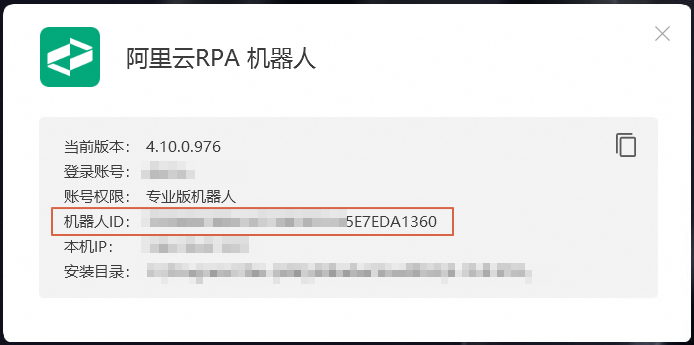
The clientId parameter specifies the ID of the robot. After you sign in to the robot client, you can find the robot ID for the local machine in the About menu, as shown in the following figure:
Response parameters
For the common response parameters, see Return results. The data parameter is described as follows:
Parameter | Type | Example | Description |
taskId | String | fa2e5fb6-****-****-****-5797490eaa98 | The unique identifier of the task. |
resultUrl | String | /rpa/openapi/task/queryServiceResult?taskId=fa2e5fb6-****-****-****-5797490eaa98 | The URL to retrieve the task result. |
Examples
Request example:
https://console-rpa.aliyun.com/rpa/openapi/task/createServiceTask?<Common request parameters>
&appId=fb6a99a1-****-****-****-2ed9cb5a0c0d
&appParams=[{"name":"Parameter 1","value":""},{"name":"Parameter 2","value":""}]
&clientId=5E77DA******CFB62A8B9527626A47F4
&callbackUrl=http://console-rpa.aliyun.com/callback
Response example:
{
    "requestId":"e6cc72d4-****-****-****-1aba346181e0",
    "success":true,
    "code":0,
    "msg":"Call succeeded",
    "msgCode":"result.success",
    "data":{
        "taskId":"fa2e5fb6-****-****-****-5797490eaa98",
        "resultUrl":"/rpa/openapi/task/queryServiceResult?taskId=fa2e5fb6-****-****-****-5797490eaa98"
    },
    "pager":null
}
Error codes
Code | Description | Description |
0 | result.success | Call succeeded. |
10000 | system.systemError | A system error occurred. Try again later. |
10004 | system.lockedFailed | Failed to update data. Try again later. |
20000 | permission.denied | You do not have the required permissions. For this operation, this error indicates that you are not authorized to access the specified application. |
20110 | param.ParamError | The parameters are invalid. |
20201 | user.userNotExist | The user does not exist. |
30102 | client.clientNotExist | The robot does not exist. |
30202 | task.taskScheduleNotExist | The scheduled task does not exist. |
30206 | task.taskCreateServiceTaskFailed | Failed to create the service task. |
30800 | app.appNotExist | The application does not exist. |
30801 | app.appNotInMarket | The application is not published to the app market. |