Send HTTP requests using RPA
This topic describes how to send HTTP requests in an automation flow. It covers both the code-based and visualization development patterns.
1. Code-based development pattern
1.1. Prerequisites
HTTP requests depend on the Python requests library, which is built into the product. You can import it directly when you develop a flow.
Handling HTTP parameter formats and parsing response bodies may involve JSON processing. Therefore, you need to import the JSON library, which is also built into Robotic Process Automation (RPA).
In the code-based pattern, import the dependencies as shown in the following figure.
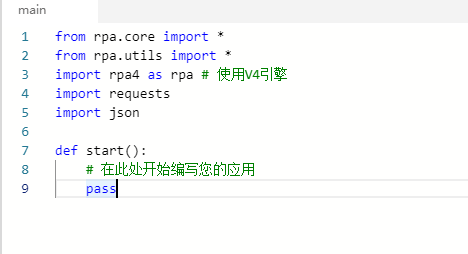
1.2. Code examples
This section provides code examples for GET and POST requests.
GET request
A GET request primarily contains a URL, and can optionally include parameters and a header.
from rpa.core import *
from rpa.utils import *
import rpa4 as rpa # Use the V4 engine
import requests
import json

def start():
    # To pass parameters, you can append them to the URL or use the params object.
    # Append parameters to the URL.
    url = "http://YOUR-URL/"
    # Pass parameters using the params object.
    params = {
        "params1": "abc"
    }
    # The header is optional.
    headers={"User-Agent": "Mozilla/5.0 (Windows NT 10.0; Win64; x64) AppleWebKit/537.36 (KHTML, like Gecko) Chrome/103.0.0.0 Safari/537.36"}
    response = requests.get(url, params=params, headers=headers)
    print(response.text)
POST request
A POST request primarily contains a URL and data, and can optionally include a header.
from rpa.core import *
from rpa.utils import *
import rpa4 as rpa # Use the V4 engine
import requests
import json

def start():
    # Start to write your application here.
    url = "http://YOUR-URL/"
    # The header is optional. Its content depends on the API rules.
    headers = {'user-agent': 'Mozilla/5.0 (Windows NT 10.0; WOW64) AppleWebKit/537.36 (KHTML, like Gecko) Chrome/86.0.4240.198 Safari/537.36'}
    data = {
        "type": "text",
        "content": "text_content",
        "date": "20000101"
    }
    # If the API requires data in dict format.
    response = requests.post(url, data=data, headers=headers)
    # If the API requires data in JSON format.
    response = requests.post(url, data=json.dumps(data), headers=headers)
    print(response.text)
Common properties and methods of the response object
Common response properties
Property | Type | Description |
status_code | int | The status code of the HTTP response, such as 200, 404, or 500. |
reason | str | The description of the HTTP response, such as OK or Not Found. |
headers | dict | The HTTP response header. |
url | str | The real address of the request. |
history | list | The access history, which includes redirection records. |
encoding | str | The encoding field of the HTTP response header. When response.text is used to get the return value, the value is decoded using the specified encoding format. If no encoding format is specified, "ISO-8859-1" is used for decoding. |
cookie | RequestsCookieJar | The cookie. |
Common response methods
Method name | Type | Description |
ok | bool | Indicates whether the status code is less than 400. |
text | str | Encoded text |
2. Visualization development pattern
The visualization development pattern provides two built-in components for HTTP operations. For more information, see HTTP Request and HTTP Download.
If the built-in components do not meet your needs, you can extend the functionality using Invoke Custom Script.