OCR driver's license recognition
1. Introduction
Required preceding components: None
Recommended succeeding components: Conditional Branch (Use a branch condition to determine if the OCR call was successful and to define the subsequent flow.)
This component uses Optical Character Recognition (OCR) technology to recognize key information on a driver's license, such as the name, license number, and nationality. For more information, see Vehicle and logistics recognition.
2. Inputs
For information about each input, see the help text on the component panel in the application flow editor.
3. Outputs
For information about each output, see the help text on the component panel in the application flow editor.
3.1. Key API return results
This output returns a dictionary that contains the key fields recognized by the API. The keys and values in this dictionary are described below.
Key |
Key description |
Value data type |
licenseNumber |
License number |
String |
name |
Name |
String |
sex |
Sex |
String |
nationality |
Nationality |
String |
address |
Address |
String |
birthDate |
Date of birth |
String |
initialIssueDate |
Initial issue date |
String |
approvedType |
Approved vehicle type |
String |
issueAuthority |
Issuing authority |
String |
validFromDate |
Valid from date |
String |
validPeriod |
Valid period |
String |
3.2. Error message
This output returns the error code and error message as a string. For more information, see the OCR Error Center.
https://next.api.aliyun.com/document/ocr-api/2021-07-07/errorCode
4. Component usage example
4.1. Component configuration example
In the AI engine section, select Alibaba Cloud OCR.
In the "Path of the image file to be recognized" field, enter the path to your image file. This example uses the image shown below.
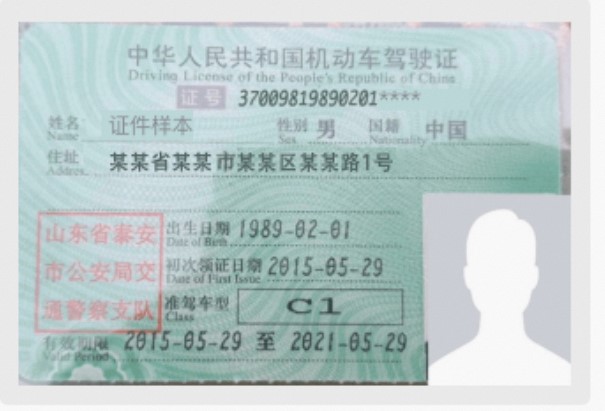
Keep the default values for the advanced options.
4.2. Example execution result
5. Flow example
5.1. Build the flow
In the OCR driver's license recognition component, specify the path of the image file to be recognized.
Use the Conditional Branch component to determine if the OCR call was successful. Use the branch condition (v_driving_license_success_1 equals the Boolean value True).
In the success branch, use the Get Value of Specified Key component to retrieve the value of a specified key (address) from the API return result dictionary, v_driving_license_data_1.
Use the Record Log component to log the key recognition result.
In the failure branch, use the Record Log component to log the error message.
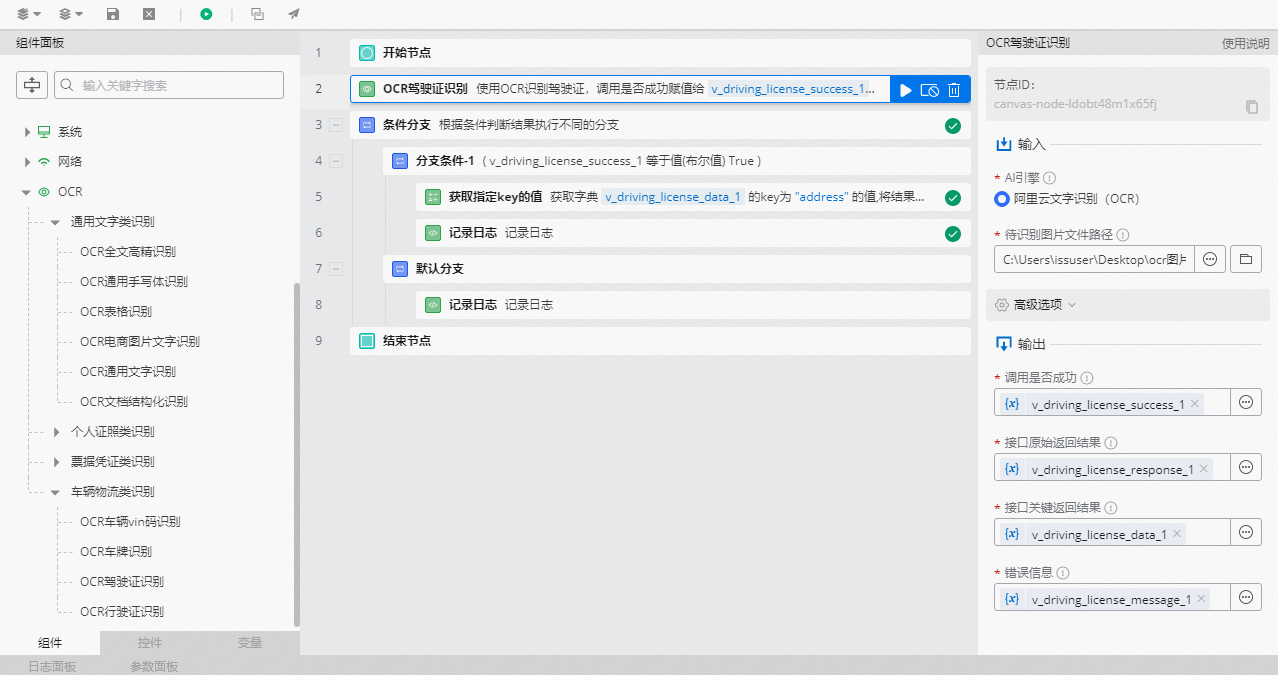
5.2. Execution result
As shown in the following figure, after the OCR call is successful, the recognition result is printed in the log panel.