OCR for vehicle licenses
1. Component introduction
Required prerequisite components: None
Recommended subsequent components: Conditional Branch (Use a branch condition to determine whether the OCR call is successful and control the subsequent flow.)
Use this component to automatically locate and recognize key fields on the front and back of a vehicle license using Optical Character Recognition (OCR) technology (Example).
2. Inputs
For more information about each input, see the help text in the component panel of the visual editor.
3. Outputs
For more information about each output, see the help text in the component panel of the visual editor.
3.1. Key API return results
This output returns a dictionary of key recognition results from the API. The following table describes the key-value pairs in the dictionary.
key |
Key description |
Value data type |
type |
Type (face, back, or both) |
string |
address |
Address (front) |
string |
engineNumber |
Engine number (front) |
string |
issueDate |
Issue date (front) |
string |
model |
Brand and model (front) |
string |
owner |
Owner (front) |
string |
licensePlateNumber |
License plate number (front) |
string |
registrationDate |
Registration date (front) |
string |
useNature |
Use nature (front) |
string |
vehicleType |
Vehicle type (front) |
string |
vinCode |
Vehicle identification number (front) |
string |
issueAuthority |
Issuing authority (front) |
string |
licensePlateNumber |
License plate number (back) |
string |
inspectionRecord |
Inspection record (back) |
string |
passengerCapacity |
Approved passenger capacity (back) |
string |
totalWeight |
Total weight (back) |
string |
curbWeight |
Curb weight (back) |
string |
permittedWeight |
Approved payload (back) |
string |
overallDimension |
Overall dimensions (back) |
string |
tractionWeight |
Gross trailer weight (back) |
string |
energySign |
Energy label: Reverse side |
string |
recordNumber |
File number (back) |
string |
remarks |
Remarks (back) |
string |
3.2. Error message
This output returns an error code and an error message as a string. For more information, see OCR Error Codes.
https://next.api.aliyun.com/document/ocr-api/2021-07-07/errorCode
4. Component usage example
4.1. Configuration example
For AI engine, select Alibaba Cloud OCR.
For Path of the image file to recognize, enter the path of the image file. The following images are used in this example.
Keep the default values for the advanced options.
4.2. Example execution result

5. Flow example
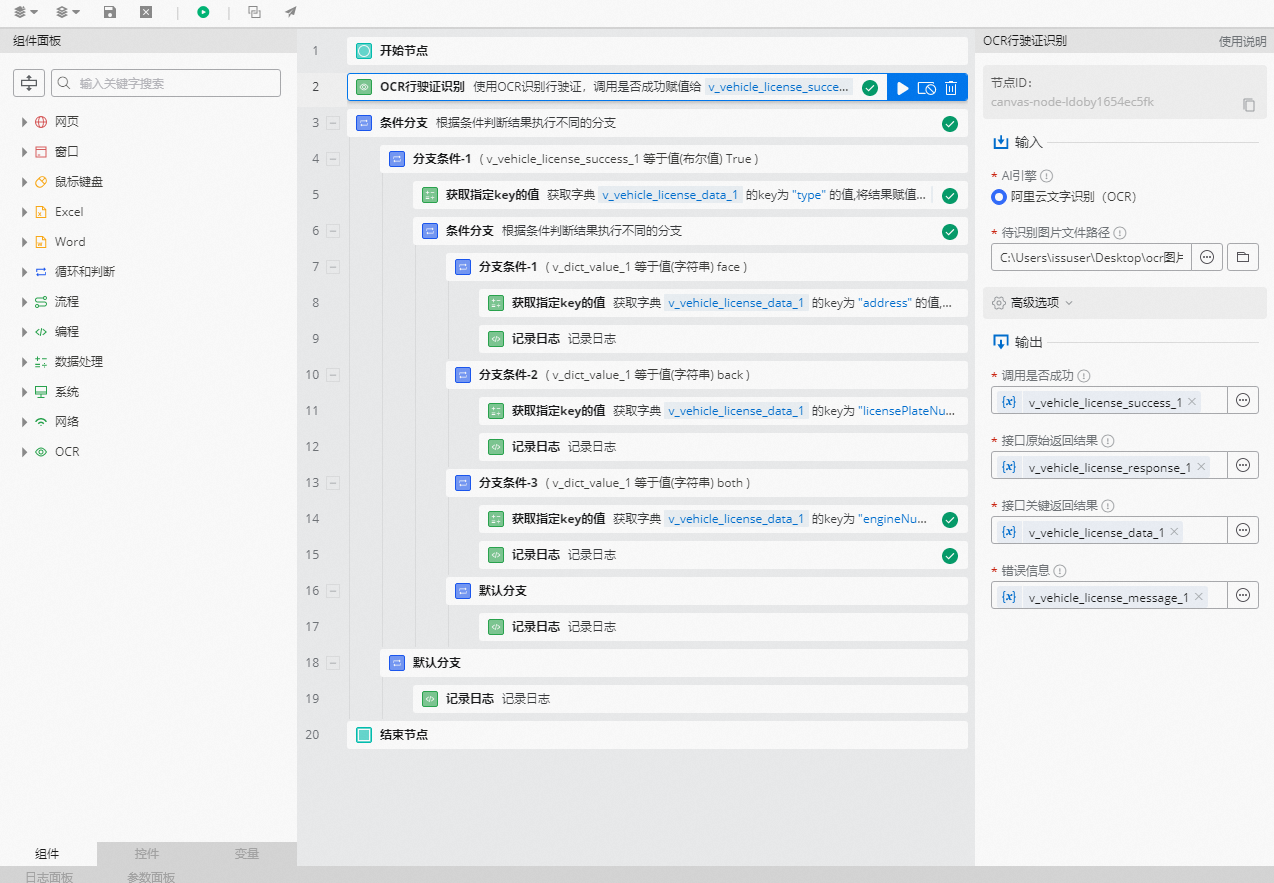
5.1. Build the flow
Use the OCR for vehicle licenses component and select the path of the image file to recognize.
Use the Conditional Branch component to determine whether the OCR call was successful. Use the branch condition where `v_vehicle_license_success_1` equals the Boolean value `True`.
In the failed branch, use the Record Log component to print the error message.
In the successful branch, use the Get Value of Specified Key component to retrieve the value of `type` from the `v_vehicle_license_data_1` dictionary. The `type` indicates the certificate side: `face` (front), `back` (back), or `both` (both sides).
Use the Conditional Branch component to check the certificate type. Use a branch condition where the `type` variable equals the string `face` to check for the front side, and another branch condition where the `type` variable equals the string `back` to check for the back side.
In the branch for condition 1 (the `face` branch), use the Get Value of Specified Key component to retrieve the value of a specified key, such as `address`, from the `v_vehicle_license_data_1` dictionary.
Use the Record Log component to print the retrieved key recognition result.
In the branch for condition 2 (the `back` branch), use the Get Value of Specified Key component to retrieve the value of a specified key, such as `licensePlateNumber`, from the `v_vehicle_license_data_1` dictionary.
Use the Record Log component to print the retrieved key recognition result.
In the default branch (the `both` branch), use the Get Value of Specified Key component to retrieve the value of a specified key, such as `engineNumber`, from the `v_vehicle_license_data_1` dictionary.
Use the Record Log component to print the retrieved key recognition result.
5.2. Execution result
As shown in the following figure, after the OCR call is successful, the recognition result is printed in the log panel.