SDK Usage Guide
Real Translation Buddy OpenAPI provides official SDKs to help you quickly integrate document translation into your own systems.
Billing notes
OpenAPI calls themselves incur no additional charges. Billing occurs only when the translation task actually runs, deducted in Credits. The billing rules are exactly the same as those in the console.
-
Uploading a file (
UploadTranslationFile) is free of charge and only provides estimated Credits consumption. -
Billing starts after submitting a translation task (
SubmitTranslationTask). -
After a task is cancelled, all frozen Credits are fully refunded.
Ensure the account has enough Credits before submitting a translation task. You can use the CreditsAvailable field returned by UploadTranslationFile as a preliminary reference; the submission result is final. If the balance is insufficient, SubmitTranslationTask returns Credits.NotEnough.
For detailed billing and deduction order, see Billing.
Product information
|
Item |
Value |
|
Endpoint |
|
|
Product Code |
RealTranslationAgent |
|
API version |
2026-06-22 |
Install the SDK
// Add the dependency to pom.xml:
<dependency>
    <groupId>com.aliyun</groupId>
    <artifactId>realtranslationagent20260622</artifactId>
    <version>1.0.3</version>
</dependency>pip install alibabacloud_realtranslationagent20260622==1.0.3npm install @alicloud/realtranslationagent20260622@1.0.3go get github.com/alibabacloud-go/realtranslationagent-20260622/client@v1.0.3dotnet add package AlibabaCloud.SDK.RealTranslationAgent20260622 --version 1.0.3composer require alibabacloud/realtranslationagent-20260622 1.0.3vcpkg install alibabacloud-sdk-realtranslationagent-20260622// Add the dependency via Swift Package Manager in Package.swift:
.package(url: "https://github.com/alibabacloud-sdk-swift/realtranslationagent-20260622", from: "1.0.3")Initialize the client
import com.aliyun.realtranslationagent20260622.Client;
import com.aliyun.teaopenapi.models.Config;

Config config = new Config()
        .setAccessKeyId("your-access-key-id")
        .setAccessKeySecret("your-access-key-secret")
        .setEndpoint("realtranslationagent.aliyuncs.com");

Client client = new Client(config);from alibabacloud_realtranslationagent20260622.client import Client
from alibabacloud_tea_openapi.models import Config
config = Config(
access_key_id="your-access-key-id",
access_key_secret="your-access-key-secret",
endpoint="realtranslationagent.aliyuncs.com"
)
client = Client(config)import Client from '@alicloud/realtranslationagent20260622';
import { Config } from '@alicloud/openapi-client';
const config = new Config({
accessKeyId: 'your-access-key-id',
accessKeySecret: 'your-access-key-secret',
endpoint: 'realtranslationagent.aliyuncs.com',
});
const client = new Client(config);import (
client "github.com/alibabacloud-go/realtranslationagent-20260622/client"
openapi "github.com/alibabacloud-go/darabonba-openapi/v2/client"
"github.com/alibabacloud-go/tea/tea"
)
config := &openapi.Config{
AccessKeyId: tea.String("your-access-key-id"),
AccessKeySecret: tea.String("your-access-key-secret"),
Endpoint: tea.String("realtranslationagent.aliyuncs.com"),
}
c, err := client.NewClient(config)using AlibabaCloud.SDK.RealTranslationAgent20260622;
using AlibabaCloud.OpenApiClient.Models;
var config = new Config
{
AccessKeyId = "your-access-key-id",
AccessKeySecret = "your-access-key-secret",
Endpoint = "realtranslationagent.aliyuncs.com"
};
var client = new Client(config);use AlibabaCloud\SDK\RealTranslationAgent\V20260622\RealTranslationAgent;
use Darabonba\OpenApi\Models\Config;
$config = new Config([
'accessKeyId' => 'your-access-key-id',
'accessKeySecret' => 'your-access-key-secret',
'endpoint' => 'realtranslationagent.aliyuncs.com',
]);
$client = new RealTranslationAgent($config);Workflow overview
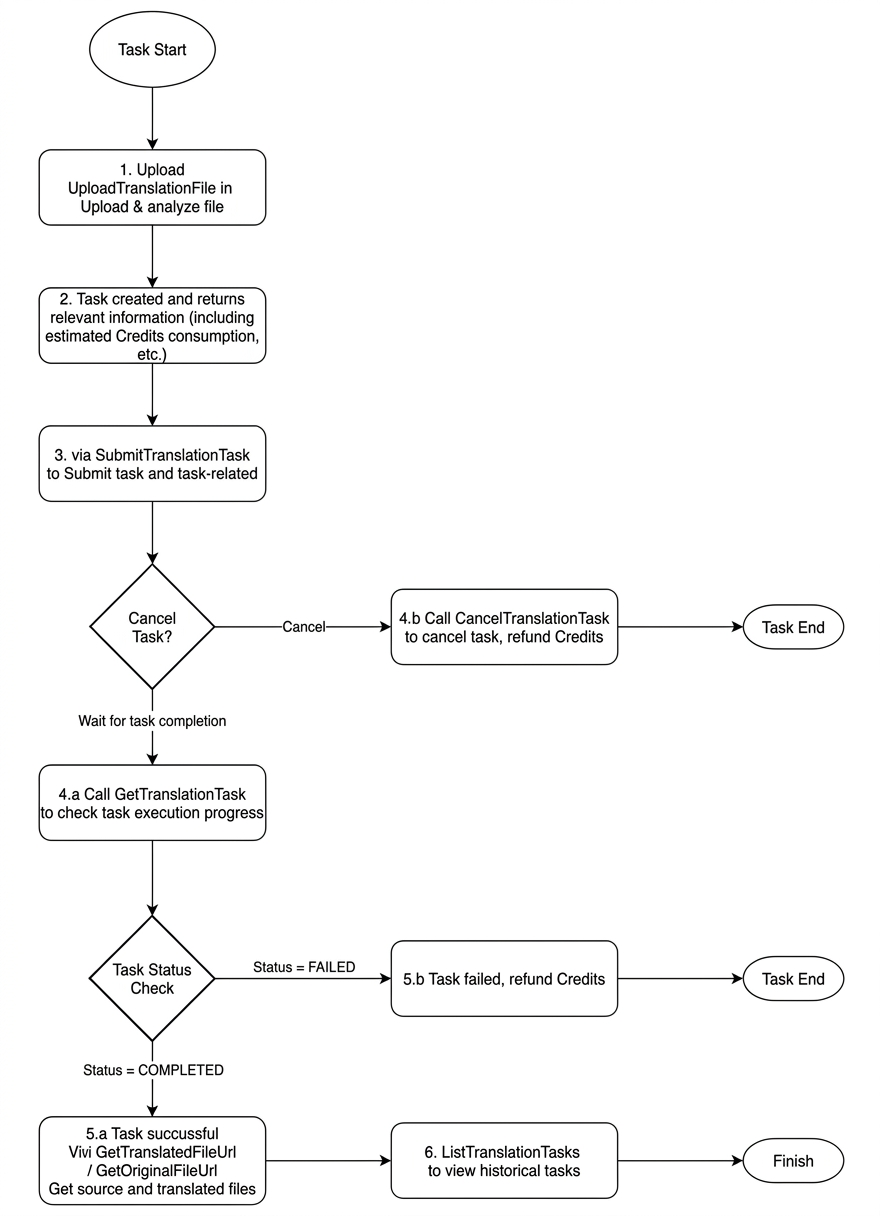
Core flows in detail
Flow 1: Upload → Submit → Poll → Download
This is the most common translation flow, suitable for new document translation.
-
Upload file and preview estimate
Call UploadTranslationFile to upload the document and obtain the parsed result and estimate.
The API returns:
-
TaskId — Unique identifier for subsequent operations
-
WordCount / PageCount — Word and page counts
-
EstimatedCostCredits — Estimated Credits consumption
-
DetectedLang — Automatically detected source language
-
Fonts — Available target fonts
-
SensitiveDetected — Whether sensitive content was detected
NoteThis step incurs no charge. You can decide whether to proceed to translation based on the estimate.
-
-
Submit the translation task
After confirming the estimate, call SubmitTranslationTask to formally submit the translation task.
Required parameters:
-
TaskId — Task ID obtained in the previous step
-
Config — Translation config (source/target language, font, etc.)
-
CustomTerms (optional) — Custom term pairs
After successful submission, the task enters the
PENDINGstate and automatically starts processing. -
-
Poll task progress
Call GetTranslationTask to poll the task status and progress.
Recommended polling interval is 3–5 seconds, until the status reaches a terminal value:
-
COMPLETED— Translation finished, the translated file can be downloaded -
FAILED— Translation failed, checkErrorMessage -
CANCELLED— Cancelled
-
-
Download the translated file
After the task is completed, call GetTranslatedFileUrl to obtain a temporary download link for the translated file.
To download the original file, call GetOriginalFileUrl.
NoteDownload links are valid for 1 hour by default; re-obtain the link after expiry.
Flow 2: cancel a translation task
During task processing, you can call CancelTranslationTask to cancel it. Upon successful cancellation, all frozen Credits are fully refunded.
Flow 3: query historical tasks
Call ListTranslationTasks to paginate through historical task lists, filterable by status, language, file name, and time range.
Flow 4: retranslate
To retranslate an existing task, call SubmitTranslationTask with BaseTaskId (the historical task ID) instead of TaskId. No need to re-upload the file.
Task status reference
|
Status |
Description |
Available actions |
|
|
File uploaded and analyzed |
Submit translation |
|
|
Task submitted, awaiting processing |
Cancel task |
|
|
Translation in progress |
Cancel task, query progress |
|
|
Translation finished |
Download translated / original file |
|
|
Translation failed |
View error message |
|
|
Cancelled |
— |
Full code example
import com.aliyun.realtranslationagent20260622.Client;
import com.aliyun.realtranslationagent20260622.models.*;
import com.aliyun.teaopenapi.models.Config;
import com.aliyun.teautil.models.RuntimeOptions;

import java.io.File;
import java.io.FileInputStream;
import java.io.InputStream;
import java.util.ArrayList;
import java.util.List;

public class TranslationExample {

    public static void main(String[] args) throws Exception {
        // 1. Initialize the client
        Config config = new Config()
                .setAccessKeyId("your-access-key-id")
                .setAccessKeySecret("your-access-key-secret")
                .setEndpoint("realtranslationagent.aliyuncs.com");
        Client client = new Client(config);

        // 2. Upload the file and preview estimate
        File file = new File("/path/to/document.docx");
        InputStream fileStream = new FileInputStream(file);

        UploadTranslationFileAdvanceRequest uploadRequest =
                new UploadTranslationFileAdvanceRequest()
                        .setFileObject(fileStream)
                        .setFileName(file.getName());
        // Member accounts must set the API Key
        // uploadRequest.setAPIKey("your-api-key");

        RuntimeOptions runtimeOptions = new RuntimeOptions();
        UploadTranslationFileResponse uploadResponse =
                client.uploadTranslationFileAdvance(uploadRequest, runtimeOptions);

        String taskId = uploadResponse.getBody().getData().getTaskId();
        System.out.println("TaskId: " + taskId);
        System.out.println("Estimated Credits: " + uploadResponse.getBody().getData().getEstimatedCostCredits());

        // 3. Submit the translation task
        SubmitTranslationTaskRequest.SubmitTranslationTaskRequestConfig translateConfig =
                new SubmitTranslationTaskRequest.SubmitTranslationTaskRequestConfig()
                        .setSourceLanguage(uploadResponse.getBody().getData().getDetectedLang())
                        .setTargetLanguage("en")
                        .setFont("Calibri");

        // Custom terms (optional)
        List<SubmitTranslationTaskRequest.SubmitTranslationTaskRequestCustomTerms> customTerms = new ArrayList<>();
        customTerms.add(new SubmitTranslationTaskRequest.SubmitTranslationTaskRequestCustomTerms()
                .setSourceTerm("人工智能")
                .setTargetTerm("Artificial Intelligence"));

        SubmitTranslationTaskRequest submitRequest = new SubmitTranslationTaskRequest()
                .setTaskId(taskId)
                .setConfig(translateConfig)
                .setCustomTerms(customTerms);

        SubmitTranslationTaskResponse submitResponse = client.submitTranslationTask(submitRequest);
        System.out.println("Status: " + submitResponse.getBody().getData().getStatus());

        // 4. Poll task progress
        String status;
        do {
            Thread.sleep(5000);
            GetTranslationTaskRequest getRequest = new GetTranslationTaskRequest()
                    .setTaskId(taskId);
            GetTranslationTaskResponse getResponse = client.getTranslationTask(getRequest);
            status = getResponse.getBody().getData().getStatus();
            System.out.println("Progress: " + getResponse.getBody().getData().getProgress() + "%, Status: " + status);
        } while ("PENDING".equals(status) || "PROCESSING".equals(status));

        // 5. Download the translated file
        if ("COMPLETED".equals(status)) {
            GetTranslatedFileUrlRequest downloadRequest = new GetTranslatedFileUrlRequest()
                    .setTaskId(taskId);
            GetTranslatedFileUrlResponse downloadResponse = client.getTranslatedFileUrl(downloadRequest);
            System.out.println("Download URL: " + downloadResponse.getBody().getData().getDownloadUrl());
        }
    }
}