SAP on Alibaba Cloud high availability architecture
1. Introduction to SAP on Alibaba Cloud high availability architecture concepts
1.1 High availability: Definition and objectives
High availability (HA) uses redundant architecture to eliminate single points of failure (SPOFs). When a component fails, the SAP system automatically fails over to a standby component to minimize service downtime.
SAP high availability architecture focuses on these core goals:
Eliminate single points of failure: Add redundancy at the application, database, network, and storage layers.
Automatically detect and switch on failure: Use cluster software such as Pacemaker to detect failures and migrate resources.
Prevent data loss: Use synchronous replication to ensure no committed transactions are lost during failover.
Minimize failover time: Reduce failover time using techniques such as preloading and memory retention.
1.2 SAP system layered architecture
A typical SAP system uses a distributed three-tier architecture:

Each tier has its own high availability solution:
Layer | Key components | High availability solution |
Presentation layer | SAP Web Dispatcher | HA cluster or load balancing |
Application layer — central services | ASCS (ABAP Central Services) | Enqueue Replication plus Pacemaker cluster |
Application layer — application servers | PAS / AAS | Horizontal scaling with multiple instances (no clustering needed) |
Database layer | SAP HANA | System Replication plus Pacemaker cluster |
1.3 Key high availability components
1.3.1 Pacemaker cluster
Pacemaker is an open source high availability cluster resource manager for Linux, which is built into SUSE Linux Enterprise Server for SAP Applications (SLES for SAP). Pacemaker handles:
Monitoring the health of cluster nodes and resources
Automatically migrating resources when it detects a failure
Managing virtual IP address failover
Coordinating quorum among cluster members
1.3.2 Corosync
Corosync provides cluster communication. It handles heartbeat detection and message passing between nodes. In Alibaba Cloud environments, use unicast (UCAST) mode for communication.
1.3.3 STONITH/fencing
STONITH (Shoot The Other Node In The Head) isolates failed nodes to prevent split-brain scenarios. Alibaba Cloud provides a dedicated STONITH device fence_aliyun. It uses Alibaba Cloud OpenAPI to force restart or shut down ECS instances.
1.3.4 SAP Enqueue Replication
The SAP Enqueue Server manages lock tables in SAP systems. Enqueue Replication maintains a synchronized copy of the lock table on the standby node to preserve lock information if the primary node fails. Two versions exist:
ENSA1 (Enqueue Replication Server 1): For SAP NetWeaver 7.40 and 7.50
ENSA2 (Enqueue Replication Server 2): For SAP S/4HANA 1809 and later. This is the current standard.
1.3.5 SAP HANA System Replication
SAP HANA System Replication (HSR) is a built-in data replication mechanism for HANA databases. It supports both synchronous (sync) and asynchronous (async) modes. In HA deployments, use synchronous mode. This ensures that the primary database waits for the secondary database to persist each commit before acknowledging the transaction.
1.4 SAP on Alibaba Cloud HA architecture overview
Deploy SAP high availability on Alibaba Cloud by implementing an independent cluster design:
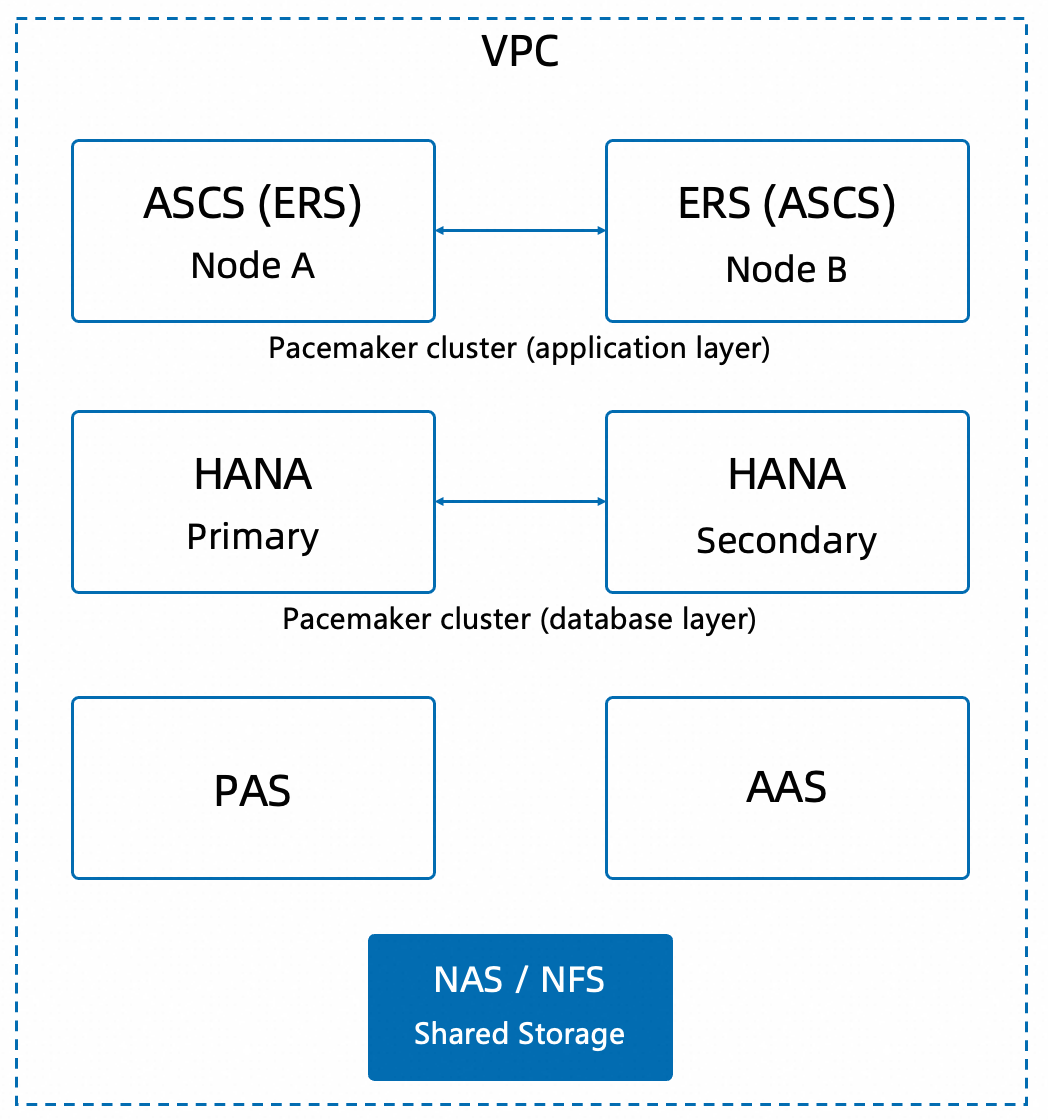
Key design principles:
Group the application layer central services (ASCS/ERS) into a dedicated two-node Pacemaker cluster.
Group the SAP HANA database into a dedicated two-node Pacemaker cluster.
PAS/AAS application servers do not require clustering. Instead, deploy multiple instances for redundancy.
Use Alibaba Cloud NAS for shared file systems.
2. Planning SAP on Alibaba Cloud application server high availability architecture
The core of SAP application server high availability is clustering ASCS (ABAP Central Services) and ERS (Enqueue Replication Server). ASCS includes the Message Server and Enqueue Server. It is the most critical SPOF in an SAP system.
2.1 Operating system selection
Alibaba Cloud supports the SUSE Linux Enterprise Server (SLES) series for SAP deployments. We recommend selecting an operating system version based on the SAP component type and your availability requirements.
2.1.1 Selection guidelines
Scenario | Recommended operating system | Description |
SAP HANA database nodes | SLES for SAP Applications | SAP HANA supports only SLES for SAP Applications, not standard SLES. |
Core application servers with high availability requirements (such as ASCS/ERS) | SLES for SAP Applications | Includes SAP-specific resource agents and HA extensions required for Pacemaker clusters, and is jointly supported by SAP and SUSE. |
Non-core application servers (such as PAS/AAS) without high availability requirements | SLES | Standard SLES meets runtime requirements at a lower cost. |
Non-HANA database nodes (such as MaxDB or ASE) | SLES | If a high availability cluster is not required, standard SLES is sufficient. |
Note: Compared with standard SLES, SLES for SAP Applications has the following key differences:
Pre-integrated with SAP-specific high availability resource agent packages (such as
SAPInstanceandSAPHanaSR).Access to a joint SAP and SUSE technical support channel.
SUSE and SAP jointly verify its compatibility with SAP software.
2.1.2 Recommended versions
Operating system | Recommended version | Minimum version | Applicability |
SLES for SAP Applications | 15 | 12 | SAP HANA and core application HA clusters |
SLES | 15 | 12 | Non-core applications and non-HANA databases |
Note: For specific versions, refer to the SAP Product Availability Matrix (PAM) and official SUSE support statements.
2.1.3 Obtaining the operating system
You can obtain SLES or SLES for SAP Applications on Alibaba Cloud in two ways:
Purchase a subscription from Marketplace: When you create an ECS instance, select an SLES or SLES for SAP Applications image from the Marketplace. The operating system subscription fee is billed with the ECS instance on a pay-as-you-go or subscription basis, eliminating the need for separate OS license management. This method is suitable for new cloud deployments or for simplifying license management.
Bring Your Own License (BYOL): If you already have a valid SUSE subscription, you can use a custom image to apply your existing OS license to Alibaba Cloud ECS instances. You are responsible for registering your SUSE subscription and configuring the software repositories. This method is suitable if you have an existing enterprise agreement with SUSE or are migrating from an on-premises environment.
Important:
All nodes in a cluster must run the same operating system version. Mixed-version deployments are not supported.
The Pacemaker cluster configuration steps in the following sections are based on SLES for SAP Applications.
These steps do not apply to nodes that use the standard SLES version.
2.2 ECS selection
2.2.1 ASCS/ERS nodes
ASCS and ERS nodes have low resource requirements. These nodes primarily consume CPU and memory for lock management and message routing.
Recommended instance families (ordered by generation priority):
Instance family | Positioning | Recommended scenario |
ecs.g9i | General-purpose enhanced (9th generation) | Production environment |
ecs.g7 | General-purpose (7th generation) | Production environment |
ecs.g6e / ecs.g6 | General-purpose (6th generation) | Production or non-production environment |
ecs.r9i | Memory-enhanced (9th generation) | Large-scale ASCS systems |
ecs.r7 | Memory-optimized (7th generation) | Large-scale ASCS systems |
Typical ASCS/ERS instance selection recommendations:
System scale | Recommended instance | Specifications | SAPS |
Small (< 500 users) | ecs.g7.xlarge | 4 vCPUs, 16 GiB | 6,429 |
Medium (500–2,000 users) | ecs.g7.2xlarge | 8 vCPUs, 32 GiB | 12,858 |
Large (> 2,000 users) | ecs.g7.4xlarge | 16 vCPUs, 64 GiB | 25,715 |
Note: Use the same instance type for both ASCS and ERS nodes. Either node might run both ASCS and ERS instances.
2.2.2 PAS/AAS nodes
PAS (Primary Application Server) and AAS (Additional Application Server) process actual business workloads. Select instance types based on your SAP sizing results. These nodes do not need clustering. Add more AAS instances to improve processing capacity and availability.
Common instance families include the following:
Instance family | Specification range | Features |
ecs.g9i | 2–192 vCPUs, 8–768 GiB | Newest generation, high cost-performance ratio |
ecs.r9i | 2–192 vCPUs, 16–1536 GiB | Memory-intensive workloads |
ecs.g7 | 2–64 vCPUs, 8–256 GiB | General-purpose balanced |
ecs.r7 | 2–128 vCPUs, 16–1024 GiB | Memory-intensive workloads |
2.3 Storage selection
SAP application layer storage needs fall into these categories:
Storage use case | Recommended solution | File system | Description |
| Alibaba Cloud NAS (General-purpose) | NFS v4 | Shared by all nodes. Stores SAP global configuration and profiles. |
| Alibaba Cloud NAS (General-purpose) | NFS v4 | SAP system directory. Shared by all nodes. |
| Alibaba Cloud NAS (General-purpose) | NFS v4 | ASCS instance directory. Shared over NFS in Simple Mount architecture. |
| Alibaba Cloud NAS (General-purpose) | NFS v4 | ERS instance directory. Shared over NFS in Simple Mount architecture. |
| Disk (ESSD) | XFS | Local directory. Contains sapservices and saphostagent. |
Alibaba Cloud NAS configuration tips:
Select General-purpose NAS.
Create dedicated NAS file systems for ASCS and ERS (traditional architecture), or share one NAS (Simple Mount architecture).
Recommended NAS mount options:
vers=4,minorversion=0,rsize=1048576,wsize=1048576,hard,timeo=600,retrans=2,_netdev,noresvport.
2.4 Network design
2.4.1 IP address planning
Use case | IP address (example) | Description |
ASCS node physical IP | 10.0.1.10 | sapapp1 |
ERS node physical IP | 10.0.2.10 | sapapp2 |
ASCS virtual IP | 10.0.100.11 | Overlay IP managed by the cluster |
ERS virtual IP | 10.0.100.12 | Overlay IP managed by the cluster |
Key point: Use Overlay IP for virtual IPs on Alibaba Cloud (implemented via route tables). Manage these VIPs with the aliyun-vpc-move-ip resource agent. VIPs do not need to overlap with physical subnets. You can use a separate IP range.2.4.2 Alibaba Cloud OpenAPI endpoints
Cluster STONITH devices and VIP resource agents use Alibaba Cloud OpenAPI. Within a VPC, access endpoints over the internal network. No NAT Gateway is required:
ECS endpoint:
ecs-vpc.<region-id>.aliyuncs.comVPC endpoint:
vpc-vpc.<region-id>.aliyuncs.com
2.4.3 /etc/hosts configuration
All cluster nodes must include complete name resolution in /etc/hosts (example):
10.0.1.10      sapapp1          # ASCS node
10.0.2.10      sapapp2          # ERS node
10.0.100.11    vsapascs         # ASCS virtual hostname
10.0.100.12    vsapers          # ERS virtual hostname
2.5 File system design
Two file system architectures are available for the SAP application layer. We recommend using the Simple Mount architecture:
2.5.1 Simple Mount architecture
The Simple Mount architecture uses NFS shares instead of cluster-managed file system resources. This approach greatly simplifies cluster configuration and maintenance.
NFS Server (Alibaba Cloud NAS)
├── /sapmnt/<SID>             ──  Mounted by all nodes over NFS
└── /usr/sap/<SID>            ──  Mounted by all cluster nodes over NFS
    ├── ASCS<xx>/             ──  ASCS instance directory
    ├── ERS<xx>/              ──  ERS instance directory
    └── SYS/                  ──  System directory

Local file system on each node:
/usr/sap/                     ──  Local XFS (contains sapservices, saphostagent)
Configure NFS mounts in each node's /etc/fstab:
<nas-endpoint>:/sapmnt/<SID>     /sapmnt/<SID>     nfs  defaults  0 0
<nas-endpoint>:/usr/sap/<SID>    /usr/sap/<SID>    nfs  defaults  0 0
2.5.2 Traditional architecture
In the traditional architecture, ASCS and ERS each use a separate NAS file system. Pacemaker's Filesystem resource agent controls mounting and unmounting:
NAS file system 1 --> /usr/sap/<SID>/ASCS<xx>  (mounted by cluster)
NAS file system 2 --> /usr/sap/<SID>/ERS<xx>   (mounted by cluster)
NFS share        --> /sapmnt                  (mounted at OS level)
NFS share        --> /usr/sap/<SID>/SYS       (mounted at OS level)
2.6 Pacemaker cluster configuration
2.6.1 Prerequisites
Operating system: SUSE Linux Enterprise Server for SAP Applications 15 SP1 or later
Packages:
sap-suse-cluster-connector>= 3.1.0,sapstartsrv-resource-agents>= 0.9.1,resource-agents>= 4.xDisable the systemd auto-start service for ASCS and ERS
Install the Alibaba Cloud STONITH device (fence_aliyun) and VIP resource agent (aliyun-vpc-move-ip)
2.6.2 Alibaba Cloud-specific components
Install required dependency packages:
# Install libcurl-devel, fence-agents, pycurl, and pexpect
zypper install libcurl-devel
zypper install fence-agents
pip3 install pycurl pexpect

# Install Alibaba Cloud SDK
pip install aliyun-python-sdk-core aliyun-python-sdk-vpc aliyun-python-sdk-ecs
Install the latest fence_aliyun (STONITH device):
# Download fence_aliyun
curl https://raw.githubusercontent.com/ClusterLabs/fence-agents/refs/heads/main/agents/aliyun/fence_aliyun.py \
  -o /usr/sbin/fence_aliyun
chmod 755 /usr/sbin/fence_aliyun
chown root:root /usr/sbin/fence_aliyun
# Set Python path
sed -i "s|@PYTHON@|$(which python3 2>/dev/null || which python 2>/dev/null)|" /usr/sbin/fence_aliyun
sed -i "s|@FENCEAGENTSLIBDIR@|/usr/share/fence|" /usr/sbin/fence_aliyun
Install aliyun-vpc-move-ip (VIP resource agent):
mkdir -p /usr/lib/ocf/resource.d/aliyun
curl https://raw.githubusercontent.com/ClusterLabs/resource-agents/refs/heads/main/heartbeat/aliyun-vpc-move-ip \
  -o /usr/lib/ocf/resource.d/aliyun/vpc-move-ip
chmod 755 /usr/lib/ocf/resource.d/aliyun/vpc-move-ip
chown root:root /usr/lib/ocf/resource.d/aliyun/vpc-move-ip
Configure RAM role authentication:
Create a RAM policy named SAP-HA-ROLE-POLICY with these permissions:
{
    "Version": "1",
    "Statement": [
        {
            "Effect": "Allow",
            "Action": [
                "ecs:StartInstance",
                "ecs:StopInstance",
                "ecs:RebootInstance",
                "ecs:Describe*"
            ],
            "Resource": ["*"]
        },
        {
            "Effect": "Allow",
            "Action": [
                "vpc:CreateRouteEntry",
                "vpc:DeleteRouteEntry",
                "vpc:Describe*"
            ],
            "Resource": ["*"]
        }
    ]
}
Create the RAM role SAP-HA-ROLE and attach the policy to it. Then, attach this RAM role to all ECS instances in the cluster:
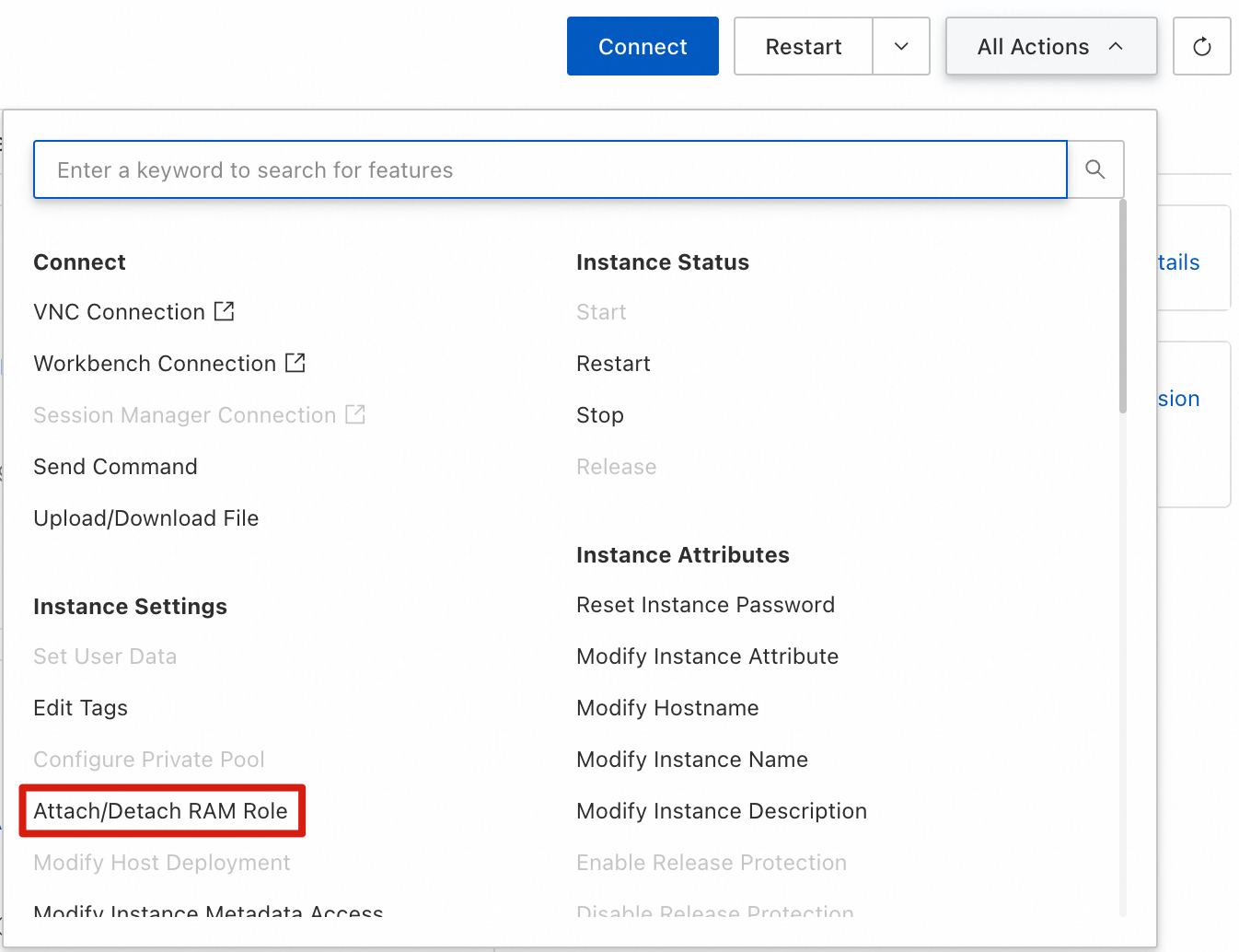
In the console, select the target ECS instance, and then choose **Grant/Revoke RAM Role** from the **More** menu.
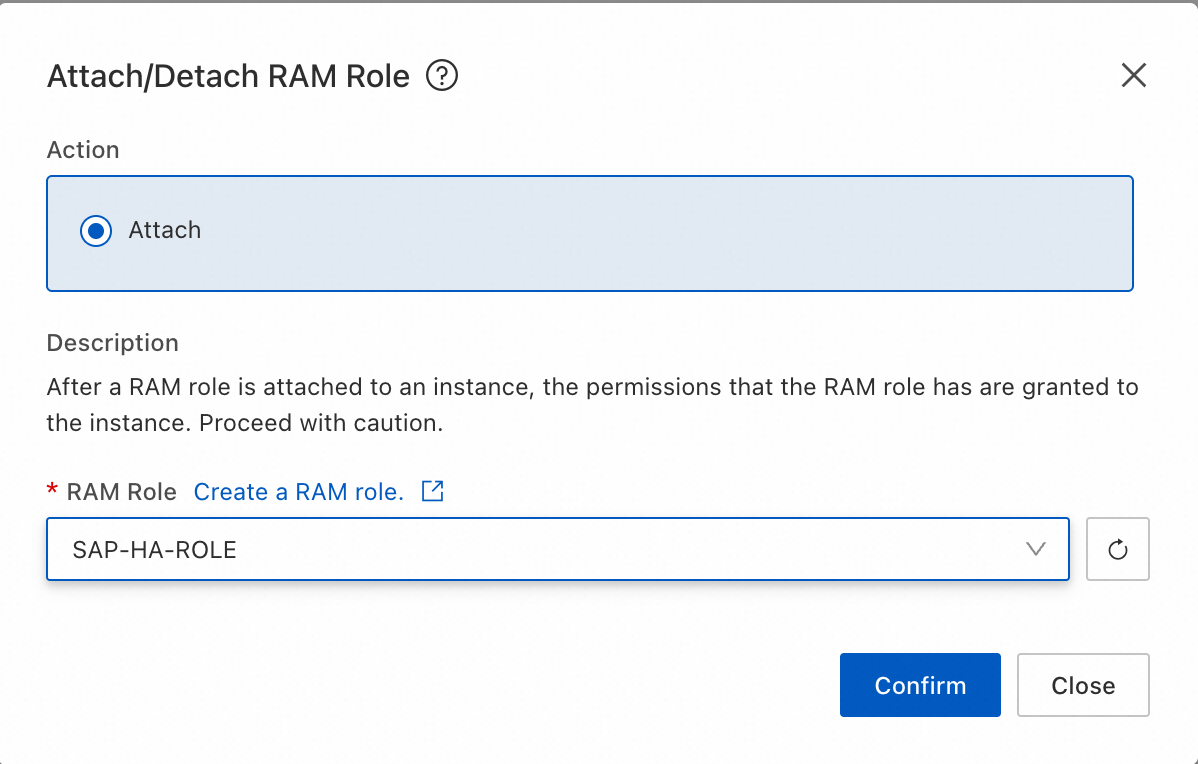
In the dialog box that appears, select the SAP-HA-ROLE that you created, and then apply the role.
Perform the same steps for the ECS nodes of the HANA cluster (as described in Section 3).
Configure Alibaba Cloud CLI authorization:
Install Alibaba Cloud CLI on the ECS instance:
/bin/bash -c "$(curl -fsSL https://aliyuncli.alicdn.com/install.sh)"Configure Alibaba Cloud CLI authorization:
# aliyun configure --profile ecsRamRoleProfile --mode EcsRamRole
Configuring profile 'ecsRamRoleProfile' in 'EcsRamRole' authenticate mode...
Ecs Ram Role []:
Default Region Id []:
Default Output Format [json]: json (Only support json)
Default Language [zh|en] en:
Saving profile[ecsRamRoleProfile] ...Done.
Ecs Ram Role: SAP-HA-ROLE
Default Region Id: Enter the region ID where your ECS instances reside, such as cn-shanghai
2.6.3 SSH trust between nodes
Before initializing the cluster, you must configure passwordless SSH access (also known as SSH trust) between all cluster nodes. The ha-cluster-join command uses SSH to connect to existing nodes, and cannot run non-interactively without this trust relationship.
The following steps use a two-node cluster (node 1: sap-ascs, node 2: sap-ers) as an example.
2.6.3.1 SSH key pair generation
Run the following command as the root user on both nodes:
ssh-keygen -t rsa -b 4096 -N "" -f /root/.ssh/id_rsa
Parameter descriptions:
-t rsa: Specifies the key type as RSA.
-b 4096: Specifies a key length of 4096 bits.
-N "": Sets an empty passphrase, which is required for automated cluster operations.If
/root/.ssh/id_rsaalready exists, you can skip this step or choose to overwrite the existing key.
2.6.3.2 Public key exchange
On node 1, distribute the public key to node 2:
ssh-copy-id -i /root/.ssh/id_rsa.pub root@sap-ers
On node 2, distribute the public key to node 1:
ssh-copy-id -i /root/.ssh/id_rsa.pub root@sap-ascs
When you run this command, you are prompted for the root password of the remote node. This is a one-time operation.
Note: If you have not yet mapped hostnames to IP addresses in /etc/hosts, use IP addresses instead of hostnames here. Ensure that you first complete the steps in Section 2.4.3 (/etc/hosts configuration).
2.6.3.3 SSH trust verification
On node 1, run the following command:
ssh root@sap-ers "hostname"
On node 2, run the following command:
ssh root@sap-ascs "hostname"
Both commands must return the remote hostname directly without prompting for a password. If you are still prompted for a password, check the following:
The file permissions for
/root/.ssh/authorized_keysmust be600.The directory permissions for
/root/.sshmust be700.The permissions for the
/rootdirectory must not be more permissive than755.Confirm that
PubkeyAuthenticationis not disabled insshd_config. The default value isyes, so this setting typically does not need to be changed.
2.6.3.4 Adding host keys to known_hosts
When you connect to a new host over SSH for the first time, you are prompted to confirm the host key fingerprint. In automated production environments, you can use ssh-keyscan to add the remote node's fingerprint to known_hosts to bypass the interactive prompt.
ssh-keyscan -H sap-ers >> /root/.ssh/known_hosts
ssh-keyscan -H sap-ascs >> /root/.ssh/known_hosts
Run the corresponding commands on both nodes.
Important:
SSH trust must be configured for the
rootuser, because Pacemaker cluster management operations, including STONITH fencing and remote execution of resource agent scripts, run as root.If the cluster includes SAP HANA database nodes (see Section 3.7), you must also configure SSH trust between the HANA nodes. The procedure is the same.
You must complete the configuration in this section before you proceed to initialize the cluster.
2.6.4 Cluster initialization
Run the ha-cluster-init script on node 1.
ha-cluster-init -y -i eth0 -uRun the ha-cluster-join script on node 2.
ha-cluster-join -y -c <node1_name_or_ip_address> -i eth0In Alibaba Cloud environments, use unicast (UCAST) mode with the udpu parameter ("-u").2.6.5 ENSA2 Simple Mount resource configuration
Prerequisite check
In Simple Mount configurations, the sapstartsrv service becomes a cluster resource. The cluster independently manages which node runs the ASCS and ERS sapstartsrv services.
Verify that the sapstartsrv-resource-agents resource agent is installed on your operating system.
ENSA2 Simple Mount cluster configuration requires SUSE Linux Enterprise Server for SAP 15 SP1 or later.
# Check whether the sapstartsrv-resource-agents resource agent is installed
ls /usr/lib/ocf/resource.d/suse/SAPStartSrv

# If the file above is missing, install the package
zypper install sapstartsrv-resource-agents
This package comes from the SLE-Module-SAP-Applications module. If zypper cannot find the package, verify that the module is enabled:
SUSEConnect --list-extensions | grep SAPIf the module is not active, enable it:
SUSEConnect -p sle-module-sap-applications/<version>/x86_64Because the cluster controls the sapstartsrv service, disable the SAP system systemd auto-start service. This prevents conflicts between sapstartsrv processes during failover, which could stop the cluster from starting SAP resources correctly.
# Check whether the SAP instance systemd auto-start service is enabled on this machine
systemctl list-unit-files | grep SAP

# Disable the service's auto-start based on the output above
systemctl disable SAP<SID>_<instance number>   # ASCS
systemctl disable SAP<SID>_<instance number>   # ERS
Sample cluster script
The following example shows a complete Pacemaker resource configuration for ENSA2 Simple Mount on Alibaba Cloud (SID=EN2, ASCS instance number=00, ERS instance number=10):
# === Cluster global properties ===
property cib-bootstrap-options: \
    stonith-enabled="true" \
    stonith-action="reboot" \
    stonith-timeout="150"

rsc_defaults rsc-options: \
    resource-stickiness="1" \
    migration-threshold="3"

op_defaults op-options: \
    timeout="600" \
    record-pending=true

# === STONITH resource (Alibaba Cloud fence_aliyun) ===
primitive res_ALIYUN_STONITH_1 stonith:fence_aliyun \
        op monitor interval=120 timeout=60 \
        params filter="InstanceIds=[\"<ECS Id1>\", \"<ECS Id2>\"]" plug=<ECS Id1> ram_role=SAP-HA-ROLE region=<region ID> \
        meta target-role=Started

primitive res_ALIYUN_STONITH_2 stonith:fence_aliyun \
        op monitor interval=120 timeout=60 \
        params filter="InstanceIds=[\"<ECS Id1>\", \"<ECS Id2>\"]" plug=<ECS Id2> ram_role=SAP-HA-ROLE region=<region ID> \
        meta target-role=Started

# STONITH location constraints: A node does not run its own STONITH resource
location loc_stonith1_not_on_sapapp1 res_ALIYUN_STONITH_1 -inf: sapapp1
location loc_stonith2_not_on_sapapp2 res_ALIYUN_STONITH_2 -inf: sapapp2

# === ASCS resources ===
# ASCS virtual IP (using Alibaba Cloud vpc-move-ip)
# The routing_table parameter value is the default route table ID of the VPC where the ECS instances reside
primitive rsc_ip_EN2_ASCS00 ocf:aliyun:vpc-move-ip \
    params address=<ascs-vip> \
           routing_table=<routing-table-id> \
           endpoint=vpc-vpc.<region-id>.aliyuncs.com \
           interface=eth0 \
    op monitor interval=10s timeout=20s

# ASCS SAPStartSrv resource (Simple Mount architecture only)
primitive rsc_SAPStartSrv_EN2_ASCS00 ocf:suse:SAPStartSrv \
    params InstanceName=EN2_ASCS00_sapen2as

# ASCS SAPInstance resource
primitive rsc_sap_EN2_ASCS00 SAPInstance \
    op monitor interval=11 timeout=60 on-fail=restart \
    params InstanceName=EN2_ASCS00_sapen2as \
           START_PROFILE="/sapmnt/EN2/profile/EN2_ASCS00_sapen2as" \
           AUTOMATIC_RECOVER=false \
    meta resource-stickiness=5000 failure-timeout=60 \
         migration-threshold=1 priority=10

# === ERS resources ===
# ERS virtual IP
# The routing_table parameter value is the default route table ID of the VPC where the ECS instances reside
primitive rsc_ip_EN2_ERS10 ocf:aliyun:vpc-move-ip \
    params address=<ers-vip> \
           routing_table=<routing-table-id> \
           endpoint=vpc-vpc.<region-id>.aliyuncs.com \
           interface=eth0 \
    op monitor interval=10s timeout=20s

# ERS SAPStartSrv resource
primitive rsc_SAPStartSrv_EN2_ERS10 ocf:suse:SAPStartSrv \
    params InstanceName=EN2_ERS10_sapen2er

# ERS SAPInstance resource
primitive rsc_sap_EN2_ERS10 SAPInstance \
    op monitor interval=11 timeout=60 on-fail=restart \
    params InstanceName=EN2_ERS10_sapen2er \
           START_PROFILE="/sapmnt/EN2/profile/EN2_ERS10_sapen2er" \
           AUTOMATIC_RECOVER=false IS_ERS=true \
    meta priority=1000

# === Resource groups ===
group grp_EN2_ASCS00 rsc_ip_EN2_ASCS00 rsc_SAPStartSrv_EN2_ASCS00 rsc_sap_EN2_ASCS00 \
    meta resource-stickiness=3000
group grp_EN2_ERS10 rsc_ip_EN2_ERS10 rsc_SAPStartSrv_EN2_ERS10 rsc_sap_EN2_ERS10

# === Constraints ===
# ASCS and ERS cannot run on the same node
colocation col_sap_EN2_not_both -5000: grp_EN2_ERS10 grp_EN2_ASCS00

# ASCS starts on the ERS node after failover
location loc_sap_EN2_failover_to_ers rsc_sap_EN2_ASCS00 \
    rule 2000: runs_ers_EN2 eq 1

# ASCS starts before ERS
order ord_sap_EN2_first_ascs Optional: rsc_sap_EN2_ASCS00:start rsc_sap_EN2_ERS10:stop
2.6.6 ENSA1 traditional resource configuration
For SAP NetWeaver 7.40/7.50, use the ENSA1 architecture. Key differences from ENSA2 include the following:
Use the Filesystem resource agent to manage mounting and unmounting ASCS and ERS file systems
Do not use the SAPStartSrv resource agent
Include Filesystem resources in resource groups
# ASCS file system resource (traditional architecture)
primitive rsc_fs_EN2_ASCS00 Filesystem \
    params device="<nas-mount-point>:/" \
           directory="/usr/sap/EN2/ASCS00" \
           fstype=nfs \
           options="vers=4,minorversion=0,rsize=1048576,wsize=1048576,hard,timeo=600,retrans=2" \
    op start timeout=60s interval=0 \
    op stop timeout=60s interval=0 \
    op monitor interval=20s timeout=40s

# Resource group includes file system
group grp_EN2_ASCS00 rsc_ip_EN2_ASCS00 rsc_fs_EN2_ASCS00 rsc_sap_EN2_ASCS00 \
    meta resource-stickiness=3000
2.6.7 sap-suse-cluster-connector integration
The sap-suse-cluster-connector implements the API v3 communication interface between SAP sapstartsrv and the Pacemaker cluster. This ensures that operations performed by SAP administrators using sapcontrol or SAP MMC notify the cluster correctly. This avoids false cluster alerts.
Install and configure:
# Install
zypper install sap-suse-cluster-connector

# Add the <sid>adm user to the haclient group
usermod -a -G haclient <sid>adm

# Add these lines to the SAP instance profile
service/halib = $(DIR_EXECUTABLE)/saphascriptco.so
service/halib_cluster_connector = /usr/bin/sap_suse_cluster_connector
3. SAP on Alibaba Cloud HANA database high availability architecture planning
SAP HANA database high availability uses HANA System Replication (HSR) plus Pacemaker cluster. SUSE provides dedicated resource agents SAPHanaController (or the older SAPHana) and SAPHanaTopology to automate management.
3.1 HSR solution selection
Solution | Applicable scenario | Failover time | Secondary node utilization | Recommendation level |
Performance Optimized | Production environment with fast failover requirements | Short (table preloading) | Supports read-enabled (read-only) | Top choice |
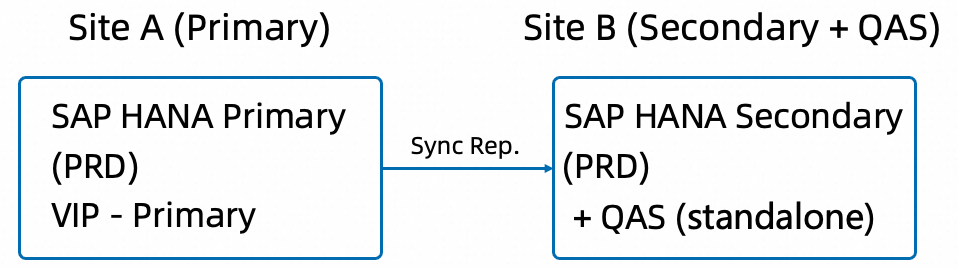
Cost Optimized | Development/test environments with budget constraints | Longer (requires stopping non-replicated instances first) | Runs non-replicated instances (QAS/DEV) | Budget-sensitive scenarios |
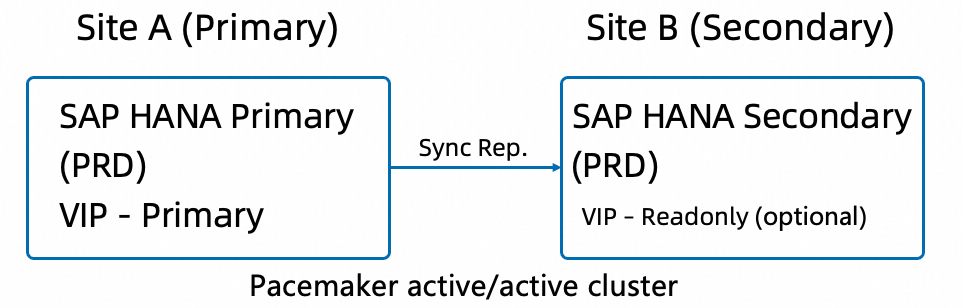
3.1.1 Performance optimized solution
Preload tables on the secondary node so data stays in memory. Failover time is usually short. Supports the logreplay_readaccess operation mode. This allows read-only queries on the secondary node.
3.1.2 Cost optimized solution
During normal operation, the secondary node also runs a non-replicated SAP HANA instance (such as QAS). Pacemaker anti-colocation constraints manage this. When the primary database needs to fail over, the cluster first stops the non-replicated instance, then performs takeover.
3.2 ECS instance selection
SAP HANA has strict hardware certification requirements. On Alibaba Cloud, HANA nodes must use ECS instance types certified in the SAP HANA Hardware Directory.
HANA-certified instances, see ECS instance types supported for SAP HANA deployment
Selection principles:
Primary and secondary nodes must use identical specifications (both sites must be able to run the Primary instance).
Memory size follows the SAP HANA sizing report.
In the Cost Optimized solution, secondary node memory must meet both Secondary (reduced memory mode) and non-replicated instance requirements.
For guidance on selecting an operating system, see 2.1 Operating system selection recommendations. SAP HANA database nodes must use SUSE Linux Enterprise Server for SAP Applications.
3.3 Storage selection
SAP HANA has strict storage performance requirements. Storage must meet the SAP HANA TDI (Tailored DataCenter Integration) storage standard.
Mount point | Purpose | Storage type | Capacity suggestion | Performance requirement |
| Data volume | ESSD PL1 or higher | 1.5× RAM | High IOPS and throughput |
| Log volume | ESSD PL1 or higher | 0.5× RAM (minimum 512 GB) | Very low latency and high IOPS |
| Shared volume | ESSD PL0 or NAS | 1× RAM (minimum 256 GB) | Moderate |
| SAP binaries | ESSD PL0 | 50 GB | Low |
Storage design tips:
Use local ESSD disks for
/hana/dataand/hana/log. Do not share them between nodes./hana/sharedis critical for the cluster. Use either ESSD disks (one per node) or NAS for sharing.Use the
SAPHanaFilesystemresource agent to monitor/hana/sharedavailability.Use XFS for all file systems.
3.4 Network design
HANA cluster network design is similar to the application layer but has additional requirements:
VPC network planning:
├── Business network vSwitch (ring0): For SAP application access and cluster heartbeats
│   ├── HANA Primary
│   └── HANA Secondary
├── Replication network vSwitch (optional, can share with business network): For HANA System Replication data transfer
└── Management network vSwitch (optional): For O&M
Example IP address planning:
Purpose | IP address | Hostname |
HANA Primary physical IP | 10.0.1.20 | hana01 |
HANA Secondary physical IP | 10.0.1.21 | hana02 |
HANA Primary VIP | 10.0.100.20 | vhanadb |
HANA Read-Enabled VIP (optional) | 10.0.100.21 | vhanadbro |
HANA System Replication network requirements:
Synchronous mode (sync/syncmem) is sensitive to network latency. Keep latency between primary and secondary nodes as low as possible.
HANA uses ports
3<instance_number>01through3<instance_number>99for communication by default.
3.5 File system design
HANA Primary (hana01)                HANA Secondary (hana02)
├── /hana/shared/<SID>/   (ESSD)     ├── /hana/shared/<SID>/   (ESSD)
├── /hana/data/<SID>/     (ESSD)     ├── /hana/data/<SID>/     (ESSD)
├── /hana/log/<SID>/      (ESSD)     ├── /hana/log/<SID>/      (ESSD)
└── /usr/sap/<SID>/       (ESSD)     └── /usr/sap/<SID>/       (ESSD)
Note: HANA data and log volumes are independent on primary and secondary nodes. Data replicates at the database level using HANA System Replication. Shared storage is not required.
3.6 Choose an SAPHanaSR resource agent package
SUSE provides two generations of resource agent packages for SAP HANA System Replication clusters, each suited for different scenarios. Before configuring the cluster, you must identify which version is installed on your system to follow the correct configuration steps.
3.6.1 Resource agent package comparison
Aspect | SAPHanaSR (Classic) | SAPHanaSR-angi (New) |
Positioning | Classic version, long-term stability. | New generation ("a next generation interface"), representing the future direction. |
Core RA provided |
|
|
Topology collection RA |
|
|
Additional RA | None |
|
HA/DR provider hook |
|
|
Scale-up support | Supported | Supported |
Scale-out support | Limited | Full |
Multi-tenant support | Limited | Full |
SLES version requirement | SLES 12 SP2+ / SLES 15+ | SLES 15 SP4+ (SP5+ recommended) |
Coexistence | Cannot coexist with the angi version. | Cannot coexist with the classic version. |
3.6.2 Check the installed version
# Check for installed packages
rpm -qa | grep SAPHanaSR

# Possible output:
# SAPHanaSR-0.155.0-...          → Classic version
# SAPHanaSR-doc-0.155.0-...
# or
# SAPHanaSR-angi-1.2.1-...       → New version
# SAPHanaSR-angi-doc-1.2.1-...
Confirm the correct RA name to use based on the installed package:
# Classic version - Confirm the SAPHana RA exists
ls /usr/lib/ocf/resource.d/suse/SAPHana

# New version - Confirm the SAPHanaController RA exists
ls /usr/lib/ocf/resource.d/suse/SAPHanaController
3.6.3 Recommendations
For new deployments on SLES 15 SP4 or later: Use
SAPHanaSR-angi. It is SUSE's future mainline version and offers more comprehensive features.For existing clusters running the classic version: Migration is not required because the classic version is still supported. However, note that upgrading to the angi version requires reconfiguring the cluster resources.
For SLES 15 SP3 and earlier: You must use the classic
SAPHanaSRpackage.The two packages cannot coexist. To switch versions, you must first uninstall the old package before installing the new one:
# To switch from the classic version to angi (perform in cluster maintenance mode)
zypper remove SAPHanaSR SAPHanaSR-doc
zypper install SAPHanaSR-angi SAPHanaSR-angi-doc
3.6.4 Impact on cluster configuration
The main differences in cluster resource configuration between the two versions are the RA name and the hook scripts:
Parameter | SAPHanaSR (Classic) | SAPHanaSR-angi (New) |
Primary resource |
|
|
Hook script path |
|
|
Hook provider name |
|
|
Additional hooks | None |
|
sudo configuration |
|
|
The cluster configuration examples in the following sections use the new SAPHanaSR-angi version (ocf:suse:SAPHanaController). If you are using the classic SAPHanaSR package, replace the RA name with ocf:suse:SAPHana and adjust the hook script configuration as described in the official SUSE documentation.
3.7 Configure the Pacemaker cluster
3.7.1 Configure HANA System Replication
Before configuring the cluster, set up HANA System Replication:
# Enable SR on the Primary node (hana01)
hdbnsutil -sr_enable --name=SiteA

# Register on the Secondary node (hana02)
hdbnsutil -sr_register --remoteHost=hana01 --remoteInstance=<inst_nr> \
    --replicationMode=sync --operationMode=logreplay --name=SiteB
3.7.2 Configure HA/DR provider hook scripts
SUSE provides three key HA/DR provider hook scripts. Configure them in HANA's global.ini:
susHanaSR.py — Monitors SR connection state changes (required):
[ha_dr_provider_sushanasr]
provider = susHanaSR
path = /usr/share/SAPHanaSR-angi/
execution_order = 1

[trace]
ha_dr_sushanasr = info
susTkOver.py — Checks before takeover to block unexpected manual takeovers:
[ha_dr_provider_sustkover]
provider = susTkOver
path = /usr/share/SAPHanaSR-angi/
execution_order = 2

[trace]
ha_dr_sustkover = info
susChkSrv.py — Monitors service state changes to speed up failover when the indexserver fails:
[ha_dr_provider_suschksrv]
provider = susChkSrv
path = /usr/share/SAPHanaSR-angi/
execution_order = 3
action_on_lost = stop

[trace]
ha_dr_suschksrv = info
Configure sudo permissions:
Create /etc/sudoers.d/SAPHanaSR:
<sid>adm ALL=(ALL) NOPASSWD: /usr/sbin/crm_attribute -n hana_<sid>_*
<sid>adm ALL=(ALL) NOPASSWD: /usr/bin/SAPHanaSR-hookHelper --sid=<SID> *
3.7.3 Configure STONITH/Fencing
Refer to the fence_aliyun solution described in section 2.6.2 Installing Alibaba Cloud-Specific Components.
3.7.4 Configure HANA cluster resources (performance optimized)
Here is a complete Pacemaker cluster resource configuration example for HANA (SID=HA1, instance number=10):
# === Cluster Global Properties ===
property cib-bootstrap-options: \
    stonith-enabled="true" \
    stonith-action="reboot" \
    stonith-timeout="150" \
    priority-fencing-delay="30"

rsc_defaults rsc-options: \
    resource-stickiness="1000" \
    migration-threshold="5000"

op_defaults op-options: \
    timeout="600" \
    record-pending=true

# === STONITH ===

# Alibaba Cloud fence_aliyun (similar to the application layer)
primitive res_ALIYUN_STONITH_1 stonith:fence_aliyun \
        op monitor interval=120 timeout=60 \
        params filter="InstanceIds=[\"<ECS Id1>\", \"<ECS Id2>\"]" plug=<ECS Id1> ram_role=SAP-HA-ROLE region=<region ID> \
        meta target-role=Started
primitive res_ALIYUN_STONITH_2 stonith:fence_aliyun \
        op monitor interval=120 timeout=60 \
        params filter="InstanceIds=[\"<ECS Id1>\", \"<ECS Id2>\"]" plug=<ECS Id2> ram_role=SAP-HA-ROLE region=<region ID> \
        meta target-role=Started
location loc_node1_stonith_not_on_node1 res_ALIYUN_STONITH_1 -inf: <node1>
location loc_node2_stonith_not_on_node2 res_ALIYUN_STONITH_2 -inf: <node2>

# === SAPHanaTopology ===
primitive rsc_SAPHanaTop_HA1_HDB10 ocf:suse:SAPHanaTopology \
    op start interval=0 timeout=600 \
    op stop interval=0 timeout=300 \
    op monitor interval=50 timeout=600 \
    params SID=HA1 InstanceNumber=10

clone cln_SAPHanaTop_HA1_HDB10 rsc_SAPHanaTop_HA1_HDB10 \
    meta clone-node-max=1 interleave=true

# === SAPHanaController ===
primitive rsc_SAPHanaCon_HA1_HDB10 ocf:suse:SAPHanaController \
    op start interval=0 timeout=3600 \
    op stop interval=0 timeout=3600 \
    op promote interval=0 timeout=900 \
    op demote interval=0 timeout=320 \
    op monitor interval=60 role=Promoted timeout=700 \
    op monitor interval=61 role=Unpromoted timeout=700 \
    params SID=HA1 InstanceNumber=10 \
           PREFER_SITE_TAKEOVER=true \
           DUPLICATE_PRIMARY_TIMEOUT=7200 \
           AUTOMATED_REGISTER=false \
    meta priority=100

clone mst_SAPHanaCon_HA1_HDB10 rsc_SAPHanaCon_HA1_HDB10 \
    meta clone-node-max=1 promotable=true interleave=true maintenance=true

# === Virtual IP ===
# Primary VIP
primitive rsc_ip_HA1_HDB10 ocf:aliyun:vpc-move-ip \
     params address=10.0.100.20 routing_table=<rt-id> \
            endpoint=vpc-vpc.<region-id>.aliyuncs.com interface=eth0

# === Constraints ===
# The VIP follows the promoted HANA instance
colocation col_saphana_ip_HA1_HDB10 2000: \
    rsc_ip_HA1_HDB10:Started mst_SAPHanaCon_HA1_HDB10:Promoted

# The topology resource must start before the controller resource
order ord_saphana_HA1_HDB10 Optional: \
    cln_SAPHanaTop_HA1_HDB10 mst_SAPHanaCon_HA1_HDB10
3.7.5 Key parameters
Parameter | Performance Optimized | Cost Optimized | Description |
PREFER_SITE_TAKEOVER | true | false | Prefer failover to the secondary site instead of local restart |
AUTOMATED_REGISTER | false (initial) / true (production) | false / true | Automatically register a failed primary as a new secondary |
DUPLICATE_PRIMARY_TIMEOUT | 7200 | 7200 | Dual-primary detection time window (seconds) |
3.7.6 Configure Active/Active Read-Enabled (optional)
If you enable the logreplay_readaccess operation mode, add a read-only VIP for the secondary node:
primitive rsc_ip_HA1_HDB10_readenabled ocf:aliyun:vpc-move-ip \
     params address=10.0.100.20 routing_table=<rt-id> \
            endpoint=vpc-vpc.<region-id>.aliyuncs.com interface=eth0

colocation col_saphana_ip_HA1_HDB10_readenabled 2000: \
    rsc_ip_HA1_HDB10_readenabled:Started mst_SAPHanaCon_HA1_HDB10:Unpromoted
4. Web Dispatcher high availability deployment options
SAP Web Dispatcher is the HTTP/HTTPS entry point for SAP systems. It distributes web requests to backend application servers. In a high availability architecture, Web Dispatcher itself must avoid becoming a single point of failure.
4.1 Overview of options
You can deploy Web Dispatcher high availability on Alibaba Cloud using these options:
Option | Complexity | Applicable scenario | Advantage | Limitations |
Option A: Embedded deployment | Low | Small-scale systems | No extra nodes required | Depends on ASCS cluster |
Option B: Standalone Pacemaker cluster | Medium | Enterprise deployments | Fully autonomous HA | Requires extra nodes |
Option C: Alibaba Cloud SLB plus multiple instances | Low | Cloud-native deployments | No single point of failure. Scales elastically. | Requires health check configuration |
4.2 Option a: Embedded deployment (embedded in ASCS)
SAP supports embedding Web Dispatcher in the ASCS instance (see SAP Note 3115889). In this option, Web Dispatcher runs as a child process of ASCS. Pacemaker manages it along with ASCS.
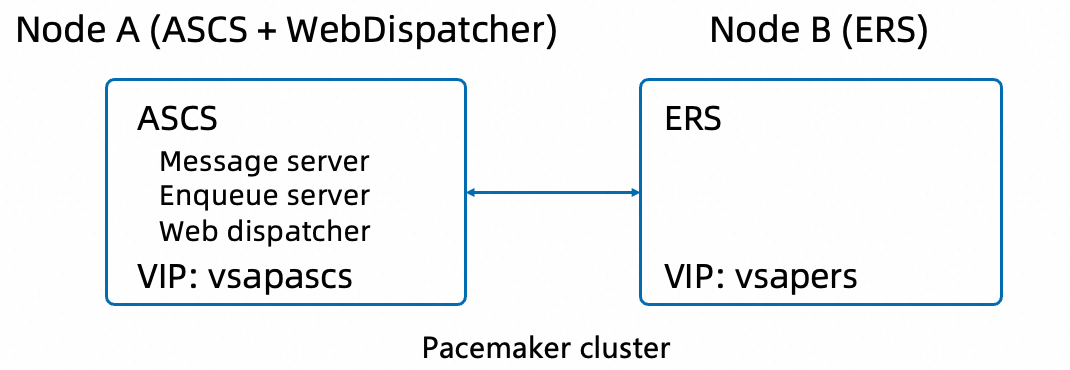
Advantages:
No extra infrastructure required
Shares cluster management with ASCS. Simple to operate and maintain.
Web Dispatcher fails over automatically with ASCS.
Disadvantages:
Web Dispatcher workload may affect ASCS performance.
Web service interruption occurs during failover.
Not suitable for high-concurrency web access.
4.3 Option b: Standalone Pacemaker cluster
Create a standalone two-node Pacemaker cluster for Web Dispatcher. Use active/passive mode.
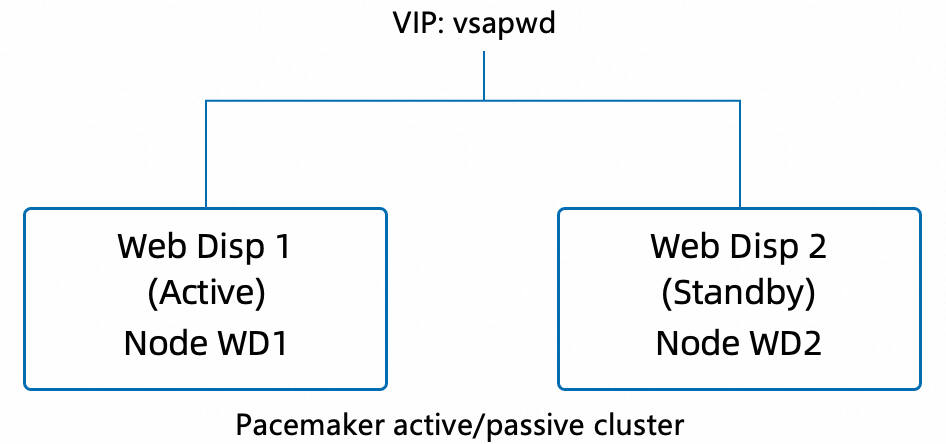
Cluster resource configuration:
# Web Dispatcher VIP
primitive rsc_ip_WD ocf:aliyun:vpc-move-ip \
    params address=<wd-vip> \
           routing_table=<rt-id> \
           endpoint=vpc-vpc.<region-id>.aliyuncs.com \
           interface=eth0 \
    op monitor interval=10s timeout=20s

# === Web Dispatcher SAPInstance resource ===
primitive rsc_sap_WD_W00 SAPInstance \
    operations $id=rsc_sap_WD_W00-operations \
    op monitor interval=11 timeout=60 on-fail=restart \
    params InstanceName=<SID>_W00_<virtual hostname> \
           START_PROFILE="/sapmnt/<SID>/profile/<SID>_W00_<virtual hostname>" \
           AUTOMATIC_RECOVER=false \
           MONITOR_SERVICES="sapwebdisp" \
    meta resource-stickiness=5000 failure-timeout=60 \
         migration-threshold=1 priority=10

# Resource group
group grp_WD rsc_ip_WD rsc_sap_WD_W00

# STONITH (configure fence_aliyun as in the application layer)
Advantages:
Web Dispatcher is fully independent. Does not affect ASCS.
Automatic failover.
Disadvantages:
Requires extra ECS instances (at least two).
Short service interruption occurs during failover.
4.4 Option c: Alibaba Cloud slb plus multiple instances (recommended)
Use Alibaba Cloud SLB (Server Load Balancer) for Web Dispatcher load balancing and high availability. This is the recommended cloud-native option.
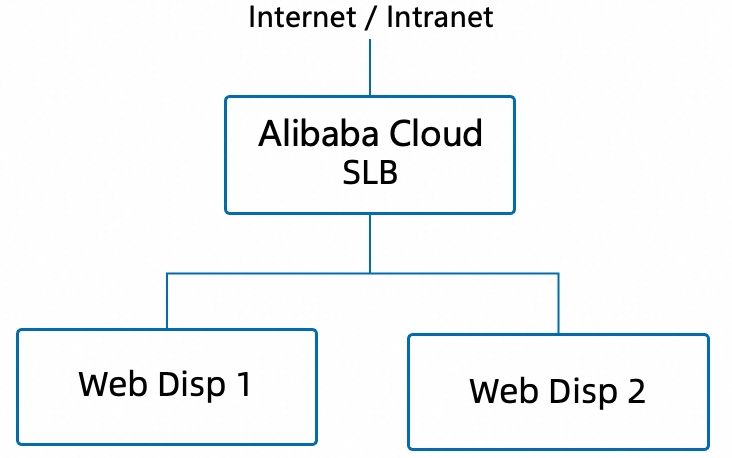
Deployment architecture:
SLB configuration:
Create an SLB instance (internal or public, depending on access needs).
Configure HTTP/HTTPS listeners. Common ports are 443 (HTTPS) or 8443.
Configure a backend server group. Add multiple Web Dispatcher instances.
Configure health checks: Use HTTP. Set the health check path to
/sap/public/ping. Expect return code 200.
Web Dispatcher instances:
Deploy two or three independent Web Dispatcher instances.
Each instance runs independently. No cluster software is required.
Use identical configurations (such as
icm/server_portand backend targets).
Session persistence:
Configure cookie-based session persistence in SLB.
Or configure the
wdisp/sticky_sidparameter in Web Dispatcher.
SLB health check configuration recommendations:
Parameter | Recommended value |
Health check protocol | HTTP |
Health check path | /sap/public/ping |
Status code: Normal | 200 |
Health check interval | 5 seconds |
Unhealthy threshold | 3 times |
Healthy threshold | 2 times |
Advantages:
No single point of failure. Multiple instances serve traffic simultaneously.
Scale Web Dispatcher instances elastically based on load.
No Pacemaker cluster required. Low operational complexity.
Supports HTTPS offloading (SSL offloading).
Disadvantages:
Additional SLB costs apply.
Ensure all Web Dispatcher instances use identical configurations.
4.5 Option selection recommendations
Scenario | Recommended option |
Small SAP system with low web traffic | Option A: Embedded deployment |
Traditional enterprise deployment. Prefer standard cluster solutions. | Option B: Pacemaker cluster |
Cloud-native deployment with high web traffic | Option C: Alibaba Cloud SLB plus multiple instances |
Mixed scenario (SAP Fiori plus traditional GUI) | Use Option C for Fiori. Use Option A or B for internal access. |
5. References
5.1 SUSE best practices documentation
SAP NetWeaver Enqueue Replication 1 High Availability Cluster - SAP NetWeaver 7.40 and 7.50 on Alibaba Cloud
SUSE Linux Enterprise Server for SAP applications 15 SP1
https://documentation.suse.com/sbp/sap-15/
SAP S/4 HANA - Enqueue Replication 2 High Availability Cluster With Simple Mount
SUSE Linux Enterprise Server for SAP applications 15 SP1
https://documentation.suse.com/sbp/sap-15/
SAP S/4 HANA - Enqueue Replication 2 High Availability Cluster
SUSE Linux Enterprise Server for SAP applications 15 SP1
https://documentation.suse.com/sbp/sap-15/
SAP HANA System Replication Scale-Up - Performance Optimized Scenario (SAPHanaSR-angi)
SUSE Linux Enterprise Server for SAP applications 15 SP4
https://documentation.suse.com/sbp/sap-15/
SAP HANA System Replication Scale-Up - Cost Optimized Scenario
SUSE Linux Enterprise Server for SAP applications 15 GA
https://documentation.suse.com/sbp/sap-15/
SAP NetWeaver Enqueue Replication 1 High Availability Cluster - SAP NetWeaver 7.40 and 7.50
SUSE Linux Enterprise Server for SAP applications 15 SP1
https://documentation.suse.com/sbp/sap-15/
5.2 SAP notes
SAP Note 2552731 - SAP Applications on Alibaba Cloud: Supported Products and IaaS VM Types
SAP Note 2552652 - SAP on Alibaba Cloud: Support Prerequisites
SAP Note 2564176 - SAP on Linux with Alibaba Cloud: Enhanced Monitoring
SAP Note 1380654 - SAP support in IaaS environments
SAP Note 2205917 - SAP HANA DB: Recommended OS settings for SLES 12 / SLES for SAP
SAP Note 2684254 - SAP HANA DB: Recommended OS settings for SLES 15 / SLES for SAP
SAP Note 3139184 - Linux: systemd integration for sapstartsrv and SAP Hostagent
SAP Note 3115889 - SAP Web Dispatcher embedded deployment in an ASCS/SCS instance