Alibaba Cloud services for SAP workloads
Cloud networking
The core unit of cloud networking is the virtual private cloud (VPC). A VPC is a logically isolated virtual network in the cloud. It lets you define private endpoints, create vSwitches, and deploy Alibaba Cloud services. Because VPCs are logically isolated, they can serve as management units for enterprise networking. This lets you plan your network environment based on your organization, business, or system role.
Alibaba Cloud supports multiple solutions to interconnect different VPCs, such as peering connections, PrivateLink, and Cloud Enterprise Network (CEN). For a comprehensive cloud migration networking plan, you can use CEN to create complex network topologies in the cloud.
When planning your SAP system architecture, plan your network as follows.
Plan your network by system role
Divide your virtual network segments by SAP system role. Place components that need to be exposed to the public network in a separate virtual network to create a DMZ.
Some shared services, such as Object Storage Service (OSS), Cloud DNS, Cloud Firewall, WAF, Server Load Balancer, and Elastic IP Address, are not bound to a specific VPC. They are available throughout an Alibaba Cloud region.
Within a VPC, you can create vSwitches as needed. For example, you can place application servers and database servers in different vSwitches.
The following is an example of network segmentation.
VPC | CIDR block (example) | Subnet | CIDR block (example) | Description |
Production network | 10.0.0.0/16 | SAP application subnet | 10.0.0.0/24 | SAP production environment application servers |
SAP Database Subnet | 10.0.1.0/24 | SAP production environment database servers | ||
Non-production network | 192.168.0.0/16 | SAP application subnet | 192.168.0.0/24 | SAP non-production environment application servers |
SAP Database Subnet | 192.168.1.0/24 | SAP non-production environment database servers | ||
DMZ network | 10.1.0.0/16 | SAP DMZ subnet | 10.1.0.0/24 | SAP components that require public network access |
Disaster recovery network | 10.11.0.0/16 | SAP application subnet | 10.11.0.0/24 | SAP disaster recovery environment application servers |
SAP database subnet | 10.11.1.0/24 | SAP disaster recovery environment database servers | ||
Disaster recovery DMZ | 10.12.0.0/16 | SAP DMZ Subnet | 10.12.0.0/24 | DMZ for the disaster recovery environment |
Network interconnection
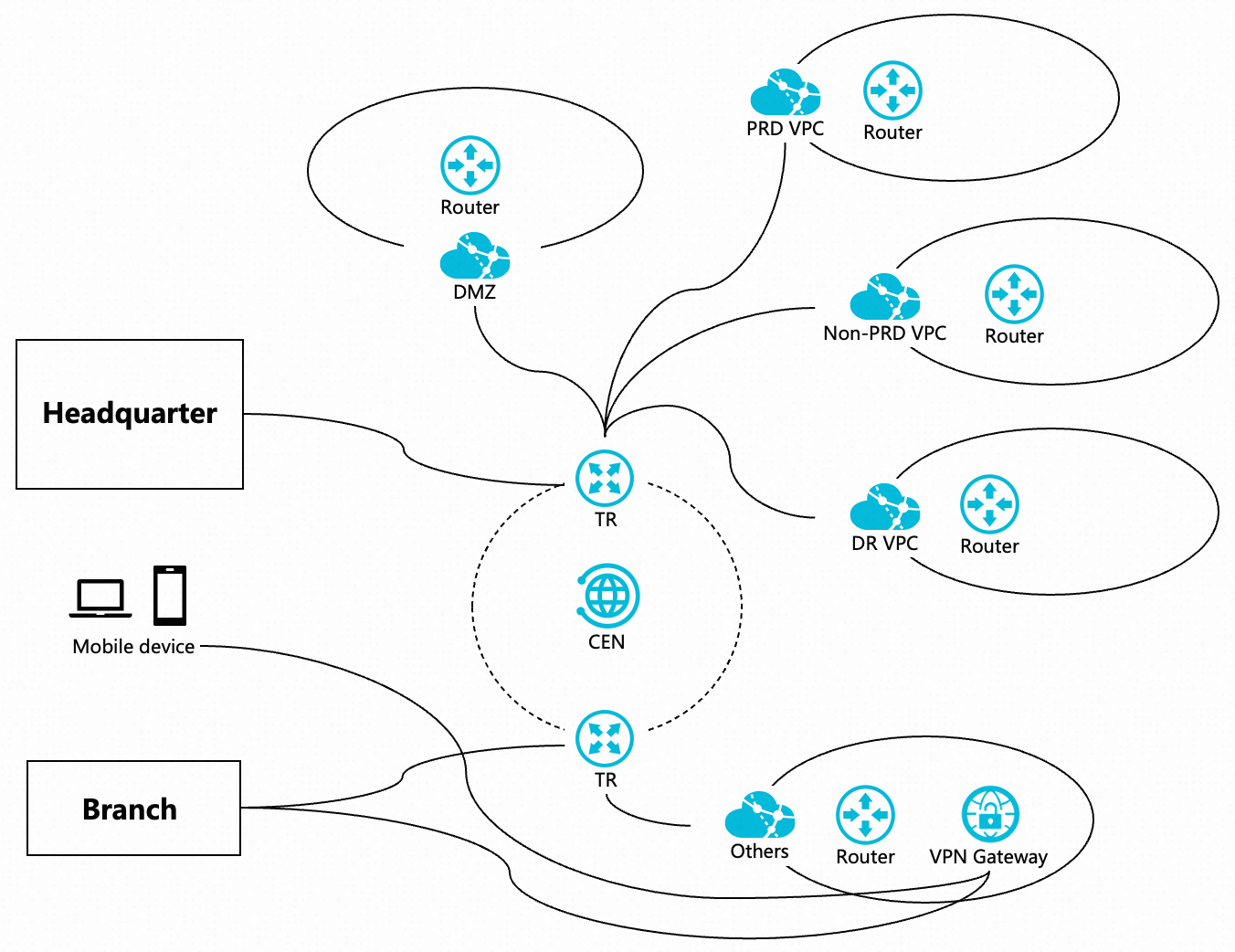
Network interconnection is the connection between different networks. In a cloud migration scenario, this typically refers to communication between VPCs in the cloud and between cloud networks and on-premises networks.
Alibaba Cloud provides the following networking services to build a flexible hybrid cloud networking environment.
Purpose | Cloud Product | Description | Scenarios |
VPC interconnection |
| Small-scale networking with no more than two VPCs. | |
VPC interconnection Hybrid cloud networking |
| Large-scale networking with more than two VPCs and a need for interconnection across multiple regions. | |
Hybrid cloud networking |
| Building a hybrid cloud network with high requirements for network performance, stability, and security. | |
Hybrid cloud networking |
| For hybrid cloud networking where performance and stability are not high priorities, and cost-effectiveness is important. Using a VPN Gateway as a backup line for a hybrid cloud network. When many mobile devices need to access the network. |
Public network access
An SAP system typically includes components that require public network access, such as SAProuter, SAP Cloud Connector, and Fiori for external services. Therefore, your cloud network architecture should include a separate network area for public access, known as a DMZ.
The combination of Alibaba Cloud Elastic IP Address and NAT Gateway lets you quickly provide a secure and reliable public access point for your cloud network.
Example deployment operations:
Create an Internet NAT gateway and deploy it in the DMZ VPC and DMZ vSwitch.
Create an Elastic IP Address. You can use the pay-by-traffic billing method for flexible configuration.
On the NAT Gateway, configure SNAT and DNAT entries and attach the corresponding Elastic IP Address.
SNAT: For outbound public network access. You can set the granularity of the entry as needed. Options include VPC granularity (all workloads in the VPC can access the public network), vSwitch granularity (all workloads in the specified vSwitch can access the public network), or flow log for an ENI (only the specified ECS instance can access the public network).
DNAT: For inbound public network access. For the private endpoint, select the corresponding workload, such as the ECS instance where SAProuter or SAP Cloud Connector is deployed. You can configure port mapping as needed.
When you configure port mapping for DNAT, note the default ports for the following SAP components.
The port for SAP support to access SAProuter is 3299.
The connection port and management web page port for SAP Cloud Connector is 8443.
After an Internet NAT gateway is created, a default route to 0.0.0.0/0 that points to the NAT Gateway instance is automatically added to the route table of the associated VPC.
If a VPC is connected to a TransitRouter in a Cloud Enterprise Network (CEN) instance, the route entry pointing to the NAT Gateway is not published to the TransitRouter by default. You must manually publish the route entry. After the route is published, all VPCs connected to the TransitRouter learn the route, which allows their workloads to access the public network.
If you want to strictly control public network access from your internal network, do not publish this route to the transit router.
Cloud storage
A complete SAP system deployment architecture involves various storage scenarios. The following cloud storage products meet the requirements of these scenarios for SAP deployments on the cloud.
Block storage
Elastic Block Storage (EBS) is a block-level storage service that provides low-latency, persistent, and highly reliable cloud disks for services such as Elastic Compute Service (ECS) and Container Compute Service (ACS).
SAP application servers and HANA database servers have different file system and storage device requirements.
Alibaba Cloud recommends the following types of block storage for SAP deployment architectures. For a detailed comparison of different block storage types, see Block storage overview.
Cloud disk type | Features | Scenarios in SAP deployments |
ESSD cloud disk |
|
|
ESSD AutoPL disk |
|
|
ESSD Entry cloud disk |
|
|
Other cloud disk types, such as previous-generation cloud disks, local disks, and elastic ephemeral disks, are not discussed in this topic. This is because they have specific use cases and are not supported by SAP-certified ECS instance types.
General requirements
Each ECS instance requires a system disk to host its operating system. The lifecycle of a system disk is tied to its ECS instance. The disk is created and released along with the instance.
File system | Purpose | Recommended cloud disk type | Recommended capacity |
/ | Operating system |
| 100 GiB |
SAP application server
SAP application servers based on the NetWeaver software architecture have various components and can be deployed on ECS using different methods. However, the primary local file systems can be planned in a consistent manner, regardless of the deployment method.
File system | Purpose | Recommended cloud disk type | Recommended capacity |
/usr/sap | File system for SAP application installation |
|
|
This section discusses only local file systems.
In the SAP application architecture, global file systems, such as /sapmnt and /usr/sap/trans, are hosted on NFS. For more information, see the File storage section.
Additionally, in a high availability architecture, the best practice for deploying ASCS and ERS instances is to use NFS to share the /usr/sap/<SID>/<ASCSinstance> and /usr/sap/<SID>/<ERSinstance> file systems within the cluster. For more information, see the File storage and High availability architecture sections.
SAP HANA server
The deployment of an SAP HANA database involves planning and partitioning several important local file systems. SAP HANA databases have high storage I/O performance requirements. Therefore, during deployment planning, you must carefully consider the selection and partitioning of cloud disks and the creation of file systems.
File system | Purpose | Recommended cloud disk type | Recommended capacity |
/hana/data | HANA database data file system |
| Plan for 1.2 to 1.5 times the memory size of the ECS instance. For the /hana/data file system, use 3 storage disks for LVM data striping to improve I/O throughput performance. |
/hana/log | HANA database log file system |
| Plan for 0.5 times the memory size of the ECS instance. |
/hana/shared | HANA software components, installation media, configurations, logs, and more. |
| Plan for 1 time the memory size of the ECS instance. |
For example, for a selected ECS instance with 1 TB of memory:
/hana/data: Provision a total capacity of 1.5 TB. Use three 500 GB ESSD AutoPL disks. After attaching the disks, perform data striping using LVM.
/hana/log: Provision a total capacity of 0.5 TB. Use one 500 GB ESSD AutoPL disk.
/hana/shared: Provision a total capacity of 1 TB. Use one 1 TB ESSD AutoPL disk.
For LVM data striping, use three stripes and a 256 KiB stripe size. To achieve maximum I/O performance, select a stripe size based on your workload characteristics and stress testing results.
Example command for data striping: lvcreate -L <lv_capacity> -n <lv_name> -i 3 -I 256 <vg_name>
File storage
Apsara File Storage NAS (NAS) is an elastically scalable, distributed file system that supports large-scale shared access. In an SAP deployment architecture, NAS is typically used to host the global file system for SAP application servers.
Alibaba Cloud NAS offers multiple specifications. For a comparison of the specifications, see Selection guide.
For recommendations on NAS selection, corresponding file systems, and use cases for an SAP deployment architecture, see the following table.
File system | Purpose | Recommended NAS type | Scenarios |
/usr/sap/trans | Stores transport files, support package installation files, and more. | General-purpose NAS file system: Performance | SAP application server deployment |
/sapmnt | Stores parameter files. | General-purpose NAS file system - compute-optimized instance | SAP application server deployment |
/usr/sap/<SID>/<ASCSinstance> /usr/sap/<SID>/ERSinstance> | Target file system for instance installation in an ASCS/ERS high availability cluster. |
| SAP ASCS/ERS high availability cluster deployment |
Object Storage Service
Alibaba Cloud Object Storage Service (OSS) is a secure, cost-effective, and highly reliable cloud storage service that offers massive capacity. It provides 99.9999999999% (twelve 9s) data durability, 99.995% data availability, and multiple storage classes to optimize your storage costs.
Standard SAP components and deployment architectures do not typically require OSS. However, some business processes may involve scenarios such as storing files to a disk or data backup. In these scenarios, you can use OSS features to optimize the storage architecture and improve cost-effectiveness.
For information about OSS product features, selection, pricing, and configuration, see the official documentation.