CLB instance FAQ
This topic answers frequently asked questions (FAQs) about Classic Load Balancer (CLB) instances.
This topic covers the following questions:
|
Category |
Questions |
|
Instance selection |
|
|
Instance types |
|
|
Instance configuration |
|
|
Instance O&M |
How to select a guaranteed-performance instance
Pay-as-you-go instances
-
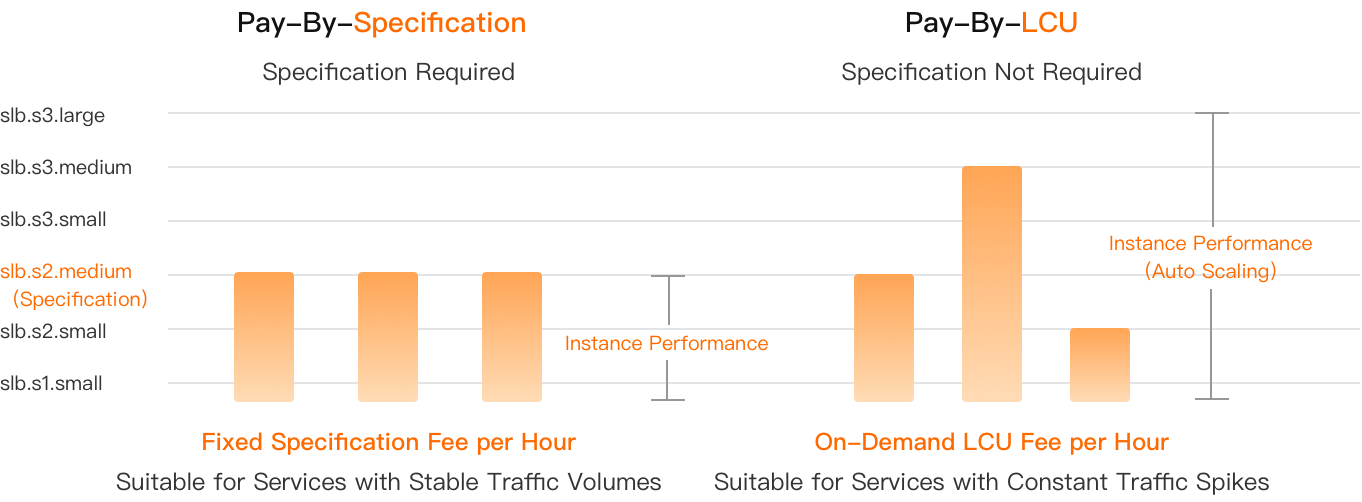
If your workloads are stable, we recommend that you select the pay-by-specification metering method. For this method, you are charged a fixed hourly fee based on the instance type you select.
-
If your workloads are periodic or fluctuate significantly, we recommend that you select the pay-by-LCU metering method. The performance of a pay-by-LCU instance automatically scales with usage, eliminating the need to specify an instance type. You are charged an hourly fee based on your actual usage (LCUs).
Beginning 00:00:00 (UTC+8), December 1, 2024, subscription CLB instances are no longer available for purchase. For more information, see End of sale for subscription CLB instances.
Subscription instances
Why instances may not reach performance limits
This follows the weakest-link principle. A guaranteed-performance instance does not guarantee that all three of its performance metrics, including bandwidth, can reach their upper limits at the same time. Throttling is triggered when any of the metrics reaches its limit.
If you purchase a pay-by-bandwidth instance, other metrics may also fail to reach their upper limits because throttling is triggered when the bandwidth reaches its peak.
For example, a user selects a High-performance I (slb.s3.small) instance. If the QPS of the instance has reached 20,000 but the number of concurrent connections has not reached 200,000, the maximum number of connections may never reach the upper limit specified for the instance type. This is because new connection requests are dropped when the QPS reaches its upper limit.
Can I change the instance type?
Yes, you can.
You can modify the configuration of a guaranteed-performance instance in the CLB console. For more information, see Modify the configuration of a pay-as-you-go instance and Upgrade a subscription instance.
You can upgrade or downgrade a pay-as-you-go guaranteed-performance instance. To downgrade a subscription guaranteed-performance instance, you must be added to a whitelist.
Therefore, we recommend that you first use a pay-as-you-go instance to test your services. After you confirm the required instance type, you can purchase a subscription instance of that type.
-
You can change only shared-resource CLB instances to high-performance ones. You cannot change high-performance CLB instances to shared-resource ones.
-
If you change both the instance type and the metering method of a guaranteed-performance instance (for example, from pay-by-data-transfer to pay-by-bandwidth), the new configuration takes effect at 00:00:00 the next day. If you only change the instance type, the change takes effect immediately. We recommend that you do not change the metering method when you modify the configuration.
-
Changing a shared-resource instance to a guaranteed-performance instance does not affect your services or change the IP address of the CLB instance.
-
Configuration modifications do not change the IP address of the CLB instance.
We recommend that you change from a shared-resource instance to a guaranteed-performance instance during off-peak hours. Alternatively, use DNS to implement load balancing among instances before you modify the configuration.
Why are instance type changes not immediate?
If you change the instance type and the metering method (for example, from pay-by-bandwidth to pay-by-data-transfer) at the same time, both changes take effect at 00:00:00 the next day instead of immediately.
Can I downgrade a subscription instance?
Beginning 00:00:00 (UTC+8), December 1, 2025, renewal of subscription CLB instances is no longer supported. For more information, see End of sale for subscription CLB instances.
-
By default, you cannot downgrade a subscription instance in real time. To use this feature, contact your account manager to apply.
-
You can change the instance type and bandwidth when you renew the instance. The change takes effect in the next billing cycle. For more information, see Renewal with configuration change.
Can I change the availability zones?
No.
You cannot change the primary availability zone after a CLB instance is created. The system automatically selects the most appropriate secondary availability zone based on regional conditions, and no manual configuration is required.
We recommend using Application Load Balancer (ALB) or Network Load Balancer (NLB), which support multi-zone deployment. For more information, see Server Load Balancer (SLB) product family, What is Application Load Balancer (ALB)?, and What is Network Load Balancer (NLB)?
Does CLB processing time include data transfer?
Yes, the processing time of a CLB instance includes the time to receive client data and send response data.
-
Time to receive client data: The value of the
read_request_timemetric. This metric indicates the time the load balancer takes to read a client request. This includes the time to receive the HTTP request header (read_header_time) and the request body (read_body_time). -
Time to send response data: This includes the time required to return response data to the client.
How to get CLB public IP ranges
CLB public IP addresses are dynamically allocated. To avoid access restrictions, we recommend obtaining the CLB IP CIDR blocks in advance and adding them to your firewall's whitelist.
EIPs and the public IP addresses of CLB instances are allocated from the same public IP resource pool. You can call the DescribePublicIpAddress operation to obtain the public IP CIDR blocks in a specified region.
This API operation supports pagination. The default page size is 100. If more than 100 entries are returned, you must adjust the pagination parameters to obtain the complete list.
How to troubleshoot a stopped CLB instance
A CLB instance enters the Stopped state for one of the following reasons:
-
The instance is manually set to the inactive state by a call to the SetLoadBalancerStatus API operation. After a user or an automated program calls this API operation, the instance immediately stops forwarding traffic.
-
Your account has an overdue payment, causing the system to lock the account and automatically stop the instance.
-
The associated Elastic IP Address (EIP) or shared bandwidth plan is released due to an overdue payment.
You can use ActionTrail to identify why the instance was stopped. Log on to the ActionTrail console. On the event query page, search for the SetLoadBalancerStatus event. View the time and operator of the event to determine whether it was a manual operation.
If the instance was not stopped due to an overdue payment, go to the Instances page in the CLB console, find the instance, and click Start in the Actions column to resume the instance.
Does CLB support cross-account migration?
No. CLB instances cannot be migrated (transferred) across Alibaba Cloud accounts. To use CLB under another account, create a new CLB instance in the target account, and then configure its listeners and backend servers.
Can I disable Ping on the service address of a CLB instance?
No. You cannot disable Ping on a CLB service address directly. As an alternative, you can associate the public IP of a public-facing CLB instance (or the EIP bound to a private CLB instance) with a cloud firewall and configure an inbound rule to deny ICMP traffic.
The service address of a CLB instance is pingable only when the instance has at least one listener in the Running state.
My CLB instance listens only on TCP ports. Why do port scans show that all UDP ports are open?
This is a false positive caused by the scanning tool's detection algorithm. CLB silently drops packets sent to UDP ports that have no listener configured, without sending an "ICMP Port Unreachable" message back to the client. Some scanning tools interpret the absence of this response as an indication that the port is open. In reality, CLB does not process or forward any traffic on ports without a configured listener, so this does not affect instance security.