CLB billing FAQ
This topic answers common billing questions for Classic Load Balancer (CLB), including billable items, charges after stopping or releasing an instance, traffic billing, and how to investigate unexpected fees.
Billable items and billing rules
What are the billable items for a CLB instance?
A pay-as-you-go CLB instance may incur the following fees. The applicable items depend on the network type and billing method of the instance.
|
Billable item |
Description |
Applies to |
|
Public IP retention fee |
Configuration fee for the public IP address. Charged as long as the IP address exists, regardless of whether it is in use. |
internet-facing instances only |
|
Instance fee |
Basic resource usage fee. Charged as long as the instance exists and has not been released. |
All instances |
|
Load balancer capacity unit (LCU) fee |
Billed hourly based on actual usage. |
Pay-by-LCU instances |
|
Specification fee |
Fixed fee based on the selected specification. Does not change with actual usage. |
Pay-by-specification instances |
|
Data transfer fee |
Fee for outbound Internet traffic based on actual usage. Inbound traffic is free. |
Internet-facing instances (pay-by-data-transfer) |
|
Bandwidth fee |
Fixed fee based on the purchased bandwidth. Not related to actual traffic usage. |
Internet-facing instances (pay-by-bandwidth) |
Internal CLB instances do not incur public IP retention fees, data transfer fees, or bandwidth fees. CLB resource plans can deduct only the instance fees and LCU fees of pay-by-LCU CLB instances. Resource plans cannot be used to deduct public IP retention fees, specification fees, data transfer fees, or bandwidth fees. To deduct data transfer fees, purchase a Data Transfer Plan.
Starting from December 1, 2024, 00:00:00 (UTC+8), "instance fee" was renamed "public IP retention fee" and a new "instance fee" billable item was added. CLB instances created before that date are exempt from instance fees until November 30, 2026, 23:59:59 (UTC+8). For details, see CLB billing adjustments and Extension of the instance fee waiver period for CLB.
How are guaranteed-performance instances billed?
Pay-by-specification (Internet-facing):
Total fee = Public IP retention fee + Instance fee + Data transfer or bandwidth fee + Specification fee
The specification fee is fixed based on the selected specification. For example, if you select the super large I (slb.s3.large) specification, you are charged for that specification even if actual usage reaches only the level of a high-performance I (slb.s3.small) instance.
Pay-by-LCU (Internet-facing):
Total fee = Public IP retention fee + Instance fee + Data transfer fee + LCU fee
Performance scales automatically with usage. No specification selection is required. The LCU fee is charged hourly based on actual consumption.
For full billing details, see Pay-as-you-go.
Subscription
Do shared-resource instances incur specification fees?
No. Specification fees apply only to guaranteed-performance instances.
The billable items vary by network type, metering method, and instance type:
|
Network type |
Public network metering method |
Instance type |
Public IP retention fee |
Instance fee |
Data transfer fee |
Bandwidth fee |
Specification fee |
|
Internet-facing |
Pay-by-data-transfer |
Shared-resource |
Yes |
Yes |
Yes |
No |
No |
|
Guaranteed-performance |
Yes |
Yes |
Yes |
No |
Yes |
||
|
Pay-by-bandwidth |
Shared-resource |
Yes |
Yes |
No |
Yes |
No |
|
|
Guaranteed-performance |
Yes |
Yes |
No |
Yes |
Yes |
||
|
Internal |
— |
Shared-resource |
No |
Yes |
No |
No |
No |
|
Guaranteed-performance |
No |
Yes |
No |
No |
Yes |
CLB instances created before December 1, 2024, 00:00:00 (UTC+8) are exempt from instance fees until November 30, 2026, 23:59:59 (UTC+8). See Extension of the instance fee waiver period for CLB.
Are internal CLB instances charged specification fees?
It depends on the instance type:
-
Shared-resource instances (discontinued): No specification fee.
-
Guaranteed-performance instances: A specification fee applies, using the same billing rules as Internet-facing instances.
For details, see Instance billing methods.
How can I estimate LCU usage and fees?
Two options are available:
-
Manual estimation: Use your business metrics and the examples in LCU fees.
-
Calculator: Use the CLB LCU calculator to estimate consumption automatically.
Does adding Elastic Compute Service (ECS) instances to a CLB backend affect CLB billing?
No. CLB and ECS are billed and settled separately. Adding ECS instances to the server group does not change the billing rules for the CLB instance, regardless of how those ECS instances are billed.
Instance lifecycle and billing
Are fees still charged after I stop a CLB instance?
Yes. A CLB instance stops accruing charges only after it is released.
Fees that continue after the instance is stopped:
-
Public IP retention fee: Charged as long as the public IP address exists, even if not in use.
-
Instance fee: Charged as long as the instance exists and has not been released.
-
Specification fee: Resources remain reserved so the instance can be restarted at any time. The specification fee continues until the instance is released.
-
Bandwidth fee (pay-by-bandwidth only): Charged based on the purchased bandwidth until the instance is released. Not affected by instance status or traffic.
Fees that stop when the instance is stopped:
-
Data transfer fee (pay-by-data-transfer only): No traffic is forwarded when the instance is stopped, so no data transfer fee accrues.
-
LCU fee: No LCUs are consumed when the instance is stopped.
Why did I receive a bill after releasing my CLB instance?
Two reasons are common:
-
Billing delay: Pay-as-you-go bills are generated with an approximate 3-hour delay. For example, if you release an instance at 14:30, the bill covering 14:00–15:00 may not appear until around 18:00. This is a normal billing cycle delay, not a duplicate charge.
-
Associated elastic IP address (EIP) not released: If an internal CLB instance was bound to a separately purchased EIP, releasing the CLB instance does not automatically release the EIP. The EIP continues to incur fees until it is released.
What is the renewal policy for subscription CLB instances?
-
Starting from December 1, 2024, new purchases of subscription CLB instances have been discontinued.
-
Starting from December 1, 2026, the renewal service for all subscription CLB instances will be discontinued.
-
Before that date, you can still renew existing subscription instances to extend their usage period.
-
If a subscription instance is not renewed within seven days after it expires, the instance is automatically released.
-
For long-term use, we recommend that you convert the subscription instance to a pay-by-LCU instance and purchase a CLB resource plan to offset fees.
How long does it take for service to resume after renewal or topping up an overdue account?
-
For a subscription instance, the service resumes immediately after renewal.
-
For a pay-as-you-go instance that is suspended due to an overdue payment, service resumes immediately after the overdue payment is cleared.
-
If service does not resume promptly, verify that the payment was processed successfully, or submit a ticket to contact technical support.
Traffic and bandwidth billing
Is inbound traffic to CLB billed?
No. CLB charges only for outbound traffic. Inbound traffic is free. For details on CLB traffic paths, see Inbound traffic path and Outbound traffic path.
Do internal CLB instances incur data transfer fees?
No. The billable items for an internal CLB instance include only the instance fee and the LCU fee (or specification fee). Public IP retention fees, data transfer fees, and bandwidth fees do not apply.
If you bind a separately purchased EIP to the CLB instance, that EIP incurs public network data transfer fees. These charges appear on the EIP bill, not the CLB bill.
Is health check traffic billed?
No. Traffic generated by CLB health checks is not included in data transfer fees.
Is attack traffic billed?
Partially. Alibaba Cloud Security provides traffic scrubbing and blackholing to protect against attacks. A short delay occurs between when an attack reaches the scrubbing or blackholing threshold and when protection activates. Traffic responses sent during this delay are billed and consume CLB bandwidth.
Why is the actual HTTPS traffic volume higher than what appears on my bill?
The HTTPS protocol uses additional traffic for TLS handshakes. This handshake overhead is not included in billed traffic, so the actual traffic volume is higher than the billed amount.
Are public network fees still charged when all backend ECS instances are stopped or removed?
Public IP retention fees, instance fees, and specification fees continue regardless of backend ECS instance status.
For traffic fees:
-
Pay-by-data-transfer: Traffic fees depend on whether the CLB instance continues to receive requests. Even with all backend ECS instances stopped, the CLB endpoint remains active. Incoming requests trigger health check responses — three-way handshake packets for Layer 4, or a Tengine 503 error page for Layer 7. This response traffic is billed. To avoid unnecessary data transfer fees, stop or release CLB instances that are no longer in use.
-
Pay-by-bandwidth: Fees are fixed based on purchased bandwidth and continue until the instance is released, regardless of instance status or traffic volume.
Billing method changes
Can I convert a subscription instance to a pay-by-LCU instance?
You cannot directly convert a subscription instance to a pay-by-LCU instance.
To convert a subscription instance to pay-as-you-go billing (pay-by-traffic), you can perform the following steps: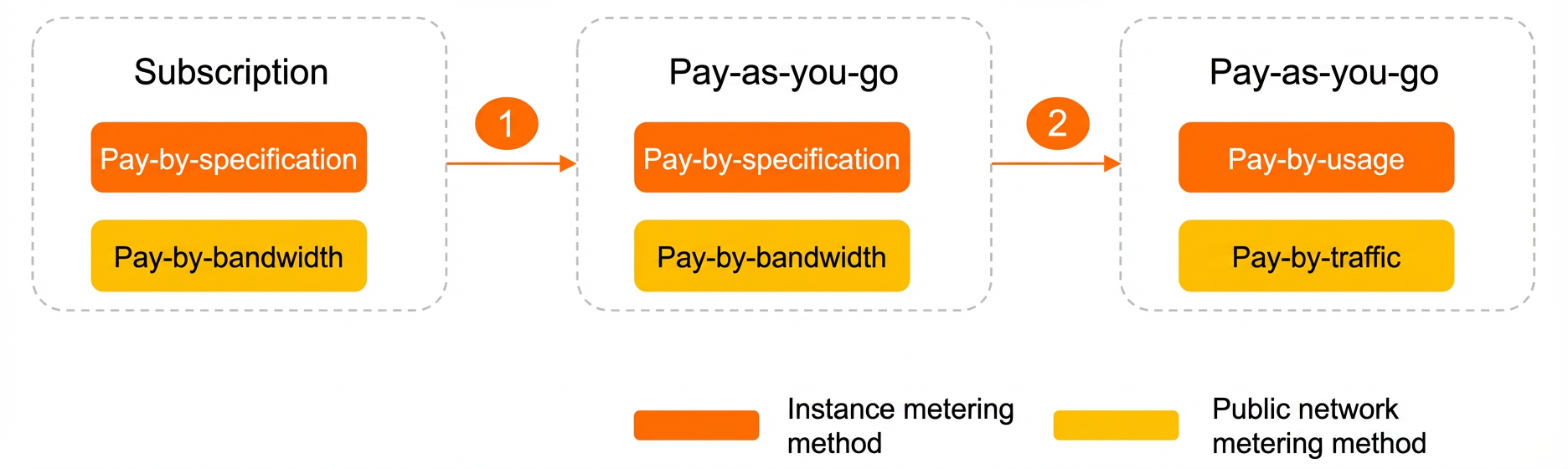
-
First, convert the subscription instance to a pay-as-you-go (pay-by-specification) instance. For more information, see Change the configurations of a subscription instance.
-
Convert the pay-as-you-go (pay-by-specification) instance to a pay-as-you-go (pay-by-LCU) instance. For more information, see Change the configurations of a pay-as-you-go instance.
When you change from pay-by-specification to pay-by-LCU, the public network billing method also changes from pay-by-bandwidth to pay-by-data-transfer.
If the public network billing method is not changed, the change takes effect immediately. If the public network billing method is changed, all configuration changes for the instance take effect at 00:00:00 on the next day. You cannot perform other configuration changes before the new configuration takes effect.
Can I convert a pay-by-LCU instance to a subscription instance?
Starting from 00:00:00 (UTC+8) on December 1, 2024, new purchases of subscription CLB instances are discontinued, and you cannot convert pay-as-you-go instances to subscription instances. For more information, see Discontinuation Notice for Subscription Classic Load Balancer (CLB) Instances.
Does changing from pay-by-specification to pay-by-LCU affect my service?
It depends on the current specification:
-
Super large I (slb.s3.large) or lower: The change does not affect your service.
-
Higher than super large I: Switching may degrade instance performance. Proceed with caution.
NoteBy default, CLB specifications higher than super large I are not available. For Layer 4 load balancing, if you require more concurrent connections, select a Network Load Balancer (NLB) product. For Layer 7 load balancing, if you require a higher number of queries per second (QPS), select an Application Load Balancer (ALB) product.
-
For more information about NLB, see What is NLB?.
-
For more information about ALB, see Application Load Balancer (ALB).
-
Pay-by-LCU instances also have performance limits. For details, see Switch from pay-by-specification to pay-by-usage.
Does upgrading or downgrading an instance specification affect my service?
No. An upgrade or downgrade does not interrupt your service. However, if the change involves a public network billing method change, all configuration changes take effect at 00:00:00 the next day. No additional upgrade or downgrade operations can be performed until the current change is complete.
Can I change the billing method for multiple instances at once?
No, you cannot.
Instance billing methods include pay-by-specification and pay-by-LCU. You can change the billing method for a single instance in the console or by calling an API operation. For more information, see Change the configurations of a pay-as-you-go instance and ModifyLoadBalancerInstanceChargeType.
Bill queries and fee troubleshooting
How do I view the fees for a specific CLB instance?
-
Log on to the Expenses and Costs console.
-
In the Resource Instance Name/ID field, enter the instance name or ID. Obtain the ID from the Server Load Balancer console.
-
Click Search.
The Expenses and Costs console also supports Customize Columns and Export features via the icons in the upper-right corner of the table.
How do I view CLB traffic usage?
Two methods are available:
-
Real-time monitoring: Log on to the CloudMonitor console, locate the target instance, and view traffic monitoring data.
-
Billed traffic from your bill: Log on to the Expenses and Costs console, filter for the target instance, and view usage details.
Discrepancies between monitoring data and bill data are normal. They are caused by different collection methods and reporting schedules. Your bill is calculated based on bill data, not monitoring data.
Why does monitoring data differ from my bill?
Three factors cause this discrepancy:
-
Different collection pipelines: CLB console traffic data is collected at 1-minute intervals and reported to CloudMonitor. Bill data is also collected at 1-minute intervals, then aggregated into an hourly accumulated value and reported to the billing system. These two pipelines are independent and not directly comparable.
-
Reporting delay tolerance: The billing system allows bill data to be reported up to 3 hours late. For example, usage data from 01:00–02:00 must be reported to the billing system by 05:00. This flexible window can cause bill data to appear later than monitoring data.
-
Different purposes: Monitoring data is designed to detect operational anomalies in near real time. Bill data is designed for accurate charge calculation based on actual resource consumption. For billing reconciliation, always use bill data as the authoritative source.
How do I investigate a sudden spike in data transfer fees?
-
Identify the spike: Log on to the CloudMonitor console and view traffic monitoring data for the CLB instance to pinpoint when the spike occurred.
-
Find the traffic source:
-
Review access logs on the backend servers to identify abnormal requests.
CLB supports configuring backend servers to obtain real client IP addresses.
-
Analyze request sources using CLB access logs. Enable access logging in advance if it is not already configured.
-
-
Determine the cause: Check for malicious attacks, web crawler activity, or sudden increases in legitimate business traffic.
-
Protect against recurrence:
-
Use Web Application Firewall (WAF) to block malicious traffic.
-
Apply access control lists (ACLs) to restrict source IP addresses.
-
Configure bandwidth monitoring alerts to detect future anomalies promptly.
-