Associate a managed CSV data source
Upload a local CSV file to Simple Log Service by using the Python SDK, and then run federated queries to join log data in a Logstore with the CSV data for enriched analysis.
Prerequisites
-
Log data is collected to a Logstore. For more information, see Data collection overview.
-
Indexes are configured for the Logstore. For more information, see Create indexes.
-
A local CSV file is prepared with the external metadata that you want to join with your log data.
-
The Simple Log Service Python SDK is installed. For more information, see Install the Simple Log Service Python SDK.
Simple Log Service requires aliyun-log-python-sdk 0.7.3 or later. To upgrade the SDK, run the pip install aliyun-log-python-sdk -U command.
Limitations
-
Each Logstore can be associated with only one CSV file at a time.
-
The original CSV file must not exceed 50 MB. The SDK compresses the file before it uploads the file to Simple Log Service. The compressed file must be smaller than 9.9 MB.
Sample data
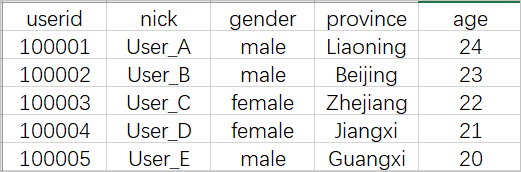
In this example, a Logstore records user login events and a CSV file stores user profiles such as gender and age. After associating the Logstore with the CSV file, you can analyze user activity based on demographic attributes.
-
Logstore
userid:100001 action:login __time__:1637737306 -
CSV file
Procedure
-
Use the Python SDK to create an ExternalStore.
For more information about the Python SDK, see Python SDK overview.
from aliyun.log import *

# Specify the Simple Log Service endpoint for your region.
endpoint='cn-shanghai.log.aliyuncs.com'

# Specify the AccessKey pair for authentication.
accessKeyId='test-project'
accessKey='TAI****YDw'

# Specify the project name and ExternalStore name.
project='lr****VM'
ext_logstore='user_meta'

# Specify the path to the local CSV file.
csv_file='./user.csv'


client = LogClient(endpoint, accessKeyId, accessKey)

# Create the ExternalStore by defining the table schema.
res = client.create_external_store(project,
    ExternalStoreCsvConfig(ext_logstore, csv_file,
        [
            {"name" : "userid", "type" : "bigint"},
            {"name" : "nick", "type" : "varchar"},
            {"name" : "gender", "type" : "varchar"},
            {"name" : "province", "type" : "varchar"},
            {"name" : "age", "type" : "bigint"}
        ]))

res.log_print()
Parameter
Description
endpoint
The endpoint of Simple Log Service in the region where your project resides. For more information, see Endpoint.
accessKeyId
The AccessKey ID of your Alibaba Cloud account. For more information, see AccessKey pair.
WarningWe recommend that you use the AccessKey pair of a RAM user to minimize the risk of AccessKey pair leaks.
accessKey
The AccessKey Secret of your Alibaba Cloud account. For more information, see AccessKey pair.
project
The name of the project that contains the destination Logstore.
ext_logstore
The name of the ExternalStore, which also serves as the virtual table name for SQL queries. The name must meet the following requirements:
-
The name can contain only lowercase letters, digits, hyphens (-), and underscores (_).
-
The name must start and end with a lowercase letter or a digit.
-
The name must be 3 to 63 characters in length.
csv_file
The path to the local CSV file that you want to upload.
Table schema
The schema of the virtual table, which defines column names and data types. Modify the column definitions based on your CSV file.
[ {"name" : "userid", "type" : "bigint"}, {"name" : "nick", "type" : "varchar"}, {"name" : "gender", "type" : "varchar"}, {"name" : "province", "type" : "varchar"}, {"name" : "age", "type" : "bigint"} ] -
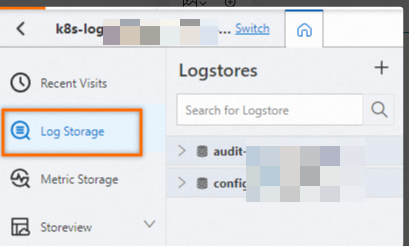
Log on to the Simple Log Service console.
In the Projects section, click the one you want.

On the tab, click the logstore you want.
-
Verify that the ExternalStore is created.
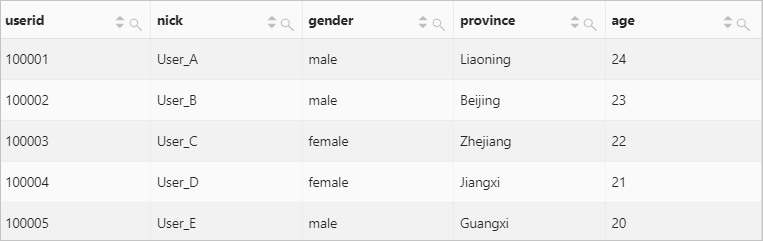
Run the following query statement. Replace
user_metawith the name of your ExternalStore.* | SELECT * FROM user_metaIf the query returns the contents of the CSV file, the ExternalStore is created.
-
Run a federated query to join the Logstore with the CSV file.
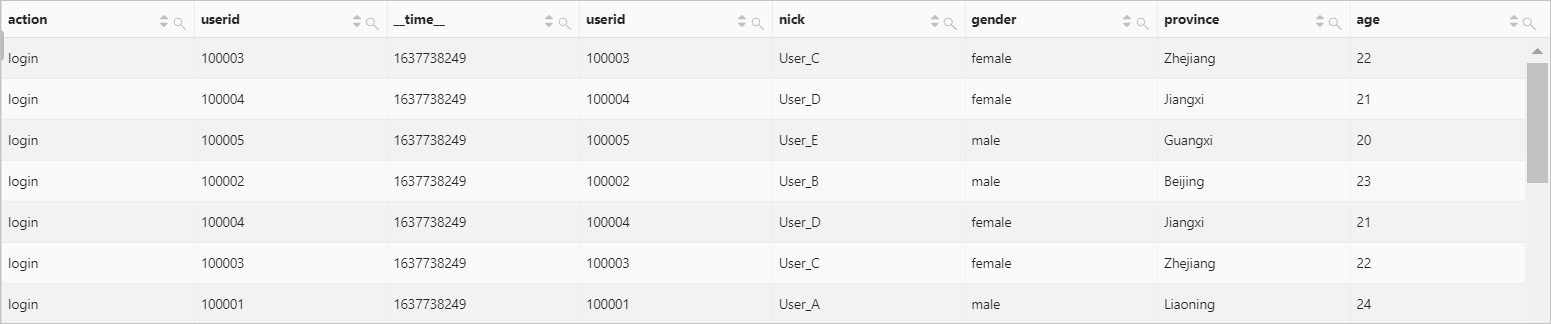
The following example joins the userid field in the Logstore with the userid field in the CSV file. In this example,
website_logis the Logstore name anduser_metais the ExternalStore name. Replace these values with your actual names.* | SELECT * FROM website_log JOIN user_meta ON website_log.userid = user_meta.userid