Alert grouping and merging
Alert Management groups and merges alerts based on route and merge policies before sending notifications.
Route and merge rules
Alerts are grouped and routed based on grouping baseline, action policy, initial wait time, change wait time, and repeat wait time. Only alerts with identical settings for all five parameters are placed in the same grouping set.
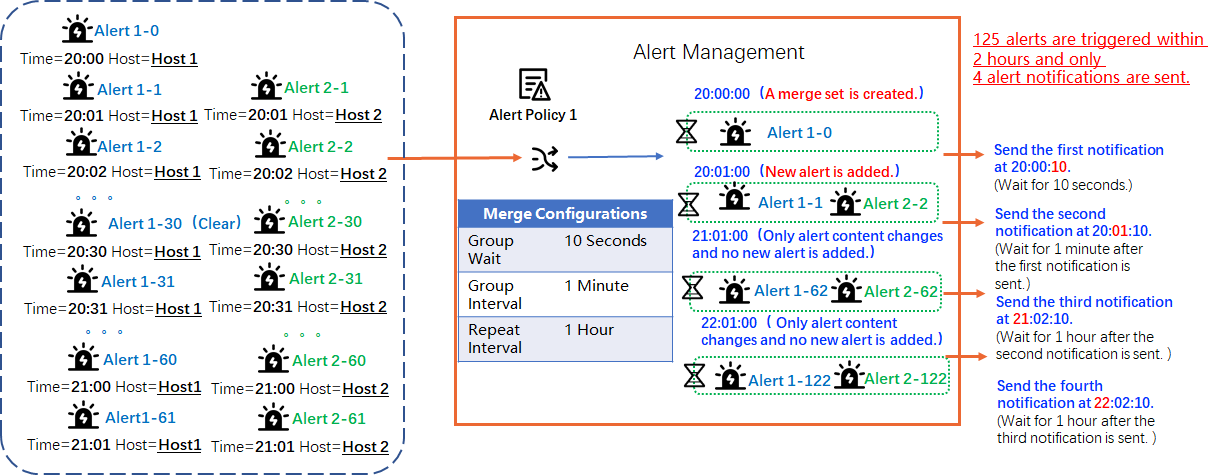
For example, two hosts in a service trigger a high CPU alert every minute starting at 20:00 and 20:01 respectively. You can group alerts by service name so that the initial alert is sent immediately, while subsequent duplicate alerts are delayed.
Grouping baseline
The grouping baseline defines how alerts are grouped by alert attributes and tags. Alert Management supports built-in and custom baselines.
|
Baseline type |
Description |
|
Built-in grouping baseline |
SLS provides the following built-in grouping baselines:
|
|
Custom grouping baseline |
You can define a custom grouping baseline by combining alert attributes and tags.
|
Action policy
An action policy determines how alert notifications are sent. You can associate an action policy when you configure a route and merge policy or when you create an alert monitoring rule. If you select dynamic action policy in the merge policy, the action policy specified in the alert monitoring rule takes precedence. Otherwise, the action policy specified in the merge policy is used.
Wait times
-
Scenario 1: Only Alert A is triggered during the initial wait time.
Assume an initial wait time of 5 seconds, a change wait time of 1 minute, and a repeat wait time of 4 hours. Orange represents Alert A; blue represents Alert B.

-
At 00:00:00, Alert A is triggered and a grouping set is created. Because an initial wait time is configured, no notification is sent immediately.
-
At 00:00:05, the initial wait time ends and the first notification is sent.
-
The system then checks for changes at each change wait interval. Within the first interval (1 minute), Alert B is triggered and added to the grouping set. At 00:01:05, a second notification is sent.
-
The grouping set (now containing Alert A and Alert B) remains unchanged. A third notification is sent at 04:01:05, after the 4-hour repeat wait time elapses.
-
-
Scenario 2: Alert A and Alert B are triggered during the initial wait time.
Assume an initial wait time of 5 seconds, a change wait time of 1 minute, and a repeat wait time of 4 hours. Orange represents Alert A; blue represents Alert B.

-
Between 00:00:00 and 00:00:05, both Alert A and Alert B are triggered and a grouping set is created. Because an initial wait time is configured, no notification is sent immediately.
-
At 00:00:05, the initial wait time ends and the first notification is sent.
-
The grouping set remains unchanged. A second notification is sent at 04:01:05, after the 4-hour repeat wait time elapses.
-
|
Parameter |
Description |
|
initial wait time |
The wait time before sending the first notification after a new grouping set is created. Typically set to a few seconds. |
|
change wait time |
The wait time before sending a notification after alerts in a grouping set change (for example, a new alert is added or an alert status changes). Typically set to a few minutes, but can use seconds for faster notifications. |
|
repeat wait time |
The wait time before resending a notification when alert data in the grouping set repeats (no new alerts added and no status changes, but other attributes such as the title or content change). Typically set to hours. Note
If you configure a dynamic action policy in the alert monitoring rule, you do not need to configure the repeat wait time in the alert policy. The repeat wait time from the rule overrides the value specified in the alert grouping policy. |
Examples
When you create an alert monitoring rule, you can configure different alert policies to group and merge triggered alerts or to disable grouping.
Scenario 1: Grouping and merging
Group alerts by the rule's Project, the env tag, and the service tag.
-
Alert events
// Alert A { "alert_name": "Alert1", "project": "Project1", "labels": { "env": "test", "service": "service1" } } // Alert B { "alert_name": "Alert2", "project": "Project1", "labels": { "env": "prod", "service": "service2" } } // Alert C { "alert_name": "Alert3", "project": "Project1", "labels": { "env": "test", "service": "service1" } } // Alert D { "alert_name": "Alert4", "project": "Project1", "labels": { "env": "prod", "service": "service2" } } -
Configuration
In the Group and Merge configuration panel, set grouping baseline to Custom. For alert attributes, select Project of the rule. For alert tags, select Custom and enter
env,servicein the Custom Tags field. For the Action Policy, select SLS built-in action policy, and set the initial wait time to30seconds. -
Grouping Result
Alert A and Alert C are grouped into one set, and Alert B and Alert D are grouped into another.
Scenario 2: No merging
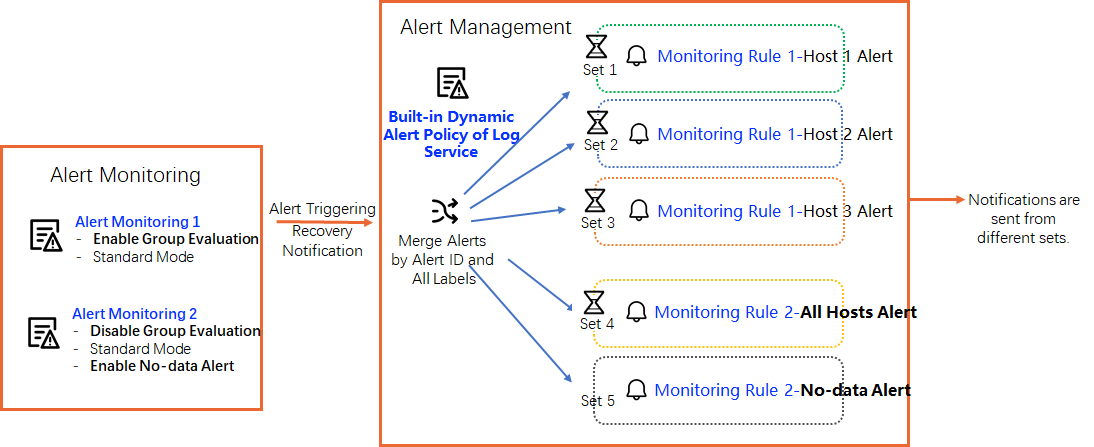
In the route and merge settings, set grouping baseline to alert monitoring rule + all tags so that alerts are grouped into different sets. For example, consider the following two alert monitoring rules:
-
For alert monitoring rule 1, group evaluation is enabled. In its Alert Policy, Advanced Mode is disabled, and grouping baseline is set to alert monitoring rule + all tags. Alert Management sends separate notifications for host 1, host 2, and host 3.
-
For alert monitoring rule 2, group evaluation is disabled. Its Alert Policy also has Advanced Mode disabled, and grouping baseline is set to alert monitoring rule + all tags. Alert Management sends a single notification that includes all hosts.