AliyunPipelineConfig parameters
Define log collection rules in a structured YAML file and submit the file by using kubectl to create a ClusterAliyunPipelineConfig. This topic describes the YAML file structure and field definitions.
The Custom Resource (CR) is the source of truth for collection configurations created by using a CustomResourceDefinition (CRD). Do not modify these configurations in the Simple Log Service console. Changes made in the console are overwritten by the CR, which may cause data format errors or data loss.
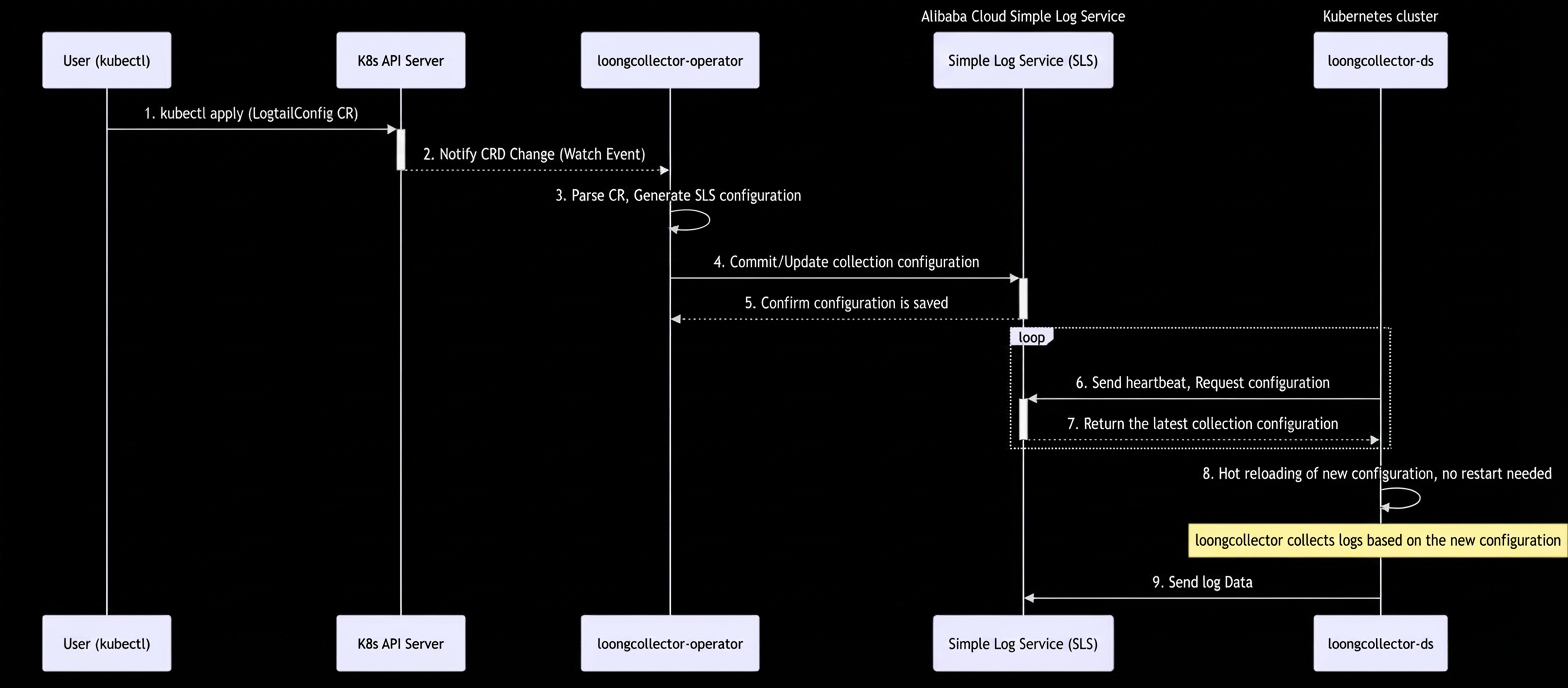
How it works
-
Create a CR: Define collection rules in a
ClusterAliyunPipelineConfigYAML file and then submit the file using kubectl. -
Controller monitors changes: The loongcollector-operator continuously monitors CRs in the cluster for changes.
-
Sync configuration: When a change to a CR is detected, the operator converts the CR into a specific configuration and submits it to the specified project.
-
Collector pulls the latest configuration: The loongcollector-ds periodically sends heartbeats to Simple Log Service to pull the latest collection configuration and then hot-reloads it.
-
Start collection and reporting: The loongcollector-ds collects logs based on the latest configuration and sends the logs to SLS using the configured endpoint.
Basic fields
All configurations must start by defining the API version and resource type as follows:
apiVersion: telemetry.alibabacloud.com/v1alpha1
kind: ClusterAliyunPipelineConfig
Structure example
apiVersion: telemetry.alibabacloud.com/v1alpha1 # Use the default value. Do not modify.
kind: ClusterAliyunPipelineConfig               # Use the default value. Do not modify.
metadata:
  name: test-config                             # Set the resource name. It must be unique within the current Kubernetes cluster.
spec:
  project:                                      # Set the name of the destination project.
    name: k8s-your-project
  config:                                       # Set the Logtail collection configuration.
    inputs:                                     # Set the input plugins for the Logtail collection configuration.
      ...
    flushers:                                   # Set the output plugins for the Logtail collection configuration.
      ...
Core parameters
metadata.name
The name of the collection configuration. Required. The name must be unique within the project and cannot be changed after creation.
|
Naming convention:
|
Example: |
spec.project
The target project for the collection configuration.
The project cannot be changed after the CR is created. To switch to a different project, create a new CR.
|
Parameter |
Data type |
Required |
Description |
|
name |
string |
Yes |
The name of the destination project. If the project does not exist, it is automatically created. |
|
description |
string |
No |
The description of the project. This parameter takes effect only when the project is created. |
|
endpoint |
string |
No |
The endpoint of the region where the project is located. The default value is the region of the cluster.
|
|
uid |
string |
No |
The UID of the Alibaba Cloud account that owns the destination project. The default value is the UID of the Alibaba Cloud account to which the current cluster belongs.
|
spec.config
The main body of the collection configuration, which defines the input, processing, and output plugins.
|
Sub-field |
Type |
Required |
Description |
|
|
string |
No |
A log sample. You can provide multiple logs. The total length cannot exceed 1,500 bytes. |
|
|
object |
No |
|
|
|
List of objects |
Yes |
A list of input plugins. Only one input plugin is allowed. |
|
|
List of objects |
No |
A list of processing plugins: |
|
|
List of objects |
Yes |
A list of output plugins. Currently, only one |
spec.LogStores
Optional. Declares the Logstores to create automatically. Note the following:
-
Effective only on creation: All parameters except for
nameapply only when a Logstore is created. If the Logstore already exists, the system ignores these settings and does not modify the existing Logstore properties. -
Does not determine the data destination: This list does not determine the destination Logstore for logs. The actual destination is determined by the output plugin in
config.flushers, such asflusher_sls. -
Optional configuration: If the destination Logstore already exists, you do not need to include it in this configuration.
-
Supports only add and delete operations: You can add new Logstores to the list or remove items from it. However, you cannot modify this configuration to change the properties of an existing Logstore, such as its TTL or shard count. To modify these properties, use the console or an API operation.
|
Parameter |
Data type |
Required |
Description |
|
name |
string |
Yes |
The name of the Logstore to create. |
|
queryMode |
string |
No |
Logstore specifications. The default value is
|
|
ttl |
int |
No |
The data retention period in days. Valid values: 1 to 3650. The default value is 30. A value of 3650 indicates permanent storage. |
|
hotTtl |
int |
No |
The hot data storage period in days. The default value is 0. The value must be less than ttl and greater than or equal to 7. |
|
infrequentAccessTTL |
int |
No |
The infrequent access storage period for the target LogStore, in days. The default value is 0. The value must be greater than or equal to 30 and less than ttl, and the hotTtl parameter must be specified. If hotTtl + infrequentAccessTTL is not equal to ttl, the following condition must also be met: |
|
shardCount |
int |
No |
The number of shards. The default value is 2. Valid values: 1 to 100. |
|
maxSplitShard |
int |
No |
The maximum number of shards that can be automatically split. The default value is 64. Valid values: 1 to 256. |
|
autoSplit |
bool |
No |
Specifies whether to enable automatic shard splitting. Default value: true. |
|
telemetryType |
string |
No |
The type of observable data. The default value is None. Valid values:
|
|
appendMeta |
bool |
No |
Specifies whether to record the public IP address and log reception time. Default value: true.
|
|
enableTracking |
bool |
No |
Specifies whether to enable web tracking. Default value: false. |
|
encryptConf |
object |
No |
The encryption configuration data structure. It contains the |
|
meteringMode |
string |
No |
Billing mode. For more information, see Manage a logstore. This field is empty by default. Valid values:
Note
A Logstore with queryMode set to query supports only the pay-by-feature billing mode. If pay-by-ingested-data is not enabled for your account, you cannot set this parameter to ChargeByDataIngest. |
|
index |
object |
No |
The index configuration. This parameter applies only when the LogStore is created. For the format, see index. This feature requires |
spec.machineGroups
The machine groups that can use this collection configuration.
-
Default behavior: When LoongCollector is installed, the system automatically creates a machine group named
k8s-group-${clusterId}. If you do not explicitly specify themachineGroupsparameter, this collection configuration is associated with that machine group by default. -
Synchronization mechanism: The
loongcollector-operatorensures that the machine groups associated with the collection configuration strictly match the list defined inmachineGroups. The system automatically disassociates any machine group that is not in this list. -
Automatic creation support: If a specified machine group does not exist, the system automatically creates an identifier-based machine group with the same name and attaches it to the current collection configuration.
|
Parameter |
Data type |
Required |
Description |
|
name |
string |
No |
The name of the machine group to associate. |
spec.enableUpgradeOverride
Optional. Specifies whether the system can overwrite previous configurations to resolve conflicts between different versions of collection configurations. Default value: false.
-
true: Theloongcollector-operatoroverwrites and upgrades the existing collection configuration defined by AliyunLogConfig. -
false: If a conflict exists in the collection configuration, applying the AliyunPipelineConfig fails.
Scenario: A conflict occurs when an AliyunLogConfig resource that defines a collection configuration already exists in the cluster, and you apply an AliyunPipelineConfig that references the same collection configuration.
Definition of the same collection configuration:
-
Same project
-
AliyunLogConfig: Uses the cluster's default project orspec.project. -
AliyunPipelineConfig: Usesspec.project.name.
-
-
Same collection configuration name
-
AliyunLogConfig:spec.logtailConfig.configName -
AliyunPipelineConfig:metadata.name
-
Upgrade process:
-
Apply new configuration: The controller applies the
ClusterAliyunPipelineConfigto update the log collection configuration. -
Remove legacy configuration: After a successful update, the controller automatically deletes the corresponding legacy
AliyunLogConfigresource from the cluster. -
Migration complete: The migration from the legacy configuration to the new configuration is complete.