UNNEST clause
Log fields can contain array or map values. Use the UNNEST clause to expand these values into multiple rows for querying and analysis.
Syntax
-
Expand an array into multiple rows in a single column named column_name.
UNNEST(x) AS table_alias(column_name) -
Expand a map into multiple rows with columns named key_name and value_name.
UNNEST(y) AS table(key_name,value_name)
If your data is a string, parse it into a JSON object and cast it to the required array or map type. For example, use try_cast(json_parse(array_column) as array(bigint)). See type conversion functions for details.
Parameters
|
Parameter |
Description |
|
x |
An expression that evaluates to an array. |
|
column_name |
The name of the output column that will contain the |
|
y |
An expression that evaluates to a map. |
|
key_name |
The name of the output column that will contain the |
|
value_name |
The name of the output column that will contain the |
Examples
Example 1
Expand the array value of the number field into multiple rows.
-
Sample field
number:[49, 50, 45, 47, 50] -
Query and analysis statement
* | SELECT a FROM log, UNNEST(cast(json_parse(number) AS array(bigint))) AS t(a) -
The query returns column a with the expanded elements: 49, 50, 45, 47, and 50.
Example 2
Expand the array value of the number field into multiple rows and calculate the sum.
-
Sample field
This sample shows a single log. The sum is calculated across all matching logs by aggregating the number values.
number:[49, 50, 45, 47, 50] -
Query and analysis statement
* | SELECT sum(a) AS sum FROM log, UNNEST(cast(json_parse(number) as array(bigint))) AS t(a) -
The query returns column sum with the value 368248, which is the total of all
numberelements across matching logs.
Example 3
Expand the array value of the number field into multiple rows and group the elements.
-
Sample field
number:[49, 50, 45, 47, 50] -
Query and analysis statement
* | SELECT a, count(*) AS count FROM log, UNNEST(cast(json_parse(number) as array(bigint))) AS t(a) GROUP BY a -
The result shows each element and its count. For example, element 50 appears 1194 times, while elements 47, 49, and 45 each appear 597 times.
Example 4
Expand the map value of the result field into multiple rows and columns.
-
Sample field
result:{ anomaly_type:"OverThreshold" dim_name:"request_time" is_anomaly:true score:1 value:"3.000000"} -
Query and analysis statement
* |
select
  key,
  value
FROM  log,
  UNNEST(
    try_cast(json_parse(result) as map(varchar, varchar))
  ) AS t(key, value)
Example 5
Expand the map value of the result field and group by key.
-
Sample field
result:{ anomaly_type:"OverThreshold" dim_name:"request_time" is_anomaly:true score:1 value:"3.000000"} -
Query and analysis statement
* | select key, count(*) AS count FROM log, UNNEST( try_cast(json_parse(result) as map(varchar, varchar)) ) AS t(key, value) GROUP BY key -
The result shows a
countof 5422 for each of the five keys (anomaly_type,dim_name,is_anomaly,score, andvalue), confirming that each log contains the same set of key-value pairs.
Example 6
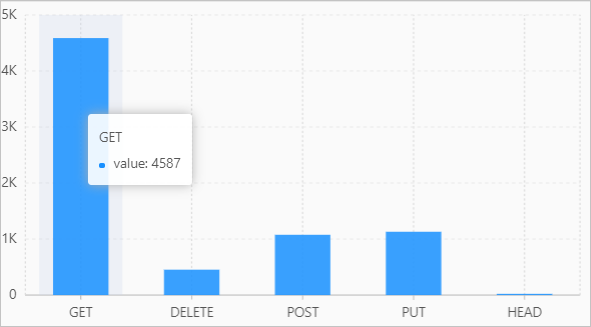
Use the histogram function to count requests by method, then expand the resulting map with UNNEST to display the data on a column chart.
-
Query and analysis statement
* | SELECT key, value FROM( SELECT histogram(request_method) AS result FROM log ), UNNEST(result) AS t(key, value) -
Query and analysis result