Send HTTP requests (Java)
This topic describes how to use Java in an API subscriber application to send HTTP requests to the gateway.
The gateway provides a client demo for your reference. After you download the API Subscriber Demo, you can find the demo code in the src/test/java/com/alipay/gateway/web/test/usercase/mainchain/http/ directory.
Prerequisites
Before you begin, complete the following tasks:
Create an application in the API Gateway console. For more information, see Create an application.
Provide the AppID of your application to the API publisher to obtain authorization. For more information, see Grant API permissions.
Obtain the following service configuration information. For more information, see Obtain server-side information.
The AccessKey pair of the application (AccessKey ID and AccessKey secret)
The domain name (host), URI of the request (path), method, and request body of the API
Procedure
API Gateway provides a Java software development kit (SDK) named gateway-sdk. This SDK handles signing, encryption, and signature verification. It also supports serialization and deserialization by default. Follow these steps to use the SDK to call HTTP services:
Import the SDK
Add the following SDK dependency to your project's pom.xml file.
<dependency>
      <groupId>com.alipay.sofa</groupId>
      <artifactId>gateway-sdk</artifactId>
       <version>2.5.0</version>
</dependency>
Create an APIClient
Use your AccessKey ID, AccessKey secret, and host to create an APIClient. The following code provides an example:
If key-based authentication is enabled for the API, you must configure the AccessKey ID and AccessKey secret in your project. We recommend using startup parameters or environment variables for this configuration.
# The AccessKey ID and AccessKey secret for client requests are the key information of the application.
gateway.accessKey=<yourAccessKeyId>
gateway.secretKey=<yourAccessKeySecret>
apigateway.url=<yourGatewayURL>
apigateway.publicKey=<yourPublicKey>
@Value("${gateway.accessKey}")
private String accessKey;
@Value("${gateway.secretKey}")
private String secretKey;
@Value("${apigateway.url}")
private String gatewayurl;
@Value("${apigateway.publicKey}")
private final String publicKey;
@Before
public void initClient() {
// Initialize the request client.
ApiSecretKey apiSecretKey = new ApiSecretKey(gateway.accessKey, gateway.secretKey);
List<ApiSecretKey> secretKeys = new ArrayList<>();
// If signing is not required, do not add secretKeys.
secretKeys.add(apiSecretKey);
// Client without signing.
apiClientNoAuth = new DefaultApiClient(gatewayUrl);
// Client with signing.
apiClient = new DefaultApiClient(gatewayUrl, secretKeys);
// Client with encryption. The encryption algorithm is RSA.
// Note: Requests that require encryption must include secretKeys.
encryptApiClient = new DefaultApiClient(gatewayUrl, secretKeys, EncryptEnum.RSA, publicKey);
// Note: Create only one of the preceding clients as needed for your scenario.
}Send a call request
After you configure the apiClient, you can call the API. The response is automatically deserialized into a response object that you can use directly. The following code provides an example:
    @Test
    public void testNoSignHttp() {
        GwSdkApiRequest request = new GwSdkApiRequest();
        request.setPath("simple/demo");// The API path. Do not add a forward slash (/) at the beginning. The SDK automatically adds a forward slash (/) to the path.
       	request.setRequestType("POST");// The request method: POST, GET, PUT, or DELETE.
      	// Specifies whether to enable encryption. The default value is false.
        request.setNeedEncrypt(false);

        // Specifies whether to perform signature verification on the response.
        request.setClientCheckSign(false);

     		 // If the gateway does not use a wildcard domain name proxy or DNS parsing, you must pass the request header. Key: x-gateway-host. Value: API group domain name.
        request.getHeaderParams().put("x-gateway-host", CommonUtils.buildDomain(getGroupId()));
				/*Specify the input parameters. This is an object that can pass an entity class as a parameter. To pass parameters as a query, append the parameters to the gatewayUrl.
      	Note: If the backend protocol of the API is SOFARPC or DUBBO, the input parameters must be consistent with the input parameters of the backend service interface.
        Otherwise, serialization may fail or the interface may not be found. If a parameter field is empty, you must still pass it, for example, {"key":null}.
      	**/
        request.setBody("{\"name\":\"tom\",\"age\":null}");
        ApiResponse response = apiClient.execute(request);

        System.out.println(JSON.toJSONString(response));
    }
The gateway currently requires a domain name to match APIs. If the domain name cannot be accessed directly, you can pass it in the header. For more information, see Set the host in the header.
Set the host in the header
If the gateway domain name is not directly accessible, you can send a request to the gateway and set the host in the header.
The following code provides an example request:
Before you send a request to the gateway, obtain the API group domain name and the API Gateway public domain name.
If key-based authentication is enabled for the API, you must configure the AccessKey ID and AccessKey secret in your project. We recommend using startup parameters or environment variables for this configuration.
# The AccessKey ID and AccessKey secret for client requests are the key information of the application.
gateway.accessKey=<yourAccessKeyId>
gateway.secretKey=<yourAccessKeySecret>
apigateway.url=<yourGatewayURL>
   @Value("${gateway.accessKey}")
   private String accessKey;

   @Value("${gateway.secretKey}")
   private String secretKey;

    @Value("${apigateway.url}")
    private String gatewayurl;

    @Before
    public void initClient() {
        // Initialize the request client.
        ApiSecretKey apiSecretKey = new ApiSecretKey(gateway.accessKey, gateway.secretKey);
        List<ApiSecretKey> secretKeys = new ArrayList<>();
        secretKeys.add(apiSecretKey);
        apiClient = new DefaultApiClient(gatewayUrl, secretKeys);
    }

    @Test
    public void testHost() {
        ParamPostRequest request = new ParamPostRequest();
        request.setPath("simple/demo");

        // !!! Set the group host in the header. !!!
        request.getHeaderParams().put("x-gateway-host","5jzkcn0idt3w****.apigateway.inc.alipay.net");

        // Specifies whether to perform signature verification on the response.
        request.setClientCheckSign(false);
        ApiResponse response = apiClient.execute(request);
        System.out.println(JSON.toJSONString(response));
    }
Notes
After you test an API in the staging environment, you can use the import and export feature to migrate the API to the production environment. The group domain name for the API changes, but the group name remains the same. To allow the client to distinguish between environments, configure the group domain name for the production environment in a configuration file.
Paste the following code into the *.properties file for the corresponding environment.
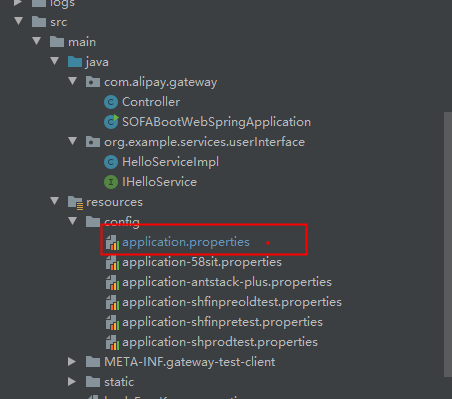
Configure in application.properties
subAppAccessKey=xxx
subAppSecretKey=xx
gatewayUrl=http://apigateway.alipay.com
# If there are multiple groups, you can configure multiple key-value domain names.
apihost=aaaa.apigateway.inc.alipay.net
apihost1=xxx.apigateway.inc.alipay.net
apihost1=zzzz.apigateway.inc.alipay.net


 @Value("${subAppAccessKey}")
 private String subAppAccessKey ;
 @Value("${subAppSecretKey}")
    private String subAppSecretKey;

 // !!! Send the request directly to the gateway. The domain name can be defined as needed.
 @Value("${gatewayUrl}")
    private String gatewayUrl;
 @Value("${apihost}")
    private String apihost;
    private ApiClient apiClient;

    @Before
    public void initClient() {
        // Initialize the request client.
        ApiSecretKey apiSecretKey = new ApiSecretKey(subAppAccessKey, subAppSecretKey);
        List<ApiSecretKey> secretKeys = new ArrayList<>();
        secretKeys.add(apiSecretKey);
        apiClient = new DefaultApiClient(gatewayUrl, secretKeys);
    }

    @Test
    public void testHost() {
        ParamPostRequest request = new ParamPostRequest();
        request.setPath("simple/demo");

        // !!! Set the group host in the header. !!!
        request.getHeaderParams().put("x-gateway-host",apihost);

        // Specifies whether to perform signature verification on the response.
        request.setClientCheckSign(false);
        ApiResponse response = apiClient.execute(request);
        System.out.println(JSON.toJSONString(response));
    }