Feature overview
To meet the compliance requirements for dual-recording (audio and video recording) in industries like insurance and banking, intelligent dual-recording quality inspection uses AI technology to intelligently monitor the sales process. The service detects key actions, spoken words, and identity documents, and performs face tracking for key roles. The on-device detection capability completes most compliance checks on-site, enabling real-time issue detection, alerts, and correction. This significantly improves user experience and first-pass rates.
You can use this SDK to build a client app for dual-recording quality inspection, tailored to your business needs.
How it works
Once you integrate the dual-recording SDK into a client app, the business process with the dual-recording cloud service works as follows: 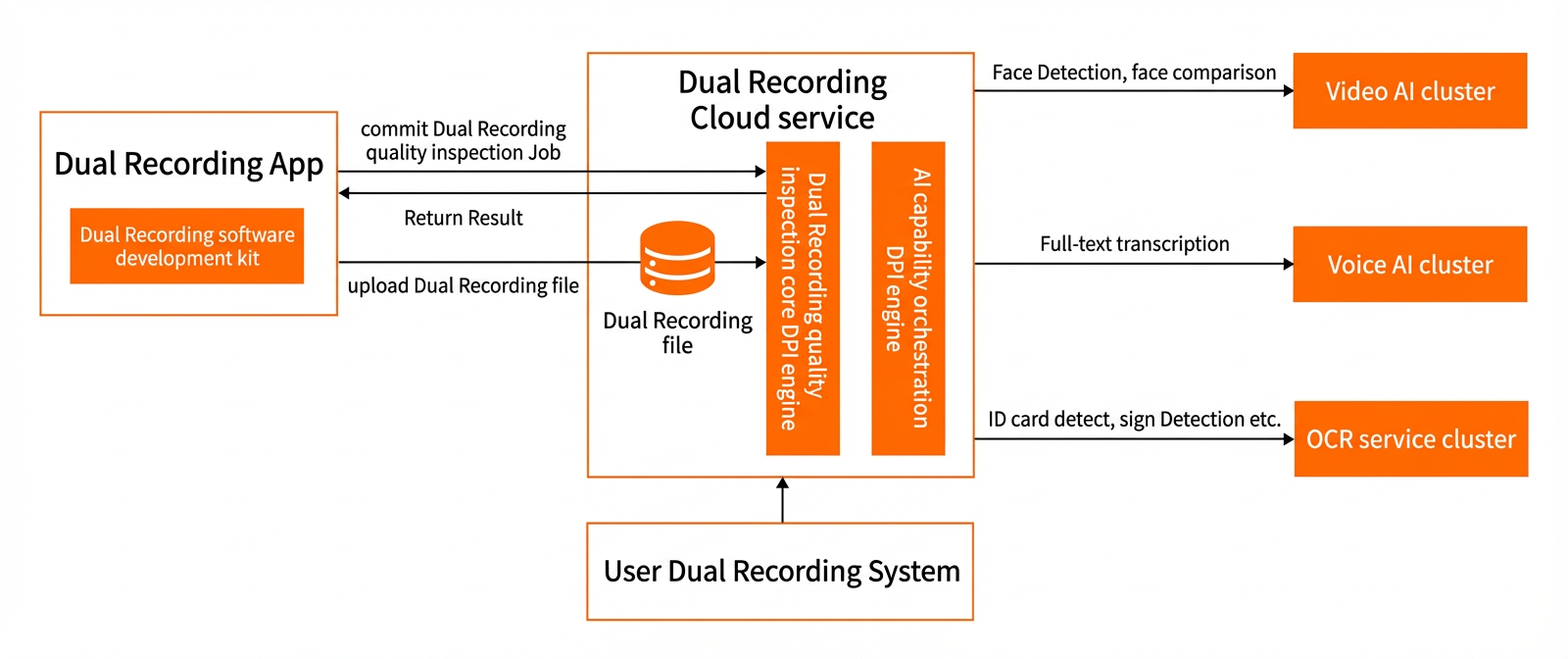
Local dual-recording quality inspection
For in-person, offline business scenarios, the local dual-recording quality inspection feature provides on-site, interactive detection.
Local dual-recording SDK features
When recording a video stream, the local dual-recording SDK invokes the appropriate detection model based on preset rules. It then processes the video according to the results from the detection model and returns the processed video and detection results to the client app.
Local dual-recording quality inspection features
Local dual-recording quality inspection includes the following features:
Multi-role face detection and tracking: Detects and tracks multiple faces in the same frame in real time.
Video fraud prevention: Identifies fraudulent activities within the video.
Image information recognition: Recognizes information from ID cards, such as ID number, name, and expiration date.
User response detection: Recognizes user responses offline.
Offline AI capability: Enables interactive, local dual-recording inspections without an internet connection, expanding the range of supported business scenarios.
Local dual-recording SDK detection capabilities
The local dual-recording SDK provides the following detection capabilities:
Face detection and information capture
Detects and captures all faces and their information from the video stream.
Supports capturing information for up to 4 faces.
The SDK's video processing from input stream to returned video takes 100 ms or less, with detection latency kept under 50 ms.
You can dynamically configure the detection frequency, for example, 5 times per second.
Face matching and tracking
Matches faces in the video with preset face information and continuously tracks the matched faces.
You can provide up to four sets of preset face information (face image and role name) for detection and tracking.
Allows you to set the similarity threshold for face matching.
You can mark matched faces in the video.
The SDK returns a face online message when it first detects a preset face in the video.
The SDK returns a face offline message if it does not detect a marked face within a specified time interval.
You can dynamically configure the detection frequency, for example, 5 times per second. The SDK calls the detection model at the specified frequency and returns the results to the client app.
The SDK's video processing from input stream to returned video takes 100 ms or less, with detection latency kept under 50 ms.
Wake-up word recognition
Detects specific wake-up words in the audio stream and returns the detected word. Detection latency is controlled within 50 ms.
The SDK includes 6 preset wake-up words.
You can add, modify, and delete wake-up words.
Liveness detection
Performs liveness detection to verify that the face in the video belongs to a real person and prevent spoofing attacks that use photos or videos. Detection latency is controlled within 50 ms.
The SDK returns the detection result and its confidence level.
Screen-swiping action recognition
Detects when a user swipes the screen of a mobile phone in the video. Detection latency is controlled within 50 ms.
Signature action recognition
Detects when a user signs on a phone or an iPad in the video. Detection latency is controlled within 50 ms.
Remote dual-recording quality inspection
For remote, online business scenarios, the remote dual-recording quality inspection feature provides real-time, interactive detection, helping users conduct business activities through remote video.
Remote dual-recording quality inspection features
Remote dual-recording quality inspection includes the following features:
Multi-role separation: Supports remote business activities with different roles, such as insurance agents and applicants.
Network-based access: Users can conduct business remotely with only an internet connection.
Role-based interactive detection: You can set different detection items for each endpoint in a session based on role.
Multi-client result synchronization: Detection results are synchronized across all clients in real time, enabling collaborative process control.
Cloud video recording: Records video streams from each endpoint and the combined video stream to the cloud. This eliminates the need for local recording and uploads.
Remote screen sharing: Enables more complex operations and collaboration for insurance agents.
Remote dual-recording SDK capabilities
Remote dual-recording quality inspection combines the capabilities of audio and video calls with a recording service. When participants are in different locations, they can communicate in real time while the session is recorded and quality-inspected. Its main components are audio and video calling, the recording service, and the detection capability.
Audio and video call
The audio and video call capability in the remote dual-recording SDK is provided by the mobile development platform (mPaaS) from Ant Group. It enables one-to-one calls and multi-party conferences. During a call, you can use features such as screen recording, screen sharing, and screenshots, as well as instant text messaging and file transfers. For more information about audio and video calls, see Product Introduction.
Recording service
The remote dual-recording SDK provides a recording service that captures and stores the entire remote session for future review. Recorded elements include audio and video calls, screenshots, voice broadcasts, interactive whiteboards, screen sharing, transaction operations, text chat content, and signing screens.
The recording service supports a primary/standby dual-recording mode to ensure high availability and stable recording.
Detection capability
The remote dual-recording SDK provides the same detection capabilities as the local dual-recording SDK. For more information, see Local dual-recording SDK detection capabilities.