How to get asynchronous task results using callbacks
This topic describes how to obtain asynchronous task results using callbacks.
Background information
The Tingwu task creation API is asynchronous. You can obtain the results for offline tasks and real-time meeting post-processing by calling the query API. Alternatively, you can configure a callback type and address in the console to receive event notifications when a Tingwu task is complete.
You can obtain Tingwu callback events in two ways:
Configure your own HTTP endpoint service to receive callback events.
Use Alibaba Cloud EventBridge to receive callback events. EventBridge then forwards the events to a target endpoint, such as a message queue, MNS, or a DingTalk robot.
Prerequisites
To activate the Tingwu service, see Quick Start.
If you want to route Tingwu callback events to Alibaba Cloud EventBridge, you must activate the service. For more information, see Activate EventBridge and grant permissions.
HTTP method
Step 1
Deploy a service to receive Tingwu callback messages. The following Java code shows an example of how to create an HTTP service and define an endpoint that accepts POST requests.
package com.alibaba.tingwu.tingwuCallbackDemo;

import org.springframework.boot.SpringApplication;
import org.springframework.boot.autoconfigure.SpringBootApplication;
import org.springframework.stereotype.Controller;
import org.springframework.web.bind.annotation.PostMapping;
import org.springframework.web.bind.annotation.RequestBody;
import org.springframework.web.bind.annotation.ResponseBody;

@Controller
@SpringBootApplication
public class TingwuCallbackDemoApplication {

    public static void main(String[] args) {
        SpringApplication.run(TingwuCallbackDemoApplication.class, args);
    }

    @PostMapping("/tingwu/callback")
    @ResponseBody
    public String receiveTingwuCallbackEvent(@RequestBody String data) {
        System.out.println("Received callback data: \n" + data);
        return "Callback received!";
    }
}
Configure your callback receiver service. You can specify the listener port, environment variables, and other settings. After you start the service, you can use a tool such as Postman or curl to simulate a callback request. This ensures that the service can correctly receive and process messages. For example:
curl --request POST 'http://{your-external-service-url}/tingwu/callback' \
--header 'Content-Type: application/json' \
--data '{
    "Code": "0",
    "Data": {
        "Test": "CheckSyncConf170168050****"
    },
    "Message": "success",
    "RequestId": "c919a74e337c40e2b9a5de1db003****"
}'Replace {your-external-service-url} with the public URL of your service.
Step 2
Go to the Tingwu console and click Create Project. Set Callback Method to HTTP post protocol. Enter the public URL of your service and click OK.
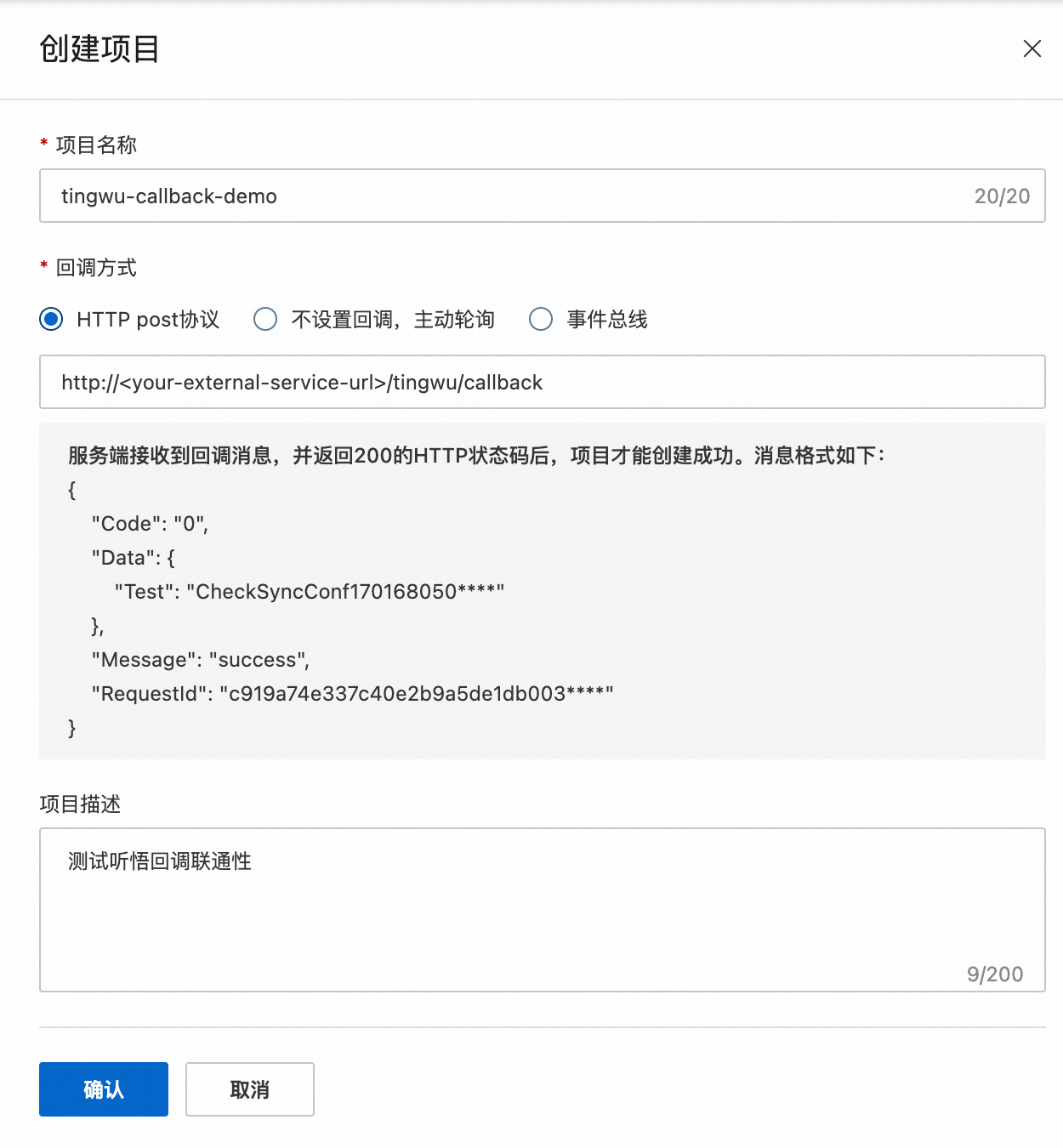
After the project is created, you can view the project information on the console homepage. The AppKey is a required parameter for submitting subsequent Tingwu tasks.

If the project fails to be created, it indicates that the Tingwu server-side encountered a problem when sending a POST request to the URL you entered. This usually happens if the URL is inaccessible or cannot process the callback message correctly. Check the following items:
Confirm that the URL is a public URL. Make sure the URL you provide is a public address accessible from the Internet. Internal or local addresses, such as localhost, cannot be accessed by external services.
Check firewall settings. If your service is deployed in an environment protected by a firewall, make sure the firewall rules allow external access to the URL. You may need to adjust your network settings to allow callback requests.
Check if an exception occurred on the server-side while processing the callback message.
Step 3
Create an offline transcription task. For more information, see Transcribe audio and video files offline. Set the AppKey parameter to the value generated in Step 2. Also, set the Input.ProgressiveCallbacksEnabled input parameter to true.
After you submit the task, monitor the logs of the callback receiver service. A Tingwu task triggers a callback when an AI sub-task is complete. The TaskStatus in the callback message is ONGOING. After all AI sub-tasks are complete, another callback is triggered, and the TaskStatus is COMPLETED. If an exception occurs in the Tingwu task, a callback is triggered immediately, and the TaskStatus is FAILED.
For example, if an offline task has only the file transcription and chapter summary features enabled, you will receive three callback messages. You will receive an ONGOING callback message when the file transcription task is complete, and another ONGOING callback message when the chapter summary task is complete, as shown below.
{
    "Code":"0",
    "Data":{
        "TaskId":"e8adc0b3bc4b42d898fcadb0********",
        "TaskStatus":"ONGOING",
        "TaskKey":"TingwuDemo",
        "Result":{
            "Transcription":"http://speech-swap.oss-cn-zhangjiakou.aliyuncs.com/tingwu_data/output/1738248129743478/e8adc0b3bc4b42d898fcadb0a1710635/e8adc0b3bc4b42d898fcadb0a1710635_Transcription_20231101141926.json?Expires=1698906034&LTAI****************&Signature=********NJlqSEWJxfkMwjwsHCA%3D"
        }
    },
    "Message":"success",
    "RequestId":"5cf2b587ac6e41e6a1f06ca1********"
}
When both tasks are complete, you will receive a COMPLETED callback message.
{
    "Code":"0",
    "Data":{
        "TaskId":"e8adc0b3bc4b42d898fcadb0********",
        "TaskStatus":"COMPLETED",
        "TaskKey":"TingwuDemo",
        "Result":{
            "AutoChapters":"http://speech-swap.oss-cn-zhangjiakou.aliyuncs.com/tingwu_data/output/1738248129743478/e8adc0b3bc4b42d898fcadb0a1710635/e8adc0b3bc4b42d898fcadb0a1710635_AutoChapters_20231101141955.json?Expires=1698906034&LTAI****************&Signature=********Ax9FvifYAO8dj4qzWg%3D",
            "Transcription":"http://speech-swap.oss-cn-zhangjiakou.aliyuncs.com/tingwu_data/output/1738248129743478/e8adc0b3bc4b42d898fcadb0a1710635/e8adc0b3bc4b42d898fcadb0a1710635_Transcription_20231101141926.json?Expires=1698906034&OSSAccessKeyId=yourAccessKeyID&Signature=********NJlqSEWJxfkMwjwsHCA%3D"
        }
    },
    "Message":"success",
    "RequestId":"9c60b07f152445349eaa6161********"
}
Alibaba Cloud EventBridge service
EventBridge is a serverless event bus service from Alibaba Cloud. It allows Alibaba Cloud services, custom applications, and Software as a Service (SaaS) applications to connect in a standardized and centralized manner. Tingwu can send callback messages to EventBridge. You can subscribe to the Tingwu event source and configure event rules for your business. EventBridge then delivers the callback messages to target services, such as Function Compute, message queues, and DingTalk robots. For more information, see What is EventBridge?.
Step 1
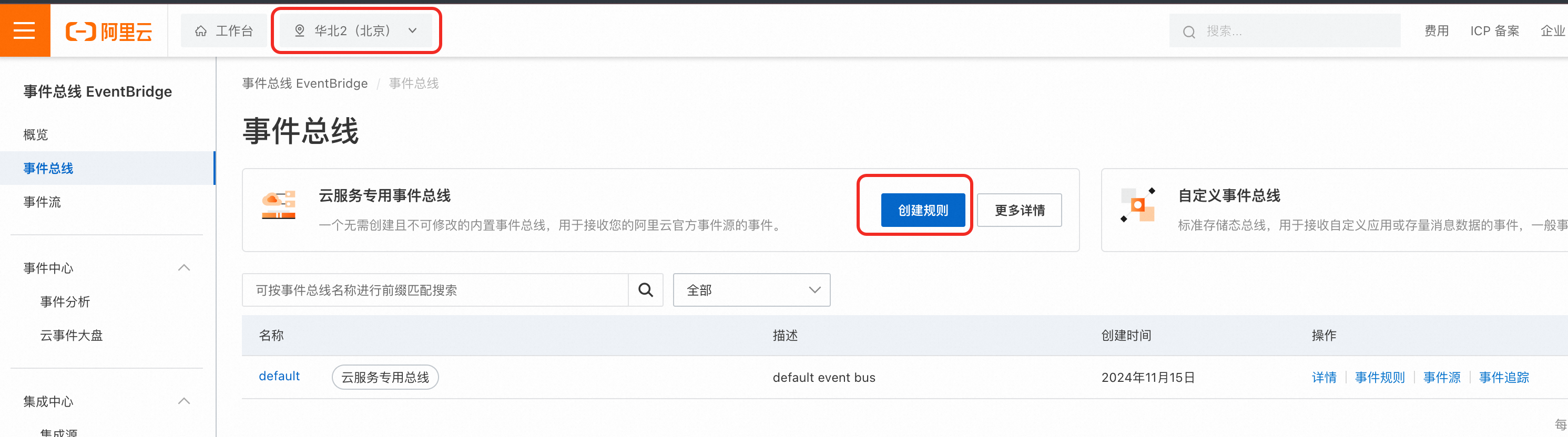
Activate EventBridge and grant permissions. Go to the EventBridge console. In the upper-left corner, select China (Beijing) as the region and click Create Rule.
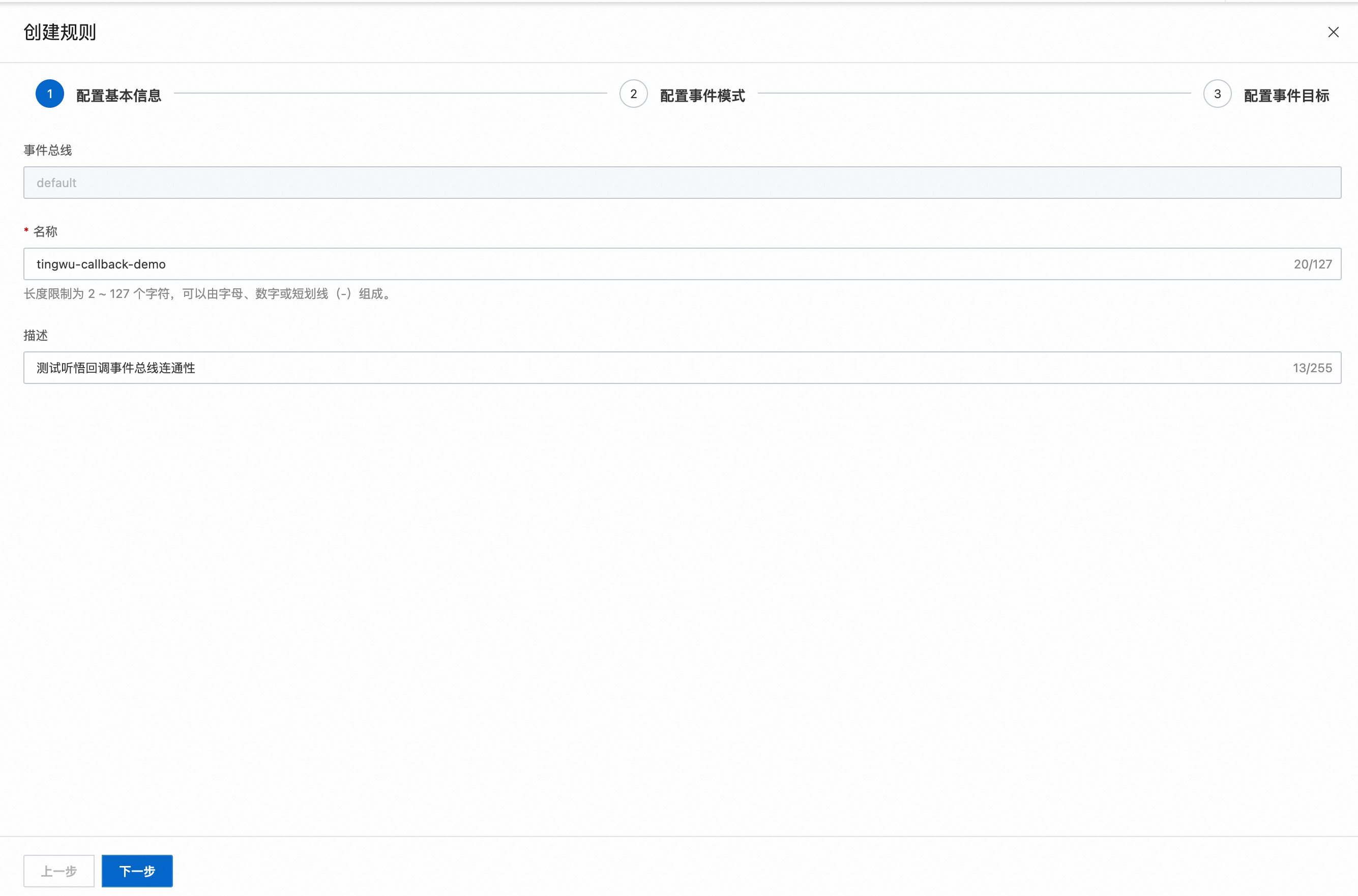
Enter the basic information and click Next.
For Event Source, select acs.tingwu. Select the event types as needed.
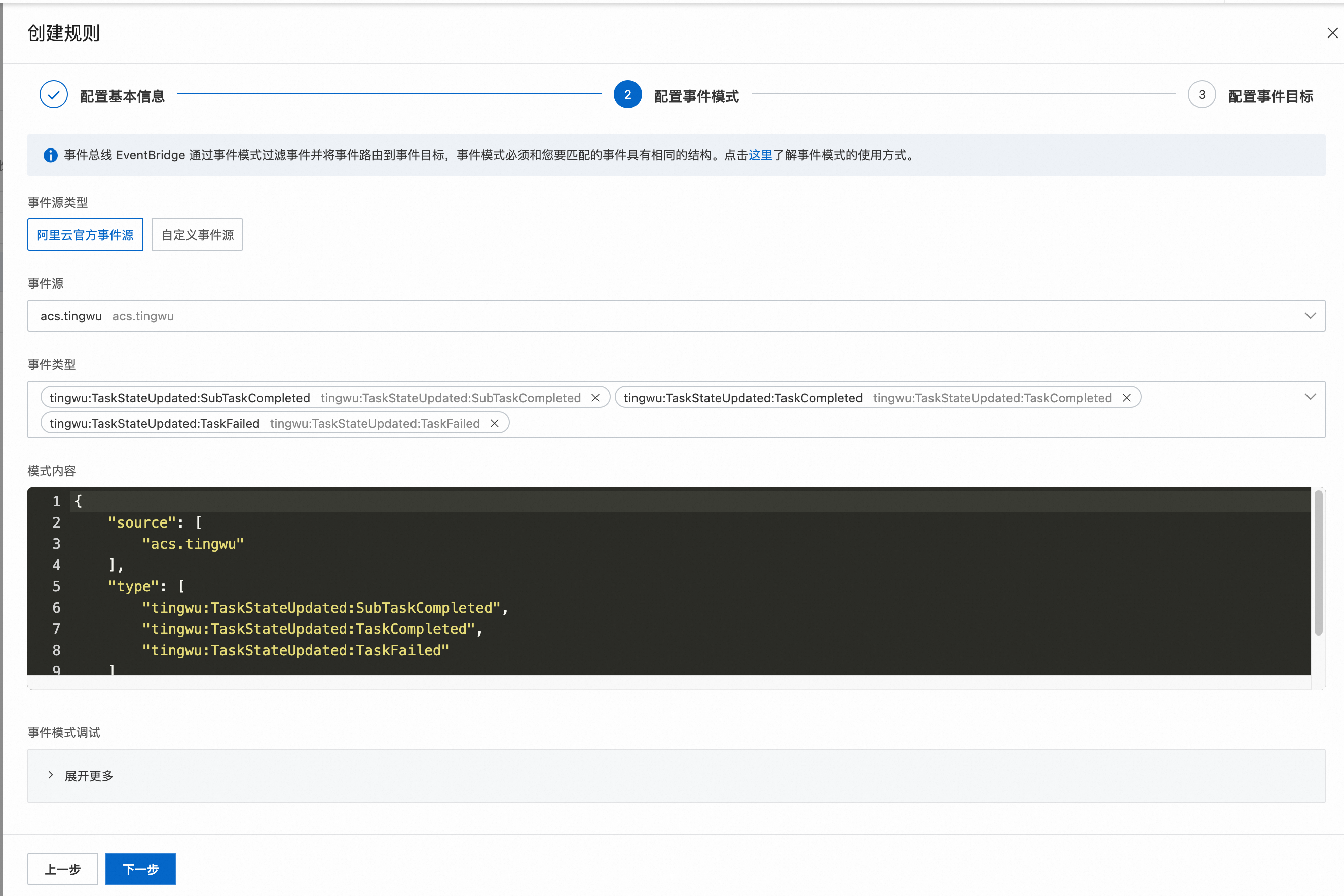
The event types and their descriptions are listed in the following table.
Event type |
Description |
tingwu:TaskStateUpdated:SubTaskCompleted |
Callback message sent after an AI sub-task is complete. |
tingwu:TaskStateUpdated:TaskCompleted |
Callback message sent after all AI sub-tasks are complete. |
tingwu:TaskStateUpdated:TaskFailed |
Callback message sent when a task fails. |
For example, if you only use the file transcription and chapter summary features, a SubTaskCompleted event is sent when the file transcription task is complete, and another is sent when the chapter summary task is complete. When both sub-tasks are complete, a TaskCompleted event is sent.
If you only care about the final task result, subscribe to the TaskCompleted and TaskFailed events. If you want to obtain the result immediately after a single sub-task is complete, instead of waiting for all sub-tasks to finish, subscribe to the SubTaskCompleted event.
After you complete the configuration, click Next to configure the event target. The following figure uses RocketMQ as an example. Select the instance and topic, and then click Create.
Step 2
Go to the Tingwu console and click Create Project. Set Callback Method to EventBridge and click OK.
After the project is created, you can view the project information on the console homepage. The AppKey is a required parameter for submitting subsequent Tingwu tasks.
Step 3
Create an offline transcription task. For more information, see Transcribe audio and video files offline. Set the AppKey parameter to the value generated in Step 2. Also, set the Input.ProgressiveCallbacksEnabled input parameter to true.
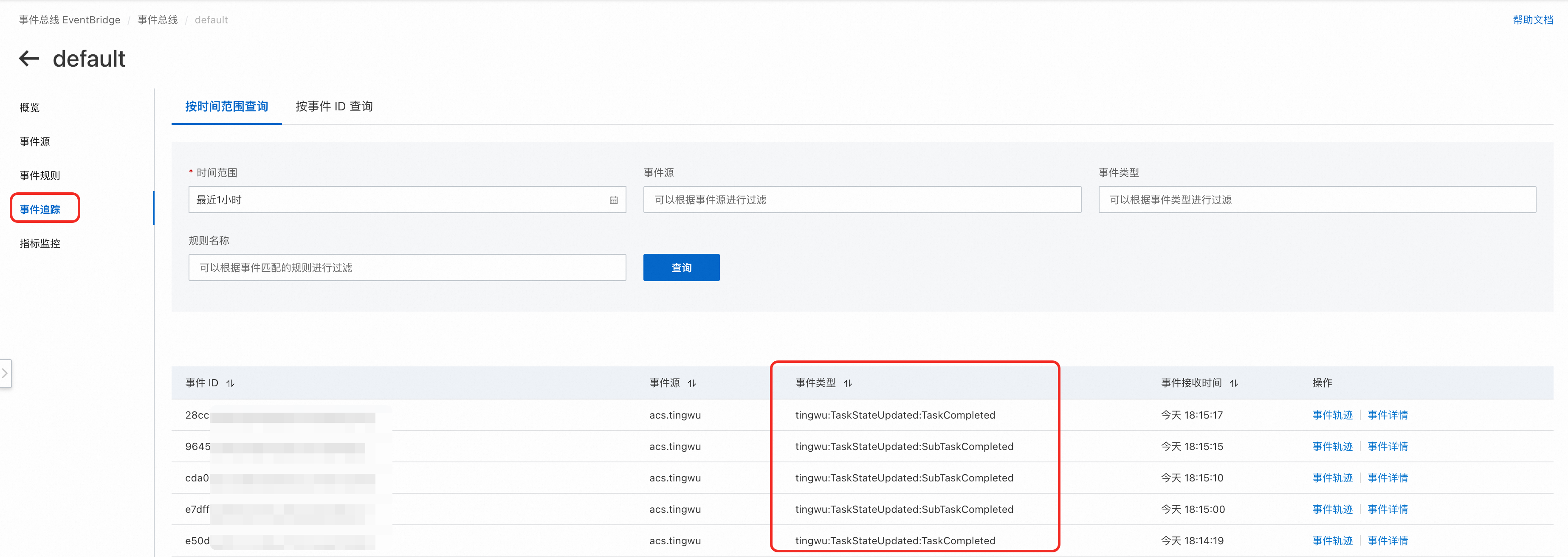
After the task is complete, go to the default page of EventBridge and select Event Trace to view the events that Tingwu sent to EventBridge. Because the target source configured in the example is RocketMQ, EventBridge routes these messages to your RocketMQ instance.
How to isolate different services
The EventBridge service receives callback messages for all Tingwu tasks under the same Alibaba Cloud account. If you have multiple services under the same account, you may need to isolate the callback messages for each service. To do this, you can use the Input.TaskKey parameter to distinguish between different services. For example, when Service A creates a Tingwu task, you can set the prefix of the Input.TaskKey parameter to TaskA.
In Step 1, if you want to subscribe only to callback messages where the Input.TaskKey prefix is TaskA, you can manually modify the event pattern as follows:
{
    "source": [
        "acs.tingwu"
    ],
    "type": [
        "tingwu:TaskStateUpdated:SubTaskCompleted",
        "tingwu:TaskStateUpdated:TaskCompleted",
        "tingwu:TaskStateUpdated:TaskFailed"
    ],
    "data": {
        "Data": {
            "TaskKey": [
                {
                    "prefix": "TaskA"
                }
            ]
        }
    }
}
You can also add more filtering rules. For more information, see Event patterns.