Alibaba Cloud proprietary cryptography
Alibaba Cloud proprietary cryptography encrypts your video data to prevent unauthorized redistribution and hotlinking. Even if a video is downloaded, it remains encrypted. This method is more secure and easier to implement than standard HLS encryption. This topic describes how to use Alibaba Cloud proprietary cryptography and provides suggestions for extended solutions.
Background
Standard hotlink protection cannot prevent authorized users, such as those who make a one-time payment, from obtaining a valid playback URL, downloading the video, and then redistributing it. Therefore, hotlink protection alone is insufficient for video copyright protection. If video files are leaked, it can cause significant financial losses for content creators who use a pay-to-view model.
Benefits
Alibaba Cloud proprietary cryptography encrypts the video data itself. Video files remain encrypted even after they are downloaded, which prevents unauthorized redistribution. Video encryption effectively prevents content leaks and hotlinking and is widely used for online copyrighted videos in fields such as online education, finance, corporate training, and exclusive series.
This feature uses Alibaba Cloud's proprietary encryption algorithms to provide a high level of security, helping you protect your video resources conveniently and efficiently.
Each media file is encrypted with a unique key. This prevents large-scale security breaches that could result from a single, leaked key.
ApsaraVideo VOD provides a comprehensive permission management system using RAM users and playback credentials.
ApsaraVideo VOD uses envelope encryption, which involves a ciphertext key and a plaintext key. The plaintext key is never stored and exists only in memory during the encryption process.
ApsaraVideo VOD provides a secure ApsaraVideo Player SDK.
Encryption type | HLS | MP4 | Features | Description |
Alibaba Cloud proprietary cryptography | Supported | Not supported | An end-to-end video encryption solution that uses a proprietary algorithm and ensures secure transmission. |
|
Alibaba Cloud License-based proprietary cryptography | Supported | Supported | This method avoids an extra HTTP request for key retrieval during playback, improving startup speed. |
|
How it works
The Alibaba Cloud proprietary cryptography solution involves two main processes: encryption and transcoding and decryption and playback.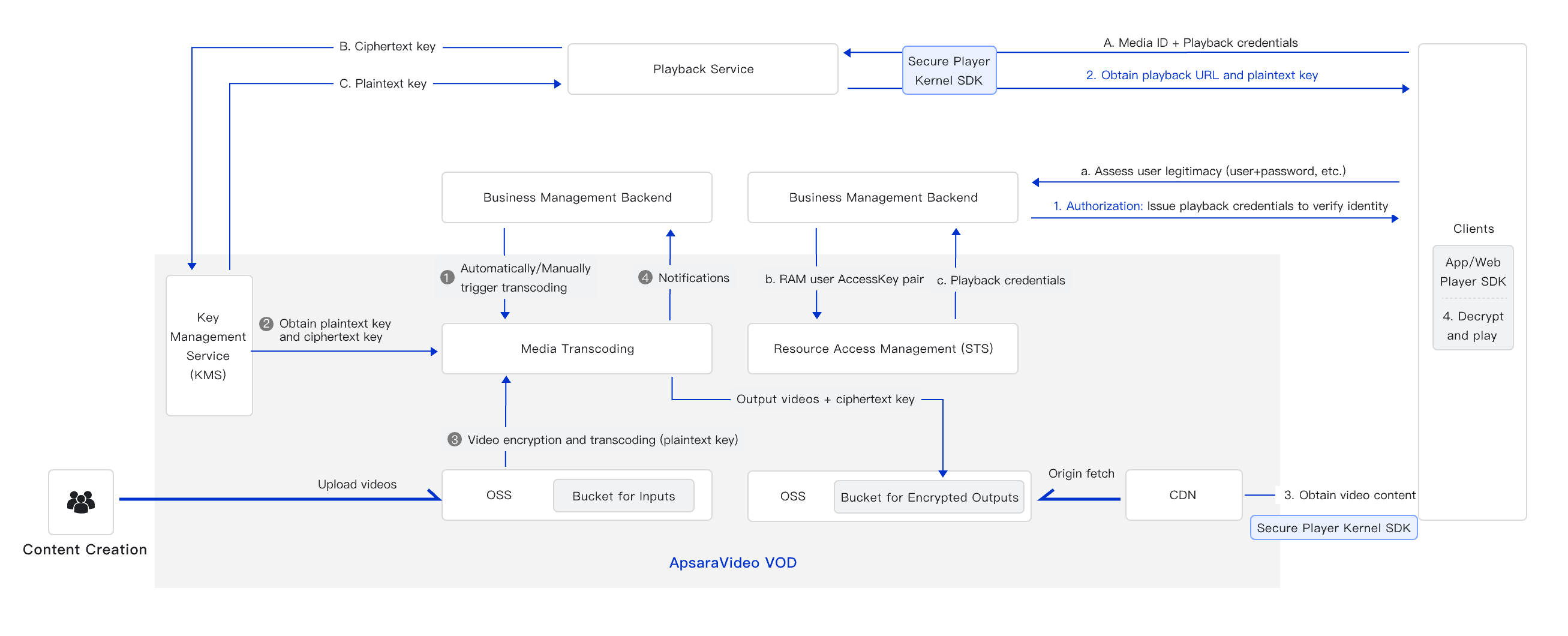
Encryption and transcoding
The application backend requests video encryption
Your application submits a transcoding job that requests data encryption.
ApsaraVideo VOD obtains the encryption key
The ApsaraVideo VOD service uses Key Management Service (KMS) to generate a plaintext key and a ciphertext key.
The video is encrypted and transcoded
The plaintext key is used to encrypt the video file. After transcoding is complete, the plaintext key is discarded.
Transcoding is complete and a notification is sent
ApsaraVideo VOD saves the encrypted video file and sends a notification to your application.
Decryption and playback
Your application authorizes playback
When a user requests a video from your mobile app or website, the request is sent to your backend service. Your backend service can then implement access control logic, such as requiring users to log in. We recommend using HTTPS. If playback is authorized, your service uses the AccessKey pair of a RAM user to access STS, obtain a playback credential, and return it to the app or website.
The player obtains the playback URL
The app or website passes the playback credential and media ID to the ApsaraVideo VOD service. The ApsaraVideo Player SDK then automatically handles the remaining steps:
It retrieves the playback URLs for various formats and resolutions from the ApsaraVideo VOD service based on the media ID.
It retrieves the corresponding decryption key for the encrypted video.
The video is decrypted and played
The secure ApsaraVideo Player SDK uses the decryption key to decrypt the content and play the video.
Before you begin
Alibaba Cloud proprietary cryptography is a free service, but you are charged for the required video transcoding operations. For more information, see Media Transcoding.
Encrypted content can only be decrypted and played by using the ApsaraVideo Player SDK provided by ApsaraVideo VOD.
Alibaba Cloud proprietary cryptography only prevents unauthorized downloading and redistribution of the original video source. It does not prevent screen recording or screen capture. Due to sandboxed container restrictions in browsers and environments such as WeChat H5, the ApsaraVideo Player SDK cannot control system-level screen recording or screen capture. If you need to trace the source of leaked content and deter unauthorized capture, we recommend that you embed a dynamic watermark in your videos.
Enabling Alibaba Cloud proprietary cryptography does not affect the read and write permissions of the underlying OSS bucket. Videos that are not encrypted retain their original access attributes (for example, public read). Proprietary cryptography only encrypts the transcoded output video file. You must use the ApsaraVideo Player SDK (Aliplayer) to decrypt and play the video; the encrypted file cannot be accessed or downloaded directly through its URL.
Procedure
Prerequisites
ApsaraVideo VOD is activated. For more information, see Activate ApsaraVideo VOD.
An accelerated domain name is configured in ApsaraVideo VOD. For more information, see Add an accelerated domain name.
Different encryption types support different playback platforms. Evaluate and select the appropriate type based on your business requirements. For more information about supported playback protocols, see Playback compatibility.
Encrypt the video
Create a transcoding template group for proprietary encryption.
Console
Log on to the ApsaraVideo VOD console. In the left-side navigation pane, choose Configuration Management > Media Processing > Transcoding Template Groups.
On the Transcoding Template Groups page, click Create Transcoding Template Group. Then, create an Audio and Video Transcoding Template and configure it for Alibaba Cloud proprietary cryptography.
The following steps describe how to add a Regular Transcoding template:
In the Basics section, set Encapsulation Format to HLS (.m3u8+ts).
In the Advanced Parameters section, enable Alibaba Cloud Private Encryption.
Configure other parameters as needed. For detailed parameter descriptions, see Transcoding templates.
Click Save to create the template.
After the template is created, you can find its ID on the Transcoding Template Groups page. Save this ID to use when you start an encryption and transcoding job.
OpenAPI
Call the AddTranscodeTemplateGroup operation and set the encryption type for the transcoding template group by specifying the
EncryptTypeparameter in theTranscodeTemplate'sEncryptSettingfield.(Optional) Create a workflow and associate it with the proprietary encryption transcoding template group.
In a workflow, you can arrange media processing tasks such as transcoding, review, and snapshotting into a specific sequence. When a workflow is triggered during media upload or processing, the workflow automatically processes the media file according to this predefined sequence.
You can add a transcoding node to a workflow that uses your proprietary encryption transcoding template group. Currently, you can create workflows only on the console. For more information, see Workflows.
Start an encryption and transcoding job.
You can start a transcoding job by using either a transcoding template group or a workflow. For instructions on how to start a transcoding job on the console, see Step 2: Start transcoding. For instructions on how to use the OpenAPI, see Step 2: Start transcoding.
View the transcoding result.
Wait for asynchronous notifications
If you have configured event notifications for ApsaraVideo VOD, you will receive a Single Definition Transcoding Complete or All Definitions Transcoding Complete callback with details about the transcoding job.
Query the status synchronously
Play the video
Videos encrypted using Alibaba Cloud proprietary cryptography can only be decrypted and played with the ApsaraVideo Player SDK provided by ApsaraVideo VOD.
The ApsaraVideo Player SDK is available for multiple platforms, including iOS, Android, and web (HTML5 and Flash). You can integrate the SDK to play encrypted videos in your applications or on your websites.
Before you use the ApsaraVideo Player SDK, you must obtain a license for the player. For more information, see Manage licenses.
Before integrating the ApsaraVideo Player SDK, review its proprietary encryption compatibility across different platforms. For more information, see Player SDK encryption compatibility.
For steps on playing encrypted videos with the ApsaraVideo Player SDK, see Play an encrypted video.
Extended solutions
If your end users need to download videos for offline viewing, we recommend that you enable secure download to protect video content. For more information, see Download settings. This feature re-encrypts video files with a key. During playback, the SDK decrypts the downloaded video. This ensures that the offline video can be played only by your application, which enhances security.
Play content encrypted by MPS
m3u8 files that ApsaraVideo Media Processing (MPS) generates by using Alibaba Cloud proprietary cryptography are not automatically synchronized to the ApsaraVideo VOD media asset library. Playback methods that rely on VidAuth or VidSts require a VideoId from the ApsaraVideo VOD media asset library, so they cannot be used to directly play content generated by MPS. To play this content, use the ApsaraVideo Player SDK and pass the encrypted playback URL through UrlSource so that the SDK can decrypt and play the video. If you want to use VidAuth or VidSts to play the content, you must first manually import the MPS output into the ApsaraVideo VOD media asset library to obtain a VideoId.