Configure a timeout for origin HTTP requests
Set the origin HTTP request timeout to balance fetch reliability against connection efficiency.
Background information
The origin HTTP request duration covers the Layer 7 HTTP request time, excluding the Layer 4 TCP connection time.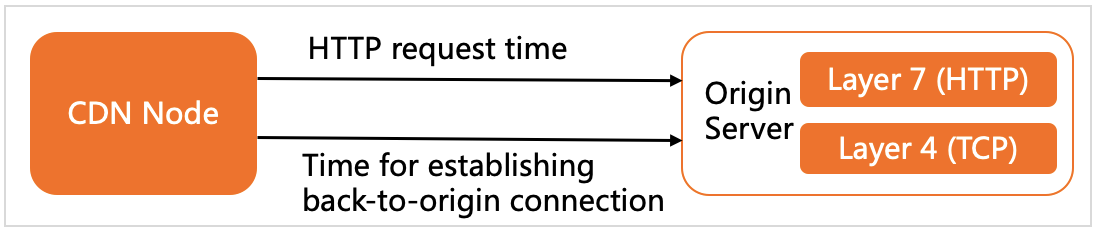
A timeout that is too short causes frequent failures during network fluctuations. A timeout that is too long lets failed requests occupy connections and block normal traffic. Set an appropriate timeout based on your network conditions and origin server capacity.
Usage notes
For ApsaraVideo VOD with CDN, the maximum timeout for the entire link cannot exceed 36 seconds, including internal links within POPs and links between POPs and the origin server.
Origin fetch retry, timeout, and probing
Origin fetch retry order:
Origin server addresses are retried in order of priority, from highest to lowest.
If multiple origin server addresses have the same priority, the node retries them according to their configured weight.
Origin fetch retry granularity:
Retries are performed at the IP address level. If an origin server is specified by a domain name, the system retries all IP addresses resolved from the domain name. A node attempts to connect to another available origin server only if connections to all IP addresses for the current origin server fail.
During a retry, the system automatically filters out unavailable origin servers listed in the dead table.
Status codes for origin fetch retries:
A CDN or node triggers an origin fetch retry when it receives a 5xx status code from the origin server.
-
Origin fetch timeout: A CDN POP retries immediately upon receiving a retry status code. If no retry status code is received, the POP retries after the configured timeout elapses.
-
Origin server TCP connection timeout: 10 seconds. To change this value, submit a ticket. Contact us.
Origin write timeout: 30 seconds by default (timeout for writing content to the origin server after a connection is established).
Origin read timeout: 30 seconds by default (the timeout for a CDN or node to receive the complete response from the origin server after a connection is established).
You can adjust the origin write timeout and origin read timeout by configuring the origin fetch HTTP request timeout.
-
-
Origin probing logic:
TCP connection failure: If a TCP connection between a CDN or node and an origin server IP address fails twice consecutively (for example, connection establishment fails or the connection times out), the CDN or node removes the IP address from the list of available origin servers and adds it to the dead table. This prevents subsequent requests from being sent to this IP address. The CDN or node then probes the IP address every 5 seconds by attempting to establish a TCP connection. If the probe is successful, the node restores the IP address to the list of available origin servers.
-
Normal TCP connection: If the TCP connection between a CDN POP and an origin IP address is normal but the POP receives a retry status code such as 5xx, a retry is triggered. The origin IP address stays in the available server list and continues to receive requests based on its weight. A Layer 7 HTTP failure does not block the origin IP address when the Layer 4 TCP connection is normal. To enable automatic blocking for Layer 7 failures, submit a ticket. Contact us.
Procedure
-
Log on to the ApsaraVideo VOD console.
In the left-side navigation pane, choose Configuration Management > CDN Configuration > Domain Names.
-
Find the target domain name and click Configure.
-
In the navigation pane on the left, click Back-to-Origin.
-
On the Configuration tab, in the Timeout for Origin HTTP Requests section, click Modify.
-
Set Timeout and click OK.