Usage analytics

更新时间:
复制 MD 格式

Usage Analytics uses data collected by the Alibaba Cloud Player SDK. It provides key metrics such as unique users, total play duration, and completion rate to help you analyze business performance and user behavior. This data complements playback data statistics to support your business decisions. This topic describes how to view metric data and trends.

Usage notes

Usage Analytics is a new ApsaraVideo VOD feature, currently in free public beta. Before using this feature, ensure you meet the following data collection requirements:

  • SDK requirements: You must use the MediaBox SDK. Ensure that you have a valid license and that the log reporting feature is enabled. This feature is supported by native client player SDK versions 5.4.9.2 and later, and web client player SDK versions 2.16.0 and later. To download the SDK, see Download Player SDK. For information about the license, see Manage licenses.

  • Supported media assets

    The current version collects data for the following:

    • Supported

      • Media assets transcoded by ApsaraVideo VOD.

      • Playback URLs that use the system's default transcoding output path and include a valid MediaId.

      • Playback URLs for videos transcoded using an ApsaraVideo VOD template group or workflow that include a valid MediaId.

    • Not supported

      • Media assets configured for original file distribution.

      • Videos distributed through OSS address registration without a MediaId.

      • Custom transcoding output paths where the MediaId cannot be recognized.

View usage analytics

  1. Log on to the ApsaraVideo VOD console.

  2. In the left-side navigation pane, choose Data Center > Usage Analytics.

  3. Set the query conditions as prompted on the page. The following table describes the available conditions.

    Note
    1. In general configurations, verify that the license region matches your business operation region. The default is Chinese mainland, Hong Kong, Macao, and Taiwan.

    2. The unique users and average plays per user metrics do not support filtering by domain name.

    Condition

    Description

    Application

    Search for or select an application under your account from the drop-down list.

    Client type

    The client type used for playback, such as web client or native client.

    Operating system

    Select an operating system from the drop-down list. By default, data for all systems is displayed. The mappings are as follows:

    • Web client: Includes Android, iOS, HarmonyOS, Windows, macOS, and Linux.

    • Native client: Includes Android, iOS, and HarmonyOS.

    Domain name

    Search for or select a domain name under your account from the drop-down list.

    Media asset

    By default, all media assets are included. You can also filter by a single media asset.

    Metric

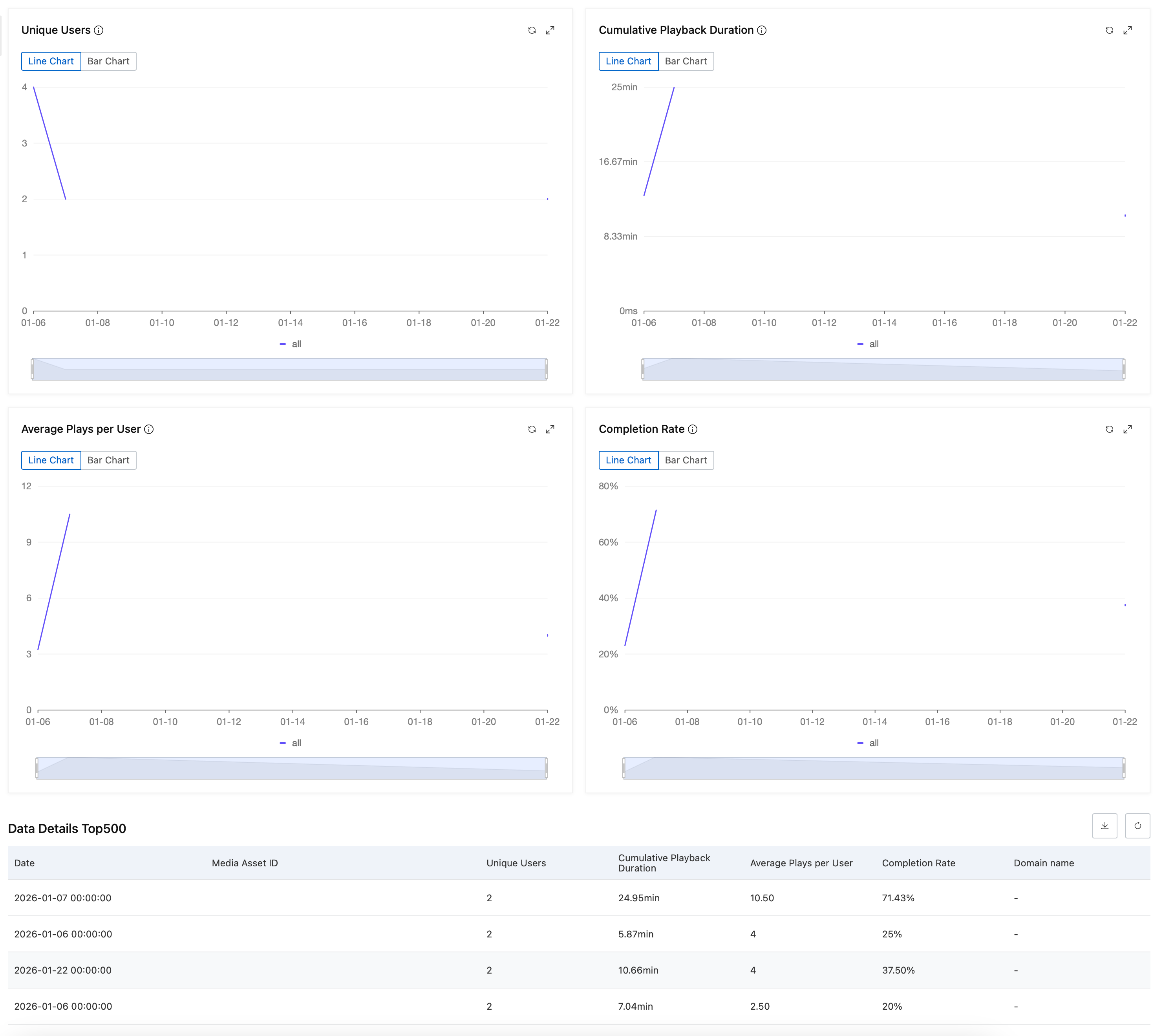
    Select the metrics to display from the drop-down list. This includes all seven metrics listed in the Key metrics section below. By default, unique users, total play duration, average plays per user, and completion rate are selected.

    Time range

    Supports period-over-period comparison. You can set a custom time range or select preset options such as Last 7 Days, Last 14 Days, or Last 30 Days.

    Note

    The default time range is the Last 7 Days. You can select data from the past year. The time range for a single query cannot exceed one month.

  4. Click Search. The real-time data and details for the selected metrics are displayed on cards. The query returns a maximum of 500 records.image

Key metrics

Unique users

Unique users

Definition:

The number of distinct users who played videos using the player SDK.

Calculation:

unique users = count(distinct(uuid)).

Significance:

Measures the number of active devices the player reaches, reflecting the size of your user base.

Scope and rules:

  • Devices are deduplicated based on a unique identifier, the uuid. The uuid is generated by a client-side algorithm. Uninstalling and reinstalling the app may change the uuid, resulting in overcounting users. For the web player SDK, clearing the browser cache or switching browsers also changes the uuid.

  • Only users who successfully start playback are counted.

Data source and unit:

A count of unique SDK device identifiers.

Total play duration

Total play duration

Definition:

The sum of the effective playback time for all users who successfully started playback, from the start of playback until they exit. This metric measures how deeply users engage with your video content.

Calculation:

total play duration = Sum of the viewing duration for all users who successfully started playback.

Scope and rules:

  • The total play duration excludes the following:

    • Time spent paused.

    • Time spent seeking by dragging the progress bar.

    • Time spent buffering due to network issues.

    • Time spent on retries due to errors.

    • Any other time the progress bar is paused.

  • Duration from looped playback is included in the statistics.

  • For playback at different speeds, the duration is based on the actual time watched. For example, if a 10-second video is played at 2x speed, the recorded play duration is 5 seconds.

Data source and unit:

The smallest unit is milliseconds (ms).

Average plays per user

Average plays per user

Definition:

The average number of successful plays per user. It reflects user activity and frequency of use. This metric can vary significantly between long-form and short-form video services.

Calculation:

average plays per user = actual plays / unique users.

Data source and unit:

A unitless value calculated by dividing total actual plays by unique users.

Completion rate

Completion rate

Definition:

The ratio of completed plays to the total number of actual plays. It is a key indicator of viewer engagement.

Calculation:

completion rate = (Completed plays / actual plays) * 100%.

Scope and rules:

  • A play is marked as complete when the tail frame is displayed.

  • Looped playback is counted as a single completion.

Data source and unit:

A percentage value.

Actual plays

Actual plays

Definition:

The number of playbacks where the first frame was successfully rendered. It excludes plays where the start method was called but the first-frame rendering callback was not received.

Significance:

Measures whether a video played successfully, which is a key indicator of a smooth user viewing experience.

Scope and rules:

  • The following scenarios are excluded:

    • The user attempts to start playback, but it fails due to network or device issues.

    • Playback fails to start due to video source encoding or decoding errors, or video authentication issues.

Data source and unit:

A count based on the number of first-frame rendering callbacks from the player SDK.

Average play duration

Average play duration

Definition:

The average effective viewing time per playback. It measures user engagement with content in a single viewing.

Calculation:

average play duration = total play duration / actual plays.

Scope and rules:

  • The total play duration excludes the following:

    • Time spent paused.

    • Time spent seeking by dragging the progress bar.

    • Time spent buffering due to network issues.

    • Time spent on retries due to errors.

    • Any other time the progress bar is paused.

  • Duration from looped playback is included in the statistics.

  • For playback at different speeds, the duration is based on the actual time watched. For example, if a 10-second video is played at 2x speed, the recorded play duration is 5 seconds.

Data source and unit:

The smallest unit is milliseconds (ms).

Average play completion rate

Average play completion rate

Definition:

The average completion percentage per playback. It measures user engagement with content in a single viewing.

Calculation:

average play completion rate = SUM(Completion percentage of a single play) / actual plays.

Scope and rules:

  • A completed play is counted as 100%.

  • An incomplete play is measured by its final playback progress.

  • For playback at different speeds, the duration is based on the actual time watched. For example, if a 10-second video is played at 2x speed, the recorded play duration is 5 seconds.

Data source and unit:

A percentage value.

Video behavior distribution

Video behavior distribution

Definition:

This metric is available only on the details page for a single video. It shows the distribution of user behavior across different progress intervals of the video. By dividing playbacks into completion rate intervals, it highlights the most engaging segments of a video and the distribution of play counts.

Calculation:

video behavior distribution = Number of plays that fall into a specific completion rate interval.

Scope and rules:

  • 80-100%: Play completion rate ≥ 80% (includes 100% completion).

  • 60-80%: 60% ≤ Play completion rate < 80%.

  • 40-60%: 40% ≤ Play completion rate < 60%.

  • 20-40%: 20% ≤ Play completion rate < 40%.

  • 0-20%: Play completion rate < 20%.

Data source and unit:

A count based on the number of events triggered by the player SDK.