Media processing
ApsaraVideo VOD provides media processing features such as audio and video transcoding, video snapshots, animated images, video watermarks, automated review, online editing, and AI processing. Read this overview to understand the basics before you explore detailed topics on each feature.
Introduction
ApsaraVideo VOD offers a cost-effective, elastic, and highly scalable method to transcode audio and video files into formats suitable for playback on PCs, TVs, and mobile devices. You can build media processing workflows to meet different scenario requirements.
You can process media by using the console, an API, an SDK, or a client. You can also use the workflow feature in the console to customize processing flows. For more information, see Workflows.
Processing capability
|
Media processing feature |
Description |
References |
|
Audio and video transcoding |
|
|
|
Video snapshots |
Captures a snapshot at a specific point in a video and generates an image file. |
|
|
Animated images |
Extracts a specific segment from a video and generates an animated image file. |
|
|
Video watermarks |
Embeds images or text into a video stream during transcoding to produce a watermarked output file. |
|
|
Media review |
Reviews videos, audio, images, and text through automated, manual, and security review configurations. Intelligent review significantly reduces content violation risks and lowers manual review costs. |
|
|
Online editing |
The online editing service is the production center of ApsaraVideo VOD. It supports cutting, merging, audio mixing, captions, image overlays, masking, transitions, and effects, with a visual editing platform and OpenAPI access. A rich set of video editing templates is available. Video AI processing results can also serve as input sources for secondary production. |
|
|
AI processing |
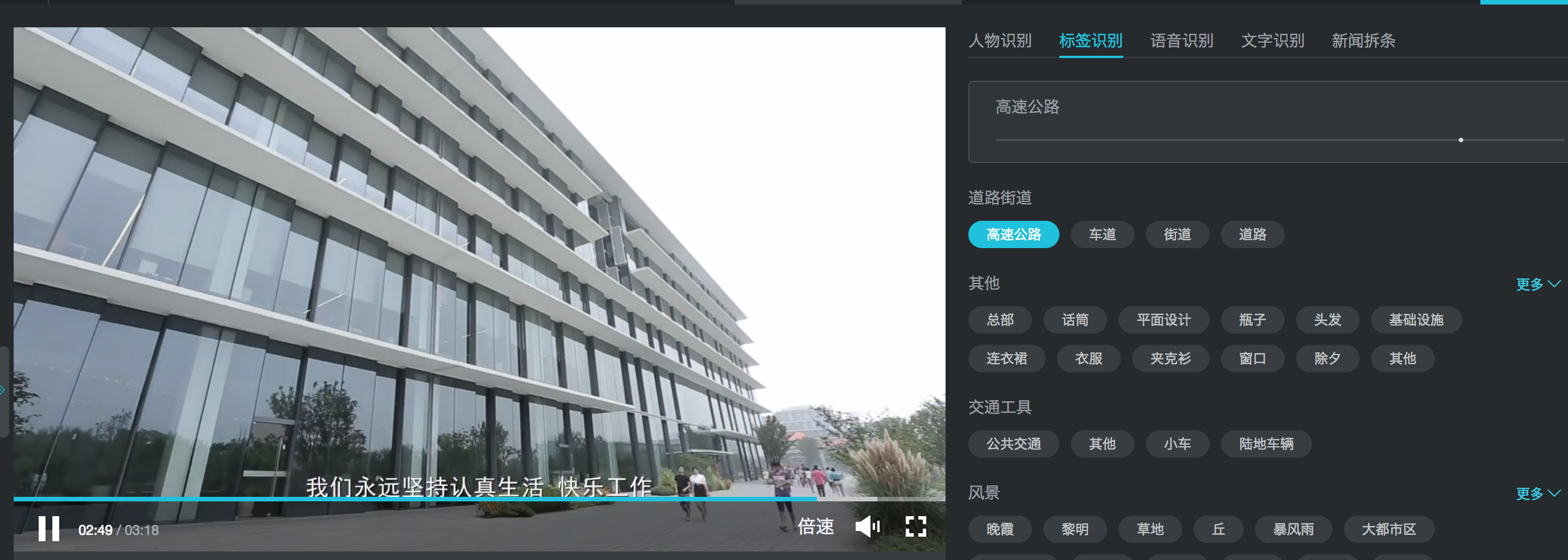
AI processing features include smart thumbnails, media fingerprint, and Intelligent Vision. Every video frame is analyzed to extract structured information. Customizable model training is available for developers and enterprises without an algorithms background. To try out applications for various scenarios, visit the Video AI Online Experience Center. The following figure shows a sample effect: |
Scenarios
ApsaraVideo VOD media processing addresses the following challenges:
-
Multi-device adaptation: Converts content for playback on PCs, TVs, and mobile devices.
-
Network adaptation: Lets users with different bandwidths select the optimal bitrate for smooth playback.
-
Lower storage and distribution costs: Adjusts bitrates and improves compression to reduce file sizes while maintaining image quality, minimizing playback stuttering and saving on storage and traffic costs.
-
Content protection: Safeguards video content in scenarios such as online education and original content protection.