How to deploy to a host using Apsara DevOps
Modern businesses require sustainable software development and rapid iterations to quickly convert requirements into delivered products. This process demands a fast response capability, which drives the adoption of continuous integration, continuous delivery, and continuous deployment.
1. User needs and problems
Deployment challenges: Deployments can be labor-intensive. Many upgrades are performed at night, which requires employees to work overnight. Even with this effort, error-free upgrades are not guaranteed. Businesses often lack the capability for rapid, large-scale deployments.
Version tracking: All historical versions must be saved for traceability. This practice enables quick rollbacks when errors occur.
Quality assurance: Businesses often lack a unified development platform, have low levels of automation, and lack an effective quality assurance system. Infrastructure development often fails to keep up with rapid business growth.
2. Apsara DevOps + Host Deployment solution
The Apsara DevOps continuous delivery pipeline, combined with host deployment, provides a solid foundation for continuous application delivery. The following figure illustrates this process.
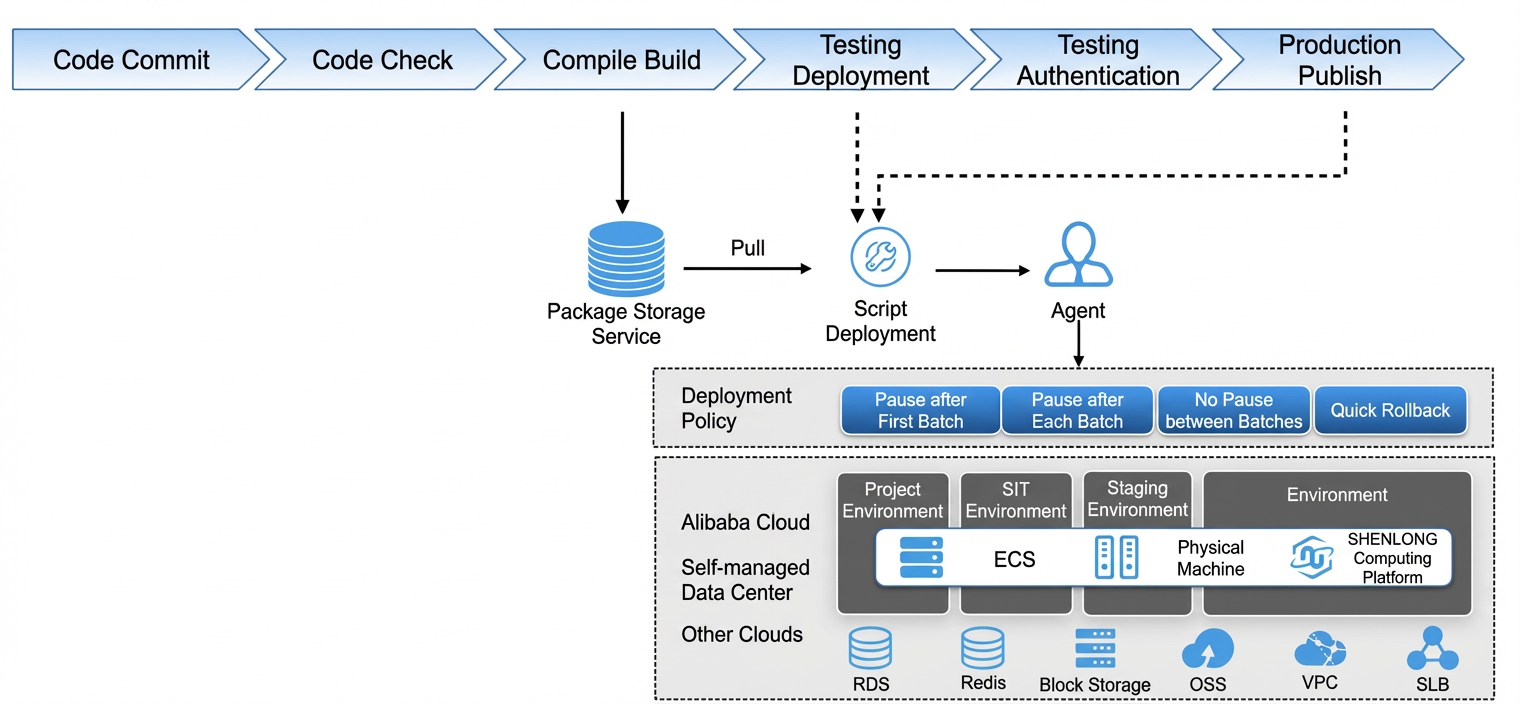
A developer commits code changes to a repository. Apsara DevOps monitors the repository for changes. When a code change is detected, a pipeline build task is automatically triggered. This process includes code scanning, building, test deployment, test validation, and production deployment. After the build is complete, an artifact package is generated and automatically uploaded to a repository. During the deployment phase, which includes deploying to testing and production environments, the latest version is retrieved from the artifact repository. The artifact is then deployed to different environments using host resources according to the specified deployment policies. These host resources can be on Alibaba Cloud or self-managed.
The following steps describe how to quickly configure this continuous deployment pipeline.
3. Apsara DevOps + Host Deployment user guide
Follow these steps to quickly create a pipeline for host deployment using Apsara DevOps.
Try it now: Apsara DevOps Flow
Create a pipeline
Navigate to the pipeline application. In the upper-right corner, click New Pipeline. Select your development language. Select the "Test, Build, and Deploy to Alibaba Cloud ECS/Self-managed Host" template to quickly enable host deployment.
In the Select Pipeline Template dialog box, select Java in the language category on the left, and select the Java · Test, Build, Deploy to Alibaba Cloud ECS/Self-managed Host template on the right (the pipeline includes Java code scanning, Java build, host deployment, and Maven unit testing).
Click Create to initialize the pipeline. Click Add Pipeline Source, select the code source to add, and then click Save.
On the pipeline configuration page, click +Add Pipeline Source to expand the configuration panel on the right. Select the Code Source tab, set the code source type to Sample Code Source, set the code type to JAVA. The code repository is pre-filled with https://atomgit.com/flow-example/spring-boot.git and the default branch is master. Click Add to complete the pipeline source configuration.
Edit the pipeline
Build artifact: You can specify a name for the artifact or use the default name. Subsequent tasks in the pipeline can use the artifact that is configured here.
In the build stage of the pipeline, click the Java Build Upload task. In the configuration panel on the right, expand the Artifact Upload step: set the upload method to Archive to Apsara DevOps public storage (for downstream tasks to pull and deploy), set the artifact name to Artifacts_${PIPELINE_ID}, and set the package path to target/.
Host deployment: Select the artifact from the previous step. Then, select or create a host group. A host group is a set of machine resources that run in a specific environment, such as an integration testing environment (also known as a daily environment), a staging environment, or a production environment that serves external users.
Edit the Host Deployment task. The main configuration items include:
Select Download artifact during deployment. The artifact name defaults to
Artifacts ${PIPELINE_ID}.Host group: Select the target host group from the dropdown (e.g., pre-release environment hosts or integration testing environment hosts).
Download path:
/home/admin/app/package.tgzExecution user:
rootDeployment script: Write deployment commands (e.g., tar to extract artifacts).
Deployment strategy: Set the pause mode to Pause after first batch with a batch count of 2.
Apsara DevOps supports two types of host groups: Alibaba Cloud ECS instances and non-Alibaba Cloud hosts that can access the public network.
For more information about deploying to Alibaba Cloud ECS.
For more information about deploying to a host on the public network.
Deployment configuration: In the host deployment task, you can configure the deployment settings to install the build artifact on the deployment machine. For more information about deployment configuration.
Deployment policy: During host deployment, you must specify a deployment policy. Apsara DevOps provides phased release and canary release capabilities.
In the host deployment task editing panel, configure the following key parameters:
Select Download artifact during deployment. The artifact name is
Artifacts_${PIPELINE_ID}.Set Download path to
/home/admin/app/package.tgz.Set Execution user to
root.In Deployment strategy, set Pause mode to Pause after first batch and Batch count to
2.
Run the pipeline
On the pipeline editing page, click Save and Run in the upper-right corner. The pipeline is automatically saved and starts running.
Deployment details: On the pipeline run page, click Deployment Details in the host deployment task to view the deployment process. In this example, a phased release is configured. The deployment pauses after the first batch is successfully deployed and requires your confirmation to continue.
Rollback: The deployment history is recorded for all pipeline runs. You can select any historical record to perform a rollback. After a new pipeline completes its first deployment, the deployment history and the rollback button may not be displayed. If this occurs, you can refresh the page.
On the pipeline page, click the Deployment History tab to view the deployment record list, including the deployment record number, run record, status, code version, deployment package, deployment start time, deployment task, and operator. To delete a deployment record, click Delete in the Actions column. Click View Details to view the detailed information of the deployment.
View test reports
On the pipeline page, you can click the test reports and logs for each stage to view detailed test results and execution statuses.
After the pipeline runs successfully, in the test stage of the pipeline execution results page, click Scan Report in the Java Code Scanning task to view the code scanning results, and click Test Report in the Maven Unit Test task to view the unit test results.
4. Advanced Apsara DevOps + Host Deployment pipelines
The previous section described basic pipeline operations. For a real-world deployment, you can enhance the pipeline by adding more validation steps and checkpoints as needed. For example:
Pipeline 1: Continuous validation pipeline (Host deployment to a testing environment)
Pipeline 1 contains 5 stages: Pipeline Source (code pull) → Build Stage (build upload) → Deployment Stage (test deployment) → Test Verification Stage (manual checkpoint — click Verification Passed or Verification Failed for approval) → Merge Code Stage (code merge). The pipeline pauses at the manual checkpoint and waits for approval before continuing to the next stage.
Pipeline 2: Continuous release pipeline (Host deployment to a production environment)
The pipeline execution details contain the following stages:
Pipeline Source: Associated with the Codeup code repository master branch.
Build: Build upload, generating runtime artifacts (e.g., Artifacts).
Deploy: Pre-release deployment.
Pre-release Verification: Manual checkpoint — requires manual approval to continue.
Release Review: Manual checkpoint — provides Verification Passed and Verification Failed options.
Deploy: Production deployment — executed after release review approval.
The pipeline pauses at manual checkpoint stages and displays a Waiting status. Approvers can click Verification Passed or Verification Failed to decide whether to continue executing subsequent stages.
A pipeline defines the steps and checkpoints of the continuous delivery process. By running Pipeline 1 and Pipeline 2, you can complete the entire continuous delivery process, from the initial code commit to the final production release.