Implement a canary release using NGINX Ingress and Apsara Devops AppStack
This topic describes how to configure NGINX Ingress and Apsara Devops AppStack to implement a canary release.
Background information
A canary release reduces deployment risks and improves service stability, which makes it especially suitable for software that iterates rapidly. Compared with Kubernetes rolling deployments, a canary release based on traffic characteristics is more precise and carries less risk. In cloud-native scenarios, canary releases based on NGINX Ingress are widely used. This solution allocates canary traffic and normal traffic at the traffic ingress: canary traffic is routed to the new service version for validation, the new version is fully deployed after it passes validation, and you can roll back promptly if it fails. This keeps user services uninterrupted.
Basic principles
For a typical web service, the basic logic of an Ingress canary release is as follows: requests that are sent to the same ingress (HOST) are partly routed to the canary service based on traffic characteristics or a traffic ratio. You then monitor and validate the canary traffic to determine whether the canary service meets the release criteria.
Based on the traffic path, the following figure shows the architecture of an Ingress canary release on Kubernetes.
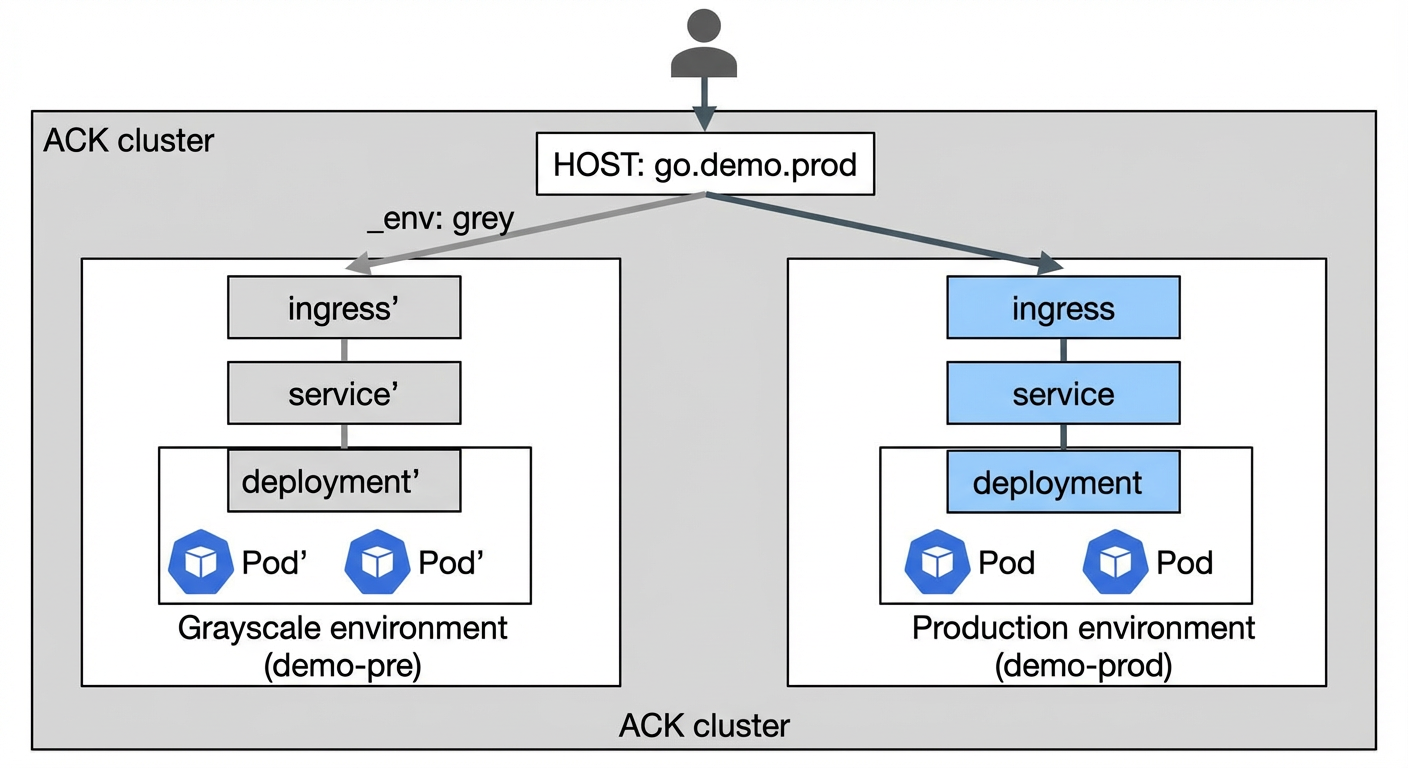
After traffic enters through the ingress HOST, NGINX Ingress routes the requests that match the canary identifier (defined in the Ingress annotations) to the service in the canary environment. The requests then reach the workload pods.
The services and deployments inside each environment do not actively detect the canary identifier, and internal RPC traffic usually does not carry it. Therefore, this architecture mainly addresses canary releases for external traffic, and is suitable for scenarios with a small number of services and simple service-to-service calls.
Procedure
The following steps use Apsara Devops AppStack to show how to perform an Ingress canary release for an application on an Alibaba Cloud Container Service for Kubernetes (ACK) cluster.
First, import an ACK cluster and create an application.
In the left-side navigation pane, click Resource Pool to go to the resource pool page. The top of the page shows the statistics of the imported clusters, such as Alibaba Cloud ACK, general Kubernetes, Alibaba Cloud ECS, and self-managed host groups. The Kubernetes clusters and the host clusters are listed separately below. Click Import Cluster in the upper-right corner, or click Import Kubernetes Cluster in the Kubernetes cluster section, to import an ACK cluster.
Environment management
Create environments
On the homepage of Apsara Devops AppStack, go to the target application, and then create a canary environment and a production environment. Both environments share the same Kubernetes cluster. Name the canary environment grey and the production environment ack-prod.
After the environments are created, the Environment page shows two cards: ACK Production Environment (label: Production Environment) and ACK Canary Environment (label: Staging Environment). Both are in the Running state.
Configure the orchestration
Choose to define the deployment orchestration. The canary annotation in the Ingress is the key to a canary release. Check the version of your NGINX Ingress controller to determine which annotations are supported. The NGINX Ingress controller on the test cluster is version 0.30 and uses a header to identify canary traffic.
On the Kubernetes Deployment tab, the orchestration defines three components that are deployed in sequence: svc (Service) at order 1, deploy (Deployment) at order 2, and ingress (Ingress) at order 3.
To enable the canary routing configuration only in the canary environment, use a conditional statement in the orchestration template. The following example shows how to do this:
---
apiVersion: networking.k8s.io/v1
kind: Ingress
metadata:
  name: {{ .AppStack.appName }}-{{ .AppStack.envName }}
  namespace: {{ .Values.namespace }}
{{ if eq .AppStack.envName "grey" }}
  annotations:
    # Enable the canary feature.
    nginx.ingress.kubernetes.io/canary: "true"
    # The request header is _env.
    nginx.ingress.kubernetes.io/canary-by-header: "_env"
    # Requests are routed to the new service version only when the value of the _env request header is grey.
    nginx.ingress.kubernetes.io/canary-by-header-value: "grey"
{{ end }}
spec:
  rules:
  - host: {{ .Values.host }}
    http:
      paths:
      - path: /
        pathType: Prefix
        backend:
          service:
            name: {{ .AppStack.appName }}-{{ .AppStack.envName }}
            port:
              number: 80
As shown in the Ingress orchestration, the canary annotation is enabled only for the environment named "grey", and the canary identifier is set to the header _env: grey.
In the Ingress rules, the host variable specifies the HOST that is associated with the route. The ACK canary environment and the ACK production environment are associated with the canary environment variable group and the production environment variable group respectively, and the host variable in both groups has the same value.
Example:
#
namespace = demo-pre
#
host = go.demo.prod
# namespace = demo-prod # host = go.demo.prodIn addition to the Ingress, you must also configure the corresponding Service and Deployment.
---
apiVersion: v1
kind: Service
metadata:
  name: {{ .AppStack.appName }}-{{ .AppStack.envName }}
  namespace: {{ .Values.namespace }}
spec:
  selector:
    run: {{ .AppStack.appName }}-{{ .AppStack.envName }}
  ports:
    - protocol: TCP
      port: 80
      targetPort: 8080
--- apiVersion: apps/v1 kind: Deployment metadata: name: {{ .AppStack.appName }}-{{ .AppStack.envName }} labels: run: {{ .AppStack.appName }}-{{ .AppStack.envName }} namespace: {{ .Values.namespace }} spec: replicas: {{ .Values.replicas }} selector: matchLabels: run: {{ .AppStack.appName }}-{{ .AppStack.envName }} template: metadata: labels: run: {{ .AppStack.appName }}-{{ .AppStack.envName }} spec: containers: - name: main image: {{ .AppStack.image.backend }} ports: - containerPort: 8080 resources: limits: cpu: {{ .Values.cpuLimit }} memory: {{ .Values.memoryLimit }} requests: cpu: {{ .Values.cpuRequest }} memory: {{ .Values.memoryRequest }}
Prepare the sample code and associate it with the application
You can download the sample code from atomgit at the following path: demo-go-echo repository
Import the code into Apsara Devops Codeup, and then associate it with the application.
On the Settings page of the application, choose Associated Code and Artifacts and click Add Association to associate the code repository. After the association succeeds, the repository name demo_go_echo is displayed and the default branch is master.
Define the canary release flow
Next, use the development flow of Apsara Devops AppStack to define the entire canary release process, as shown in the following figure:
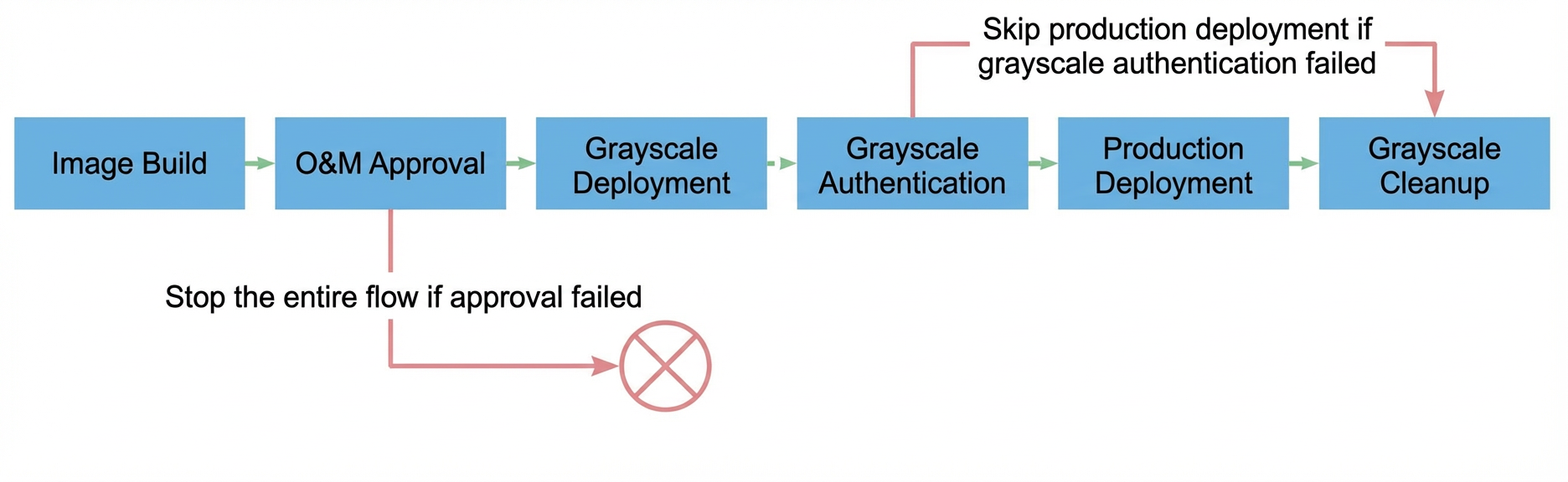
In this flow, each run pulls code from the master branch to build an image. After the build is complete, the run is handed over to O&M for approval, and the deployment starts after the approval is granted.
The deployment process consists of four steps: canary deployment, canary validation, production deployment, and canary cleanup.
The canary deployment step updates the ACK canary environment with the image that was built in the previous step. You can then perform canary validation by including the _env:grey header in your requests.
Canary validation is a manual gate for observing and validating the canary environment. If the validation passes, the production environment is deployed automatically. If the validation fails, the production deployment is skipped and the canary cleanup is executed.
The production deployment step updates the ACK production environment with the image. The new service version is then visible to regular users. To reduce risks, the production deployment policy is set to deploy in batches and pause after the first batch. This ensures a gradual rollout and allows you to roll back quickly if needed.
The canary cleanup step removes the resources of the canary environment. This saves resources and prevents the canary environment from affecting the production environment if canary validation fails.
On the Settings page of the application in Apsara Devops AppStack, choose Development Flow and click Edit. Add stages such as build, approval, and deployment as needed, and configure the parameters of each stage. If you only want to try out the canary release feature, you can configure the production stage only.
You can define the preceding flow by using the following pipeline YAML. Replace the image address and the service connection in acr_docker_build_step with your actual values, and replace the userId in grey_validate and ops_validate with your own Alibaba Cloud account ID.
---
stages:
  build:
    name: "Build"
    jobs:
      go_build:
        name: "Go Image Build"
        steps:
          golang_build_step:
            name: "Golang Build"
            step: "GolangBuild"
            with:
              goVersion: "1.20.x"
              run: |
                export GOPROXY=https://goproxy.cn
                make build
          upload_step:
            step: "ArtifactUpload"
            name: "Upload Build Output"
            with:
              serviceConnection: "wtdbdh89rrfdsod6"
              repo: "flow_generic_repo"
              artifact: "demo-go-echo"
              version: "prod-${CI_COMMIT_ID}.${DATETIME}"
              filePath:
              - "demo-go-echo"
              - "deploy.sh"
          acr_docker_build_step:
            name: "Build an image and push it to Container Registry Personal Edition"
            step: "ACRDockerBuild"
            with:
              artifact: "image"
              dockerfilePath: "Dockerfile"
              dockerRegistry: "registry.cn-zhangjiakou.aliyuncs.com/docker007/demo-go-echo"
              dockerTag: "prod-${CI_COMMIT_ID}.${DATETIME}"
              region: "cn-zhangjiakou"
              serviceConnection: "<connectionId>"
  approve:
    name: "Deployment Approval"
    jobs:
      ops_validate:
        name: "O&M Approval"
        component: "ManualValidate"
        with:
          validatorType: "users"
          validators:
          - <userId>
  grey:
    name: "Canary Validation"
    jobs:
      grey_deploy_job:
        name: "ACK Canary Deployment"
        component: "AppStackFlowDeploy"
        with:
          application: "demo-go-echo"
          environment: "grey"
          artifacts:
          - label: "backend"
            value: "$[stages.build.go_build.acr_docker_build_step.artifacts.image.dockerUrl]"
          autoDeploy: true
      grey_validate:
        name: "Canary Validation"
        component: "ManualValidate"
        needs:
        - "grey_deploy_job"
        with:
          validatorType: "users"
          validators:
          - <userId>
  deploy:
    name: "Deploy"
    jobs:
      ack_deploy_job:
        name: "ACK Production Deployment"
        component: "AppStackFlowDeploy"
        condition: |
          succeed('grey.grey_validate')
        with:
          application: "demo-go-echo"
          environment: "ack-prod"
          artifacts:
          - label: "backend"
            value: "$[stages.build.go_build.acr_docker_build_step.artifacts.image.dockerUrl]"
          autoDeploy: true
  cleanup:
    name: "Clean Up Environment"
    jobs:
      cleanup_grey_env_job:
        name: "Clean Up Canary Environment"
        component: "AppStackCleanEnv"
        needs:
        - "grey.grey_validate"
        - "deploy.ack_deploy_job"
        condition: |
          failed('grey.grey_validate') || succeed('deploy.ack_deploy_job')
        with:
          application: "demo-go-echo"
          environment: "grey"
          deleteEnv: "cleanEnv"
Validate the canary release flow
Assume that the development flow contains only the production stage. Run the production stage once to deploy the application to the canary environment and the production environment. Note: For the first deployment to an environment, you may need to manually create a deployment ticket.
Modify the code by changing the version number in routes.go to a new value, and then run the production stage again until the canary validation step. At this point, the production environment and the canary environment run different versions.
Run kubectl get ing -A to obtain the egress IP address of the Ingress, and then bind the IP address to go.demo.prod in the local /etc/hosts file. For example:
127.0.0.1 go.demo.prod # Replace 127.0.0.1 with the actual egress IP addressOpen a terminal and send requests to the /version endpoint by using httpie or curl. The following example uses httpie:
http -v http://go.demo.prod/version    # Request the production environment
http -v http://go.demo.prod/version _env:grey    # Request the canary environment
FAQ
With a canary environment in place, do I still need to deploy to the production environment in batches?
We recommend that you still enable batch deployment for the production environment. Although the canary environment passed validation, factors such as data volume can still affect the production environment, so releasing all instances at once is not recommended. Batch deployment limits the risk to a small scope and helps prevent major failures.
How do I integrate configuration changes and data changes into the development flow?
You can add configuration changes and data changes as steps in a development stage of the pipeline YAML. We recommend that you perform data changes before the application is deployed and configuration changes after the application is deployed. In addition, if the canary environment on Kubernetes uses a configuration center such as Nacos, it should also have a corresponding canary namespace to prevent direct modifications to the production configuration.
If the canary environment contains multiple applications, how do I ensure that calls between their internal services also stay within the canary environment?
For a complete solution, we recommend that you use products such as Microservices Engine (MSE).
If you have a small number of applications and a simple call chain, and a basic Kubernetes-based solution is acceptable, you can define a canary environment for each application. All of these environments share the same cluster and namespace, and the applications call each other through Services. Because namespaces are isolated, an application in the canary environment calls only the canary versions of the other applications in the same namespace.
This solution requires the canary environment of each application to remain available over the long term, so you must remove the final environment cleanup step from the development flow.
How do I integrate other release types, such as Function Compute, into the flow?
You can orchestrate the relevant Function Compute steps into the pipeline YAML of the development flow so that the two work together.