Security center
Security Overview
You can access the CodeupCodeuphomepage,select,view thesecurity scoreand security risk events provided by the security center。Among themSecurity Analysisand other partial data are advanced version exclusive features,which require upgrading to the advanced version package to use。Security Overviewis divided intoSecurity ScoreandSecurity Analysistwo parts。
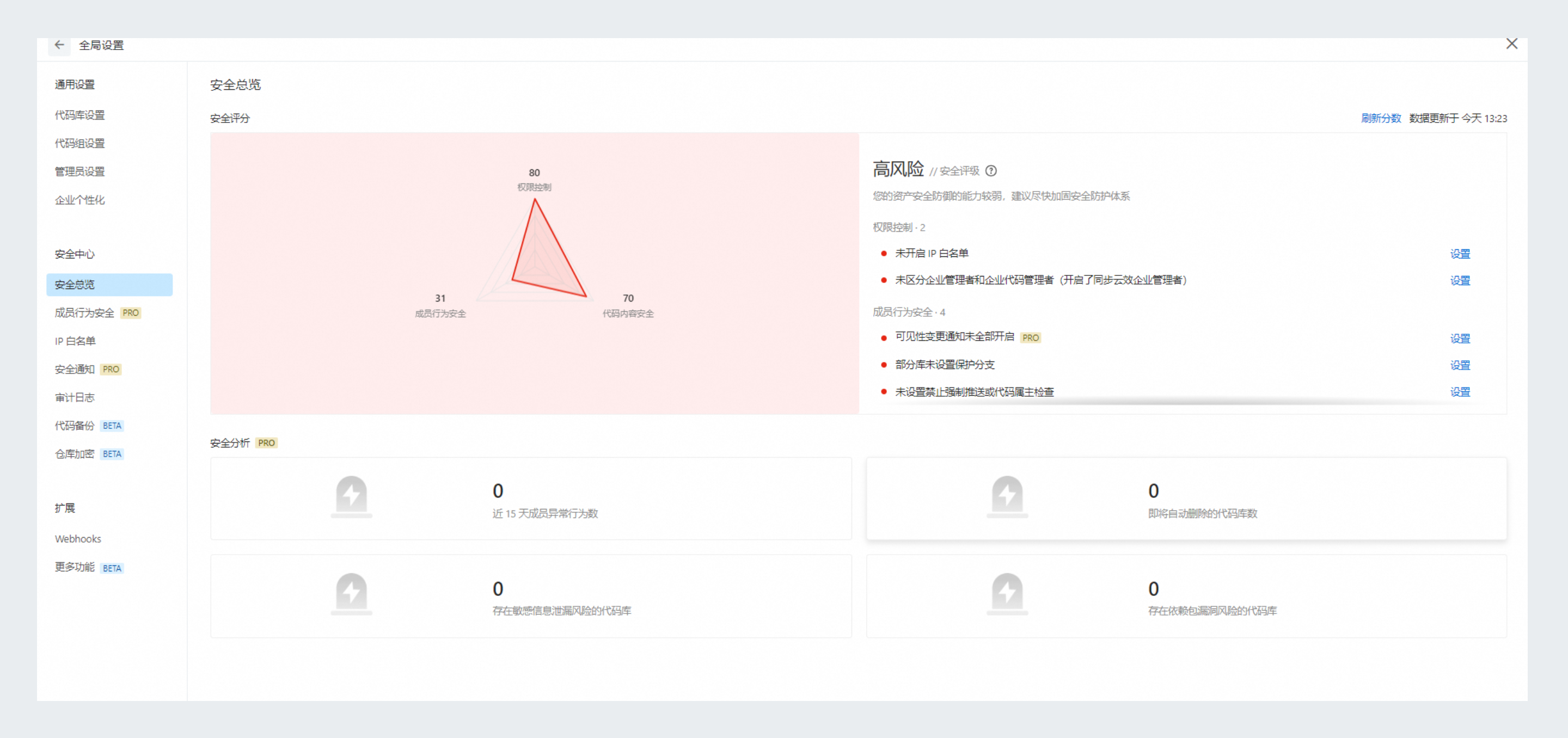
Security Analysis
Security Analysis uses diverse security detection capabilities to,identify、analyze、and alert enterprise code data risks,including:
-
Past 15 days of abnormal behavior by enterprise members。
-
Deleted code repositories remaining in the recycle bin。
-
Code repositories with sensitive information leakage risks。
-
Code repositories with dependency package vulnerability risks。
Security Score
Security Score uses backup and recovery、, security and encryption、, code security detection and other security capabilities,, evaluates security scores from three dimensions: permission control、, member behavior security、, and code content security。Each dimension has a maximum score of 100 points,. Security score table:
|
Security Score |
Score Description |
Font Color |
Level |
|
90~100 |
Congratulations,, your asset security status is good。 |
Green |
Good(90~99) Excellent(100) |
|
80~89 |
Your assets have security risks,We recommend that you strengthen your security protection system as soon as possible。 |
Blue |
Low risk |
|
60~79 |
Your assets have multiple security risks,We recommend that you strengthen your security protection system promptly。 |
Yellow |
Medium risk |
|
60 or below |
Your assets have weak security defense capabilities,We recommend that you strengthen your security protection system as soon as possible。 |
Red |
High risk |
The overall security level is determined based onaccess control、member behavior security、code content securityscores across three dimensions:
-
If any dimension is high risk,then the overall level is high risk。
-
If there is no high risk,any dimension is medium risk,then the overall level is medium risk。
-
If there is no high risk or medium risk,any dimension is low risk,the overall risk is low。
-
If all are good,the overall risk is good。
-
If all are excellent,the overall risk is excellent。
Based on security risks,provide corresponding optimized security setting recommendations,to improve security scores,strengthen enterprise data security。Deduction items and optimization recommendations:
|
Deduction category |
Deduction item |
Deduction score |
Optimization recommendation |
|
Permission control |
Not enabledIPallowlist |
10 |
|
|
No distinction between enterprise administrators and enterprise code administrators(synchronized Apsara DevOps enterprise administrators is enabled) |
10 |
Disable synchronization of Apsara DevOps enterprise administrators |
|
|
Member behavior security |
Visibility change notifications not enabled-repository public notifications-in-site notification |
2.5 |
|
|
Visibility change notification not enabled-repository public notification-email notification |
2.5 |
||
|
Visibility change notification not enabled-repository deletion notification-in-site notification |
2.5 |
||
|
Visibility change notification not enabled-repository deletion notification-email notification |
2.5 |
||
|
Visibility change notification not enabled-group public notification-in-site notification |
2.5 |
||
|
Visibility change notification not enabled-group public notification-email notification |
2.5 |
||
|
Visibility change notification not enabled-group deletion notification-in-site notification |
2.5 |
||
|
Visibility change notifications not enabled-code group deletion notifications-email notifications |
2.5 |
||
|
Not all repositories have protected branches configured |
Percentage of repositories without protected branches configured*10 |
||
|
Enterprise has not configured prohibition of force push or code owner check |
10 |
||
|
Sensitive behavior monitoring not enabled |
30 |
||
|
Sensitive behavior monitoring is enabled,but monitoring whitelist is configured |
3 |
||
|
Sensitive behavior monitoring is enabled,but sensitive behavior alert notifications are not enabled-in-site notifications |
3 |
||
|
Sensitive behavior monitoring is enabled,but sensitive behavior alert notifications are not enabled-email notifications |
3 |
||
|
Code content security |
Sensitive information detection or dependency vulnerability detection not enabled |
Proportion of code repositories with sensitive information detection or dependency vulnerability detection not enabled * 30 |
|
|
Issue rate per thousand lines of code |
Issue rate per thousand lines of code * 40 |
Fix issues detected by code scanning |