
本文档适用于用户想要在本地加载 Agentloop 中的数据集,并利用数据集中的数据项对部署的 LLM Agent 应用进行实验,并将实验结果上传到 Agentloop 服务端,以进行后续的评估。主要应用于在 LLM Agent 应用进行灰度发布后的回归验证、优化效果验证等场景。
前提要求
完成 AgentLoop 产品开通。
在 Agentloop 上完成数据集的创建以及数据的导入。
准备好子账号 AccessKey ID / Secret,该子账号至少具备下述权限。
{
  "Version": "1",
  "Statement": [
    {
      "Action": "cms:ExecuteQuery",
      "Resource": "*",
      "Effect": "Allow"
    },
    {
      "Action": "cms:GetWorkspace",
      "Resource": "*",
      "Effect": "Allow"
    },
    {
      "Action": "log:PostLogStoreLogs",
      "Resource": "*",
      "Effect": "Allow"
    }
  ]
}
实验示例步骤
实验代码执行原理
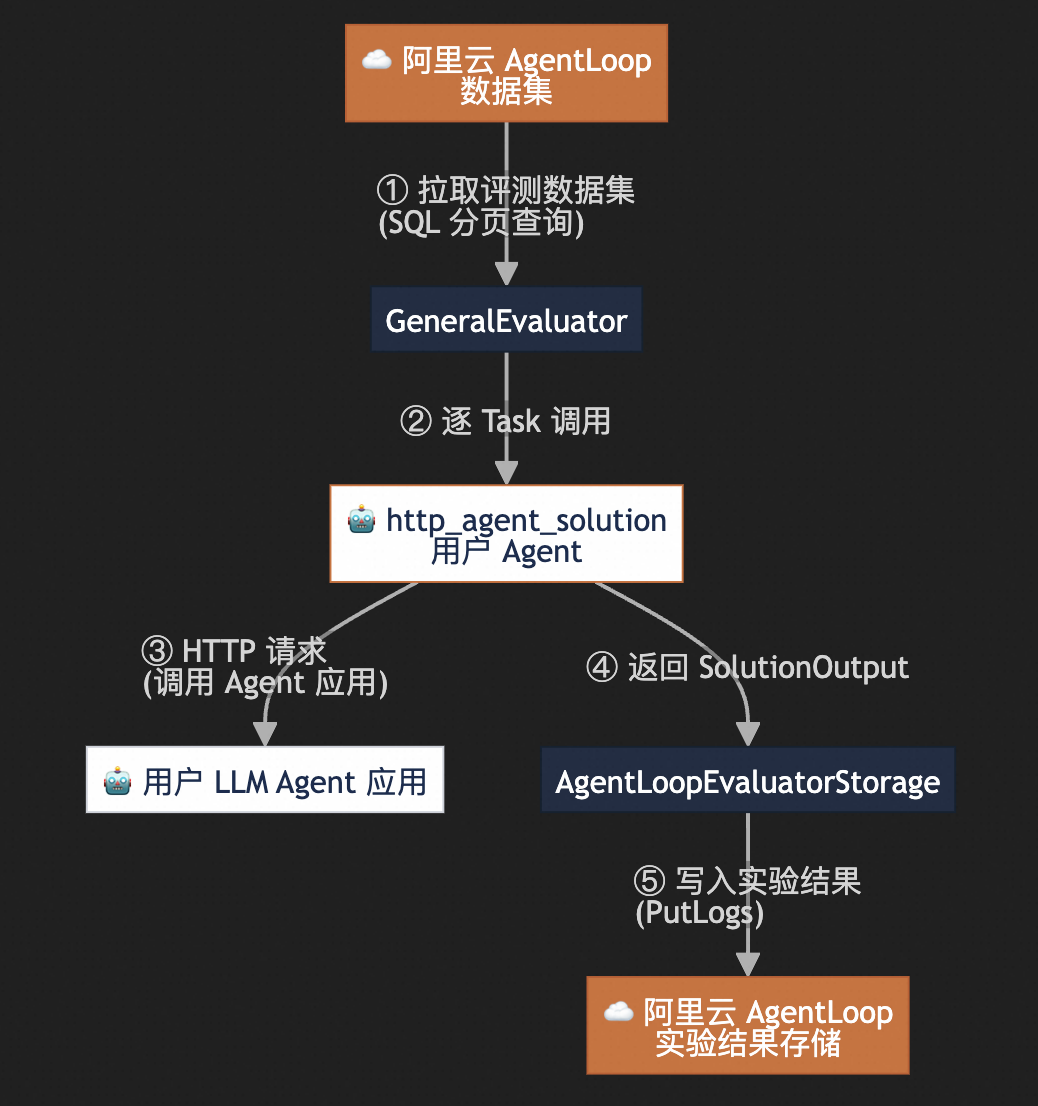
完整代码示例
代码文件名为agentloop_demo.py 执行离线实验需要对代码中关键逻辑进行调整。
import asyncio
import logging
from typing import Callable
from dotenv import load_dotenv

load_dotenv()  # 默认会加载当前目录的 .env

from agentloop_sdk import (
    AgentLoopBenchmark,
    AgentLoopEvaluatorStorage,
    AgentLoopConfig,
    GeneralEvaluator,
    SolutionOutput,
    Task,
)

logging.basicConfig(level=logging.INFO)
logger = logging.getLogger(__name__)


# ============ HTTP Agent Solution ============
async def http_agent_solution(
    task: Task,
    pre_hook: Callable,
) -> SolutionOutput:
    output = "replace this with the agent output"  # call your agent and get the output

    return SolutionOutput(
        success=True,
        output=output,
        trajectory=[],
        meta={
            "task": task.input,
        },
    )


async def run_agentloop_experiment(
    # Dataset CMS configuration
    workspace: str,
    dataset: str,
    region_id: str,
    # Local storage
    result_dir: str,
) -> None:
    """Run evaluation using AgentLoop.

    Args:
        ak: Alibaba Cloud access key ID.
        sk: Alibaba Cloud access key secret.
        workspace: CMS workspace name where the dataset is located.
        dataset: CMS dataset name.
        region_id: Region ID for dataset (constructs CMS endpoint).
        result_dir: Local result storage directory.
    """
    logger.info("=" * 60)
    logger.info("Running AgentLoop Evaluation")
    logger.info("=" * 60)

    # Create AgentLoopConfig for Benchmark
    agentloop_config = AgentLoopConfig(
        workspace=workspace,
        dataset=dataset,
        region_id=region_id,
    )

    experiment_config = {"agent_name": "MockAgent"}

    # Load dataset from CMS Dataset
    logger.info("Loading dataset from CMS:")
    logger.info("  Workspace: %s", agentloop_config.workspace)
    logger.info("  Dataset:   %s", agentloop_config.dataset)
    logger.info("  Region ID: %s", agentloop_config.region_id)
    benchmark = AgentLoopBenchmark(
        config=agentloop_config,
        name="AgentLoop Benchmark",
        description=f"Benchmark from CMS: {workspace}/{dataset}",
    )
    logger.info("Loaded %d tasks", len(benchmark))

    # Configure storage
    logger.info("Using SLS to store results:")
    logger.info("  Result Workspace: %s", agentloop_config.workspace)
    logger.info("  Result Region ID: %s", agentloop_config.region_id)
    logger.info("Also saving locally to: %s", result_dir)
    storage = AgentLoopEvaluatorStorage(
        save_dir=result_dir,
        config=agentloop_config,
        experiment_name="AgentLoop Demo",
        experiment_type="agent",
        experiment_metadata={"run_env": "local_run"},
        experiment_config=experiment_config,
    )
    logger.info("  Project:      %s", storage.config.project)
    logger.info("  SLS Endpoint: %s", storage.config.sls_endpoint)
    logger.info("  Logstore:     %s", storage.logstore)
    logger.info("Experiment ID: %s", storage.experiment_id)

    # Run experiment
    evaluator = GeneralEvaluator(
        name="AgentLoop Evaluation",
        benchmark=benchmark,
        n_repeat=1,
        storage=storage,
        n_workers=4,
    )

    logger.info("Starting experiment...")
    await evaluator.run(http_agent_solution)
    logger.info("Experiment completed!")


async def main() -> None:
    """Main function"""
    await run_agentloop_experiment(
        # CMS dataset configuration
        workspace="replace with your workspace",
        dataset="replace with your dataset",
        region_id="replace with your region",
        result_dir="./results",
    )


if __name__ == "__main__":
    asyncio.run(main())
步骤 1: 安装依赖
执行pip install agentloop-sdk命令安装离线实验 sdk。
步骤 2: 改造并运行实验代码
针对完整代码示例,进行下述调整:
将示例代码行
main方法中调用run_agentloop_experiment方法时传递的参数替换为您当前的实际值。workspace:填入 agentloop 的工作空间。
dataset:填入当前待进行实验的数据集,需要保证该数据集中存在有效数据,否则实验是无效的。
region_id:填入当前工作空间所属的阿里云 region(比如 cn-hangzhou、cn-beijing、ap-southeast-1 等等)。
result_dir:本地数据存储目录,给一个任意有写权限的目录即可。
async def main() -> None:
    """Main function"""
    await run_agentloop_experiment(
        workspace="replace with your workspace",
        dataset="replace with your dataset name",
        region_id="replace with your region_id",
        result_dir="./results",
    )


if __name__ == "__main__":
    asyncio.run(main())
修改 http_agent_solution 方法中 output 字段的复制逻辑。在这里,你会用到 task 的 input 字段,该字段是一个字典,其中包含dataset 中每一行记录的所有内容。你需要利用该字段的内容构建 http 请求并发送到你的 LLM Agent 应用,获得返回值并赋值给 output 变量。
async def http_agent_solution(
    task: Task,
    pre_hook: Callable,
) -> SolutionOutput:
    output = "replace this with the agent output"  # call your agent and get the output

    return SolutionOutput(
        success=True,
        output=output,
        trajectory=[],
        meta={
            "task": task.input,
        },
    )
步骤 3: 运行代码
进入代码所在目录,通过下述两种方式配置 AccessKey ID / Secret。
方法一:在项目根目录创建.env 文件,并配置 AccessKey ID / Secret,内容如下所示
ALIBABA_CLOUD_ACCESS_KEY_ID={replace with your AccessKey ID}
ALIBABA_CLOUD_ACCESS_KEY_SECRET={replace with AccessKey Secret}
方法二:手动添加 AccessKey ID / Secret到环境变量:
export ALIBABA_CLOUD_ACCESS_KEY_ID={replace with your AccessKey ID} ALIBABA_CLOUD_ACCESS_KEY_SECRET={replace with your AccessKey Secret}
完成AccessKey ID / Secret设置后,执行 python agentloop_demo.py 即可运行代码,运行应该能看到类似下方的输出:
INFO:__main__:============================================================
INFO:__main__:Running AgentLoop Evaluation
INFO:__main__:============================================================
INFO:__main__:Loading dataset from CMS:
INFO:__main__:  Workspace: *****
INFO:__main__:  Dataset:   *****
INFO:__main__:  Region ID: cn-hongkong
2026-03-13 17:43:11,224 | INFO    | _agentloop_benchmark:_load_data_from_cms:215 - CMS workspace: *****, dataset: *****
2026-03-13 17:43:11,224 | INFO    | _agentloop_benchmark:_load_data_from_cms:241 - CMS paginated query (offset=0, limit=100): * | select * from `*****` LIMIT 0, 100
2026-03-13 17:43:11,553 | INFO    | _agentloop_benchmark:_load_data_from_cms:241 - CMS paginated query (offset=4, limit=100): * | select * from `*****t` LIMIT 4, 100
2026-03-13 17:43:11,616 | INFO    | _agentloop_benchmark:_load_data_from_cms:259 - Empty response at offset 4, stopping pagination.
2026-03-13 17:43:11,616 | INFO    | _agentloop_benchmark:_load_data_from_cms:269 - Loaded 4 records from CMS.
INFO:__main__:Loaded 4 tasks
INFO:__main__:Using SLS to store results:
INFO:__main__:  Result Workspace: *****
INFO:__main__:  Result Region ID: cn-hongkong
INFO:__main__:Also saving locally to: ./results
INFO:__main__:  Project:      *****
INFO:__main__:  SLS Endpoint: cn-hongkong.log.aliyuncs.com
INFO:__main__:  Logstore:     experiment_detail
INFO:__main__:Experiment ID: *****
INFO:__main__:Starting experiment...
Repeat ID: 0
INFO:__main__:Experiment completed!
常见问题
如何调整加载数据集中数据的逻辑
默认情况下,会加载用户指定数据集中最多前 1000 条数据,你可以通过下述方式调整该逻辑:
创建
AgentLoopConfig时传入max_rows参数,此后 sdk 会加载最多max_rows 行数据。创建
AgentLoopConfig时传入query参数,此后 sdk 会加载 query 语句实际能查询到的数据。
两个参数不会同时生效,同时传入两个参数,query 参数优先。
如何并行实验
默认情况下,实验是串行的,当数据集中数据较多时可能耗时较长,此时可以使用RayEvaluator 替代实验代码中的GeneralEvaluator。