
本文为您介绍如何为使用PAI-Bladellm(以下简称Bladellm)的LLM推理服务进行压测。
概述
PAI-PPU环境准备,请参见在PAI-EAS上使用PPU部署模型服务。
BladeLLM介绍,请参见LLM推理引擎(BladeLLM)。
所使用压测工具:bench_toolkit.tar.gz。
模型服务部署
可参考在PAI-EAS上使用PPU部署模型服务文档进行 EAS 基本环境搭建和推理服务部署,以 qwen2-72b-instruct 模型为例,进行 tp=4 的模型切分和 a16w4 的模型量化操作,进行模型部署,参考命令如下:
blade_llm_split --tensor_parallel_size 4 --model /path/to/your/models/qwen-ckpts/qwen2-72b-instruct --output_dir /path/to/your/models/qwen-ckpts/qwen2-72b-instruct/tp4pp1

blade_llm_quantize --model /path/to/your/models/qwen-ckpts/qwen2-72b-instruct/tp4pp1 --output_dir /path/to/your/models/qwen-ckpts/qwen2-72b-instruct/tp4pp1_a16w4 --quant_mode weight_only_quant --tensor_parallel_size 4 --quant_dtype int --bit 4 --quant_algo gptq --experimental_pad

blade_llm_server --port 8888 --model /path/to/your/models/qwen-ckpts/qwen2-72b-instruct/tp4pp1_a16w4 --tensor_parallel_size 4
压测步骤
压测环境准备。
启动 dsw 实例,下载压测工具,并安装相应依赖。
cd /path/to/your/models
tar -xzvf archive.tar.gz
cd /mnt/workspace/z**k/eas-model-deployment-main
python -m venv venv-ben
source venv-ben/bin/activate
pip install -r requirements.txt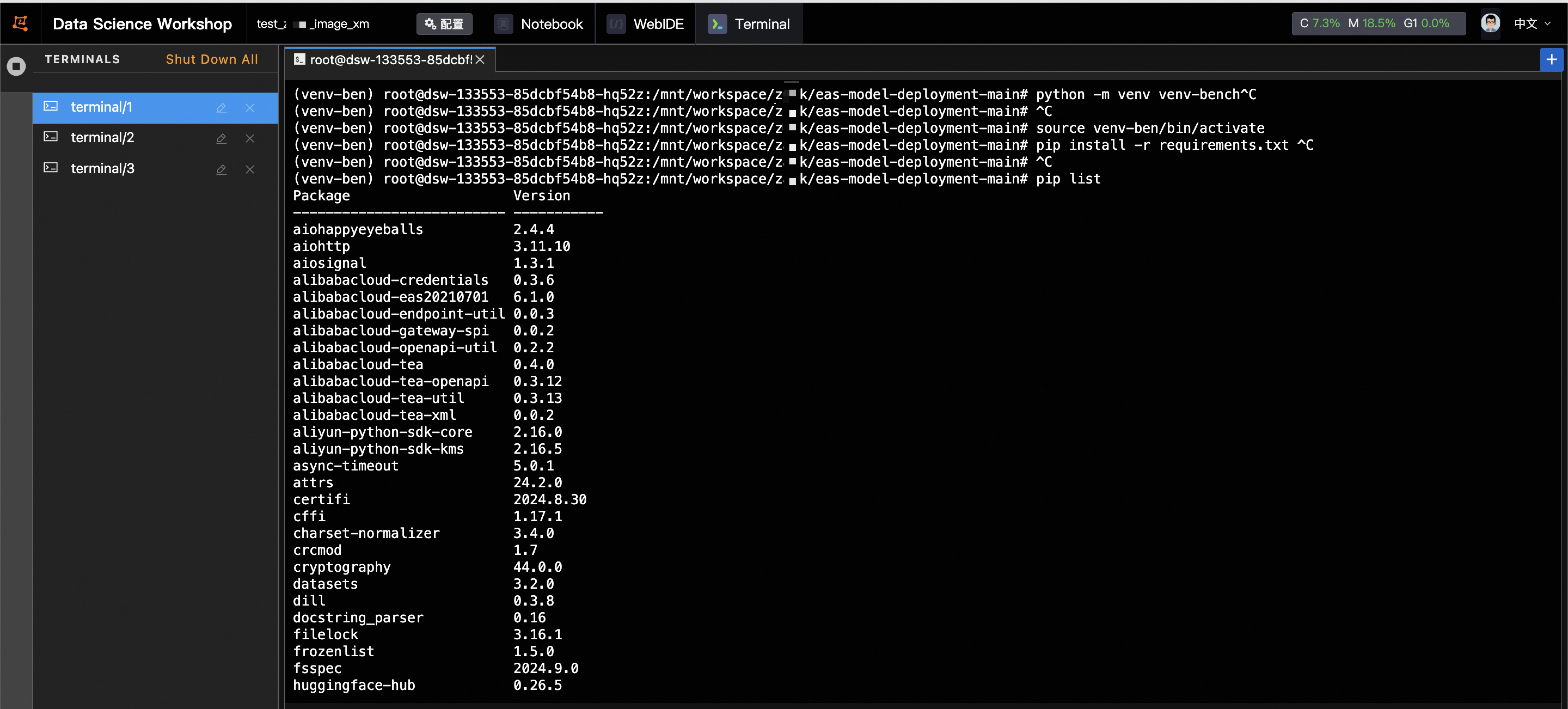
在压测工具中的 run.sh 脚本中修改相应参数,执行压测命令。
供参考:下列代码将会执行 5 组测试,分别会在 request_rate=2,4,6,8,10 的情况下测试输入长度和输出长度为 2000 和 300 的 case,总请求数为 300 个。压测完毕后,程序会将相应的统计结果以 p99 的方式进行统计并持久化保存。
#!/bin/bash # PYTHON=python3 Now=$(date +"%Y%m%d_%H%M%S") echo ${Now} # Define inputlength,outputlength, concurrency combination and other parameters for testing InputLengthList=(2000 2000 2000 2000 2000) OutPutLengthList=(300 300 300 300 300) # ConcurrencyList=(1 2 3 4 5) RequestRateList=(2 4 6 8 10) Percentile=99 #by default RequestRate is set inf, if willing to test for qps performance, set it to a number and cancel the concurrency part. # RequestRate=inf NumPrompts=300 IgnoreEos=false input_length=${#InputLengthList[@]} output_length=${#OutPutLengthList[@]} concurrency_length=${#ConcurrencyList[@]} # if [[ $input_length -ne $output_length || $input_length -ne $concurrency_length ]]; then # echo "parameters length should have the same length." # exit 1 # fi Dir=$(realpath $(dirname -- "${BASH_SOURCE[0]}")) BenchmarkDir=$(dirname ${Dir}) ResultDir=${BenchmarkDir}/result/${Now} echo ${ResultDir} # Define the service url and other parameters for the serverside ServerUrl=http://xxxxx.cn-wulanchabu.pai-eas.aliyuncs.com/api/predict/test_mixtral_8x7b_ppu Endpoint=/v1/completions tokenizer=/path/to/your/models/eas-model-deployment-main/tokenizer/qwen ClientName=testing_client ModelPath=/path/to/your/models/qwen-ckpts/xxxxx LogInCSV=true AccessToken=xxxxxx if [ ! -d ${ResultDir} ]; then mkdir -p ${ResultDir} fi export PYTHONPATH=./ echo ${AccessToken} LogDir=${ResultDir}/log/${ClientName} CSVFile=${ResultDir}/log/${ClientName}/summary.csv if [ ! -d ${LogDir} ]; then mkdir -p ${LogDir} fi if [[ $LogInCSV == true ]]; then touch ${CSVFile} saveFields=("num_prompts" "request_rate" "max_concurrency" "duration" "total_input_tokens" "total_output_tokens" "request_throughput" "output_throughput" "total_token_throughput" "mean_ttft_ms" "median_ttft_ms" "std_ttft_ms" p${Percentile}"_ttft_ms" "mean_tpot_ms" "median_tpot_ms" "std_tpot_ms" p${Percentile}"_tpot_ms" "mean_itl_ms" "median_itl_ms" "std_itl_ms" p${Percentile}"_itl_ms" "mean_e2el_ms" "median_e2el_ms" "std_e2el_ms" p${Percentile}"_e2el_ms" "avg_input_len" "avg_output_len") fi # Iterate over all combinations of batch size and sequence length for ((i=0;i<${#InputLengthList[*]};i++)) do InputLength=${InputLengthList[$i]} OutputLength=${OutPutLengthList[$i]} # Concurrency=${ConcurrencyList[$i]} RequestRate=${RequestRateList[$i]} echo ${InputLength} ${OutputLength} ${Concurrency} # for OutputLength in "${OutPutLengthList[@]}"; do # for Concurrency in "${ConcurrencyList[@]}"; do echo "Running benchmark with input len :${InputLength},output len: ${OutputLength}, prompts:${NumPrompts}, concurrency:${Concurrency}, request_rate:${RequestRate}" result_file=${LogDir}/result_input_${InputLength}_output_${OutputLength}_prompts_${NumPrompts}_concurrency_${Concurrency}_request_rate_${RequestRate}.json AccessToken=${AccessToken} \ python3 benchmark_serving.py \ --backend openai \ --base-url ${ServerUrl} \ --endpoint ${Endpoint} \ --tokenizer ${tokenizer} \ --percentile-metrics ttft,tpot,itl,e2el \ --save-result \ --result-filename ${result_file} \ --ignore-eos \ --trust-remote-code \ --model ${ModelPath} \ --dataset-name random \ --random-output-len ${OutputLength} \ --random-input-len ${InputLength}\ --num-prompts ${NumPrompts} \ --request-rate ${RequestRate} \ --metric-percentiles ${Percentile} \ # --max-concurrency ${Concurrency} if [[ $LogInCSV == true ]]; then python3 ${BenchmarkDir}/eas-model-deployment-main/scripts/write_csv.py \ --json_file ${result_file} \ --csv_file ${CSVFile} \ --fields ${saveFields[@]} fi # done # done done支持定义多组输入长度,输出长度,并发量,每秒发送请求个数,并指定请求总数。如需进行并发程度压测需打开concurrencyList并设定数值;如需进行QPS测试,可关闭concurrency相关设置,调整request_rate进行测试。需结合实际测试需求场景指定相应参数。相应测试结果均会以JSON格式记录下来,并可以自动汇总在CSV表格中。
该文章对您有帮助吗?