文件元数据离线分析

更新时间:
复制 MD 格式

EMR-3.30.0及后续版本的Block模式,支持dump整个namespace的元数据信息至OSS中,并通过Jindo Sql工具直接分析元数信息。

背景信息

HDFS文件系统中,整个分布式文件的元数据存储在名为fsimage的快照文件中。文件中包含了整个文件系统的命名空间、文件、Block和文件系统配额等元数据信息。HDFS支持通过命令行下载整个fsimage文件(xml形式)到本地,以便离线分析元数据信息,而JindoFS无需下载元数据信息至本地。

上传文件系统元数据至OSS

使用Jindo命令行工具上传命名空间的元数据至OSS,命令格式如下。
jindo jfs -dumpMetadata <nsName>

<nsName>Block模式对应的namespace名称。

例如,上传并离线分析test-block的元数据。

jindo jfs -dumpMetadata test-block

:bin/xxx jindo jfs -dumpMetadata test-block
SLF4J: Class path contains multiple SLF4J bindings.
SLF4J: Found binding in [jar:file:/Users/xxx code/bigboot-3rdparty/bigboot/output/sdk/lib/bigboot-emr-cli.jar!/org/slf4j/impl/StaticLoggerBinder.class]
SLF4J: Found binding in [jar:file:/Users/xxx code/bigboot-3rdparty/bigboot/output/sdk/lib/jindo-auditlog-full.jar!/org/slf4j/impl/StaticLoggerBinder.class]
SLF4J: Found binding in [jar:file:/Users/xxx code/bigboot-3rdparty/bigboot/output/sdk/lib/jboot.jar!/org/slf4j/impl/StaticLoggerBinder.class]
SLF4J: Found binding in [jar:file:/Users/xxx code/bigboot-3rdparty/bigboot/output/sdk/lib/jindo-distcp-2.7.4.jar!/org/slf4j/impl/StaticLoggerBinder.class]
SLF4J: See http://www.slf4j.org/codes.html#multiple_bindings for an explanation.
SLF4J: Actual binding is of type [org.slf4j.impl.Log4jLoggerFactory]
Successfully upload namespace metadata to OSS.

当提示如下信息时,表示上传成功并以JSON格式的文件存放在OSS中。
Sucessfully upload namespace metadata to OSS.

元数据上传路径

元数据信息上传的路径为JindoFS中配置的sysinfo的子目录下的metadataDump子目录。

例如,配置的namespace.sysinfo.oss.urioss://abc/,则上传的文件会在oss://abc/metadataDump子目录中。
参数 说明
namespace.sysinfo.oss.uri 存储Bucket和路径。
namespace.sysinfo.oss.endpoint 对应Endpoint信息,支持跨Region。
namespace.sysinfo.oss.access.key 阿里云的AccessKey ID。
namespace.sysinfo.oss.access.secret 阿里云的AccessKey Secret。
批次信息:因为分布式文件系统的元数据会跟随用户的使用发生变化,所以我们每次对元数据进行分析是基于命令执行当时的元数据信息的快照进行的。每次运行Jindo命令进行上传会在目录下,根据上传时间生成对应批次号作为本次上传文件的根目录,以保证每次上传的数据不会被覆盖,您可以根据需要删除历史数据。元数据上传路径格式为 oss://{Bucket}/sysinfo/metadataDump/{namespace}/{批次号}/,例如 oss://emr-xxx-test/sysinfo/metadataDump/test-block/2020_09_14_18_58_16/
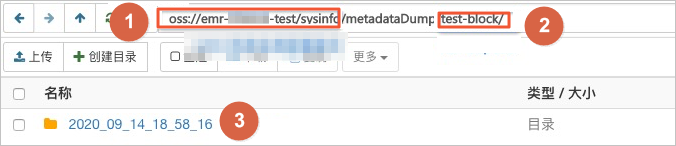
  • sysinfo/metadataDumpOSS系统信息配置路径。
  • {namespace}namespace。
  • {批次号}为批次号。

元数据Schema

上传至OSS的文件系统元信息以JSON文件格式存放。其Schema信息如下。
{
  "type":"string",          /*INode类型,FILE文件DIRECTORY目录*/
  "id": "string",            /*INode id*/
  "parentId" :"string",         /*父节点id*/
  "name":"string",         /*INode名称*/
  "size": "int",         /*INode大小, bigint*/
  "permission":"int",         /*permission以int格式存放*/
  "owner":"string",          /*owner名称*/
  "ownerGroup":"string",     /*owner组名称*/
  "mtime":"int",              /*inode修改时间,bigint*/
  "atime":"int",              /*inode最近访问时间,bigint*/
  "attributes":"string",       /*文件相关属性*/
  "state":"string",            /*INode状态*/
  "storagePolicy":"string",    /*存储策略*/
  "etag":"string"           /*etag*/
}

使用Jindo Sql分析元数据

  1. 执行如下命令,启动Jindo Sql。
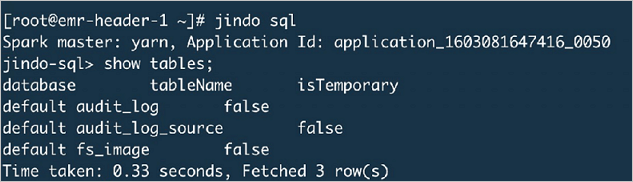
    jindo sql
    
    
    启动后显示 Spark master 为 yarn。在 jindo-sql 提示符下执行以下命令查看表信息:
    
    sql show tables;
    
    返回结果示例如下。
    
    database tableName isTemporary default audit_log false default audit_log_source false default fs_image false Time taken: 0.33 seconds, Fetched 3 row(s)
  2. 查询Jindo Sql可以分析的表格。
    • 使用show tables可以查看支持查询分析的表格。目前Jindo Sql内置了审计和元数据信息的分析功能,对应audit_logfs_image
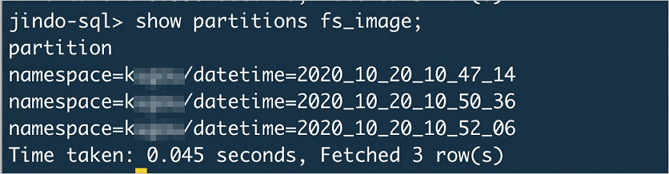
    • 使用show partitions fs_image可以查看表的fs_image分区信息。每一个分区对应于一次上传jindo jfs -dumpMetadata生成的数据。
      示例如下。
      jindo-sql> show partitions fs_image;
      partition
      namespace=xxx/datetime=2020_10_20_10_47_14
      namespace=xxx/datetime=2020_10_20_10_50_36
      namespace=xxx/datetime=2020_10_20_10_52_06
      Time taken: 0.045 seconds, Fetched 3 row(s)
  3. 查询分析元数据信息。
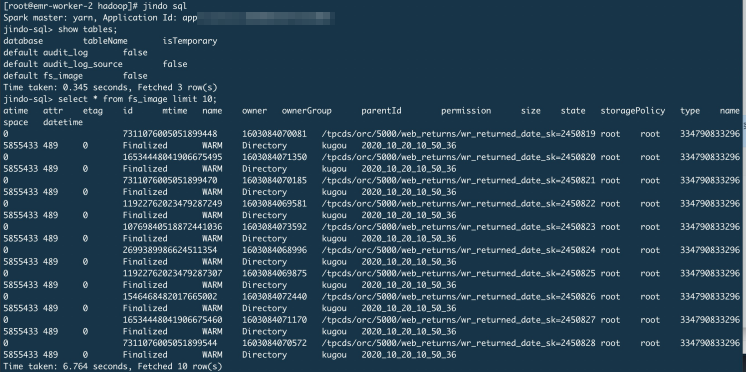
    Jindo Sql使用Spark-SQL语法。您可以使用SQL进行分析和查询fs_image表。
    示例如下。
    [root@emr-worker-2 hadoop]# jindo sql
    Spark master: yarn, Application Id: app
    jindo-sql> show tables;
    database  tableName        isTemporary
    default   audit_log        false
    default   audit_log_source false
    default   fs_image         false
    Time taken: 0.345 seconds, Fetched 3 row(s)
    jindo-sql> select * from fs_image limit 10;
    atime  ctime  etag  id  mtime  name  owner  ownerGroup  parentId  permission  size  state  storagePolicy  type  name
    0      5855433 489  0  7311076005051899448  1603084070081  /tpcds/orc/5000/web_returns/wr_returned_date_sk=2450819  root  xxx  334790833296
    0      5855433 489  0  16534448041906675495  1603084071350  /tpcds/orc/5000/web_returns/wr_returned_date_sk=2450820  root  xxx  334790833296
    ...
    Time taken: 6.764 seconds, Fetched 10 row(s)

    namespacedatetimeJindo Sql增加的两列,分别对应于namespace名称和上传元数据的时间戳。

    例如:根据某次dump的元数据信息统计该namespace下的目录个数。

    jindo-sql>  select count(*) from fs_image where type = "Directory" and namespace="kugou" and datetime="2020_10_20_10_47_14";
    count(1)
    11837
    Time taken: 6.852 seconds, Fetched 1 row(s)

使用Hive分析元数据

  1. Hive中创建Table Schema。

    Hive中创建对应的元信息以供查询,您可以参考下面的格式在Hive中创建文件系统元信息对应表的Schema。

    CREATE EXTERNAL TABLE `table_name` 
    (`type` string,
     `id` string,
     `parentId` string,
     `name` string,
     `size` bigint, 
     `permission` int,
     `owner` string,
     `ownerGroup` string,
     `mtime` bigint, 
     `atime` bigint,
     `attr` string,
     `state` string,
     `storagePolicy` string,
     `etag` string) 
     ROW FORMAT SERDE 'org.apache.hive.hcatalog.data.JsonSerDe' 
     STORED AS TEXTFILE 
     LOCATION '文件上传的OSS路径';
  2. 使用Hive进行离线分析。
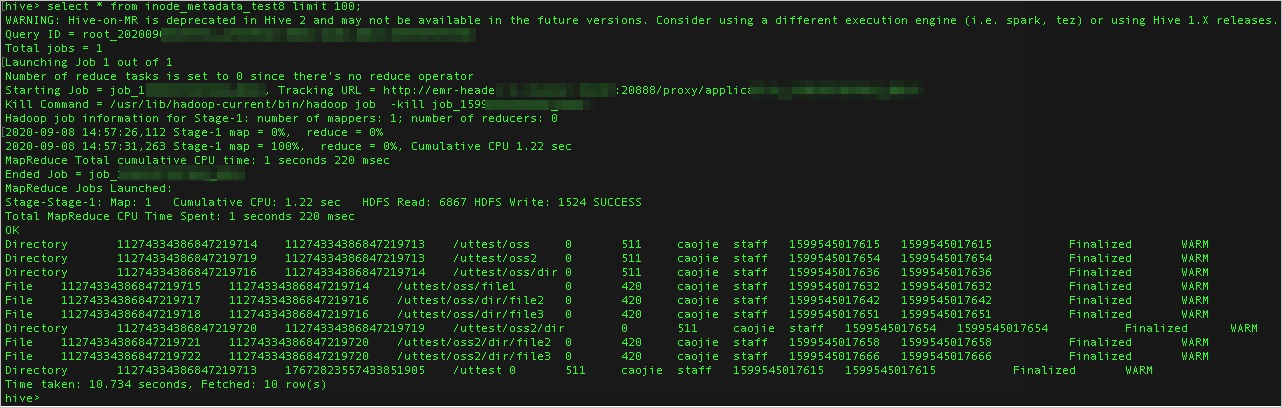
    创建完Hive表后,您可以使用Hive SQL分析元数据。
    select * from table_name limit 200;
    示例如下。
    hive> select * from inode_metadata_test8 limit 100;
    WARNING: Hive-on-MR is deprecated in Hive 2 and may not be available in the future versions. Consider using a different execution engine (i.e. spark, tez) or using Hive 1.X releases.
    Query ID = root_xxx
    Total jobs = 1
    Launching Job 1 out of 1
    Number of reduce tasks is set to 0 since there's no reduce operator
    Starting Job = job_1xxx       , Tracking URL = http://emr-heade xxx          :20888/proxy/applicxxx
    Kill Command = /usr/lib/hadoop-current/bin/hadoop job  -kill job_1599xxx
    Hadoop job information for Stage-1: number of mappers: 1; number of reducers: 0
    2020-09-08 14:57:26,112 Stage-1 map = 0%,  reduce = 0%
    2020-09-08 14:57:31,263 Stage-1 map = 100%,  reduce = 0%, Cumulative CPU 1.22 sec
    MapReduce Total cumulative CPU time: 1 seconds 220 msec
    Ended Job = job_xxx
    MapReduce Jobs Launched:
    Stage-Stage-1: Map: 1   Cumulative CPU: 1.22 sec   HDFS Read: 6867 HDFS Write: 1524 SUCCESS
    Total MapReduce CPU Time Spent: 1 seconds 220 msec
    OK
    Directory      1127433438684721971 4   1127433438684721971 3   /uttest/oss       0     511     caojie  staff   1599545017615   1599545017615              Finalized       WARM
    Directory      1127433438684721971 9   1127433438684721971 3   /uttest/oss2      0     511     caojie  staff   1599545017654   1599545017654              Finalized       WARM
    Directory      1127433438684721971 6   1127433438684721971 4   /uttest/oss/dir   0     511     caojie  staff   1599545017636   1599545017636              Finalized       WARM
    File           1127433438684721971 5   1127433438684721971 4   /uttest/oss/file1 0     420     caojie  staff   1599545017632   1599545017632              Finalized       WARM
    File           1127433438684721971 7   1127433438684721971 6   /uttest/oss/dir/file2 0  420     caojie  staff   1599545017642   1599545017642              Finalized       WARM
    File           1127433438684721971 8   1127433438684721971 6   /uttest/oss/dir/file3 0  420     caojie  staff   1599545017651   1599545017651              Finalized       WARM
    Directory      1127433438684721972 0   1127433438684721971 9   /uttest/oss2/dir  0     511     caojie  staff   1599545017654   1599545017654              Finalized       WARM
    File           1127433438684721972 1   1127433438684721972 0   /uttest/oss2/dir/file2 0 420     caojie  staff   1599545017658   1599545017658              Finalized       WARM
    File           1127433438684721972 2   1127433438684721972 0   /uttest/oss2/dir/file3 0 420     caojie  staff   1599545017666   1599545017666              Finalized       WARM
    Directory      1127433438684721971 3   1767282355743385190 5   /uttest 0         511     caojie  staff   1599545017615   1599545017615              Finalized       WARM
    Time taken: 10.734 seconds, Fetched: 10 row(s)
    hive>