
万相-参考生视频模型支持 多模态输入 (文本/图像/视频/音频),可将人物或物体作为主角,根据提示词生成自然生动的表演视频。
快速开始
输入提示词:视频1抱着图3,在图4的椅子上弹奏一支舒缓的乡村民谣,并说道:“今天的阳光真好。”图1手中拿着图2,路过视频1,把手中的图2放到视频1旁边的桌子上,并说道:“真好听,能不能再唱一遍”。 | |||||
输入图像(图1)
| 输入视频(视频1)
| 输入图像(图2)
| 输入图像(图3)
| 输入图像(图4)
| 输出视频(多镜头,有声视频) |
 输入参考音色: | 输入参考音色: |  | 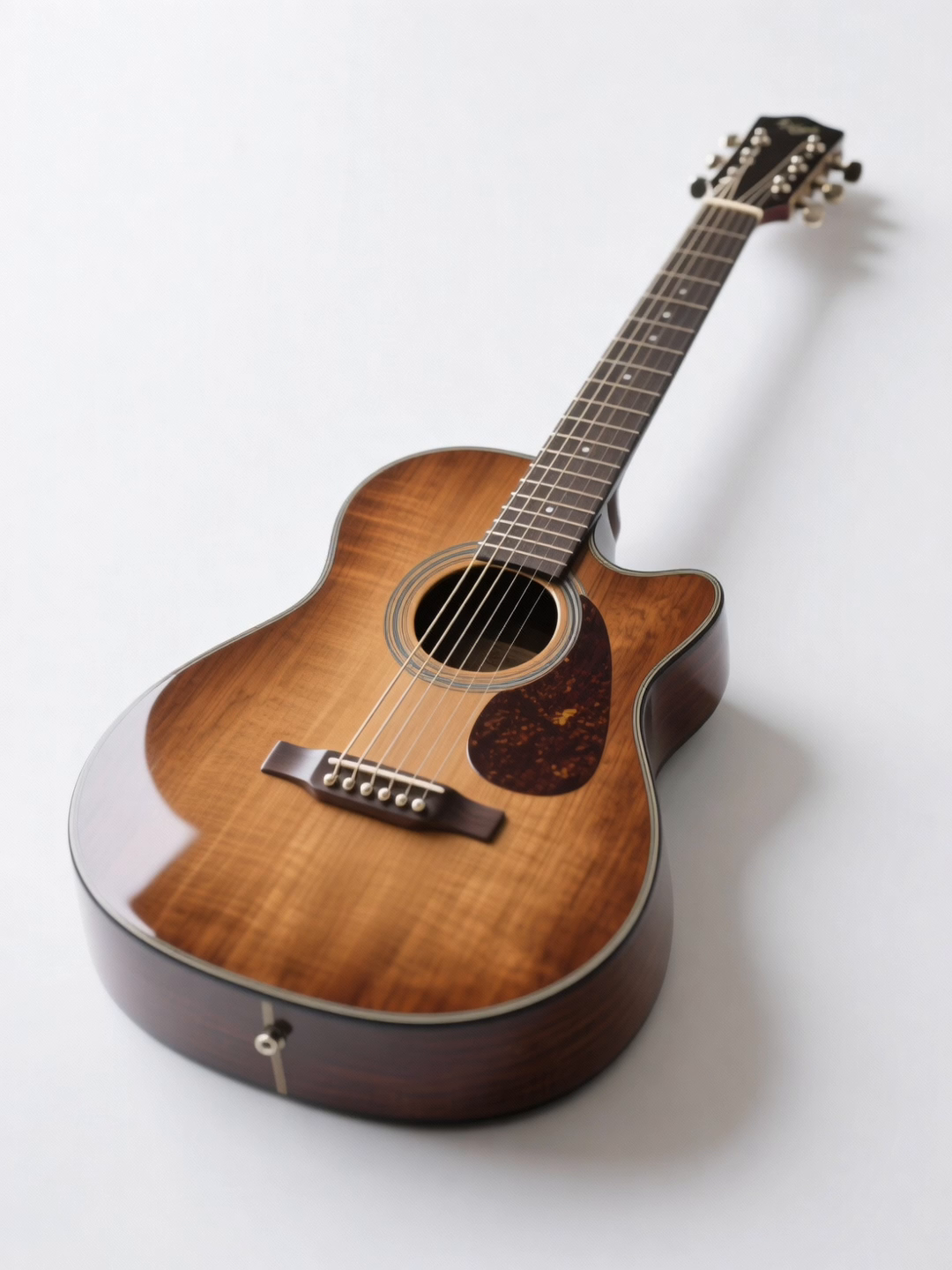 |  | |
在调用前,先获取与配置 API Key,再配置API Key到环境变量。通过SDK进行调用,请安装DashScope SDK。
Python SDK
重要请确保 DashScope Python SDK 版本不低于1.25.16,再运行以下代码。
若版本过低,可能会触发 "url error, please check url!" 等错误。请参考安装SDK进行更新。
# -*- coding: utf-8 -*-
from http import HTTPStatus
from dashscope import VideoSynthesis
import dashscope
import os

# 以下为华北2(北京)地域的URL。请将 {WorkspaceId} 替换为您的百炼业务空间ID,各地域的URL不同,获取URL:https://help.aliyun.com/zh/model-studio/video-reference-api-reference
dashscope.base_http_api_url = 'https://{WorkspaceId}.cn-beijing.maas.aliyuncs.com/api/v1'

# 若没有配置环境变量,请用百炼API Key将下行替换为:api_key="sk-xxx"
# 各地域的API Key不同。获取API Key:https://help.aliyun.com/zh/model-studio/get-api-key
api_key = os.getenv("DASHSCOPE_API_KEY")

media = [
    {
        "type": "reference_image",
        "url": "https://help-static-aliyun-doc.aliyuncs.com/file-manage-files/zh-CN/20260408/sjuytr/wan-r2v-object-girl.jpg",
        "reference_voice": "https://help-static-aliyun-doc.aliyuncs.com/file-manage-files/zh-CN/20260408/gbqewz/wan-r2v-girl-voice.mp3"
    },
    {
        "type": "reference_video",
        "url": "https://help-static-aliyun-doc.aliyuncs.com/file-manage-files/zh-CN/20260129/qigswt/wan-r2v-role2.mp4",
        "reference_voice": "https://help-static-aliyun-doc.aliyuncs.com/file-manage-files/zh-CN/20260408/isllrq/wan-r2v-boy-voice.mp3"
    },
    {
        "type": "reference_image",
        "url": "https://help-static-aliyun-doc.aliyuncs.com/file-manage-files/zh-CN/20260129/rtjeqf/wan-r2v-object3.png"
    },
    {
        "type": "reference_image",
        "url": "https://help-static-aliyun-doc.aliyuncs.com/file-manage-files/zh-CN/20260129/qpzxps/wan-r2v-object4.png"
    },
    {
        "type": "reference_image",
        "url": "https://help-static-aliyun-doc.aliyuncs.com/file-manage-files/zh-CN/20260129/wfjikw/wan-r2v-backgroud5.png"
    }
]

print('please wait...')
rsp = VideoSynthesis.call(
    api_key=api_key,
    model="wan2.7-r2v-2026-06-12",
    media=media,
    resolution="720P",
    ratio="16:9",
    duration=10,
    prompt_extend=False,
    watermark=True,
    prompt="视频1抱着图3,在图4的椅子上弹奏一支舒缓的乡村民谣,并说道:“今天的阳光真好。”图1手中拿着图2,路过视频1,把手中的图2放到视频1旁边的桌子上,并说道:“真好听,能不能再唱一遍”。",
)
print(rsp)
if rsp.status_code == HTTPStatus.OK:
    print("video_url:", rsp.output.video_url)
else:
    print('Failed, status_code: %s, code: %s, message: %s' % (rsp.status_code, rsp.code, rsp.message))
Java SDK
重要请确保 DashScope Java SDK 版本不低于2.22.14,再运行以下代码。
若版本过低,可能会触发 "url error, please check url!" 等错误。请参考安装SDK进行更新。
// Copyright (c) Alibaba, Inc. and its affiliates.

import com.alibaba.dashscope.aigc.videosynthesis.VideoSynthesis;
import com.alibaba.dashscope.aigc.videosynthesis.VideoSynthesisParam;
import com.alibaba.dashscope.aigc.videosynthesis.VideoSynthesisResult;
import com.alibaba.dashscope.exception.ApiException;
import com.alibaba.dashscope.exception.InputRequiredException;
import com.alibaba.dashscope.exception.NoApiKeyException;
import com.alibaba.dashscope.utils.Constants;
import com.alibaba.dashscope.utils.JsonUtils;

import java.util.ArrayList;
import java.util.List;

public class Ref2Video {

    static {
        // 以下为华北2(北京)地域的URL。请将 {WorkspaceId} 替换为您的百炼业务空间ID,各地域的URL不同,获取URL:https://help.aliyun.com/zh/model-studio/video-reference-api-reference
        Constants.baseHttpApiUrl = "https://{WorkspaceId}.cn-beijing.maas.aliyuncs.com/api/v1";
    }

    // 若没有配置环境变量,请用百炼API Key将下行替换为:apiKey="sk-xxx"
    // 各地域的API Key不同。获取API Key:https://help.aliyun.com/zh/model-studio/get-api-key
    static String apiKey = System.getenv("DASHSCOPE_API_KEY");

    public static void ref2video() throws ApiException, NoApiKeyException, InputRequiredException {
        VideoSynthesis vs = new VideoSynthesis();
        final String prompt = "视频1抱着图3,在图4的椅子上弹奏一支舒缓的乡村民谣,并说道:“今天的阳光真好。”图1手中拿着图2,路过视频1,把手中的图2放到视频1旁边的桌子上,并说道:“真好听,能不能再唱一遍”。";
        List<VideoSynthesisParam.Media> media = new ArrayList<>();
        media.add(VideoSynthesisParam.Media.builder()
                .url("https://help-static-aliyun-doc.aliyuncs.com/file-manage-files/zh-CN/20260408/sjuytr/wan-r2v-object-girl.jpg")
                .type("reference_image")
                .referenceVoice("https://help-static-aliyun-doc.aliyuncs.com/file-manage-files/zh-CN/20260408/gbqewz/wan-r2v-girl-voice.mp3")
                .build());
        media.add(VideoSynthesisParam.Media.builder()
                .url("https://help-static-aliyun-doc.aliyuncs.com/file-manage-files/zh-CN/20260129/qigswt/wan-r2v-role2.mp4")
                .type("reference_video")
                .referenceVoice("https://help-static-aliyun-doc.aliyuncs.com/file-manage-files/zh-CN/20260408/isllrq/wan-r2v-boy-voice.mp3")
                .build());
        media.add(VideoSynthesisParam.Media.builder()
                .url("https://help-static-aliyun-doc.aliyuncs.com/file-manage-files/zh-CN/20260129/rtjeqf/wan-r2v-object3.png")
                .type("reference_image")
                .build());
        media.add(VideoSynthesisParam.Media.builder()
                .url("https://help-static-aliyun-doc.aliyuncs.com/file-manage-files/zh-CN/20260129/qpzxps/wan-r2v-object4.png")
                .type("reference_image")
                .build());
        media.add(VideoSynthesisParam.Media.builder()
                .url("https://help-static-aliyun-doc.aliyuncs.com/file-manage-files/zh-CN/20260129/wfjikw/wan-r2v-backgroud5.png")
                .type("reference_image")
                .build());
        VideoSynthesisParam param =
                VideoSynthesisParam.builder()
                        .apiKey(apiKey)
                        .model("wan2.7-r2v-2026-06-12")
                        .prompt(prompt)
                        .media(media)
                        .watermark(true)
                        .duration(10)
                        .resolution("720P")
                        .ratio("16:9")
                        .promptExtend(false)
                        .build();
        System.out.println("please wait...");
        VideoSynthesisResult result = vs.call(param);
        System.out.println(JsonUtils.toJson(result));
    }

    public static void main(String[] args) {
        try {
            ref2video();
        } catch (ApiException | NoApiKeyException | InputRequiredException e) {
            System.out.println(e.getMessage());
        }
        System.exit(0);
    }
}
curl
步骤1:创建任务获取任务IDcurl --location 'https://{WorkspaceId}.cn-beijing.maas.aliyuncs.com/api/v1/services/aigc/video-generation/video-synthesis' \
-H 'X-DashScope-Async: enable' \
-H "Authorization: Bearer $DASHSCOPE_API_KEY" \
-H 'Content-Type: application/json' \
-d '{
"model": "wan2.7-r2v-2026-06-12",
"input": {
"prompt": "视频1抱着图3,在图4的椅子上弹奏一支舒缓的乡村民谣,并说道:“今天的阳光真好。”图1手中拿着图2,路过视频1,把手中的图2放到视频1旁边的桌子上,并说道:“真好听,能不能再唱一遍”。 ",
"media": [
{
"type": "reference_image",
"url": "https://help-static-aliyun-doc.aliyuncs.com/file-manage-files/zh-CN/20260408/sjuytr/wan-r2v-object-girl.jpg",
"reference_voice": "https://help-static-aliyun-doc.aliyuncs.com/file-manage-files/zh-CN/20260408/gbqewz/wan-r2v-girl-voice.mp3"
},
{
"type": "reference_video",
"url": "https://help-static-aliyun-doc.aliyuncs.com/file-manage-files/zh-CN/20260129/qigswt/wan-r2v-role2.mp4",
"reference_voice": "https://help-static-aliyun-doc.aliyuncs.com/file-manage-files/zh-CN/20260408/isllrq/wan-r2v-boy-voice.mp3"
},
{
"type": "reference_image",
"url": "https://help-static-aliyun-doc.aliyuncs.com/file-manage-files/zh-CN/20260129/rtjeqf/wan-r2v-object3.png"
},
{
"type": "reference_image",
"url": "https://help-static-aliyun-doc.aliyuncs.com/file-manage-files/zh-CN/20260129/qpzxps/wan-r2v-object4.png"
},
{
"type": "reference_image",
"url": "https://help-static-aliyun-doc.aliyuncs.com/file-manage-files/zh-CN/20260129/wfjikw/wan-r2v-backgroud5.png"
}
]
},
"parameters": {
"resolution": "720P",
"ratio": "16:9",
"duration": 10,
"prompt_extend": false,
"watermark": true
}
}'
将{task_id}完整替换为上一步接口返回的task_id的值。task_id查询有效期为24小时,并请将{WorkspaceId}替换为真实的业务空间ID。
curl -X GET https://{WorkspaceId}.cn-beijing.maas.aliyuncs.com/api/v1/tasks/{task_id} \
--header "Authorization: Bearer $DASHSCOPE_API_KEY"
适用范围
- 各地域支持的模型有所差异,且资源相互独立。各地域支持的模型请参见百炼控制台。
- 调用时,确保模型、Endpoint URL 和 API Key 均属于同一地域,跨地域调用将会失败。
说明本文的示例代码适用于北京地域。如使用其他地域,请参见API参考。
核心能力(wan2.7模型)
单图参考(多宫格图)
支持模型:wan2.7系列模型。
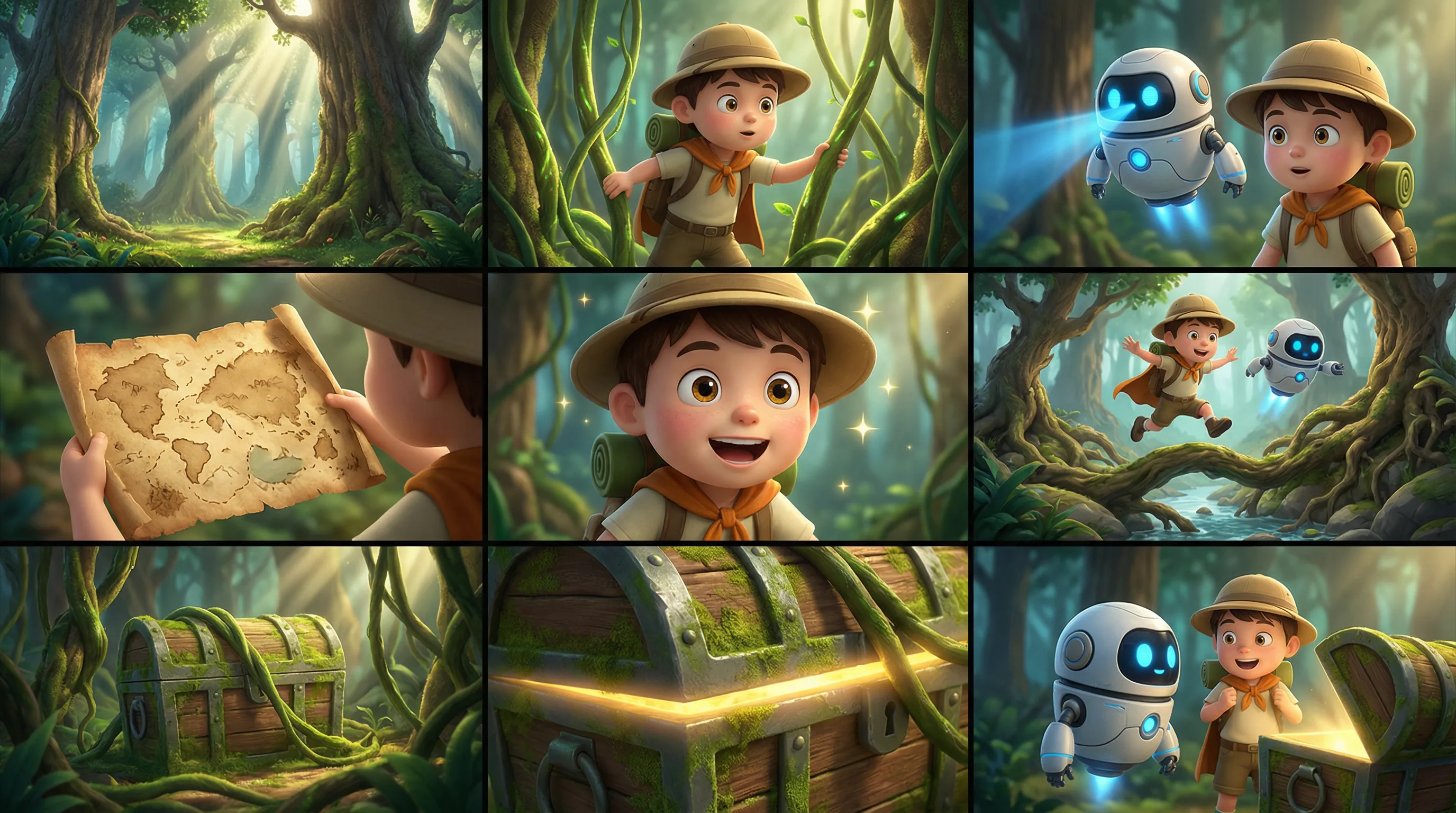
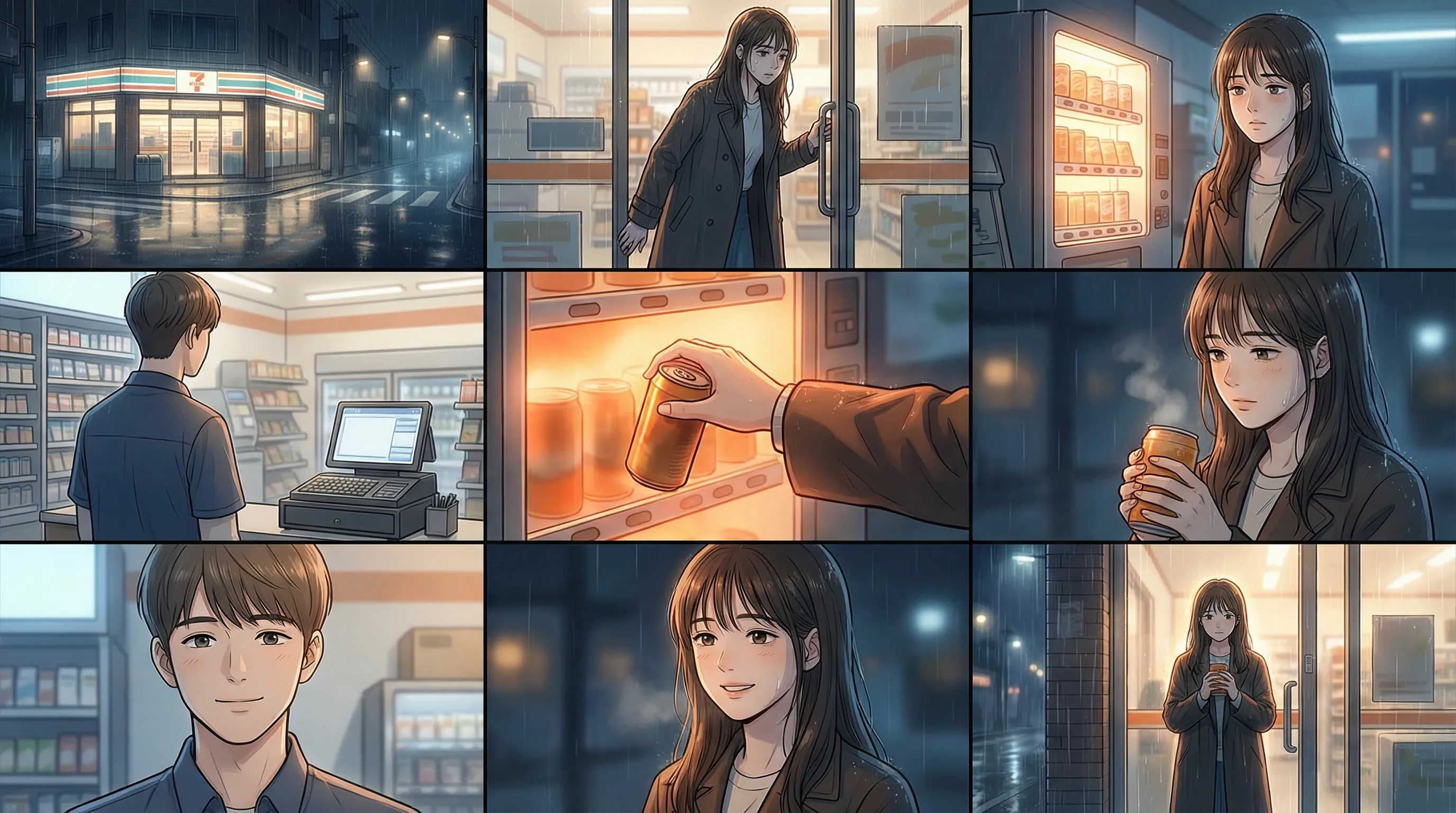
功能介绍:输入一张多宫格图(故事板),模型自动识别多宫格布局,生成角色、场景和镜头一致的视频。建议单次仅传入一张多宫格图。
参数设置:
media.type:设置为reference_image(参考图像)。media.url:多宫格图像的 URL 或 base64 编码字符串。prompt:当参考素材有且仅有一张图片或一个视频,则可表述为“参考图片”或“参考视频”。
输入提示词:参考图片 ,3D卡通冒险电影风,角色Q版但材质细腻,动作流畅,色彩鲜明,保持角色与森林场景一致,不要加入文字。氛围: 冒险、轻快、神秘、童趣。角色: 小男孩探险家:圆帽、背包、短斗篷。小伙伴:会飞的小机器人,圆形身体,蓝色发光眼。场景: 奇幻森林,巨大树根、蘑菇、藤蔓、藏宝洞口、阳光光束。分镜脚本: 1. 全景:奇幻森林里高大树木与光束交错,环境神秘明亮。 2. 中景:小男孩拨开藤蔓向前探路。 3. 中景:小机器人飞在他身边,用蓝光扫描前方。 4. 特写:一张旧藏宝图在男孩手里展开。 5. 近景:他露出兴奋表情,眼睛亮起来。 6. 动作镜头:两人跳过树根和小溪,继续深入森林。 7. 中景:藤蔓后方露出一个被苔藓覆盖的宝箱。 8. 特写:宝箱边缘闪出金色光芒。 9. 收束镜头:男孩和小机器人站在宝箱前惊喜对望,冒险感拉满。 | |
| 输入多宫格图像 | 输出视频 |
 | |
输入提示词:参考图片,韩漫风格,夜晚灯光柔和,人物表情细腻,场景统一,图中不要出现文字。氛围: 治愈、安静、微孤独、温柔。角色: 女主:打工结束的年轻女生,长外套,疲惫但温柔。店员少年:便利店夜班店员,清爽短发。场景: 深夜便利店,暖白灯,货架整齐,玻璃门外有细雨和街灯。分镜脚本: 1. 全景:深夜便利店在雨夜街角亮着暖白色灯光。 2. 中景:女主推门走进店里,肩上还带着夜雨湿气。 3. 近景:她疲惫地站在热饮柜前,轻轻发呆。 4. 中景:店员少年从收银台抬头看见她。 5. 特写:热饮柜的橙色灯光映在她手边。 6. 近景:女主拿起一罐热饮,神情稍微放松。 7. 近景:店员朝她露出温和而克制的笑并说:”今天也辛苦啦。” 8. 中景:女主回以浅浅笑意,疲惫感被冲淡。 9. 收束镜头:她捧着热饮站在店门前,看着雨夜,便利店灯光把背影映得很温柔。 | |
| 输入多宫格图像 | 输出视频 |
 | |
Python SDK
请确保 DashScope Python SDK 版本不低于
1.25.16,可参考安装SDK进行更新。
# -*- coding: utf-8 -*-
from http import HTTPStatus
from dashscope import VideoSynthesis
import dashscope
import os

# 以下为华北2(北京)地域的URL。请将 {WorkspaceId} 替换为您的百炼业务空间ID,各地域的URL不同,获取URL:https://help.aliyun.com/zh/model-studio/video-reference-api-reference
dashscope.base_http_api_url = 'https://{WorkspaceId}.cn-beijing.maas.aliyuncs.com/api/v1'

# 若没有配置环境变量,请用百炼API Key将下行替换为:api_key="sk-xxx"
# 各地域的API Key不同。获取API Key:https://help.aliyun.com/zh/model-studio/get-api-key
api_key = os.getenv("DASHSCOPE_API_KEY")

media = [
    {
        "type": "reference_image",
        "url": "https://help-static-aliyun-doc.aliyuncs.com/file-manage-files/zh-CN/20260403/wgjaxy/banana_storyboard_00000020.png"
    }
]

def sample_sync_call():
    print('----sync call, please wait a moment----')
    rsp = VideoSynthesis.call(
        api_key=api_key,
        model="wan2.7-r2v-2026-06-12",
        media=media,
        resolution="720P",
        ratio="16:9",
        duration=10,
        prompt_extend=False,
        watermark=True,
        prompt="参考图片,3D卡通冒险电影风,角色Q版但材质细腻,动作流畅,色彩鲜明,保持角色与森林场景一致,不要加入文字。氛围: 冒险、轻快、神秘、童趣。角色: 小男孩探险家:圆帽、背包、短斗篷。小伙伴:会飞的小机器人,圆形身体,蓝色发光眼。场景: 奇幻森林,巨大树根、蘑菇、藤蔓、藏宝洞口、阳光光束。分镜脚本: 1. 全景:奇幻森林里高大树木与光束交错,环境神秘明亮。 2. 中景:小男孩拨开藤蔓向前探路。 3. 中景:小机器人飞在他身边,用蓝光扫描前方。 4. 特写:一张旧藏宝图在男孩手里展开。 5. 近景:他露出兴奋表情,眼睛亮起来。 6. 动作镜头:两人跳过树根和小溪,继续深入森林。 7. 中景:藤蔓后方露出一个被苔藓覆盖的宝箱。 8. 特写:宝箱边缘闪出金色光芒。 9. 收束镜头:男孩和小机器人站在宝箱前惊喜对望,冒险感拉满。",
    )
    if rsp.status_code == HTTPStatus.OK:
        print(rsp.output.video_url)
    else:
        print('Failed, status_code: %s, code: %s, message: %s' %
              (rsp.status_code, rsp.code, rsp.message))

if __name__ == '__main__':
    sample_sync_call()
Java SDK
请确保 DashScope Java SDK 版本不低于
2.22.14,可参考安装SDK进行更新。
// Copyright (c) Alibaba, Inc. and its affiliates.

import com.alibaba.dashscope.aigc.videosynthesis.VideoSynthesis;
import com.alibaba.dashscope.aigc.videosynthesis.VideoSynthesisParam;
import com.alibaba.dashscope.aigc.videosynthesis.VideoSynthesisResult;
import com.alibaba.dashscope.exception.ApiException;
import com.alibaba.dashscope.exception.InputRequiredException;
import com.alibaba.dashscope.exception.NoApiKeyException;
import com.alibaba.dashscope.utils.Constants;
import com.alibaba.dashscope.utils.JsonUtils;

import java.util.ArrayList;
import java.util.List;

public class Ref2Video {

    static {
        //  以下为华北2(北京)地域的URL。请将 {WorkspaceId} 替换为您的百炼业务空间ID,各地域的URL不同,获取URL:https://help.aliyun.com/zh/model-studio/video-reference-api-reference
        Constants.baseHttpApiUrl = "https://{WorkspaceId}.cn-beijing.maas.aliyuncs.com/api/v1";
    }

    // 若没有配置环境变量,请用百炼API Key将下行替换为:apiKey="sk-xxx"
    // 各地域的API Key不同。获取API Key:https://help.aliyun.com/zh/model-studio/get-api-key
    static String apiKey = System.getenv("DASHSCOPE_API_KEY");

    public static void syncCall() {
        VideoSynthesis videoSynthesis = new VideoSynthesis();
        final String prompt = "参考图片,3D卡通冒险电影风,角色Q版但材质细腻,动作流畅,色彩鲜明,保持角色与森林场景一致,不要加入文字。氛围: 冒险、轻快、神秘、童趣。角色: 小男孩探险家:圆帽、背包、短斗篷。小伙伴:会飞的小机器人,圆形身体,蓝色发光眼。场景: 奇幻森林,巨大树根、蘑菇、藤蔓、藏宝洞口、阳光光束。分镜脚本: 1. 全景:奇幻森林里高大树木与光束交错,环境神秘明亮。 2. 中景:小男孩拨开藤蔓向前探路。 3. 中景:小机器人飞在他身边,用蓝光扫描前方。 4. 特写:一张旧藏宝图在男孩手里展开。 5. 近景:他露出兴奋表情,眼睛亮起来。 6. 动作镜头:两人跳过树根和小溪,继续深入森林。 7. 中景:藤蔓后方露出一个被苔藓覆盖的宝箱。 8. 特写:宝箱边缘闪出金色光芒。 9. 收束镜头:男孩和小机器人站在宝箱前惊喜对望,冒险感拉满。";
        List<VideoSynthesisParam.Media> media = new ArrayList<>();
        media.add(VideoSynthesisParam.Media.builder()
                .url("https://help-static-aliyun-doc.aliyuncs.com/file-manage-files/zh-CN/20260403/wgjaxy/banana_storyboard_00000020.png")
                .type("reference_image")
                .build());
        VideoSynthesisParam param =
                VideoSynthesisParam.builder()
                        .apiKey(apiKey)
                        .model("wan2.7-r2v-2026-06-12")
                        .prompt(prompt)
                        .media(media)
                        .watermark(true)
                        .duration(10)
                        .resolution("720P")
                        .ratio("16:9")
                        .promptExtend(false)
                        .build();
        VideoSynthesisResult result = null;
        try {
            System.out.println("---sync call, please wait a moment----");
            result = videoSynthesis.call(param);
        } catch (ApiException | NoApiKeyException e){
            throw new RuntimeException(e.getMessage());
        } catch (InputRequiredException e) {
            throw new RuntimeException(e);
        }
        System.out.println(JsonUtils.toJson(result));
    }

    public static void main(String[] args) {
        syncCall();
    }
}
curl
步骤1:创建任务获取任务IDcurl --location 'https://{WorkspaceId}.cn-beijing.maas.aliyuncs.com/api/v1/services/aigc/video-generation/video-synthesis' \
-H 'X-DashScope-Async: enable' \
-H "Authorization: Bearer $DASHSCOPE_API_KEY" \
-H 'Content-Type: application/json' \
-d '{
"model": "wan2.7-r2v-2026-06-12",
"input": {
"prompt": "参考图片,3D卡通冒险电影风,角色Q版但材质细腻,动作流畅,色彩鲜明,保持角色与森林场景一致,不要加入文字。氛围: 冒险、轻快、神秘、童趣。角色: 小男孩探险家:圆帽、背包、短斗篷。小伙伴:会飞的小机器人,圆形身体,蓝色发光眼。场景: 奇幻森林,巨大树根、蘑菇、藤蔓、藏宝洞口、阳光光束。分镜脚本: 1. 全景:奇幻森林里高大树木与光束交错,环境神秘明亮。 2. 中景:小男孩拨开藤蔓向前探路。 3. 中景:小机器人飞在他身边,用蓝光扫描前方。 4. 特写:一张旧藏宝图在男孩手里展开。 5. 近景:他露出兴奋表情,眼睛亮起来。 6. 动作镜头:两人跳过树根和小溪,继续深入森林。 7. 中景:藤蔓后方露出一个被苔藓覆盖的宝箱。 8. 特写:宝箱边缘闪出金色光芒。 9. 收束镜头:男孩和小机器人站在宝箱前惊喜对望,冒险感拉满。",
"media": [
{
"type": "reference_image",
"url": "https://help-static-aliyun-doc.aliyuncs.com/file-manage-files/zh-CN/20260403/wgjaxy/banana_storyboard_00000020.png"
}
]
},
"parameters": {
"resolution": "720P",
"ratio": "16:9",
"duration": 10,
"prompt_extend": false,
"watermark": true
}
}'
将{task_id}完整替换为上一步接口返回的task_id的值。task_id查询有效期为24小时,并请将{WorkspaceId}替换为真实的业务空间ID。
curl -X GET https://{WorkspaceId}.cn-beijing.maas.aliyuncs.com/api/v1/tasks/{task_id} \
--header "Authorization: Bearer $DASHSCOPE_API_KEY"
多主体参考+音色定制
支持模型:wan2.7系列模型。
功能介绍:支持传入多个参考图像和参考视频作为主体素材,并可为每个主体独立指定音色,实现多角色同框互动与音色区分。
参数设置:
-
media:参考素材数组。-
media.type:支持reference_image(参考图像)和reference_video(参考视频)。参考图像 + 参考视频 ≤ 5。 -
media.url:素材的 URL;图像还支持 base64 编码字符串。 -
media.reference_voice(可选):为主体指定音色的音频 URL,推荐与reference_image或reference_video搭配使用。音频生效逻辑:若
reference_video本身包含音频且未指定reference_voice,默认使用视频原声;若同时传入,reference_voice将覆盖视频原声。
-
-
prompt:在提示词中指代参考素材,规则如下:- 使用“图1、图2”指代
reference_image素材,使用“视频1、视频2”指代reference_video素材,英文提示词则写为“Image 1”、"Video 1”这类标识。 - 按照
media数组定义参考素材的引用顺序,图和视频分别计数。
- 使用“图1、图2”指代
输入提示词:视频1抱着图3,在图4的椅子上弹奏一支舒缓的乡村民谣,并说道:“今天的阳光真好。”图1手中拿着图2,路过视频1,把手中的图2放到视频1旁边的桌子上,并说道:“真好听,能不能再唱一遍”。 | |||||
输入图像(图1)
| 输入视频(视频1)
| 输入图像(图2)
| 输入图像(图3)
| 输入图像(图4)
| 输出视频(多镜头,有声视频) |
输入参考音色: | 输入参考音色: | | | | |
输入提示词:图2从画面左侧深处走来,随后切换到图2的特写,图1正靠在右侧图片3充满锈迹的墙壁上发呆。她注意到了脚步声,缓缓转头。 图1看到图2后,图1说:“你怎么还是来了?”图2回答:“我们谈谈吧。” | |||
输入图像(图1)
| 输入图像(图2)
| 输入图像(图3)
| 输出视频(多镜头,有声视频) |
 输入参考音色: |  输入参考音色: 输入参考音色: |  | |
Python SDK
请确保 DashScope Python SDK 版本不低于
1.25.16,可参考安装SDK进行更新。
# -*- coding: utf-8 -*-
from http import HTTPStatus
from dashscope import VideoSynthesis
import dashscope
import os

# 以下为华北2(北京)地域的URL。请将 {WorkspaceId} 替换为您的百炼业务空间ID,各地域的URL不同,获取URL:https://help.aliyun.com/zh/model-studio/video-reference-api-reference
dashscope.base_http_api_url = 'https://{WorkspaceId}.cn-beijing.maas.aliyuncs.com/api/v1'

# 若没有配置环境变量,请用百炼API Key将下行替换为:api_key="sk-xxx"
# 各地域的API Key不同。获取API Key:https://help.aliyun.com/zh/model-studio/get-api-key
api_key = os.getenv("DASHSCOPE_API_KEY")

media = [
    {
        "type": "reference_image",
        "url": "https://help-static-aliyun-doc.aliyuncs.com/file-manage-files/zh-CN/20260408/sjuytr/wan-r2v-object-girl.jpg",
        "reference_voice": "https://help-static-aliyun-doc.aliyuncs.com/file-manage-files/zh-CN/20260408/gbqewz/wan-r2v-girl-voice.mp3"
    },
    {
        "type": "reference_video",
        "url": "https://help-static-aliyun-doc.aliyuncs.com/file-manage-files/zh-CN/20260129/qigswt/wan-r2v-role2.mp4",
        "reference_voice": "https://help-static-aliyun-doc.aliyuncs.com/file-manage-files/zh-CN/20260408/isllrq/wan-r2v-boy-voice.mp3"
    },
    {
        "type": "reference_image",
        "url": "https://help-static-aliyun-doc.aliyuncs.com/file-manage-files/zh-CN/20260129/rtjeqf/wan-r2v-object3.png"
    },
    {
        "type": "reference_image",
        "url": "https://help-static-aliyun-doc.aliyuncs.com/file-manage-files/zh-CN/20260129/qpzxps/wan-r2v-object4.png"
    },
    {
        "type": "reference_image",
        "url": "https://help-static-aliyun-doc.aliyuncs.com/file-manage-files/zh-CN/20260129/wfjikw/wan-r2v-backgroud5.png"
    }
]

def sample_sync_call():
    print('----sync call, please wait a moment----')
    rsp = VideoSynthesis.call(
        api_key=api_key,
        model="wan2.7-r2v-2026-06-12",
        media=media,
        resolution="720P",
        ratio="16:9",
        duration=10,
        prompt_extend=False,
        watermark=True,
        prompt="视频1抱着图3,在图4的椅子上弹奏一支舒缓的乡村民谣,并说道:“今天的阳光真好。”图1手中拿着图2,路过视频1,把手中的图2放到视频1旁边的桌子上,并说道:“真好听,能不能再唱一遍”。",
    )
    if rsp.status_code == HTTPStatus.OK:
        print(rsp.output.video_url)
    else:
        print('Failed, status_code: %s, code: %s, message: %s' %
              (rsp.status_code, rsp.code, rsp.message))

if __name__ == '__main__':
    sample_sync_call()
Java SDK
请确保 DashScope Java SDK 版本不低于
2.22.14,可参考安装SDK进行更新。
// Copyright (c) Alibaba, Inc. and its affiliates.

import com.alibaba.dashscope.aigc.videosynthesis.VideoSynthesis;
import com.alibaba.dashscope.aigc.videosynthesis.VideoSynthesisParam;
import com.alibaba.dashscope.aigc.videosynthesis.VideoSynthesisResult;
import com.alibaba.dashscope.exception.ApiException;
import com.alibaba.dashscope.exception.InputRequiredException;
import com.alibaba.dashscope.exception.NoApiKeyException;
import com.alibaba.dashscope.utils.Constants;
import com.alibaba.dashscope.utils.JsonUtils;

import java.util.ArrayList;
import java.util.List;

public class Ref2Video {

    static {
        //  以下为华北2(北京)地域的URL。请将 {WorkspaceId} 替换为您的百炼业务空间ID,各地域的URL不同,获取URL:https://help.aliyun.com/zh/model-studio/video-reference-api-reference
        Constants.baseHttpApiUrl = "https://{WorkspaceId}.cn-beijing.maas.aliyuncs.com/api/v1";
    }

    // 若没有配置环境变量,请用百炼API Key将下行替换为:apiKey="sk-xxx"
    // 各地域的API Key不同。获取API Key:https://help.aliyun.com/zh/model-studio/get-api-key
    static String apiKey = System.getenv("DASHSCOPE_API_KEY");

    public static void syncCall() {
        VideoSynthesis videoSynthesis = new VideoSynthesis();
        final String prompt = "视频1抱着图3,在图4的椅子上弹奏一支舒缓的乡村民谣,并说道:“今天的阳光真好。”图1手中拿着图2,路过视频1,把手中的图2放到视频1旁边的桌子上,并说道:“真好听,能不能再唱一遍”。";
        List<VideoSynthesisParam.Media> media = new ArrayList<>();
        media.add(VideoSynthesisParam.Media.builder()
                .url("https://help-static-aliyun-doc.aliyuncs.com/file-manage-files/zh-CN/20260408/sjuytr/wan-r2v-object-girl.jpg")
                .type("reference_image")
                .referenceVoice("https://help-static-aliyun-doc.aliyuncs.com/file-manage-files/zh-CN/20260408/gbqewz/wan-r2v-girl-voice.mp3")
                .build());
        media.add(VideoSynthesisParam.Media.builder()
                .url("https://help-static-aliyun-doc.aliyuncs.com/file-manage-files/zh-CN/20260129/qigswt/wan-r2v-role2.mp4")
                .type("reference_video")
                .referenceVoice("https://help-static-aliyun-doc.aliyuncs.com/file-manage-files/zh-CN/20260408/isllrq/wan-r2v-boy-voice.mp3")
                .build());
        media.add(VideoSynthesisParam.Media.builder()
                .url("https://help-static-aliyun-doc.aliyuncs.com/file-manage-files/zh-CN/20260129/rtjeqf/wan-r2v-object3.png")
                .type("reference_image")
                .build());
        media.add(VideoSynthesisParam.Media.builder()
                .url("https://help-static-aliyun-doc.aliyuncs.com/file-manage-files/zh-CN/20260129/qpzxps/wan-r2v-object4.png")
                .type("reference_image")
                .build());
        media.add(VideoSynthesisParam.Media.builder()
                .url("https://help-static-aliyun-doc.aliyuncs.com/file-manage-files/zh-CN/20260129/wfjikw/wan-r2v-backgroud5.png")
                .type("reference_image")
                .build());
        VideoSynthesisParam param =
                VideoSynthesisParam.builder()
                        .apiKey(apiKey)
                        .model("wan2.7-r2v-2026-06-12")
                        .prompt(prompt)
                        .media(media)
                        .watermark(true)
                        .duration(10)
                        .resolution("720P")
                        .ratio("16:9")
                        .promptExtend(false)
                        .build();
        VideoSynthesisResult result = null;
        try {
            System.out.println("---sync call, please wait a moment----");
            result = videoSynthesis.call(param);
        } catch (ApiException | NoApiKeyException e){
            throw new RuntimeException(e.getMessage());
        } catch (InputRequiredException e) {
            throw new RuntimeException(e);
        }
        System.out.println(JsonUtils.toJson(result));
    }

    public static void main(String[] args) {
        syncCall();
    }
}
curl
步骤1:创建任务获取任务IDcurl --location 'https://{WorkspaceId}.cn-beijing.maas.aliyuncs.com/api/v1/services/aigc/video-generation/video-synthesis' \
-H 'X-DashScope-Async: enable' \
-H "Authorization: Bearer $DASHSCOPE_API_KEY" \
-H 'Content-Type: application/json' \
-d '{
"model": "wan2.7-r2v-2026-06-12",
"input": {
"prompt": "视频1抱着图3,在图4的椅子上弹奏一支舒缓的乡村民谣,并说道:“今天的阳光真好。”图1手中拿着图2,路过视频1,把手中的图2放到视频1旁边的桌子上,并说道:“真好听,能不能再唱一遍”。 ",
"media": [
{
"type": "reference_image",
"url": "https://help-static-aliyun-doc.aliyuncs.com/file-manage-files/zh-CN/20260408/sjuytr/wan-r2v-object-girl.jpg",
"reference_voice": "https://help-static-aliyun-doc.aliyuncs.com/file-manage-files/zh-CN/20260408/gbqewz/wan-r2v-girl-voice.mp3"
},
{
"type": "reference_video",
"url": "https://help-static-aliyun-doc.aliyuncs.com/file-manage-files/zh-CN/20260129/qigswt/wan-r2v-role2.mp4",
"reference_voice": "https://help-static-aliyun-doc.aliyuncs.com/file-manage-files/zh-CN/20260408/isllrq/wan-r2v-boy-voice.mp3"
},
{
"type": "reference_image",
"url": "https://help-static-aliyun-doc.aliyuncs.com/file-manage-files/zh-CN/20260129/rtjeqf/wan-r2v-object3.png"
},
{
"type": "reference_image",
"url": "https://help-static-aliyun-doc.aliyuncs.com/file-manage-files/zh-CN/20260129/qpzxps/wan-r2v-object4.png"
},
{
"type": "reference_image",
"url": "https://help-static-aliyun-doc.aliyuncs.com/file-manage-files/zh-CN/20260129/wfjikw/wan-r2v-backgroud5.png"
}
]
},
"parameters": {
"resolution": "720P",
"ratio": "16:9",
"duration": 10,
"prompt_extend": false,
"watermark": true
}
}'
将{task_id}完整替换为上一步接口返回的task_id的值。task_id查询有效期为24小时,并请将{WorkspaceId}替换为真实的业务空间ID。
curl -X GET https://{WorkspaceId}.cn-beijing.maas.aliyuncs.com/api/v1/tasks/{task_id} \
--header "Authorization: Bearer $DASHSCOPE_API_KEY"
多主体参考+首帧控制
支持模型:wan2.7系列模型。
功能介绍:在主体参考基础上加入首帧控制,让画面构图和内容走向更加可控。
参数设置:
-
media:参考素材数组。-
media.type:支持first_frame、reference_image(参考图像)和reference_video(参考视频)。首帧图像最多1张,参考图像和参考视频至少传入1个,参考图像 + 参考视频 ≤ 5。
-
media.url:素材的 URL;图像还支持 base64 编码字符串。
-
-
prompt:在提示词中指代参考素材,规则如下:- 使用“图1、图2”指代
reference_image素材,使用“视频1、视频2”指代reference_video素材,英文提示词则写为“Image 1”、"Video 1”这类标识。 - 按照
media数组定义参考素材的引用顺序,图和视频分别计数。 - 首帧无需在提示词中引用。
- 使用“图1、图2”指代
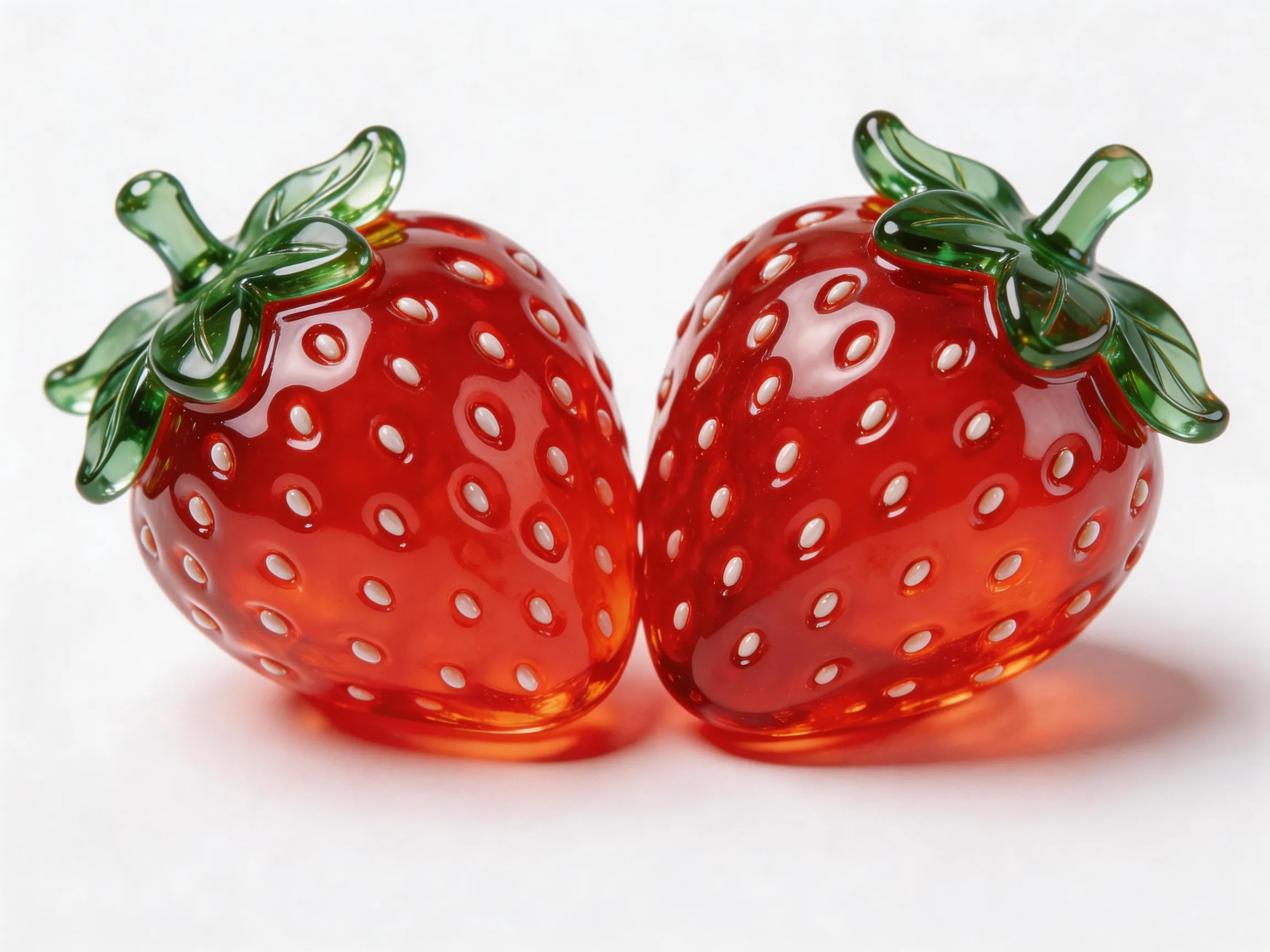
输入提示词:俯拍在一个蓝色的星球上,镜头逐渐推进到星球上面给到图1特写,他拿着图2,一边吃着图2,一边说:“怎么没人找我来玩呀?” | |||
输入首帧
| 输入图像(图1)
| 输入图像(图2)
| 输出视频
|
 |  |  | |
Python SDK
请确保 DashScope Python SDK 版本不低于
1.25.16,可参考安装SDK进行更新。
# -*- coding: utf-8 -*-
from http import HTTPStatus
from dashscope import VideoSynthesis
import dashscope
import os

# 以下为华北2(北京)地域的URL。请将 {WorkspaceId} 替换为您的百炼业务空间ID,各地域的URL不同,获取URL:https://help.aliyun.com/zh/model-studio/video-reference-api-reference
dashscope.base_http_api_url = 'https://{WorkspaceId}.cn-beijing.maas.aliyuncs.com/api/v1'

# 若没有配置环境变量,请用百炼API Key将下行替换为:api_key="sk-xxx"
# 各地域的API Key不同。获取API Key:https://help.aliyun.com/zh/model-studio/get-api-key
api_key = os.getenv("DASHSCOPE_API_KEY")

media = [
    {
        "type": "first_frame",
        "url": "https://help-static-aliyun-doc.aliyuncs.com/file-manage-files/zh-CN/20260414/ixwovg/wan2.7-r2v-first-frame.webp"
    },
    {
        "type": "reference_image",
        "url": "https://help-static-aliyun-doc.aliyuncs.com/file-manage-files/zh-CN/20260414/fkltfw/wan2.7-r2v-image-qq.webp"
    },
    {
        "type": "reference_image",
        "url": "https://help-static-aliyun-doc.aliyuncs.com/file-manage-files/zh-CN/20260414/kxkbsv/wan2.7-r2v-image-ob.webp"
    }
]

def sample_sync_call():
    print('----sync call, please wait a moment----')
    rsp = VideoSynthesis.call(
        api_key=api_key,
        model="wan2.7-r2v-2026-06-12",
        media=media,
        resolution="720P",
        duration=10,
        prompt_extend=False,
        watermark=True,
        prompt="俯拍在一个蓝色的星球上,镜头逐渐推进到星球上面给到图1特写,他拿着图2,一边吃着图2,一边说:“怎么没人找我来玩呀?”",
    )
    if rsp.status_code == HTTPStatus.OK:
        print(rsp.output.video_url)
    else:
        print('Failed, status_code: %s, code: %s, message: %s' %
              (rsp.status_code, rsp.code, rsp.message))

if __name__ == '__main__':
    sample_sync_call()
Java SDK
请确保 DashScope Java SDK 版本不低于
2.22.14,可参考安装SDK进行更新。
// Copyright (c) Alibaba, Inc. and its affiliates.

import com.alibaba.dashscope.aigc.videosynthesis.VideoSynthesis;
import com.alibaba.dashscope.aigc.videosynthesis.VideoSynthesisParam;
import com.alibaba.dashscope.aigc.videosynthesis.VideoSynthesisResult;
import com.alibaba.dashscope.exception.ApiException;
import com.alibaba.dashscope.exception.InputRequiredException;
import com.alibaba.dashscope.exception.NoApiKeyException;
import com.alibaba.dashscope.utils.Constants;
import com.alibaba.dashscope.utils.JsonUtils;

import java.util.ArrayList;
import java.util.List;

public class Ref2Video {

    static {
        //  以下为华北2(北京)地域的URL。请将 {WorkspaceId} 替换为您的百炼业务空间ID,各地域的URL不同,获取URL:https://help.aliyun.com/zh/model-studio/video-reference-api-reference
        Constants.baseHttpApiUrl = "https://{WorkspaceId}.cn-beijing.maas.aliyuncs.com/api/v1";
    }

    // 若没有配置环境变量,请用百炼API Key将下行替换为:apiKey="sk-xxx"
    // 各地域的API Key不同。获取API Key:https://help.aliyun.com/zh/model-studio/get-api-key
    static String apiKey = System.getenv("DASHSCOPE_API_KEY");

    public static void syncCall() {
        VideoSynthesis videoSynthesis = new VideoSynthesis();
        final String prompt = "俯拍在一个蓝色的星球上,镜头逐渐推进到星球上面给到图1特写,他拿着图2,一边吃着图2,一边说:“怎么没人找我来玩呀?”";
        List<VideoSynthesisParam.Media> media = new ArrayList<>();
        media.add(VideoSynthesisParam.Media.builder()
                .url("https://help-static-aliyun-doc.aliyuncs.com/file-manage-files/zh-CN/20260414/ixwovg/wan2.7-r2v-first-frame.webp")
                .type("first_frame")
                .build());
        media.add(VideoSynthesisParam.Media.builder()
                .url("https://help-static-aliyun-doc.aliyuncs.com/file-manage-files/zh-CN/20260414/fkltfw/wan2.7-r2v-image-qq.webp")
                .type("reference_image")
                .build());
        media.add(VideoSynthesisParam.Media.builder()
                .url("https://help-static-aliyun-doc.aliyuncs.com/file-manage-files/zh-CN/20260414/kxkbsv/wan2.7-r2v-image-ob.webp")
                .type("reference_image")
                .build());
        VideoSynthesisParam param =
                VideoSynthesisParam.builder()
                        .apiKey(apiKey)
                        .model("wan2.7-r2v-2026-06-12")
                        .prompt(prompt)
                        .media(media)
                        .watermark(true)
                        .duration(10)
                        .resolution("720P")
                        .promptExtend(false)
                        .build();
        VideoSynthesisResult result = null;
        try {
            System.out.println("---sync call, please wait a moment----");
            result = videoSynthesis.call(param);
        } catch (ApiException | NoApiKeyException e){
            throw new RuntimeException(e.getMessage());
        } catch (InputRequiredException e) {
            throw new RuntimeException(e);
        }
        System.out.println(JsonUtils.toJson(result));
    }

    public static void main(String[] args) {
        syncCall();
    }
}
curl
步骤1:创建任务获取任务IDcurl --location 'https://{WorkspaceId}.cn-beijing.maas.aliyuncs.com/api/v1/services/aigc/video-generation/video-synthesis' \
-H 'X-DashScope-Async: enable' \
-H "Authorization: Bearer $DASHSCOPE_API_KEY" \
-H 'Content-Type: application/json' \
-d '{
"model": "wan2.7-r2v-2026-06-12",
"input": {
"prompt": "俯拍在一个蓝色的星球上,镜头逐渐推进到星球上面给到图1特写,他拿着图2,一边吃着图2,一边说:“怎么没人找我来玩呀?” ",
"media": [
{
"type": "first_frame",
"url": "https://help-static-aliyun-doc.aliyuncs.com/file-manage-files/zh-CN/20260414/ixwovg/wan2.7-r2v-first-frame.webp"
},
{
"type": "reference_image",
"url": "https://help-static-aliyun-doc.aliyuncs.com/file-manage-files/zh-CN/20260414/fkltfw/wan2.7-r2v-image-qq.webp"
},
{
"type": "reference_image",
"url": "https://help-static-aliyun-doc.aliyuncs.com/file-manage-files/zh-CN/20260414/kxkbsv/wan2.7-r2v-image-ob.webp"
}
]
},
"parameters": {
"resolution": "720P",
"duration": 10,
"prompt_extend": false,
"watermark": true
}
}'
将{task_id}完整替换为上一步接口返回的task_id的值。task_id查询有效期为24小时,并请将{WorkspaceId}替换为真实的业务空间ID。
curl -X GET https://{WorkspaceId}.cn-beijing.maas.aliyuncs.com/api/v1/tasks/{task_id} \
--header "Authorization: Bearer $DASHSCOPE_API_KEY"
如何输入参考素材
wan2.7系列模型
参考图像、视频和音频均传入media数组。
输入图像
-
首帧数量:首帧(
media.type=first_frame)最多1张。 -
参考图像数量:参考图像(
media.type=reference_image)最多5张,同时满足参考图像 + 参考视频 ≤ 5。 -
输入方式:
-
公网URL:支持 HTTP 或 HTTPS 协议。示例:https://xxxx/xxx.png。
-
临时URL:支持OSS协议,必须通过上传文件获取临时 URL。示例:oss://dashscope-instant/xxx/xxx.png。
-
Base64 编码字符串:遵循
data:{MIME_type};base64,{base64_data}的格式,其中:-
{base64_data}:图像文件经过 Base64 编码后的字符串。
-
{MIME_type}:图像的媒体类型,需与文件格式对应。
图像格式
MIME Type
JPEG
image/jpeg
JPG
image/jpeg
PNG
image/png
BMP
image/bmp
WEBP
image/webp
-
-

输入视频
-
参考视频数量:参考视频(
media.type=reference_video)最多5个,同时满足参考图像 + 参考视频 ≤ 5。 -
输入方式:
- 公网URL:支持 HTTP 或 HTTPS 协议。示例:https://xxxx/xxx.mp4。
- 临时URL:支持OSS协议,必须通过上传文件获取临时 URL。示例:oss://dashscope-instant/xxx/xxx.mp4。
输入音频
-
使用限制:参考音色(
media.reference_voice)只能与reference_image或reference_video搭配使用,为对应主体角色指定音色。 -
输入方式:
- 公网URL:支持 HTTP 或 HTTPS 协议。示例:https://xxxx/xxx.mp3。
- 临时URL:支持OSS协议,必须通过上传文件获取临时 URL。示例:oss://dashscope-instant/xxx/xxx.mp3。
输出视频
-
视频个数:1个。
-
视频规格:格式为MP4。详细规格请参见支持的模型。
-
视频URL有效期:24小时。
-
视频尺寸:
-
wan2.7系列模型:通过
resolution控制分辨率档位(720P/1080P),通过ratio控制宽高比(16:9、9:16、1:1、4:3、3:4)。- 传入首帧图像时:
ratio参数被忽略,输出视频的宽高比与首帧图像近似。 - 未传入首帧图像时:由
ratio参数指定宽高比,默认为 16:9。
- 传入首帧图像时:
-
计费与限流
-
模型免费额度和计费单价请参见万相-参考生视频。
-
模型限流请参见万相系列。
-
计费说明:
- 输入图像不计费,输入视频和输出视频按 视频秒数计费。
- 模型调用失败或处理错误不产生任何费用,也不消耗新人免费额度。
-
计费公式:
总计费时长(秒) = 输入视频计费时长(秒) + 输出视频时长(秒)。wan2.7系列模型
输入视频计费时长:上限 5 秒。
单个视频截断上限 = 5秒 ÷ 输入参考视频数量(参考图像和首帧图像均不计入),每个视频按min(实际时长, 截断上限)计费,多个视频累加。- 1 个参考视频:单个视频截断上限 5秒。
- 2 个参考视频:单个视频截断上限 2.5秒。
- 3 个参考视频:单个视频截断上限 1.65秒。
- 4 个参考视频:单个视频截断上限 1.25秒。
- 5 个参考视频:单个视频截断上限 1秒。
- 示例:若输入2个参考视频+1张图像,图像不计入,按2个参考视频计算截断上限为2.5秒,
输入计费时长=min(视频1时长,2.5s)+ min(视频2时长,2.5s)。
输出视频计费时长:模型成功生成的视频秒数。
wan2.6系列模型
输入视频计费时长:上限 5 秒。
单个视频截断上限 = 5秒 ÷ 参考素材总数(参考图像 + 参考视频,首帧图像不计入),每个视频按min(实际时长, 截断上限)计费,多个视频累加。- 1 个参考素材:单个视频截断上限 5秒。
- 2 个参考素材:单个视频截断上限 2.5秒。
- 3 个参考素材:单个视频截断上限 1.65秒。
- 4 个参考素材:单个视频截断上限 1.25秒。
- 5 个参考素材:单个视频截断上限 1秒。
更多示例:输入视频计费时长计算
-
输入1个参考素材:单视频截断上限为5秒。
- 若为视频:
输入计费时长=min(视频时长,5s)。 - 若为图像:免费。
- 若为视频:
-
输入2个参考素材:单视频截断上限为2.5秒。
- 若1个视频+1张图像:
输入计费时长=min(视频1时长,2.5s)。 - 若2个参考视频:
输入计费时长=min(视频1时长,2.5s)+ min(视频2时长,2.5s)。
- 若1个视频+1张图像:
-
输入3个参考素材:单视频截断上限为1.65秒。
- 若1个视频+2张图像:
输入计费时长=min(视频1时长,1.65s)。 - 若3个参考视频:
输入计费时长=min(视频1时长,1.65s)+ min(视频2时长,1.65s)+min(视频3时长,1.65s)。
- 若1个视频+2张图像:
-
输入4个参考素材:单视频截断上限为1.25秒。
- 若2个视频+2张图像:
输入计费时长=min(视频1时长,1.25s)+ min(视频2时长,1.25s)。 - 若3个视频+1张图像:
输入计费时长=min(视频1时长,1.25s)+ min(视频2时长,1.25s)+min(视频3时长,1.25s)。
- 若2个视频+2张图像:
-
输入5个参考素材:单视频截断上限为1秒。
- 若1个视频+4张图像:
输入计费时长=min(视频1时长,1s)。 - 若3个视频+2张图像:
输入计费时长=min(视频1时长,1s)+ min(视频2时长,1s)+min(视频3时长,1s)。
- 若1个视频+4张图像:
输出视频计费时长:模型成功生成的视频秒数。
API文档
常见问题
Q:如何在提示词中引用参考素材?
A:引用方式取决于所使用的模型和功能:
wan2.7系列模型
- 参考图像通过“图1、图2”这类标识指代,参考视频通过“视频1、视频2”这类标识指代。英文提示词则写为“Image 1”、"Video 1”这类标识。
- 图和视频分别计数。顺序与
media数组中同类型素材的顺序一致。 - 若参考素材有且仅有一张图片或一个视频,可简化为“参考图片”或“参考视频”。
- 首帧图像通常无需在提示词中引用。
{
    "input": {
        "prompt": "视频1在弹吉他,图1手中拿着一束花,路过视频1",
        "media": [
            {
                "type": "first_frame",
                "url":  "https://example.com/scene.jpg"
            },
            {
                "type": "reference_video",
                "url":  "https://example.com/girl.mp4"           // 视频1
            },
            {
                "type": "reference_image",
                "url": "https://example.com/boy.png"             // 图1
            }
        ]
    }
}
Q:reference_voice 可以与首帧图像搭配使用吗?
A:不推荐。media.reference_voice 推荐与 reference_image(参考图像)或 reference_video(参考视频)搭配使用,用于为对应主体指定音色。