在GPU实例上配置DeepGPU-LLM容器镜像后,可以帮助您快速构建大语言模型(例如Llama模型、ChatGLM模型、百川Baichuan模型或通义千问Qwen模型)的推理环境,主要应用在智能对话系统、文本分析、编程辅助等自然语言处理业务场景,您无需深入了解底层的硬件优化细节,镜像拉取完成后,无需额外配置即可开箱即用。本文为您介绍如何在GPU实例上使用DeepGPU-LLM容器镜像构建大语言模型的推理服务。
DeepGPU-LLM是阿里云研发的基于GPU云服务器的大语言模型(Large Language Model,LLM)推理引擎,可以帮助您实现大语言模型在GPU上的高性能推理优化功能。更多信息,请参见什么是推理引擎DeepGPU-LLM。
准备工作
获取DeepGPU-LLM容器镜像详细信息,以便您在GPU实例上部署该容器镜像时使用。例如,创建GPU实例时需要提前了解容器镜像适用的GPU实例类型,拉取容器镜像时需要提前获取镜像地址等信息。
登录容器镜像服务控制台。
在左侧导航栏,单击制品中心。
在仓库名称搜索框,搜索
deepgpu选择目标镜像egs/deepgpu-llm。DeepGPU-LLM容器镜像大概每3个月内更新一次。镜像详情如下所示:
镜像名称
组件信息
镜像地址
适用的GPU实例
DeepGPU-LLM
DeepGPU-LLM:24.3
Python:3.10
PyTorch:2.1.0
CUDA:12.1.1
cuDNN:8.9.0.131
基础镜像:Ubuntu 22.04
egs-registry.cn-hangzhou.cr.aliyuncs.com/egs/deepgpu-llm:24.3-pytorch2.1-cuda12.1-cudnn8-ubuntu22.04
DeepGPU-LLM镜像仅支持以下GPU实例选择,更多信息,请参见GPU计算型(gn/ebm/scc系列)。
gn6e、ebmgn6e
gn7i、ebmgn7i、ebmgn7ix
gn7e、ebmgn7e、ebmgn7ex
操作步骤
本操作以Ubuntu 20.04操作系统的gn7i实例规格为例。
创建GPU实例并安装Tesla驱动。
具体操作,请参见创建GPU实例。
在GPU实例上使用DeepGPU-LLM镜像,需要提前在该实例上安装Tesla驱动且驱动版本为535或更高,建议您通过ECS控制台购买GPU实例,并选中安装GPU驱动。
说明GPU实例创建完成后,会同时自动安装Tesla驱动、CUDA、cuDNN库等,相比手动安装方式更快捷。

远程连接GPU实例。
具体操作,请参见使用Workbench登录Linux实例。
执行以下命令,安装Docker环境。
sudo apt-get update sudo apt-get -y install ca-certificates curl sudo install -m 0755 -d /etc/apt/keyrings sudo curl -fsSL http://mirrors.cloud.aliyuncs.com/docker-ce/linux/ubuntu/gpg -o /etc/apt/keyrings/docker.asc sudo chmod a+r /etc/apt/keyrings/docker.asc echo \ "deb [arch=$(dpkg --print-architecture) signed-by=/etc/apt/keyrings/docker.asc] http://mirrors.cloud.aliyuncs.com/docker-ce/linux/ubuntu \ $(. /etc/os-release && echo "$VERSION_CODENAME") stable" | \ sudo tee /etc/apt/sources.list.d/docker.list > /dev/null sudo apt-get update sudo apt-get install -y docker-ce docker-ce-cli containerd.io执行以下命令,检查Docker是否安装成功。
docker -v如下图回显信息所示,表示Docker已安装成功。

执行以下命令,安装nvidia-container-toolkit。
若安装失败,请参考解决方案。
curl -fsSL https://nvidia.github.io/libnvidia-container/gpgkey | sudo gpg --dearmor -o /usr/share/keyrings/nvidia-container-toolkit-keyring.gpg \ && curl -s -L https://nvidia.github.io/libnvidia-container/stable/deb/nvidia-container-toolkit.list | \ sed 's#deb https://#deb [signed-by=/usr/share/keyrings/nvidia-container-toolkit-keyring.gpg] https://#g' | \ sudo tee /etc/apt/sources.list.d/nvidia-container-toolkit.list sudo apt-get update sudo apt-get install -y nvidia-container-toolkit设置Docker开机自启动并重启Docker服务。
sudo systemctl enable docker sudo systemctl restart docker执行以下命令,查看Docker是否已启动。
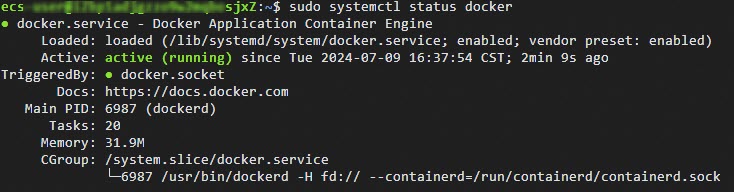
sudo systemctl status docker如下图回显所示,表示Docker已启动。
执行以下命令,拉取DeepGPU-LLM镜像。
sudo docker pull egs-registry.cn-hangzhou.cr.aliyuncs.com/egs/deepgpu-llm:24.3-pytorch2.1-cuda12.1-cudnn8-ubuntu22.04执行以下命令,运行DeepGPU-LLM容器。
sudo docker run -d -t --net=host --gpus all \
 --privileged \
 --ipc=host \
 --name deepgpu \
 -v /root:/root \
 egs-registry.cn-hangzhou.cr.aliyuncs.com/egs/deepgpu-llm:24.3-pytorch2.1-cuda12.1-cudnn8-ubuntu22.04
测试验证
本测试以通义千问-7B-Chat模型为例,您可以通过DeepGPU-LLM安装包自带的可运行代码实例体验模型运行效果,展示使用DeepGPU-LLM的推理性能。更多信息,请参见安装并使用DeepGPU-LLM。
执行以下命令,进入DeepGPU-LLM容器。
sudo docker exec -it deepgpu bash执行以下命令,下载modelscope格式的
通义千问-7B-Chat模型。git-lfs clone https://modelscope.cn/qwen/Qwen-7B-Chat.git执行以下命令,将modelscope格式的通义千问模型转换为DeepGPU-LLM支持的格式。
#qwen-7b weight convert huggingface_qwen_convert \ -in_file /workspace/Qwen-7B-Chat \ -saved_dir /workspace/Qwen-7B-Chat-converted \ -infer_gpu_num 1 \ -weight_data_type fp16 \ -model_name qwen-7b说明in_file参数后的/workspace/Qwen-7B-Chat请替换为您实际待转换的原始模型所在路径。saved_dir参数后的/workspace/Qwen-7B-Chat-converted请替换为您实际转换后的模型所存放的路径。
执行以下命令,运行DeepGPU-LLM安装包自带的推理代码,测试模型的推理效果。
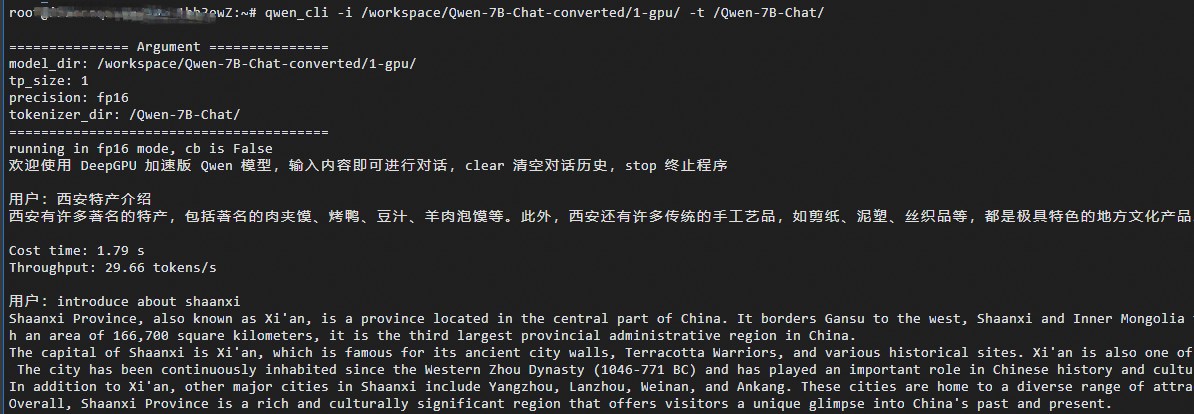
qwen_cli -i /workspace/Qwen-7B-Chat-converted/1-gpu/ -t /workspace/Qwen-7B-Chat/运行完成后,您可以输入内容和ChatGLM模型进行问答对话。例如: