Configure isolation rules
Isolation rules ensure system stability by controlling the number of concurrent threads for an interface or dependency. You can use these rules to handle instability in your application or its downstream dependencies, such as issues caused by slow SQL queries or their increased response times.
Prerequisites
Your application is connected to Application High-Availability Service (AHAS). For instructions, see Access Application.
Background
When a strong dependency, such as a method or an interface, becomes unstable, you can configure the number of concurrent threads to isolate the unstable dependency. If the response time for a request increases, the number of concurrent threads also increases. When the number of concurrent threads exceeds the specified threshold, AHAS rejects excess requests until the pending tasks are complete and the thread count decreases. This process isolates the fault and minimizes the impact of the instability.
To set a concurrency threshold, consider the following information:
- Number of concurrent threads = (Expected QPS × Response time) + Headroom.
- For example, assume a SQL query is expected to take 20 ms, the target QPS is 20, and the observed peak concurrency is 6 threads. The calculated concurrency is 20 QPS × 0.02 s = 0.4 threads. You should use the greater of the calculated concurrency and the observed peak concurrency, which is Max(0.4, 6) = 6. If you add a headroom of 2, the recommended concurrency threshold is 8.
- After you configure the rule, if the SQL query experiences a deadlock or performance issue and becomes a slow SQL query, it will occupy a maximum of 8 threads, even if new requests continue to arrive. This prevents the process from exhausting its active threads due to a sustained backlog of requests that cannot be completed quickly.
- When the SQL query returns to normal, the number of concurrent threads quickly drops. Once the thread count falls below the threshold, the system stops rejecting requests and the application's processing capacity is restored. This mechanism automatically adjusts to changes in response time and effectively isolates unstable dependencies.
Isolation rules are typically used for strong dependency isolation. For more information, see Isolate strong dependencies.
Procedure
Log on to the AHAS console.
In the upper-left corner of the AHAS console, select the region where your application is deployed.
In the left-side navigation pane, choose .
On the Applications page, click the target application card on the Application Card tab.
- To create an isolation rule, use one of the following methods:
- In the left-side navigation pane, click Application Overview. Find the target interface and click Isolate in the Actions column.
- In the left-side navigation pane, click API Details. On the API Details page, click the
 icon in the upper-right corner of a resource card. In the Create Rule dialog box, click the New Isolation Rule tab.Note If a rule already exists for the interface, click the
 icon and then click the Isolation Rule tab to create an isolation rule.
 - In the left-side navigation pane, click Rule Management. Click the Isolation RuleIsolation rule tab, and then click New Isolation Rule.
- In the New Isolation Protection Rule dialog box, configure the rule parameters:
- On the Select Protection Scenario page, modify the resource name and click Next.
- On the Configure Protection Rule page, configure the protection rule and click Next.Note If you are editing an existing isolation rule, the wizard starts directly from this page.
- On the Configure Throttling Behavior page, add and select an associated rule, and then click .
- On the Manage Rule page, click Enable in the Status column.
- In the Reminder dialog box, click OK to enable the configured protection rule.
Use case 1: Ensure sufficient resources
For example, consider a SQL query that is expected to take 20 ms and have a target QPS of 20.
In the New Isolation Protection Rule dialog box, configure the following parameters:
- Specify the Resource Name and Source Application.
- For Metric Type, select Current Interface.
- Set the Concurrency Threshold to 10.
Use case 2: Manage dependent interfaces
When the QPS of an associated interface called by a source application exceeds a threshold, requests from that source application to the current interface are throttled. This provides a way to configure rules based on the relationship between resources. For example, the resources read_db and write_db represent database read and write operations, respectively, and the write_db interface has a higher priority.
To ensure that the write_db resource has sufficient resources when it contends with the read resource, configure the following parameters in the New Isolation Protection Rule dialog box:
- Set Resource Name to
read_db. - For Metric Type, select Associated Resource.
- Set Associated Resource to
write_db. - Set Threshold for Associated Resource to 10.
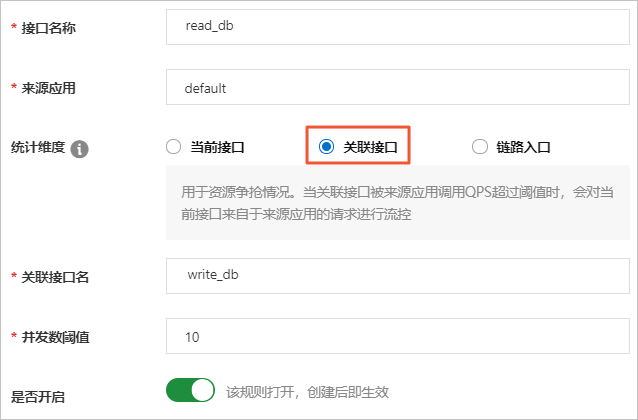
With this configuration, if the QPS for calls to the write_db resource exceeds 10, requests to the read_db resource from the source application are throttled. This ensures that sufficient resources are available for write_db.
Use case 3: Isolate invocation link entries
You can isolate resources at the entry point of an invocation chain to guarantee resources for higher-priority entry points. When the concurrency of calls from a source application to a call stack entry exceeds a threshold, requests to the current interface from that source application are isolated and throttled.
In the New Isolation Protection Rule dialog box, configure the following parameters:
- Specify the Resource Name and Source Application.
- For Metric Type, select Invocation Link Entry.
- Set the Concurrency Threshold to 10.
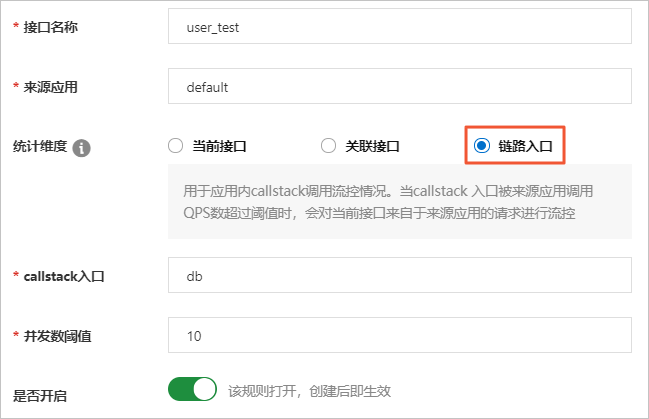
When the interface of the call stack entry is called more than 10 times, the current interface user_test performs isolated flow control on requests from the source application.
More information
The following table describes the parameters on the New Isolation Protection Rule page.
| Parameter | Description |
| Resource Name | The name of the resource to isolate. |
| Source Application | The source application to which the rule applies. The default value is default, which indicates that the rule applies to all source applications. 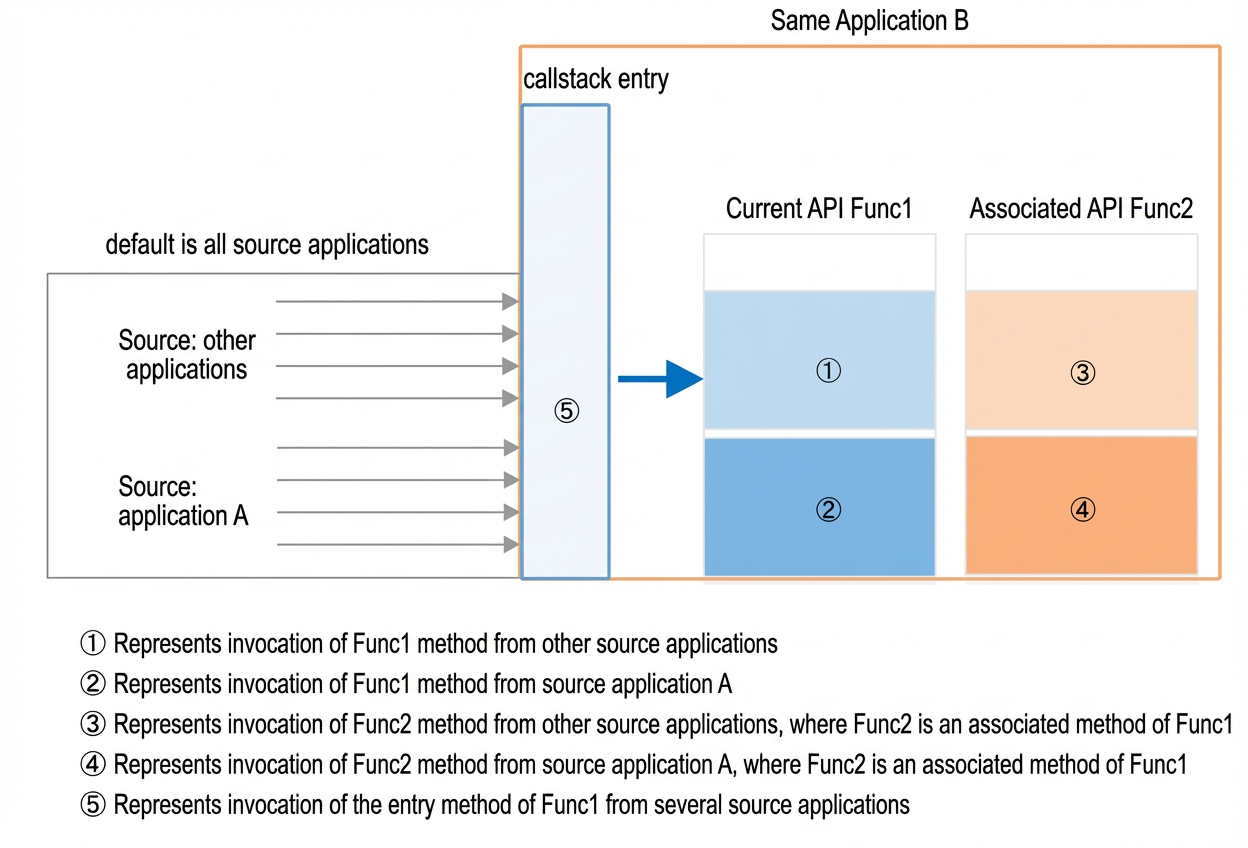
Important To ensure optimal performance, limit the number of source applications to 200. Exceeding this limit can lead to high memory usage. |
| Metric Type | The relationship between the resources to be used for isolation and flow control.
|
| Concurrency Threshold | The maximum number of concurrent threads that can execute the resource. |