Build dedicated large model applications with Model Studio
Alibaba Cloud Model Studio integrates with the vector search engine of Cloud-native Data Warehouse AnalyticDB for PostgreSQL to provide a one-stop platform for developing and deploying dedicated large model applications for enterprises. The platform provides APIs to integrate these applications into your business and serve them externally, which streamlines the development process.
Overview
Product introduction
Built on the Qwen large model, large-scale industry models, and proprietary enterprise data, Alibaba Cloud Model Studio features a full-lifecycle toolkit for large model development. It provides a complete set of tools for model training, fine-tuning, and evaluation. Pre-built application plug-ins and convenient integration methods allow you to build large model applications more quickly and efficiently.
By integrating with the high-performance vector search engine of Cloud-native Data Warehouse AnalyticDB for PostgreSQL, Alibaba Cloud Model Studio enables you to build proprietary knowledge bases. This enables your large models to use private, domain-specific information.
Target users: Enterprise users, partners, developers, and technical staff.
Core capability: Support for large model training and fine-tuning.
Service model: API-based services that allow users to easily integrate and use dedicated large model capabilities.
Application orchestration: Support for connecting your own business APIs to incorporate dedicated large model capabilities into your business workflows.
Three core paths support enterprises and ecosystem partners in building their own dedicated large models to solve real-world business problems.
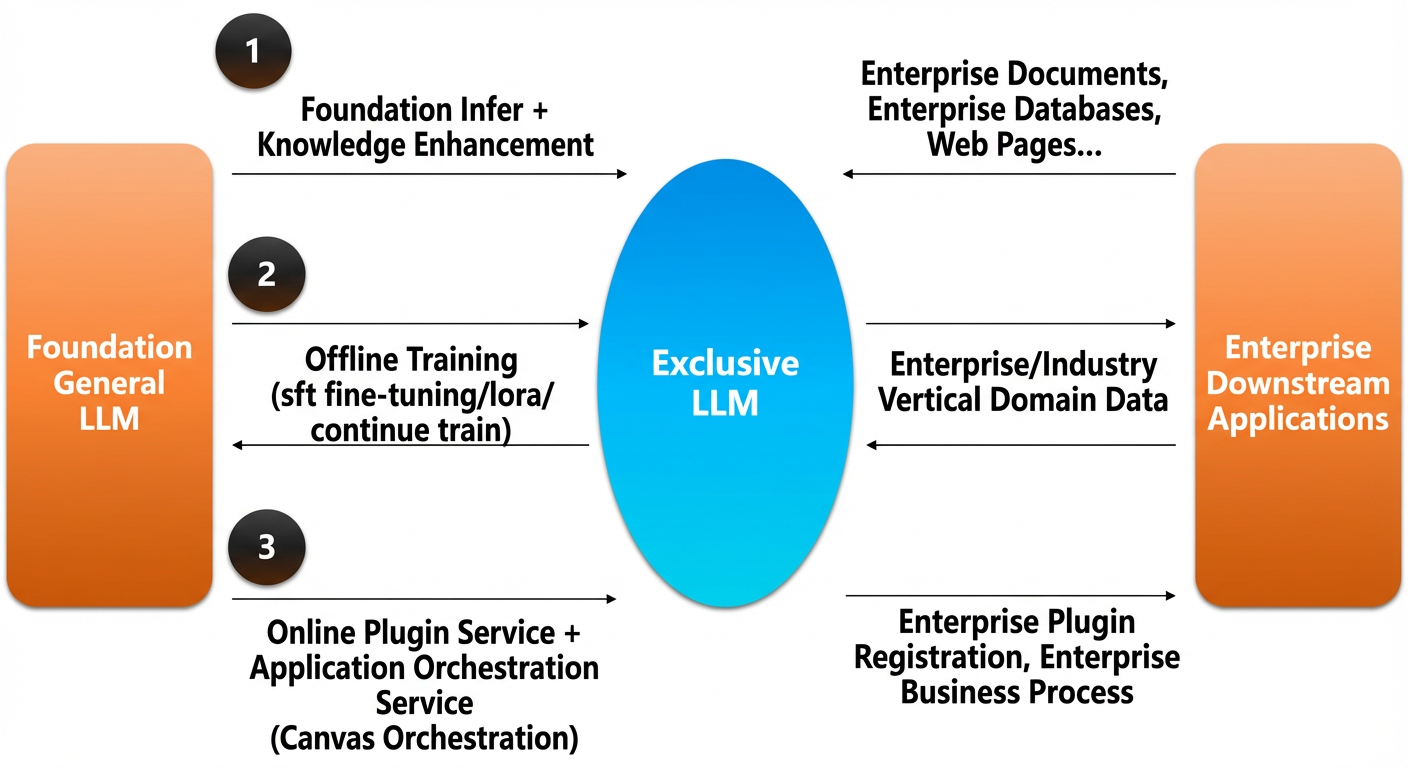
For more information about Alibaba Cloud Model Studio, see Product Introduction.
Product advantages
Three core competitive advantages:
Model training and evaluation tools for enterprise workflows.
Inference acceleration: The platform performs model compression and inference acceleration by default, abstracting away the complexities of machine management and acceleration tasks.
Full-lifecycle training platform: A rich set of model training tools supports various optimization methods, such as Supervised Fine-Tuning (SFT) and Low-Rank Adaptation (LoRa), with one-click deployment after training.
Multi-dimensional evaluation: Supports various evaluation methods, including single-model and multi-model comparative assessments.
Rapid business application development with large models.
Ready-to-use solutions: Pre-configured retrieval-augmented generation flows and prompt templates enable non-developers to get started immediately.
Plugin center: API plugins connect to enterprise systems, allowing large models to respond to queries and generate content based on proprietary knowledge with simple configuration.
Canvas-based workflow orchestration: Supports complex large model application workflows, enabling you to orchestrate applications with minimal development effort.
Large models for multiple industries.
Official enhanced capabilities: Pre-built models are enhanced for specific domains, such as Q&A, summarization, NL2SQL, and content writing. You can use these models out of the box without investing in data collection and training.
Support for third-party and industry-specific models: In addition to the Qwen large model, the platform also supports third-party models and various industry-specific large models.
AnalyticDB for PostgreSQL vector search engine.
Hybrid query: For queries involving vector indexes, the Cost-Based Optimizer (CBO) generates an optimal hybrid query execution plan.
Partition-level parallelism: Supports parallel execution across multiple partitions to reduce latency.
Aggregation and re-ranking: Supports aggregation and re-ranking of results from multiple partitions.
Distance plugin: To better support encryption algorithms from various vendors, the database integrates distance calculation algorithms as plugins.
Low-level optimization: The instruction layer is optimized with Single Instruction, Multiple Data (SIMD), providing fundamental performance improvements over open-source solutions.
Excellent vector analysis performance. For more information, see Vector analysis performance tests.
A rich set of built-in application templates helps you quickly start projects and accelerate business innovation.
Pricing
For the pricing of Alibaba Cloud Model Studio, see Billable Items.
For the pricing of the Cloud-native Data Warehouse AnalyticDB for PostgreSQL vector search engine, see Product Pricing.
Product portals
Alibaba Cloud Model Studio | Cloud-native Data Warehouse AnalyticDB for PostgreSQL |
Prerequisites
Activate Model Studio: Use your Alibaba Cloud account to go to Alibaba Cloud Model Studio. Read and accept the Terms of Service to activate the service. If no Terms of Service dialog appears, the service is already activated.
If you see the message “You have not completed identity verification” when activating the service, complete identity verification first.
You have an instance of AnalyticDB for PostgreSQL 6.0 or later that uses elastic storage mode in the China (Beijing), China (Hangzhou), China (Shanghai), China (Shenzhen), or China (Hong Kong) region, with vector search engine optimization enabled. For more information, see Create Instance.
ImportantThe vector database configuration for Alibaba Cloud Model Studio is currently supported only in the China (Beijing), China (Hangzhou), China (Shanghai), China (Shenzhen), and China (Hong Kong) regions.
This tutorial uses a Q&A application for enterprise documents as an example to demonstrate how to build a large model application and call it from your business services.
Step 1: Create a knowledge base
Go to Knowledge Base, select Standard Edition or Ultimate Edition, and click Create Knowledge Base.
Enter a Knowledge Base Name and Knowledge Base Description. You can keep the default values for the other settings. Click Next.
Select the Default Category and upload the Alibaba_Cloud_Model_Studio_Phone_Series_Product_Introduction.docx file. Click Next, and then click Finish.
Step 2: Create a large model application
Create a blank application: Go to the Application Management page. Click Create Application. On the Agent Application tab of the dialog box that appears, click Create Now.
In this tutorial, the application name is set to "Alibaba Cloud Model Studio Phone Shopping Guide".
Select a model: Select a large language model for the application. We recommend the Qwen-Max model.
Design the prompt: The prompt (also called a system prompt) defines the application's role and tasks. If you are using the sample file for this tutorial, use the following prompt:
"You are an Alibaba Cloud Model Studio phone purchasing guide. Your task is to help customers compare phone parameters, analyze their needs, and provide personalized recommendations."Click + next to , and then add a knowledge base to complete the configuration.
On the right side of the page, you can ask questions to test the application.
Publish the application: After you confirm that the changes are correct, click Publish.
Step 3: Call the application
To call the Q&A application or other Alibaba Cloud Model Studio applications via API, see Workflow and legacy agent app API.