Use OPA policies for fine-grained access control
Service Mesh (ASM) integrates with the Open Policy Agent (OPA) plugin, enabling fine-grained access control for your applications through OPA policies. ASM allows you to define these policies on the control plane and push them to data plane clusters. This topic describes how to use this feature to control access based on criteria such as the request URL and tokens in the request header.
Prerequisites
An ASM instance of version 1.9.7 or later. For more information, see Create an ASM instance.
Automatic sidecar injection enabled for the default namespace. For more information, see Enable automatic injection.
Background
As an incubating project hosted by the CNCF, Open Policy Agent (OPA) is a policy engine that can be used to implement fine-grained access control for your applications. As a general-purpose policy engine, OPA can be deployed as a standalone service alongside microservices. To protect applications, each request to a microservice must be authorized before it can be processed. To check for authorization, the microservice makes an API call to OPA to determine whether the request is authorized.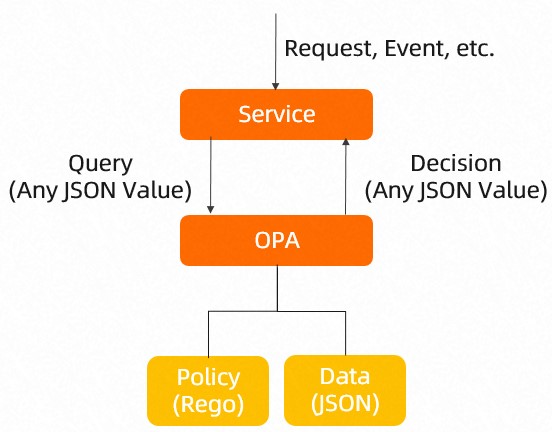
Step 1: Enable the OPA plugin and scope control
-
Log on to the ASM console. In the left-side navigation pane, choose .
-
On the Mesh Management page, click the name of the ASM instance. In the left-side navigation pane, choose .
On the OPA Policy page, select Enable Open Policy Agent (OPA) Plugin and Enable OPA Injection Scope Control, click Enable OPA, and then click OK in the Note dialog box.
Step 2: Create an OPA policy
You create an ASMOPAPolicy resource on the ASM control plane. ASM then pushes this resource to the data plane cluster, where the OPA engine in each relevant pod uses it to enforce fine-grained access control.
Option 1: Use the ASM console
-
Log on to the ASM console. In the left-side navigation pane, choose .
-
On the Mesh Management page, click the name of the ASM instance. In the left-side navigation pane, choose .
On the OPA Policy page, click Create. Select the default namespace, set the Name of the OPA policy to bookinfo-opa, and click Add Matching Label. Set Name to version and Value to v1. Copy the following Rego rules into the text box and then click Create.
Option 2: Use kubectl
Create a file named opa.yaml with the following content.
NoteWhen you define an OPA policy for a pod, you can include only one
default allowfield. If multiple OPA policies apply to a single pod and each policy defines adefault allowfield, the multipledefault allowfields cause dynamic updates to fail.Scope policies by using labels. An invalid Rego rule can make a service inaccessible.
The OPA execution engine and the application container run in the same pod and occupy ports 15081 and 9191.
OPA policies default to
allow = false. Do not redefinedefault allowto avoid conflicts.
Parameter
Description
specThe policy rules, written in the Rego language. For more information about Rego syntax, see Rego.
workloadSelectorSpecifies the policy's scope within the namespace. If omitted, the policy applies to all pods in the namespace. If specified, it applies only to pods with matching labels.
user_rolesGrants role permissions to users. In this example, the user
guest1is granted theguestrole, and the useradmin1is granted theadminrole.role_permsDefines the permissions of each role. In this example, the
guestrole can access /productpage, and theadminrole can access /productpage and /api/v1/products.Run the following command to create the OPA policy.
For more information about how to connect to an ASM instance by using kubectl, see Use kubectl on the control plane to access Istio resources.
kubectl apply -f opa.yaml
Step 3: Inject the OPA proxy
Deploy the Bookinfo sample application to the ASM instance and confirm that ASM injected the OPA proxy into each pod.
Deploy the Bookinfo sample application to the ASM instance. For more information, see Deploy an application in a cluster associated with an ASM instance.
Create an ingress gateway, an Istio gateway, and a virtual service. For more information, see Use Istio resources to route traffic based on versions.
Check whether the OPA proxy is injected into each application pod.
-
Log on to the ACK console. In the left navigation pane, click Clusters.
-
On the Clusters page, click the name of your cluster. In the left navigation pane, click .
On the Pods page, select default from the Namespace drop-down list and click the name of the target application pod.
On the Containers tab, verify that the pod contains both the istio-proxy (the sidecar proxy) and opa-istio (the OPA proxy) containers.
-
Step 4: Verify the OPA access control policy
Run the following command to access /productpage.
curl -X GET http://<INGRESS_GATEWAY_IP>/productpage --user guest1:password -IExpected output:
HTTP/1.1 200 OKRun the following command to access
/api/v1/products.curl -X GET http://<INGRESS_GATEWAY_IP>/api/v1/products --user guest1:password -IExpected output:
HTTP/1.1 403 ForbiddenThe results confirm that the user guest1, with the guest role, can access
/productpagebut is denied access to/api/v1/products.Run the following command to access
/productpage.curl -X GET http://<INGRESS_GATEWAY_IP>/productpage --user admin1:password -IExpected output:
HTTP/1.1 200 OKRun the following command to access
/api/v1/products.curl -X GET http://<INGRESS_GATEWAY_IP>/api/v1/products --user admin1:password -IExpected output:
HTTP/1.1 200 OKThe results show that
admin1is assigned theadminrole.admin1can access both/productpageand/api/v1/products. This indicates that the OPA access control policy is working as expected.
Step 5: Dynamically update an OPA policy
Run the following command to modify the OPA policy.
kubectl edit asmopapolicy bookinfo-opa -n default In the output, edit the OPA policy to grant guest1 both the guest and admin roles.
apiVersion: istio.alibabacloud.com/v1beta1
kind: ASMOPAPolicy
metadata:
  name: bookinfo-opa
  namespace: default
spec:
  policy: |
    package istio.authz
    import input.attributes.request.http as http_request
    allow {
        roles_for_user[r]
        required_roles[r]
    }
    roles_for_user[r] {
        r := user_roles[user_name][_]
    }
    required_roles[r] {
        perm := role_perms[r][_]
        perm.method = http_request.method
        perm.path = http_request.path
    }
    user_name = parsed {
        [_, encoded] := split(http_request.headers.authorization, " ")
        [parsed, _] := split(base64url.decode(encoded), ":")
    }
    user_roles = {
        "guest1": ["guest", "admin"],
        "admin1": ["admin"]
    }
    role_perms = {
        "guest": [
            {"method": "GET",  "path": "/productpage"},
        ],
        "admin": [
            {"method": "GET",  "path": "/productpage"},
            {"method": "GET",  "path": "/api/v1/products"},
        ],
}user_roles: Grants role permissions to users. In this example, the user
guest1is granted both theguestandadminroles, and the useradmin1is granted theadminrole.role_perms: Defines the permissions of each role. In this example, the
guestrole can access /productpage, and theadminrole can access both /productpage and /api/v1/products.
Step 6: Verify the dynamic update
Run the following command to access /productpage.
curl -X GET http://<INGRESS_GATEWAY_IP>/productpage --user guest1:password -IExpected output:
HTTP/1.1 200 OKRun the following command to access /api/v1/products.
curl -X GET http://<INGRESS_GATEWAY_IP>/api/v1/products --user guest1:password -IExpected output:
HTTP/1.1 200 OKPreviously,
guest1could only access/productpage. After the update,guest1can also access/api/v1/products, which confirms the dynamic policy update was successful.
Scenarios
Scenario 1: Authorize requests based on JWT claims
This scenario shows how to authorize requests based on claims in a JSON Web Token (JWT). The policy verifies the JWT in the request header, allowing only trusted requests to access the application.
The following ASMOPAPolicy allows access to the Productpage application only when the request uses the GET method, the Role claim in the JWT is guest, and the userGroup claim is visitor.
apiVersion: istio.alibabacloud.com/v1beta1
kind: ASMOPAPolicy
metadata:
  name: policy-jwt
  namespace: default
spec:
  policy: |
    package istio.authz

    allow {
      input.attributes.request.http.method == "GET"
      input.parsed_path[0] == "productpage"
      # set certificate 'B41BD5F462719C6D6118E673A2389'
      io.jwt.verify_hs256(bearer_token, "B41BD5F462719C6D6118E673A2389")
      claims.Role == "guest"
      claims.userGroup == "visitor"
    }
    claims := payload {
       [_, payload, _] := io.jwt.decode(bearer_token)
    }
    bearer_token := t {
      v := input.attributes.request.http.headers.authorization
      startswith(v, "Bearer ")
      t := substring(v, count("Bearer "), -1)
}input.attributes.request.http.method: The request method. In this example, the value is
GET.input.parsed_path[0]: The application being accessed.
claims.Role: Restricts the JWT. In this example,
Rolemust beguest.claims.userGroup: Restricts the JWT. In this example,
userGroupmust bevisitor.
Use a JWT tool to encode request information such as Role and userGroup into a JWT string. In the Payload of the JWT encoding tool, in addition to Role and userGroup, you also need to set name to guest1, the signing key to B41BD5F462719C6D6118, and select the HS256 algorithm. After encoding, you can obtain the JWT string for request authorization.
Run the following command to access the Productpage application.
curl --location --request GET 'http://<INGRESS_GATEWAY_IP>/productpage' \
--header 'Authorization: Bearer
eyJhbGciOiJIUzI1NiIsInR5cCI6IkpXVCJ9.eyJuYW1lIjoiZ3Vlc3QxIiwiUm9sZSI6Imd1ZXN0IiwidXNlckdyb3VwIjoidmlzaXRvciJ9.44OnUFZwOzSWzC7hyVfcle-uYk8byv7q_BBxS10AEWc'
Expected output:
HTTP/1.1 200 OKA 200 response indicates that a GET request to the Productpage application is successful. This occurs when the request includes a JWT Token where the Role is guest and the userGroup is visitor. If an incorrect JWT Token is used, or if the request does not contain a JWT Token, a 403 response is returned, indicating that access to the Productpage application failed.
Scenario 2: Restrict the HTTP request body
This scenario demonstrates how to authorize requests by validating fields in the HTTP request body against claims in the JWT.
The following ASMOPAPolicy allows access to the Productpage application only when the request uses the GET method, the username in the request body matches the Role claim in the JWT, and the userGroup claim is manager.
apiVersion: istio.alibabacloud.com/v1beta1
kind: ASMOPAPolicy
metadata:
  name: policy-body
  namespace: default
spec:
  policy: |
    package istio.authz

    allow {
      input.attributes.request.http.method == "GET"
      input.parsed_path[0] == "productpage"
      io.jwt.verify_hs256(bearer_token, "B41BD5F462719C6D6118E673A2389")
      claims.Role == input.parsed_body.username
      claims.userGroup == "manager"
    }
    claims := payload {
       [_, payload, _] := io.jwt.decode(bearer_token)
    }
    bearer_token := t {
      v := input.attributes.request.http.headers.authorization
      startswith(v, "Bearer ")
      t := substring(v, count("Bearer "), -1)
}input.attributes.request.http.method: The request method. In this example, the value is
GET.input.parsed_path[0]: The application being accessed.
claims.Role: Restricts the JWT. In this example, the value is set to
input.parsed_body.username, which requires that theusernamein the request body must match theRoleclaim in the JWT.claims.userGroup: Restricts the JWT. In this example,
userGroupmust bemanager.
Use a JWT tool to encode request information such as Role and userGroup into a JWT string.
Run the following command to access the Productpage application.
curl --location --request GET 'http://<INGRESS_GATEWAY_IP>/productpage' \
--header 'Authorization: Bearer eyJhbGciOiJIUzI1NiIsInR5cCI6IkpXVCJ9.eyJuYW1lIjoiZ3Vlc3QxIiwiUm9sZSI6ImFkbWluIiwidXNlckdyb3VwIjoibWFuYWdlciJ9.pAUvTeONHF-i5Ps-EUYYXk-hnaz-j-ZgP_wXJZMBiR0' \
--header 'Content-Type: application/json' \
--header 'Cookie: session=eyJ1c2VyIjoiYWRtaW4ifQ.YRz90g.GT34_5BqlFTwGqabZk_qGZzxYQ0' \
--data-raw '{
    "username":"admin",
    "password":"12****"
}'
Expected output:
HTTP/1.1 200 OKA 200 OK response indicates that a GET request can access the Productpage application if the username in the request body matches the Role claim in the JWT and the userGroup claim in the JWT is manager. Invalid or missing JWTs will result in a 403 Forbidden response.
Scenario 3: Restrict more contextual information
Based on Scenario 2, you can restrict more contextual information. For example, you can require that the username claim in the JWT must be within the bookinfo_managers list.
The following ASMOPAPolicy allows access to the Productpage application only when the request uses the GET method, the username in the request body matches the Role claim in the JWT, the username claim in the JWT is within the bookinfo_managers list, and the userGroup claim is manager.
apiVersion: istio.alibabacloud.com/v1beta1
kind: ASMOPAPolicy
metadata:
  name: policy-range
  namespace: default
spec:
  policy: |
    package istio.authz
    bookinfo_managers = [{"name": "user1"}, {"name": "user2"}, {"name": "user3"}]

    allow {
      input.attributes.request.http.method == "GET"
      input.parsed_path[0] == "productpage"
      io.jwt.verify_hs256(bearer_token, "B41BD5F462719C6D6118E673A2389")
      claims.Role == input.parsed_body.username
      claims.userGroup == "manager"
      claims.username == bookinfo_managers[_].name
    }
    claims := payload {
       [_, payload, _] := io.jwt.decode(bearer_token)
    }
    bearer_token := t {
      v := input.attributes.request.http.headers.authorization
      startswith(v, "Bearer ")
      t := substring(v, count("Bearer "), -1)
}input.attributes.request.http.method: The request method. In this example, the value is
GET.input.parsed_path[0]: The application being accessed.
claims.Role: Restricts the JWT. In this example, the value is set to
input.parsed_body.username, which requires that the username in the request body must match the Role claim in the JWT.claims.userGroup: Restricts the JWT. In this example,
userGroupmust bemanager.claims.username: Restricts the JWT. In this example, the value is set to
bookinfo_managers[_].name, which requires that theusernameclaim in the JWT must be present in thebookinfo_managerslist.
Use a JWT tool to encode the request information into a JWT string.
Run the following command to access the Productpage application.
curl --location --request GET 'http://<INGRESS_GATEWAY_IP>/productpage' \
--header 'Authorization: Bearer eyJhbGciOiJIUzI1NiIsInR5cCI6IkpXVCJ9.eyJ1c2VybmFtZSI6InVzZXIxIiwiUm9sZSI6ImFkbWluIiwidXNlckdyb3VwIjoibWFuYWdlciJ9.2X0Fmb96jBexLcVm_55t8ZY6XveSxUAsQ1j3ar5dI_g' \
--header 'Content-Type: application/json' \
--header 'Cookie: session=eyJ1c2VyIjoiYWRtaW4ifQ.YRz90g.GT34_5BqlFTwGqabZk_qGZzxYQ0' \
--data-raw '{
    "username":"admin",
    "password":"12****"
}'
Expected output:
HTTP/1.1 200 OKA 200 OK response indicates that a GET request can access the Productpage application if the username in the request body matches the Role claim in the JWT, the username claim in the JWT is present in the bookinfo_managers list, and the userGroup claim in the JWT is manager. Invalid or missing JWTs will result in a 403 Forbidden response.
FAQ
How to check OPA policies on a pod?
The OPA engine runs as a sidecar in the application pod. To see all OPA policies that apply to a pod, log on to it and run the following command:
curl 127.0.0.1:15081/v1/policiesHow do I test Rego syntax?
OPA provides an online testing tool for validating Rego policies.
References
If you previously used ConfigMaps to configure OPA policies, see the following topics: