This topic guides you through testing your network and hardware before using Cloud Contact Center. Welcome to Cloud Contact Center. Before you begin, ensure your software, hardware, and network meet the following requirements.
Agent workstation requirements
The workstation is the platform used by agents, business administrators, and IT administrators to access Cloud Contact Center. It must meet the following requirements:
Hardware: A standard computer with a sound card is sufficient. Recommended specifications: 8 GB or more of memory, a 4-core CPU, and a screen resolution of at least 1920×1200 (minimum 1280×800).
Software: Chrome browser version 57.0.2987.13 or later on Windows or macOS. Download the latest Chrome browser from:
Official download links: Standalone, Enterprise Edition.
Pre-downloaded Cloud Contact Center versions: Windows standalone installer (Download), Windows Enterprise Edition (Download), Windows Enterprise Edition 64-bit (Download), macOS standalone installer (Download).
For enterprises deploying Chrome via Windows domain control, refer to this guide.
Headset and microphone: Use a noise-canceling headset with USB or 3.5 mm jack. Recommended products: Low-cost, Mid-range.
Agent network requirements
Per-agent bandwidth requirements:
Voice traffic requires 100 Kbps of bandwidth.
Business operations require 100 Kbps of bandwidth.
Network latency < 100 ms.
Packet loss rate < 0.5%.
Public endpoints and ports that agents must be allowed to access
If your agent workstations have restricted Internet access, ensure they can reach the following public services:
TCP protocol ports
Main service endpoints (HTTPS, port 443):
https://ccc.aliyun.com/workbench/vip-poc
https://ccc.console.aliyun.com
Related service endpoints (HTTPS, port 443):
https://account-cn.alibabacloud.com
Voice Service (WebSocket protocol, ports 80 and 9443):
wss://as.ccc.aliyuncs.com:80/
wss://sip.ccc.aliyuncs.com:9443/
SIP and agent control services (TCP protocol, port 443):
sh-sip-ccc.aliyuncs.com:443
sh-wss-ccc.aliyuncs.com:443
UDP protocol
Open ports: 40000–50000
How to test and evaluate network quality between agents and Cloud Contact Center
Your network connection to Cloud Contact Center must support reliable voice calls and related operations. Allocate 100 Kbps per call and an additional 100 Kbps for business operations and queries.
Preparation before testing
Install iperf3.
Ensure ports 60001–60010 are open in your firewall for outbound Internet access from the test workstation.
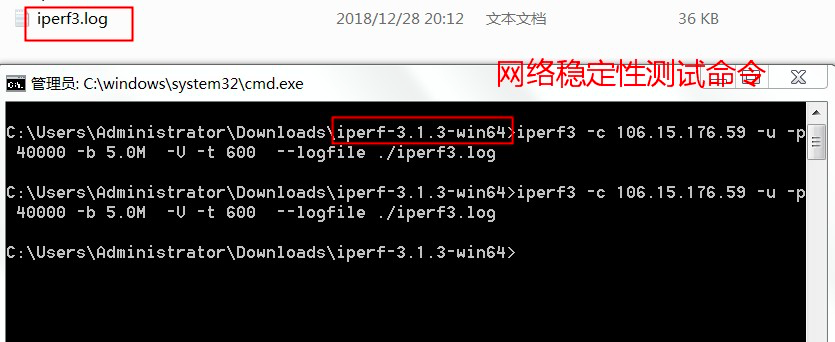
Run the following commands on the agent network:
iperf3 -c 139.196.165.160 -u -p 60001 -b 5.0M -V -t 300 --logfile ./5min.txt
iperf3 -c 139.196.165.160 -u -p 60001 -b 5.0M -V -t 600 --logfile ./10min.txt
iperf3 -c 139.196.165.160 -u -p 60001 -b 5.0M -V -t 900 --logfile ./15min.txt
iperf3 -c 139.196.165.160 -u -p 60001 -b 5.0M -V -t 1200 --logfile ./20min.txt
iperf3 -c 139.196.165.160 -u -p 60001 -b 5.0M -V -t 1500 --logfile ./25min.txt
iperf3 -c 139.196.165.160 -u -p 60001 -b 5.0M -V -t 1800 --logfile ./30min.txt.
These commands run tests from 5 to 30 minutes. Choose a duration based on your schedule. We recommend running the test for 10–20 minutes.
Command purpose: Test network quality between your agent workstation and Cloud Contact Center under a 5 Mbps load. After the test completes, send the generated log file to Cloud Contact Center technical support via DingTalk.
Parameter explanation:
139.196.165.160 is the Cloud Contact Center network quality test server.
60001 is the test port. You can use any port from 60001 to 60010. If you see a connection error, try a different port.
5M is the test load between your agent network and Cloud Contact Center. Each agent requires 200 Kbps (100 Kbps for voice, 100 Kbps for business). A 5 Mbps load supports up to 25 concurrent agents.
600 sets the test duration to 600 seconds (10 minutes).
iperf3.log is the file where the execution results are written.
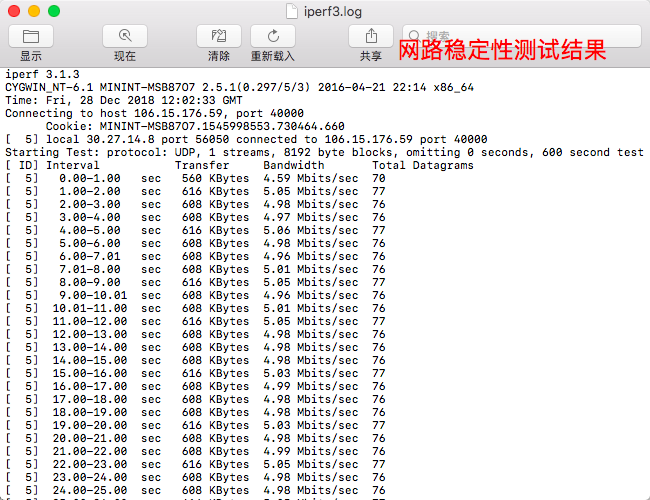
Review and interpret results: Check whether latency and packet loss meet requirements.
Network latency < 100 ms.
Packet loss rate < 0.5%.