Integration approach
API definitions
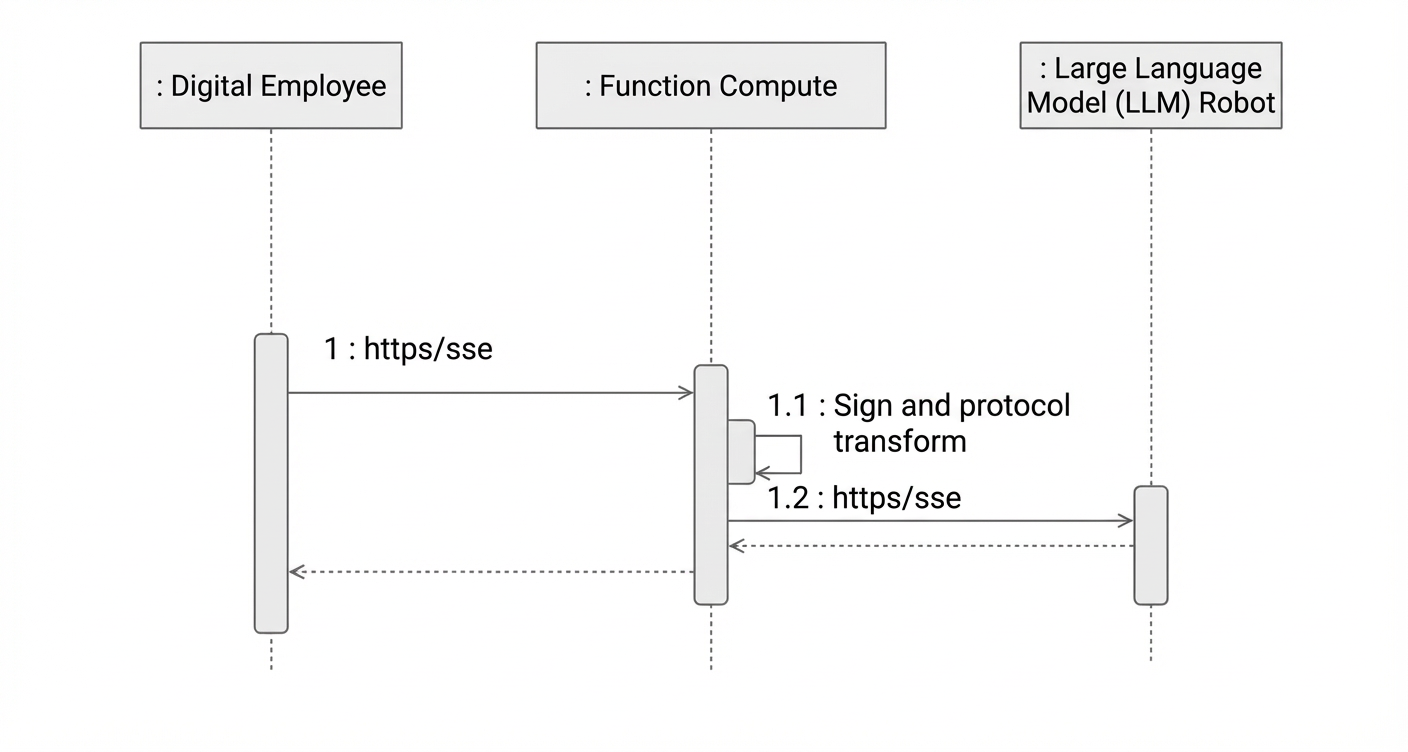
First, follow the four interface conventions below. Then, use a Function Compute web function as a proxy for these APIs. The web function handles signature authentication and request forwarding. Finally, configure your Digital Employee page as described in the Configuration steps section.
/proxy/beginSession Start session
Description
Start a session.
Protocol
SSE
Request parameters
Name
Type
Required
Example value
Description
requestId
String
Yes
UUID
Request ID
tenantId
Long
Yes
378210
Tenant ID (Alibaba Cloud UID)
instanceId
String
Yes
n1
Instance ID
scriptId
String
Yes
Digital Employee scenario ID
sessionId
String
Yes
UUID
Session ID
streamId
String
Yes
UUID
Conversation round ID
vendorParams
Map
Yes
Contextual parameters
callingNumber
String
Yes
Calling number
calledNumber
String
Yes
Callee number
Other fields
String
No
Custom contextual fields
Response parameters
Name
Type
Required
Example
Description
requestId
String
Yes
1
Request ID
httpStatusCode
Int
Yes
200
HTTP status code
code
String
Yes
OK
Response code
message
String
No
Error message
data
Object
Yes
streamEnd
Boolean
Yes
Stream end flag
updatedTime
Long
Yes
Update time in milliseconds
sessionId
String
No
Session ID
streamId
String
No
Conversation round ID
answer
String
No
Bot response
controlParamsList
List<ControlParams>
No
Voice control parameters for bot speech
type
String
Yes
HangUp
Control type:
HangUp: Hang up
Transfer: Transfer
GatherDtmf: Collect DTMF input
Voice: Voice
/proxy/dialogue Conversation
Description
In-conversation interface
Protocol
SSE
Request parameters
Name
Type
Required
Example
Description
requestId
String
Yes
UUID
Request ID
tenantId
Long
Yes
123321123
Tenant ID (Alibaba Cloud UID)
instanceId
String
Yes
n1
Instance ID
scriptId
String
Yes
Digital Employee scenario ID
sessionId
String
Yes
UUID
Session ID
streamId
String
Yes
UUID
Conversation round ID
utterance
String
Yes
Check balance
User utterance
extras
List<Map>
Extended content
dataType
String
DTMF
DTMF/Silence
dtmf
String
1234
DTMF digits
Response parameters
Name
Type
Required
Example
Description
requestId
String
Yes
1
Request ID
httpStatusCode
Int
Yes
200
HTTP status code
code
String
Yes
OK
Response code
message
String
No
Error message
data
Object
Yes
streamEnd
Boolean
Yes
Stream end flag
updatedTime
Long
Yes
Update time
sessionId
String
No
Session ID
streamId
String
No
Conversation round ID
answer
String
No
Bot response
controlParamsList
List<ControlParams>
Control parameters
type
String
Yes
HangUp
Control type:
HangUp: Hang up
Transfer: Transfer
GatherDtmf: Collect DTMF input
Voice: Voice
/proxy/abortDialogue End current conversation round
Description
End the current conversation round. Returns any text already played and stops subsequent actions.
Protocol
HTTPS
Request parameters
Name
Type
Required
Example
Description
requestId
String
Yes
UUID
Request ID
tenantId
Long
Yes
123321123
Tenant ID (Alibaba Cloud UID)
instanceId
String
Yes
"n1"
Instance ID
scriptId
String
No
Digital Employee scenario ID
sessionId
String
Yes
UUID
Session ID
streamId
String
Yes
UUID
Conversation round ID
answer
String
No
Text already played
type
String
Yes
Canceled
Canceled: Cancel
Interrupted
Response parameters
Name
Type
Required
Example
Description
requestId
String
Yes
1
Request ID
httpStatusCode
Int
Yes
200
HTTP status code
code
String
Yes
OK
Response code
message
String
No
Error message
/proxy/endSession End session
Description
End a session.
Protocol
HTTPS
Request parameters
Name
Type
Required
Example
Description
requestId
String
Yes
UUID
Request ID
tenantId
Long
Yes
123321123
Tenant ID (Alibaba Cloud UID)
instanceId
String
Yes
n1
Instance ID
scriptId
String
Yes
Digital Employee scenario ID
sessionId
String
Yes
UUID
Session ID
Response parameters
Name
Type
Required
Example
Description
requestId
String
Yes
1
Request ID
httpStatusCode
Int
Yes
200
HTTP status code
code
String
Yes
OK
Response code
message
String
No
Error message
Common control parameters
HangUpControlParams
Name
Type
Required
Example
Description
delay
Int
No
0
Delay before hanging up, in seconds. Default is 0.
Range: 0–10.
reason
String
No
Hang-up reason
TransferControlParams
Name
Type
Required
Example
Description
transferType
String
Yes
SkillGroup
Transfer type:
SkillGroup: Skill group
Agent: Agent (not supported)
External: External number (not supported)
transferee
String
Yes
1853821****
Transfer target
transferor
String
No
skg-1234****
Caller number required when transferring to an external number
DtmfControlParams
Name
Type
Required
Example
Description
terminator
String
Yes
#
End-of-digit-reception flag bit
Limitation: Only # is supported.
maxDigits
Int
Yes
Maximum number of DTMF digits
Range: 1–100.
timeout
Int
Yes
Timeout per digit, in seconds
Range: 1–10. Recommended: 5.
disableVoiceInput
boolean
No
Disable voice input for DTMF
Default: true
VoiceControlParams
Name
Type
Required
Example
Description
interruptible
Boolean
No
false
Whether the bot can be interrupted. Default: false.
silenceDetectionTimeout
Int
No
User silence timeout, in seconds. Default: 5.
Range: 1–10. Recommended: 5.
synthesizerConfig
Object
No
Yes
Voice synthesis settings for personalized bot voices.
Supported vendors:
Alibaba Cloud small model
Alibaba Cloud CosyVoice LLM
Doubao LLM
voice
String
Yes
Voice tone. See vendor documentation for available options.
volume
Double
No
Volume. Default: 50.
See vendor documentation for details.
pitchRate
Double
No
Pitch rate. Default: 0.
See vendor documentation for details.
speechRate
Double
No
Speech rate. Default: 0.
See vendor documentation for details.
Create your Function Compute instance in Shanghai whenever possible. This lets you use a private network endpoint to reduce latency and disable public network access to improve security.
Each ControlParams type has specific requirements:
Voice: If needed, include it in the first response packet. Later packets will ignore it.
GatherDtmf: If needed, include it in the first response packet. Later packets will ignore it.
Transfer: You can send this at any point in the conversation.
HangUp: You can send this at any point in the conversation.
Although beginSession uses streaming, the initial implementation uses synchronous blocking calls. Keep response time under 200 ms.
To ensure good user experience, the LLM bot must return its first response packet within 600 ms.
When using TTS to play the LLM bot’s responses, note the following:
Format numbers appropriately based on context to ensure correct pronunciation.
Some TTS vendors may mispronounce homographs, affecting intonation.
Grayscale deployment
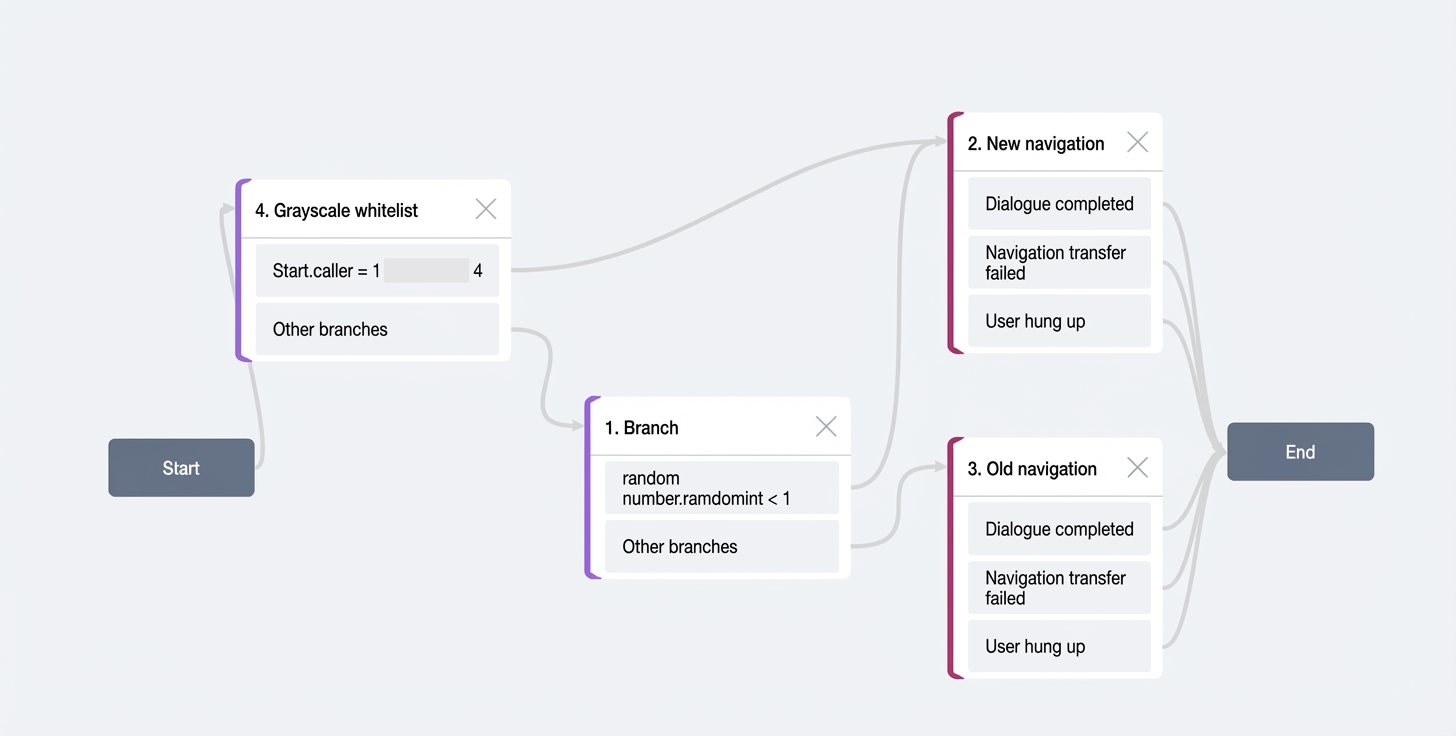
Option 1
Add grayscale branches before the Digital Employee node based on a phone number whitelist or a percentage-based whitelist. randomInt ranges from [0,99].
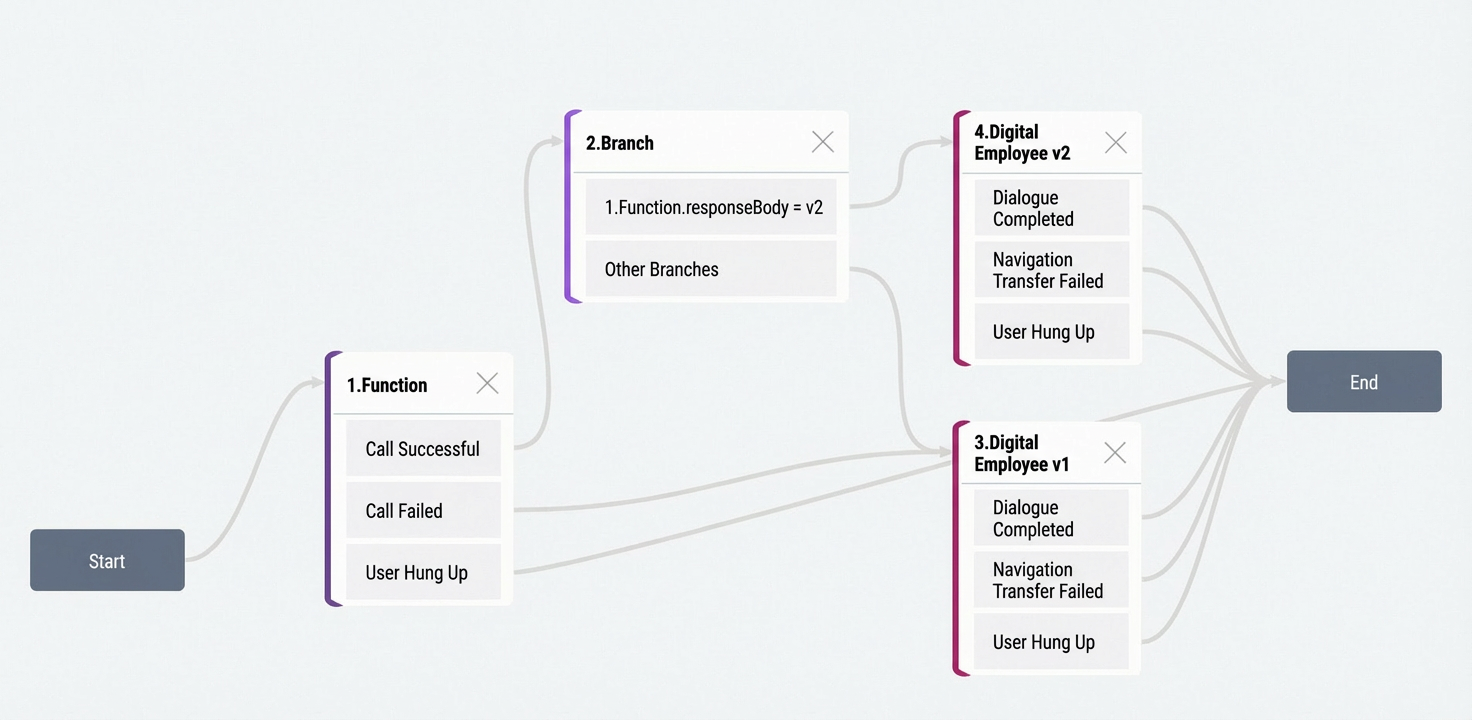
Option 2
For more complex grayscale logic, implement your own Function Compute to manage traffic.
Function Compute demo
Configuration steps
Prerequisites
Configure Function Compute
Go to the Function Compute console for Shanghai.

Create a new web function. This example uses a Java-based demo. Configure as shown:
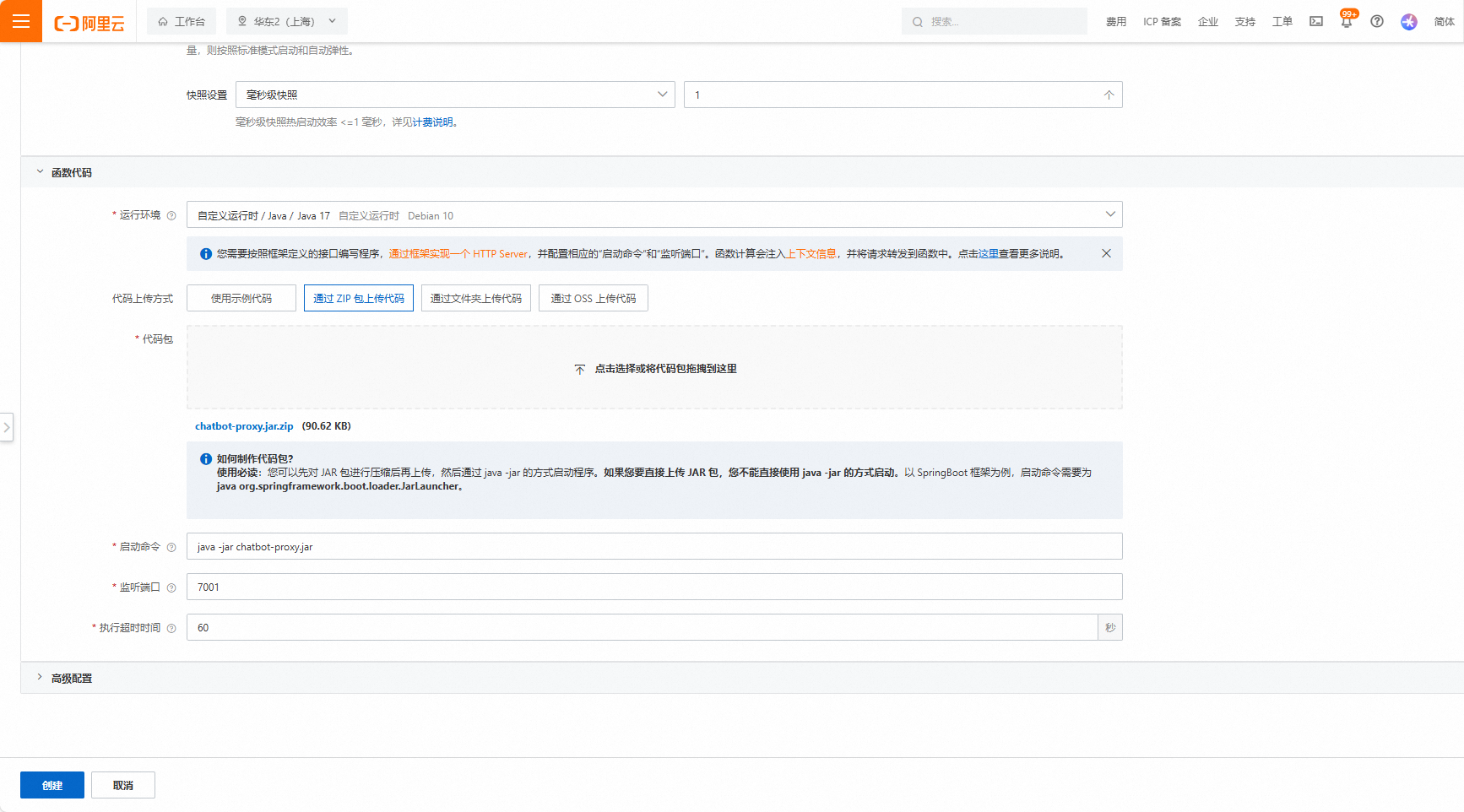
On the function details page:
Set up the trigger. Use signature authentication and disable public network access.
Configure provisioned instances and horizontal scaling based on your workload. Set at least one provisioned instance to avoid timeouts on the first call.
Obtain the Web Function Compute configuration information:
Function name
Function region
Trigger URL. Use the private network (HTTP) endpoint for lowest latency.
Configure Digital Employee
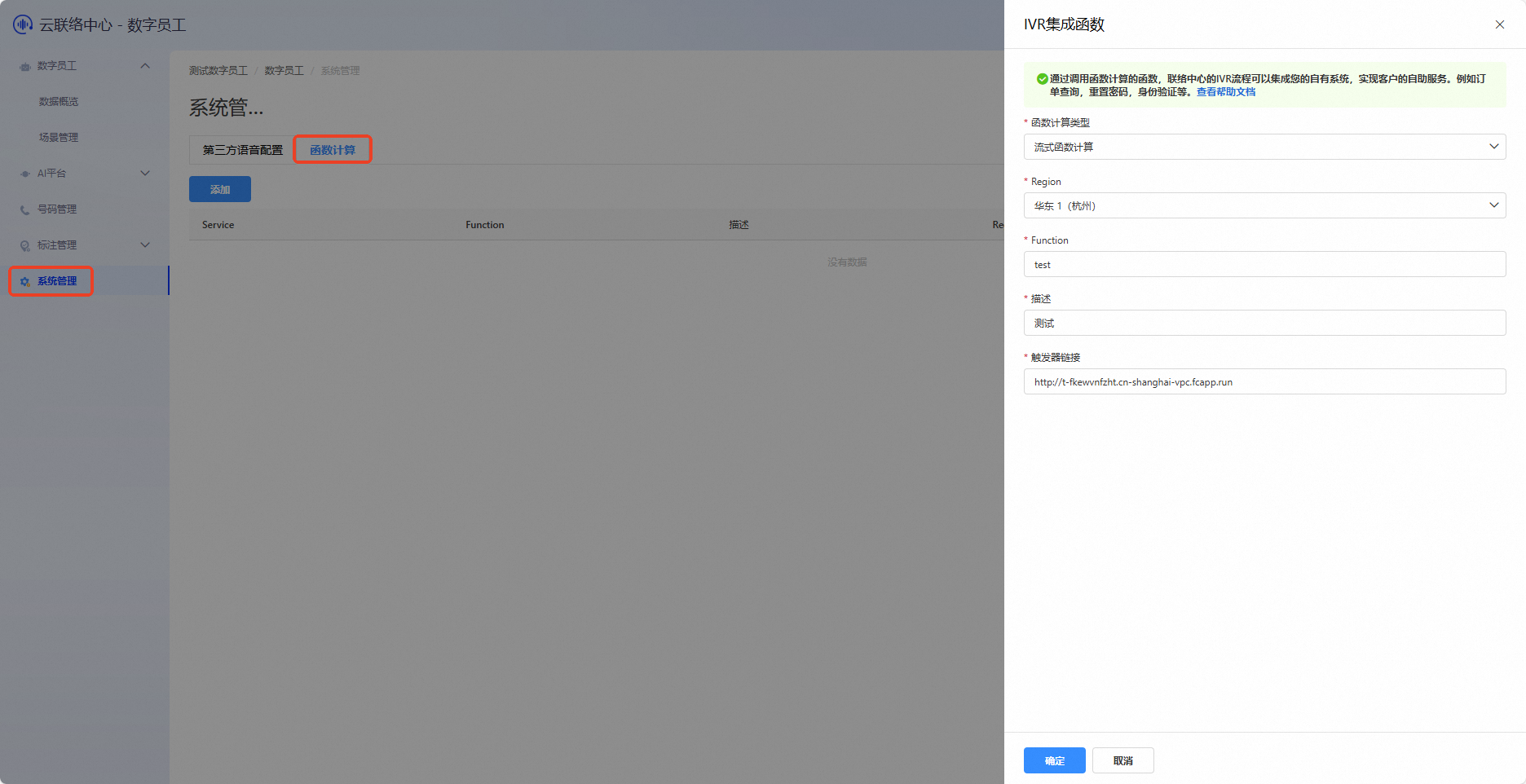
Log on to the Digital Employee console, select System Administration > Function Compute integration page, and click Add to add Web Function Compute information.

Click Test to verify your configuration and code.
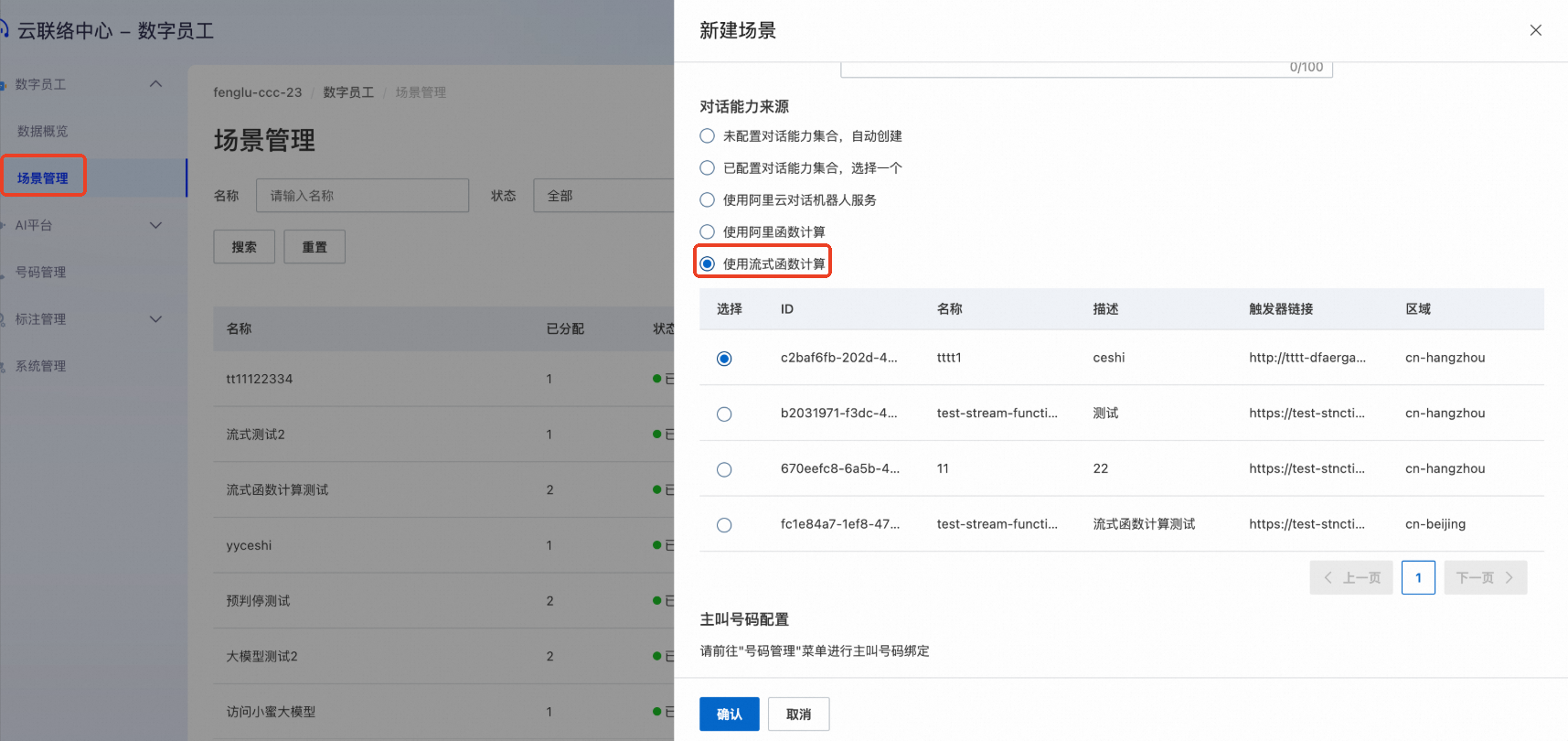
In the navigation pane on the left, choose Scenario management. Click Create scenario and select your configured Function Compute ID.
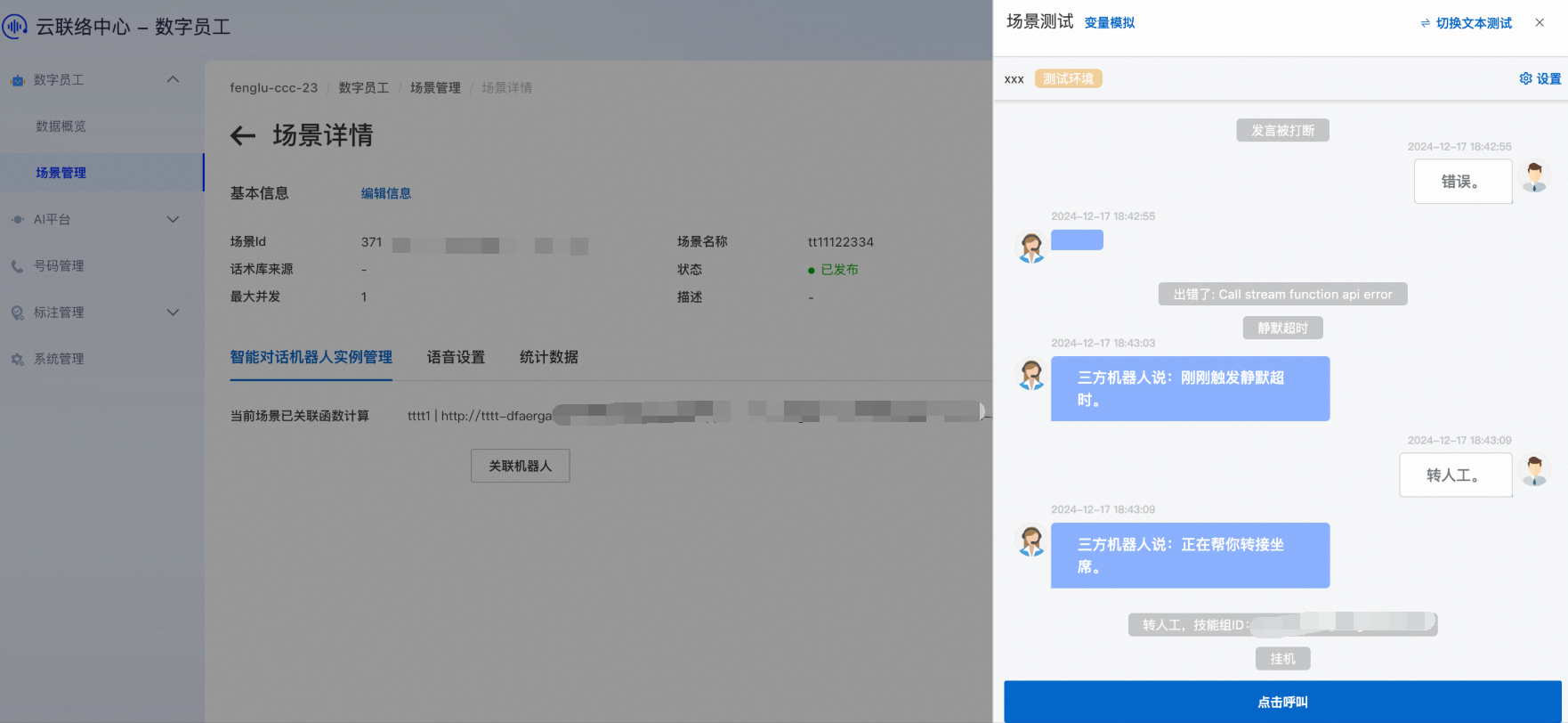
Click Edit to go to the scenario details page, then click Scenario Test. This displays some control parameters and error descriptions, such as the skill group for call transfer, whether the robot's speech can be interrupted, and API call error messages.