This topic lists common questions about Cloud Contact Center recording storage and their solutions.
Notice on charging for recording storage
Cloud Contact Center has provided free recording storage for several years without strictly enforcing the 50 GB free quota. As the product matures, compliance and standardization must also improve accordingly.
Therefore, we have decided to:
Begin billing for recording storage based on the established pricing policy starting February 1, 2023. The first 50 GB per Alibaba Cloud account are free. Storage beyond 50 GB costs CNY 0.148 per GB per month. This fee is billed monthly and calculated using the daily average storage usage over the entire month. For example, if storage usage is 101 GB at 24:00 on January 1 and increases by 1 GB each day thereafter, the total fee for January would be 66 × 0.148 = CNY 9.768 (where 66 is the average of daily usage from 51 GB to 81 GB over 31 days).
Ask your administrator to go to the Recording Storage Statistics page in the console as soon as possible to configure the following:
Storage limit per instance (same as in version 1.0).
Storage format: choose WAV, MKV, or MP3 (version 2.0 defaults to MP3; recordings made before this configuration change remain in WAV format).
Monitor storage usage.
You can also use the Batch Management button to apply global settings (new configurations take effect immediately but are not saved on this page, so reopening it shows the original default settings; however, individual instance policies are updated and saved).
We will soon offer a new feature that lets you store recordings in a custom OSS path. Before developing new logic to periodically pull and delete recordings, calculate and compare the costs of the new storage method.
If you have any questions, contact customer support (DingTalk ID: cccsupport2).
Thank you for supporting Cloud Contact Center. We want you continued business success!
1. Why charge for recordings?
Answer: We need to manage customer call recording data storage primarily because of security compliance requirements and Alibaba Cloud data governance requirements.
2. How are recording files stored?
Answer: You can choose pay-as-you-go storage or time-limited storage.
Time-limited storage does not restrict total usage. Instead, it sets a maximum lifecycle for each recording file. Files exceeding this duration are automatically deleted. The shortest lifecycle is 1 day; the longest is 2,000 days.
Quota-limited storage sets a fixed upper limit on total usage. If exceeded, the system automatically deletes the oldest recordings. For example, if a recording was created on January 1 and usage exceeds the selected quota on January 30, the January 1 recording is deleted. The maximum storage capacity is 1,048,576 GB (1,024 TB).
3. How is recording storage billed?
Answer: Monthly average storage = sum of daily storage usage ÷ number of billing days in the month. The monthly storage fee equals the monthly average storage (in GB) × CNY 0.148 per GB. For details, see billing logic.
4. Is the billing logic the same for quota-limited and time-limited storage?
Answer: Yes. Billing applies only after usage exceeds 50 GB.
For time-limited storage set to 2 months: In February 2023, you pay for two months—January’s average usage × 0.148 + February’s average usage × 0.148.
5. What is the maximum lifecycle for time-limited storage?
Answer: The shortest lifecycle is 1 day; the longest is 2,000 days.
6. What is the URL for querying recording storage statistics? Can only the Alibaba Cloud account access it?
Answer: Use the query URL. The Alibaba Cloud account can access it directly. RAM users must be granted the AliyunCCCFullAccess permission in Resource Access Management. For authorization instructions, see authorization and logon issues.
7. Can I retrieve recording files through an API?
Answer: Yes. See recording API operations.
8. How do I permanently retain recordings?
Answer: The maximum retention period is 2,000 days, and the maximum quota-limited storage is 1,048,576 GB. If you require permanent retention, contact Cloud Contact Center technical support (DingTalk ID: cccsupport1). Configuration changes made on the page take effect overnight, with the last submitted value applied.
9. Are voicemail fees included in storage fees?
Answer: Yes.
10. My current recording storage is set to six months. Will adding voicemail affect the storage duration?
Answer: No. Time-limited storage sets a maximum lifecycle per recording file but does not restrict total usage. Files exceeding the lifecycle are automatically deleted.
11. What is the default recording storage configuration?
Answer: Default configuration is quota-limited storage at 50 GB. If unchanged, only the most recent 50 GB of recordings are retained; older recordings beyond this limit are purged.
To change recording storage settings, see recording storage configuration.
12. How do I avoid charges?
Answer: Set quota-limited storage to 50 GB—the free quota—to avoid fees. Recordings exceeding this limit are automatically deleted within a few days.
13. Why does the recording storage configuration still show quota-limited 50 GB after I changed it using batch management?
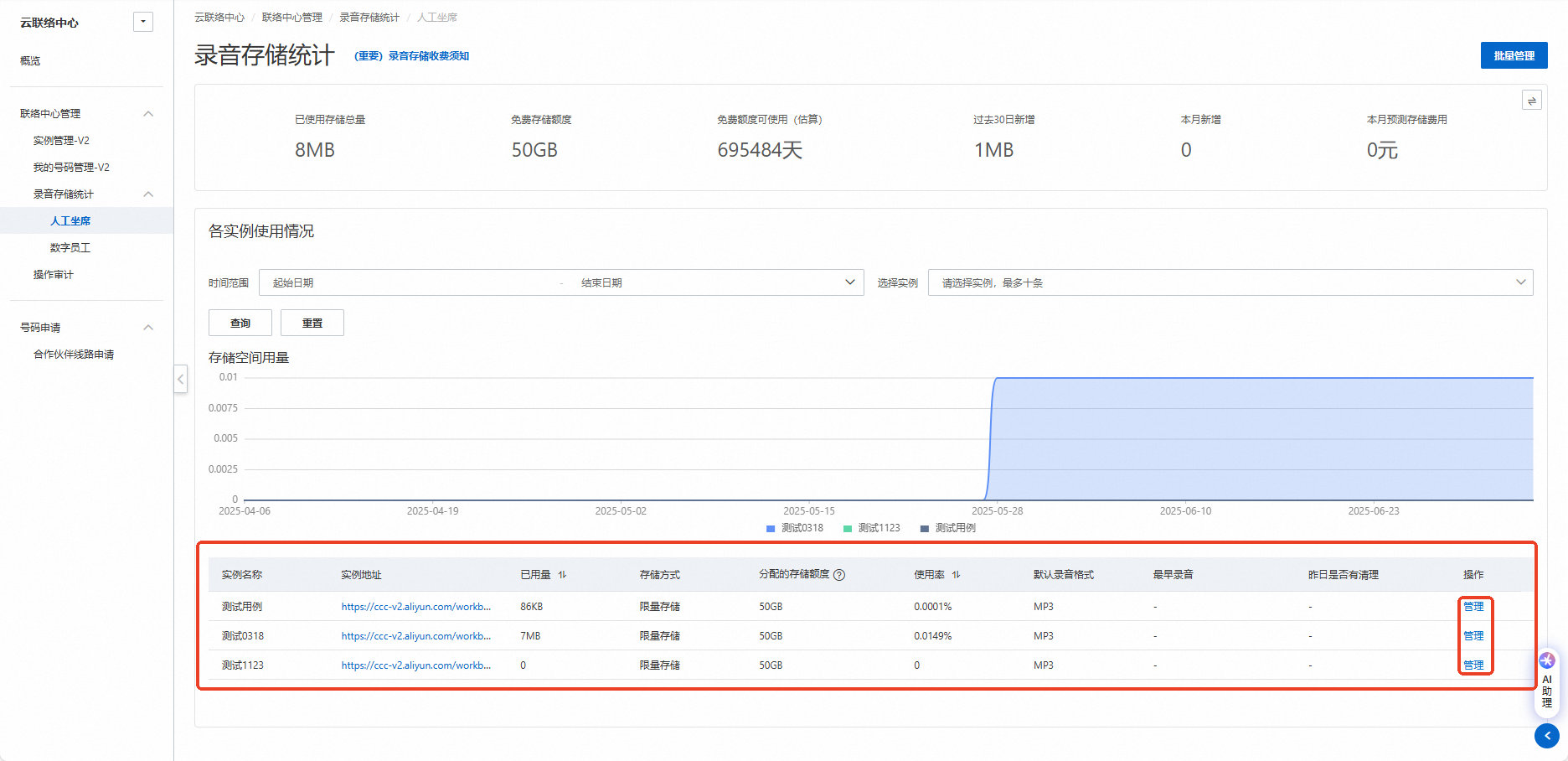
Answer: Batch management applies the same configuration to all instances. This page always displays the default setting (quota-limited 50 GB). If you’ve already changed the configuration, the update succeeded.
Check the instance-specific configuration section below for details. Since individual instances can be adjusted separately, the batch management page shows the default configuration.
14. Are recordings charged for the entire lifecycle?
Answer: Yes. As long as recordings exist in Cloud Contact Center and a storage method is set, they incur charges for their entire lifecycle.
15. How do I automatically delete all recordings?
Answer: Set time-limited storage to 1 day to enable automatic cleanup. Proceed with caution—once deleted, recordings cannot be recovered from Cloud Contact Center.
16. Can I batch download or export recordings to my local machine?
Answer: No. You must manually download recordings from the Cloud Contact Center console or use the API. For API details, see recording API operations.
17. I changed the storage mode, but usage hasn’t decreased noticeably. Does it take time to take effect?
Answer: Yes. Recording deletion tasks run daily between 1:00 AM and 4:00 AM. Changes made today typically start executing the next day at midnight.
18. How do I set up notifications for Cloud Contact Center recordings?
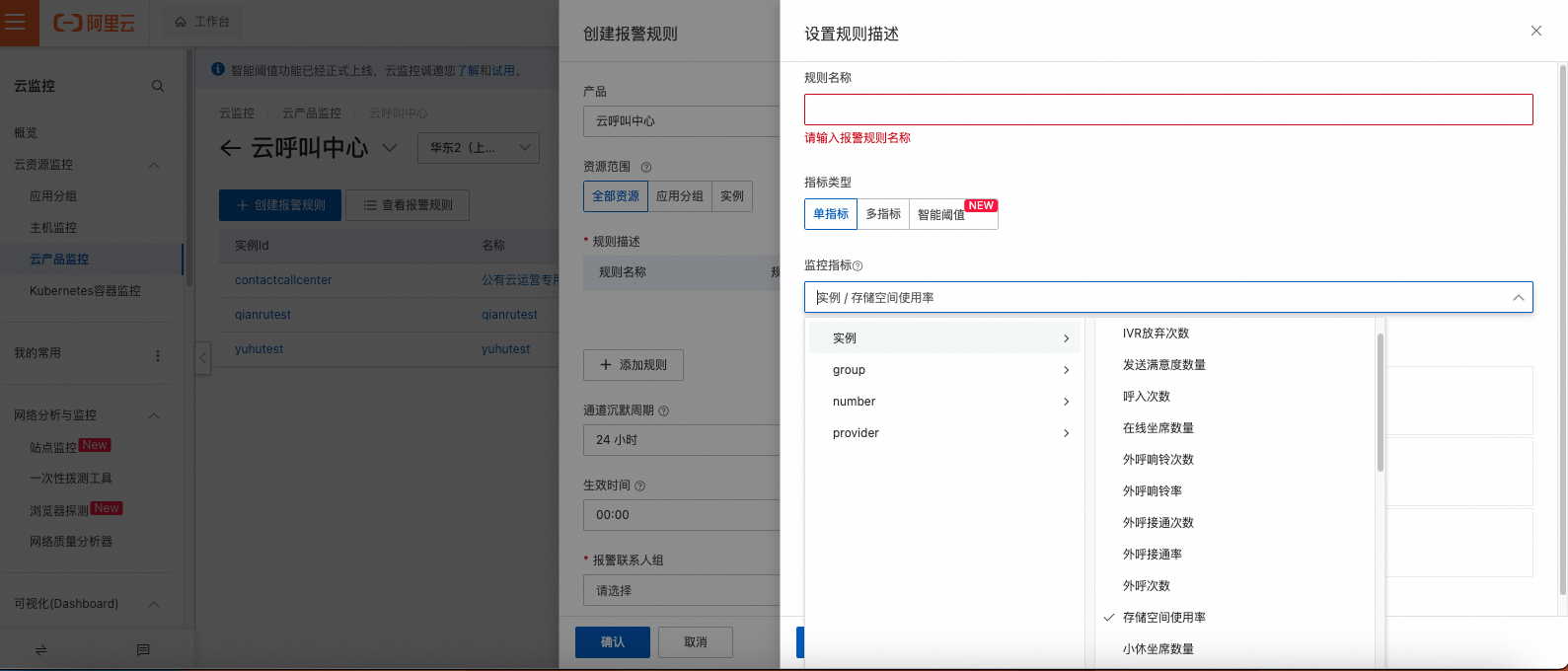
Answer: Cloud Contact Center integrates with Cloud Monitor. Use the Cloud Monitor console to create alert rules and notify contacts. This helps prevent accidental deletion due to missed configurations. We also recommend periodically downloading recordings manually.
19. How do I permanently delete recordings from a Cloud Contact Center V1 instance?
Answer: If you no longer use V1 and want to permanently delete its recordings, delete the V1 instance directly. This action is irreversible—proceed with caution. Log on to V1 instances.
20. How much storage does one minute of audio use?
Answer: Use these estimates (actual usage may vary): MP3 format uses approximately 200 KB per minute; MKV format uses approximately 400 KB per minute.