This topic lists common requirement-related questions and their solutions.
1. Does Cloud Contact Center support integration with your own business system?
Yes. Cloud Contact Center supports integration with your own business system, provided the CRM system is web-based. For the supported integration process, see Integrate agent workspace.
2. Does Cloud Contact Center support integration with mobile apps and mini programs?
No. Cloud Contact Center does not support full app integration. However, if you only use the StartBack2BackCall method to call customers (without involving the agent workspace), integration into a mobile app is possible.
3. Does Cloud Contact Center support pop-up screen on incoming calls?
Yes. Cloud Contact Center supports pop-up screen on incoming calls. Your business system must be web-based and its URL must support the HTTPS protocol. For details, see Pop-up screen on incoming calls.
4. Does Cloud Contact Center support sending satisfaction surveys to customers?
Yes. Cloud Contact Center supports sending satisfaction surveys to customers. For details, see Satisfaction survey configuration.
5. Does Cloud Contact Center support call recording?
Yes. Cloud Contact Center automatically records every connected call. You can listen to or download recordings online, or retrieve them using an API.
6. How long are call recordings stored in Cloud Contact Center, and can they be stored directly in your Alibaba Cloud OSS bucket?
You can configure Cloud Contact Center to store recordings based on time or volume. For details, see Recording storage statistics.
7. Does Cloud Contact Center support private deployment?
No. Cloud Contact Center is a public cloud product and does not support private deployment.
8. Does Cloud Contact Center support transferring callers to different agents based on keypad input?
Yes. You can configure your own IVR flow to enable this feature. For details, see IVR flow.
9. Does Cloud Contact Center support sending text messages to incoming callers?
Yes. This feature requires activating Alibaba Cloud Short Message Service separately. For details, see SMS configuration.
10. Does Cloud Contact Center support connecting your own phone numbers?
Yes. Cloud Contact Center supports connecting your own business numbers. Details are as follows:
Number type | Connection method |
Standard landline | See SIP connection details below |
400 number (choose one of two methods) | Method 1: See SIP connection details below |
Method 2: Request a landline from us to serve as the termination number for your 400 service. Check with your 400 number carrier for required documentation. Some documents may not be available from our side, so confirm requirements in advance. |
SIP connection details | Description |
Cost | CNY 30,000 per line (one-time fee) |
Description | If you want to use your own number in Cloud Contact Center, you must complete SIP connection. A single SIP line supports unlimited numbers. To request this service, submit a ticket, contact Cloud Contact Center Service Support (DingTalk ID: cccsupport2), or reach out to your account manager. Connection and maintenance incur fees—request as needed. |
Requirements | |
Order | |
Line explanation | Refers to a voice gateway. One voice gateway supports numbers from one carrier (China Mobile, China Unicom, or China Telecom) with no limit on the number of lines. |
11. Does Cloud Contact Center support transferring calls to a mobile phone for answering?
Yes. Cloud Contact Center supports transferring calls to an agent’s mobile phone, but only if a callable number (such as a landline or mobile number) is attached to Cloud Contact Center. This feature is not supported if only a 400 number is attached, because 400 numbers cannot make outbound calls.
Transferring to a mobile phone adds an extra step: Cloud Contact Center uses its attached number to call the agent’s mobile number. This outbound leg counts toward your outbound call minutes.
Normal flow: Customer calls in > Agent answers in workspace.
Mobile answering flow: Customer calls in > Cloud Contact Center initiates transfer (using an outbound-capable number) > Agent’s mobile number
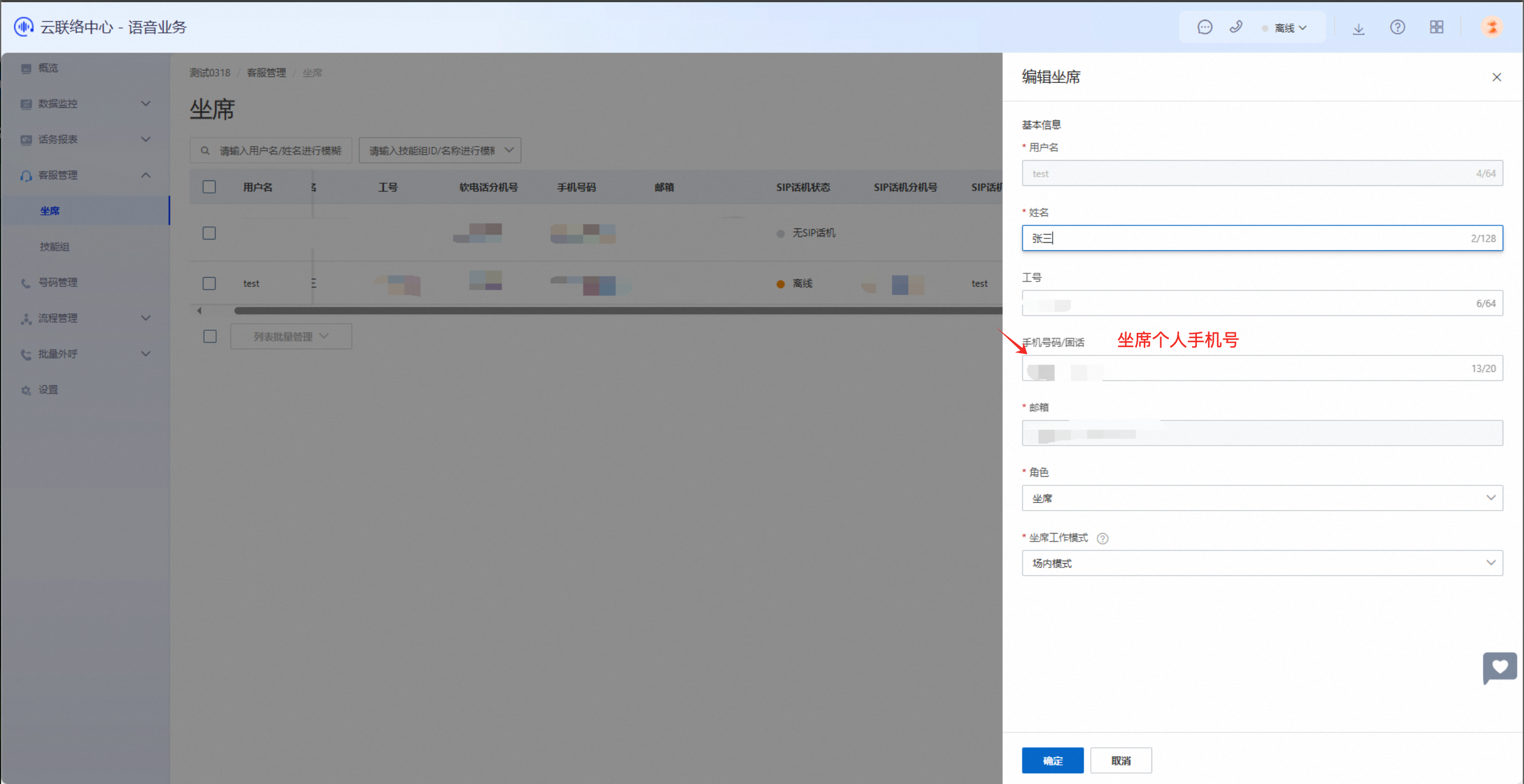
Alternatively, use the External transfer module in IVR to transfer externally without requiring an agent to be online.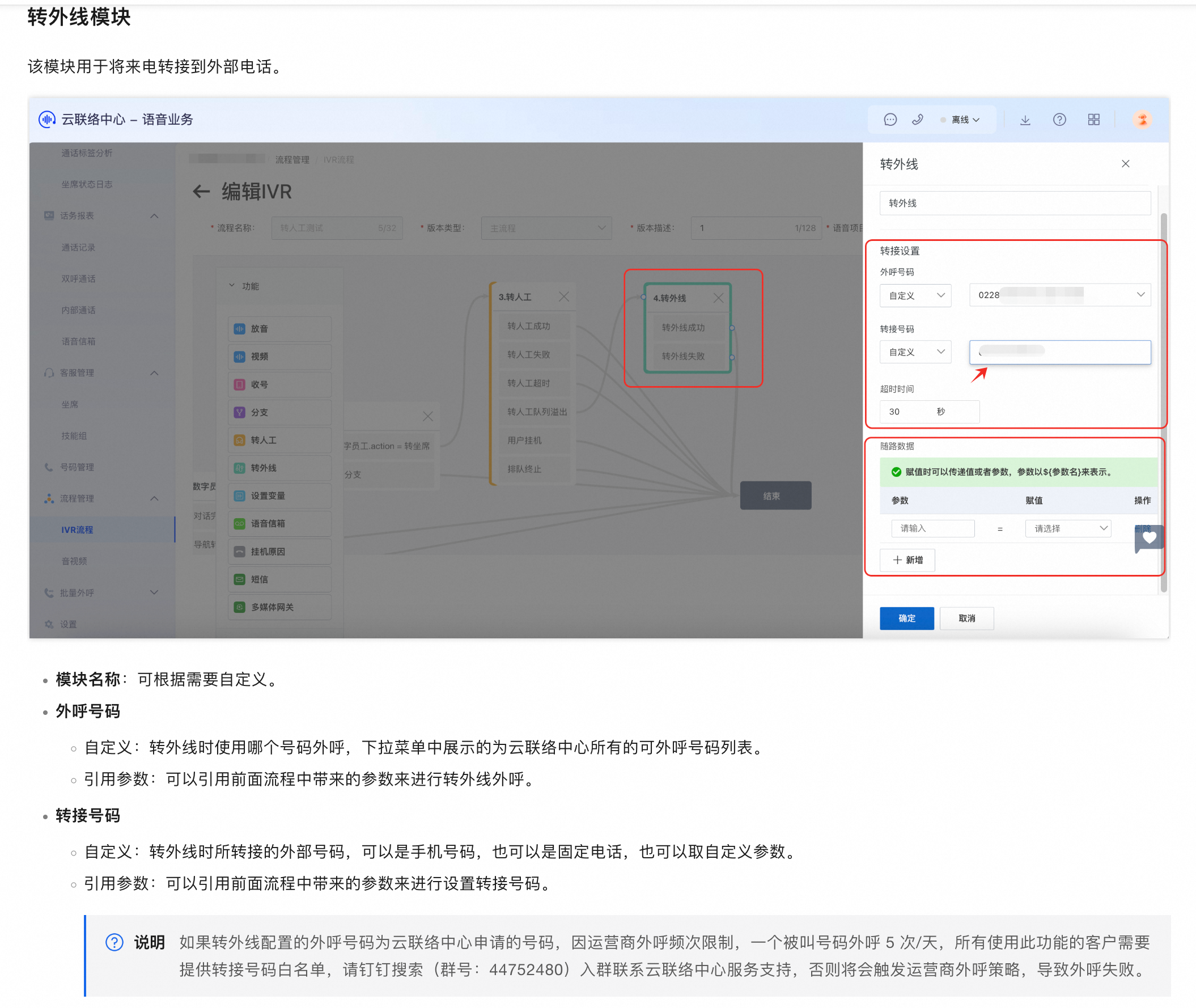
12. Does Cloud Contact Center support inbound and outbound blacklists?
Yes. Cloud Contact Center supports inbound and outbound blacklists. See Inbound control and Outbound control.
13. Does Cloud Contact Center support calling international numbers?
Cloud Contact Center provides calling functionality, but you must obtain an international-capable number first. Think of it like a mobile phone and a SIM card: Cloud Contact Center is the phone, and the telephony line is the SIM card.
14. Can Cloud Contact Center trigger an SMS as soon as a caller enters the IVR?
Yes. To trigger an SMS upon IVR entry, place an SMS module immediately after the desired IVR node. You must activate Short Message Service first. For details, see SMS configuration.
15. How do I trigger an SMS when a call times out waiting for an agent or enters the IVR? How do I configure this?
Place an SMS module directly after the relevant node in your IVR flow. You must activate Short Message Service first. For details, see SMS configuration.
16. Can IVR play short audio clips, and where is this configured?
Yes. Configure audio playback in the IVR announcement module. For details, see Announcement module.
17. How do I configure IVR to announce the agent’s name and ID before the agent answers the call?
Configure this in the IVR “transfer to agent” node, before the agent picks up.
Configuration: You can define audio to play after the call connects but before the agent answers. Customize it to include the agent’s name and ID. The agent joins the call only after the audio finishes playing.
Example message: Hello, agent ${agent name}, ID ${agent ID}, will assist you shortly.