CDN overview page
The Overview page features four key panels: Beginner's Wizard, Access Data, Status Code, and Billing Method.
Beginner's wizard
This panel is automatically hidden when you have more than 30 accelerated domain names.
Domain name dashboard
This section displays the total count of accelerated domain names in your account, categorized by status: Enabled, Disabled, and Configuring.
The Configuring status indicates that configuration changes are being distributed to Alibaba Cloud CDN points of presence (POPs) across the network. This is a normal transitional state after you add or modify domain configurations, and the domain typically transitions to Enabled within 5 to 10 minutes. If the status persists, check whether configuration errors exist (such as the ConfigParentExceedLimit error caused by exceeding the threshold for advanced condition rules), or refresh the page to view the latest status.
Enabled domains dashboard
For all domain names in the Enabled state, this dashboard shows the number of domains that are Not Configured or Configured for the following items: CNAME, Cache Expiration Time, and SSL Certificate. Hovering over a count displays the domain names for the corresponding configuration state.
|
Parameter |
Required |
Description |
|
CNAME |
Required |
A CNAME record is a type of DNS record. This configuration is required to ensure that your accelerated domain name functions correctly with Alibaba Cloud CDN. |
|
Cache Expiration Time |
Recommended |
The cache expiration time specifies how long Alibaba Cloud CDN points of presence (POPs) cache resources from your origin server. When this time expires, POPs mark the cached content as invalid. A proper cache expiration time improves the cache hit ratio and reduces content delivery latency. |
|
SSL Certificate |
Recommended |
An SSL certificate encrypts data transferred between clients and Alibaba Cloud CDN POPs, allowing your accelerated domain name to be accessed over HTTPS. |
Access data
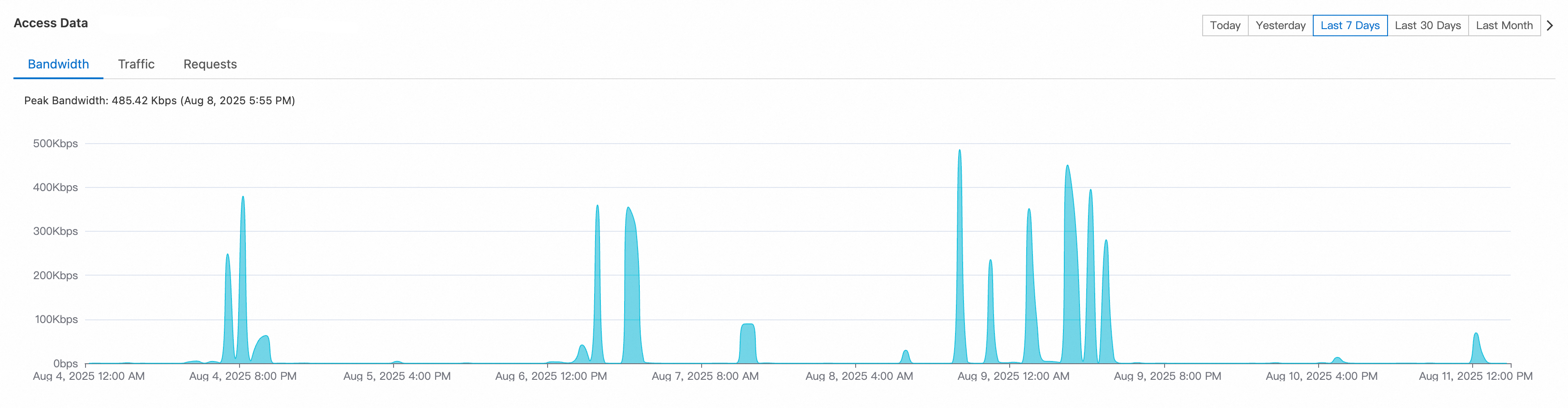
This panel displays statistics for Bandwidth, Traffic, and Requests for all accelerated domain names in your account for different time ranges, such as Today, Yesterday, and Last 7 Days.
Click the > button next to a time range to open the Usage Query page. From there, you can query data for a specific accelerated domain name or view more detailed access data for a custom time range.
Status code
This module displays statistics for HTTP status codes received by clients for different time dimensions, such as Today, Yesterday, and Last 7 days, including the number and proportion of 2xx Success, 4xx Client Error, and 5xx Server Error responses.
For example, the percentage of 4xx Client Error responses is the ratio of 4xx Client Errors to the total number of edge responses.
Click the > button for the time dimension to query data for a single accelerated domain name or more detailed HTTPCODE data within a custom time range on the Resource Monitoring page.
2xx Success - Edge Response: A client request was successfully processed by the POP, which returned the requested resource or a confirmation.
4xx Client Error-Edge Response: The POP could not process the client request due to an error in the request, such as insufficient permissions. Modify and resend the client request.
4xx Client Error-Origin Fetch Response: The origin server could not process the POP's request due to an error, such as a non-existent resource. Modify the client request or your CDN domain configuration, then resend the request.
5xx Server Error-Edge Response: An internal error occurred on the POP while processing a client request, possibly due to high server load. Check your origin server's network configuration.
5xx Server Error-Origin Fetch Response: An internal error occurred on the origin server while processing a POP's request, possibly due to high server load. Check your origin server's configuration and load.
Billing method
Billing method
This panel displays the current billing methods for your account's Alibaba Cloud CDN basic services billing (Traffic) and HTTPS requests for static content.
The default billing method for basic services billing (Traffic) is pay-by-data-transfer. If your business scenario requires a different billing method, click Change to change the billing method. The billing method for HTTPS Requests for Static Content is fixed as pay-by-data-transfer, billed hourly.
Resource plan
-
Detailed usage information for resource plans is displayed only when the billing method for basic services billing (Traffic) is pay-by-data-transfer.
-
If the billing method for basic services billing (Traffic) is not pay-by-data-transfer, purchased resource plans are not used to offset costs. Instead, fees are deducted from your account balance. For more information, see Why am I charged or have an overdue payment after I purchased a resource plan?
This panel displays your purchased Alibaba Cloud CDN resource plans that are currently active and have a remaining balance.
|
Item |
Description |
Example |
|
Resource Plan Type |
Outbound data transfer (GB), HTTPS requests for static content (10,000 requests), etc. |
|
|
Acceleration Region |
The acceleration regions where an outbound data transfer resource plan can be applied. |
Chinese mainland, Asia Pacific 1, Asia Pacific 2, Asia Pacific 3, North America, Europe, Middle East/Africa, and South America. |
|
Usage This Month |
The amount of a resource plan that has been used in the current month. |
|
|
Deductible |
Number of resource plans |
|
Click the Resource Plans button below to view details about your resource plans, including total quota, remaining quota, and expiration date. For more information, see Resource Plan Management Details.