Getting started
Updated at:
This topic describes how to get started with CloudBox.
Preparations
Before you purchase and use CloudBox, ensure that you have an Alibaba Cloud account and have completed identity verification. For more information, see the following topics:
Workflow
CloudBox is an integrated hardware and software solution that extends Alibaba Cloud's public cloud infrastructure, such as computing, storage, and networking, to your on-premises data center. You can purchase CloudBox resources in the Alibaba Cloud Management Console. Alibaba Cloud then installs and deploys CloudBox at your location. You can then use the resources in CloudBox to create cloud product instances. The workflow is as follows: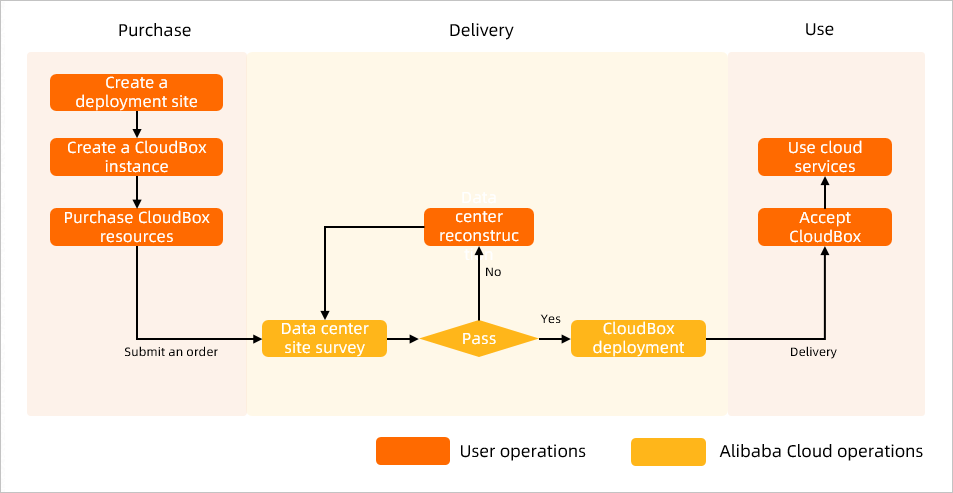
As shown in the preceding figure, the CloudBox workflow includes the following steps:
- Purchase CloudBox
In the Alibaba Cloud Management Console, create a deployment point for CloudBox. Then, at the deployment point, create a CloudBox, purchase its resources, and submit the order to Alibaba Cloud.
- Deploy CloudBox
After Alibaba Cloud accepts and confirms your purchase order, the CloudBox deployment process begins. This process includes an on-site survey of your data center. After the survey is approved, Alibaba Cloud installs and deploys CloudBox on-site.
- Use CloudBox
After Alibaba Cloud deploys CloudBox, you inspect and accept the deployment. After you accept the deployment, the billing cycle for CloudBox begins. You can then use the resources in CloudBox to create cloud product instances, such as ECS instances.
Is this page helpful?