Scale out an Alibaba Cloud Box
You can scale out your Alibaba Cloud Box when its compute, storage, or other resources no longer meet your business needs, as long as more than six months remain before its expiration date. This topic explains how to submit a scale-out order from the console.
Background information
Resource scale-out
Alibaba Cloud Box allows you to independently scale out compute, storage, and network resources.
-
Compute resources: You can purchase compute SKUs, compute expansion packages, and SLA value-added service packages.
-
Compute SKU: Purchase new compute SKUs to scale out compute resources by adding full racks.
-
Compute expansion package: Scale out compute resources within your existing racks.
-
SLA value-added service package: Purchase a value-added service for a Service Level Agreement (SLA) on your compute resources.
-
-
Storage resources: You can expand storage capacity based on your existing storage resources. When you scale out block storage, the type of the new block storage must be the same as the type you originally purchased.
-
Network resources: You can purchase a local Express Connect bandwidth expansion package to increase the bandwidth of your local Express Connect (the network bandwidth between your Alibaba Cloud Box and on-premises devices).
Scale-out billing
When you scale out, the system calculates the total cost of the order by aligning its subscription period with the expiration date of your existing Alibaba Cloud Box. Billing for the scaled-out resources begins after you submit the order. If the order involves hardware deployment, you can use these resources only after the hardware delivery and acceptance are complete. To compensate for the time you are billed before the hardware is ready to use, Alibaba Cloud extends the expiration date of your entire Alibaba Cloud Box deployment based on the overpaid amount.
The following is an example:
-
Initial purchase: On January 1, 2021, you purchase an Alibaba Cloud Box with a three-year subscription (Order A). The hardware is accepted on February 10, 2021. The expiration date is therefore February 10, 2024 (T1).
-
Scale-out: On June 1, 2022 (T2), you purchase a compute expansion package (Order B). The new hardware is accepted on July 10, 2022 (T3).
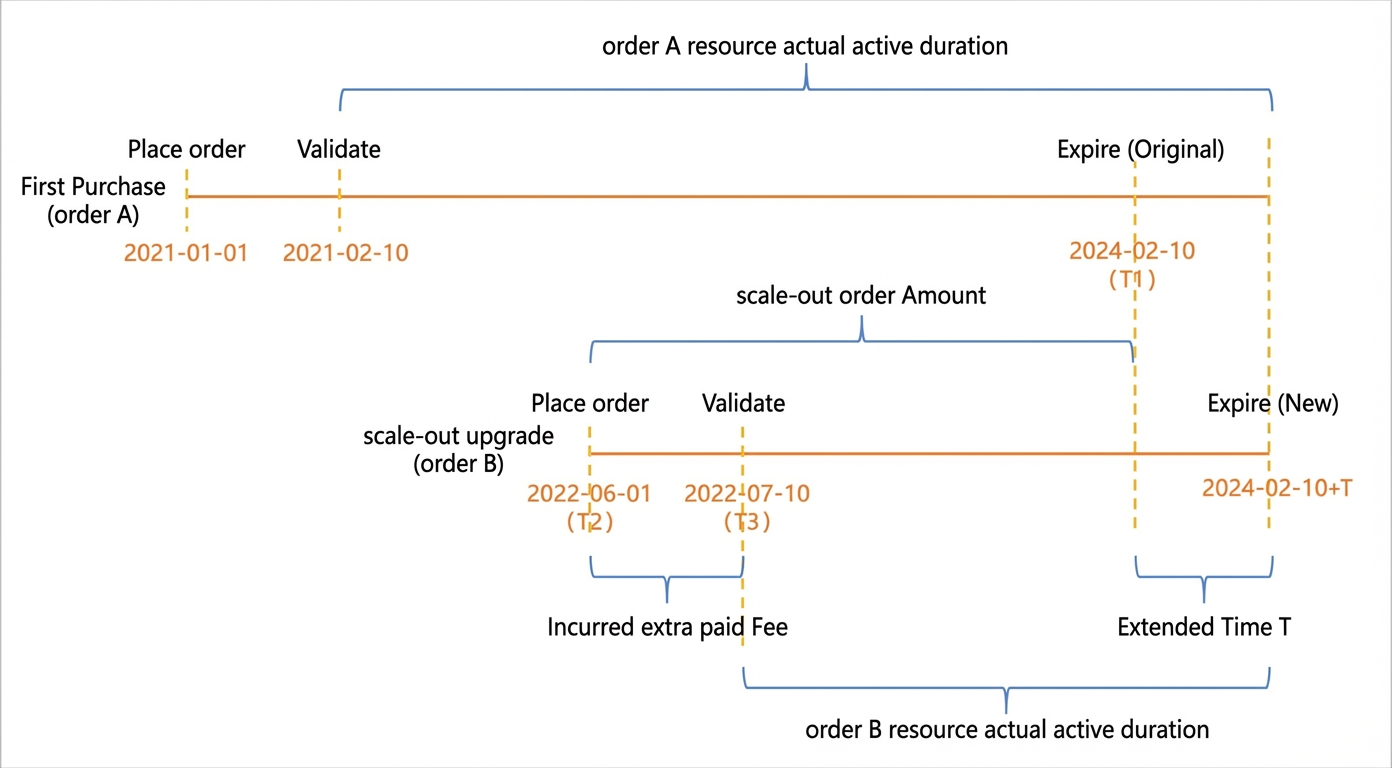
The costs are calculated as follows:
-
Scale-out order cost = Price of scaled-out resources × (T1 - T2)
-
Overpaid fees = Monthly cost of Order B × (Number of months from T2 to T3)
-
Extended duration (T) = Overpaid fees / (Monthly cost of Order A + Monthly cost of Order B)
If you do not pay in full upfront, the system generates an installment bill for the remaining balance on the first day of each month. For an initial purchase, the system generates the first installment bill on the first day of the month after acceptance. For a scale-out, the system generates the first installment bill on the first day of the month after the order is placed. After accepting the scale-out order, you can confirm the new expiration date of your Alibaba Cloud Box.
In the preceding example, the system generates the first installment bill for the initial purchase on March 1, 2021, for the monthly cost of Order A. After you scale out, the system generates the first installment bill on July 1, 2022. The new monthly installment amount is the sum of the monthly costs of Order A and Order B.
Prerequisites
The Alibaba Cloud Box is in the Running, Site Surveying, or To Be Accepted state.
Procedure
-
Go to the Cloud Boxes tab.
-
Log on to the ECS console.
-
In the left-side navigation pane, choose .
-
In the top navigation bar, select a region.
Click the Cloud Boxes tab.
-
-
Find the Alibaba Cloud Box that you want to scale out and click Scale Out in the Actions column.
-
Configure the compute, storage, and network resources that you want to add.
-
Compute
Purchase new compute SKUs to scale out compute resources by adding full racks.
-
Block Storage
-
Block Storage
The current block storage capacity of your Alibaba Cloud Box is displayed by default. Use the plus and minus icons to adjust the capacity to add. You can only add capacity to your existing block storage resources. The capacity can be increased in increments of 12 TiB.
-
Object Storage Service
The current object storage capacity of your Alibaba Cloud Box is displayed by default. Use the plus and minus icons to adjust the capacity to purchase or expand. The minimum initial purchase capacity for object storage is 54 TiB, and the expansion increment is 22 TiB.
-
-
Value-added Service Package
-
SLA Value-added Service Package
This package provides an SLA for your compute resources.
-
OR-738C0885A1: Provides an SLA guarantee for instance types of the ecs.g6, ecs.c6, and ecs.r6 families.
-
OR-8067C6E180: Provides an SLA guarantee for instance types of the ecs.gn6i-c24g1 family.
-
-
local Express Connect bandwidth expansion package
Increases your local Express Connect bandwidth. The default bandwidth between your Alibaba Cloud Box and on-premises equipment is 20 Gbps. After expansion, the bandwidth can be increased to 60 Gbps.
-
Compute expansion package
Scales out compute resources within your existing racks. A single rack can accommodate up to 12 compute servers. When you purchase expansion packages, you must purchase a minimum of two units of each type, and you can purchase multiple packages. The table below lists the maximum instance type and number of instances that a single expansion package supports.
ID
vCPU
Memory (GiB)
Maximum instance type
Maximum instances
OR-C8F0E47EC1
104
384
1
OR-C9460E6BA3
104
192
1
OR-7A18046168
104
768
1
OR-79E6B4C158
96
372
1
-
NoteScale-out orders use the billing method selected during the initial purchase of the Alibaba Cloud Box. You cannot change the billing method.
-
-
Read and select the Alibaba Cloud Box Service Terms, and then click Confirm.
-
Complete the payment.
Next steps
After submitting the scale-out order, if the order involves hardware deployment, Alibaba Cloud will deliver, install, and deploy the required hardware in your on-premises IDC. For more information, see Deliver and accept an Alibaba Cloud Box.