When you add a data source, you must establish network connectivity between Dataphin and the data source. The appropriate solution depends on the network environment of the data source. This topic describes network connectivity solutions for data sources in various network environments.
Network connectivity solutions
Select a network connectivity solution from the following diagram based on the network environment of your data source.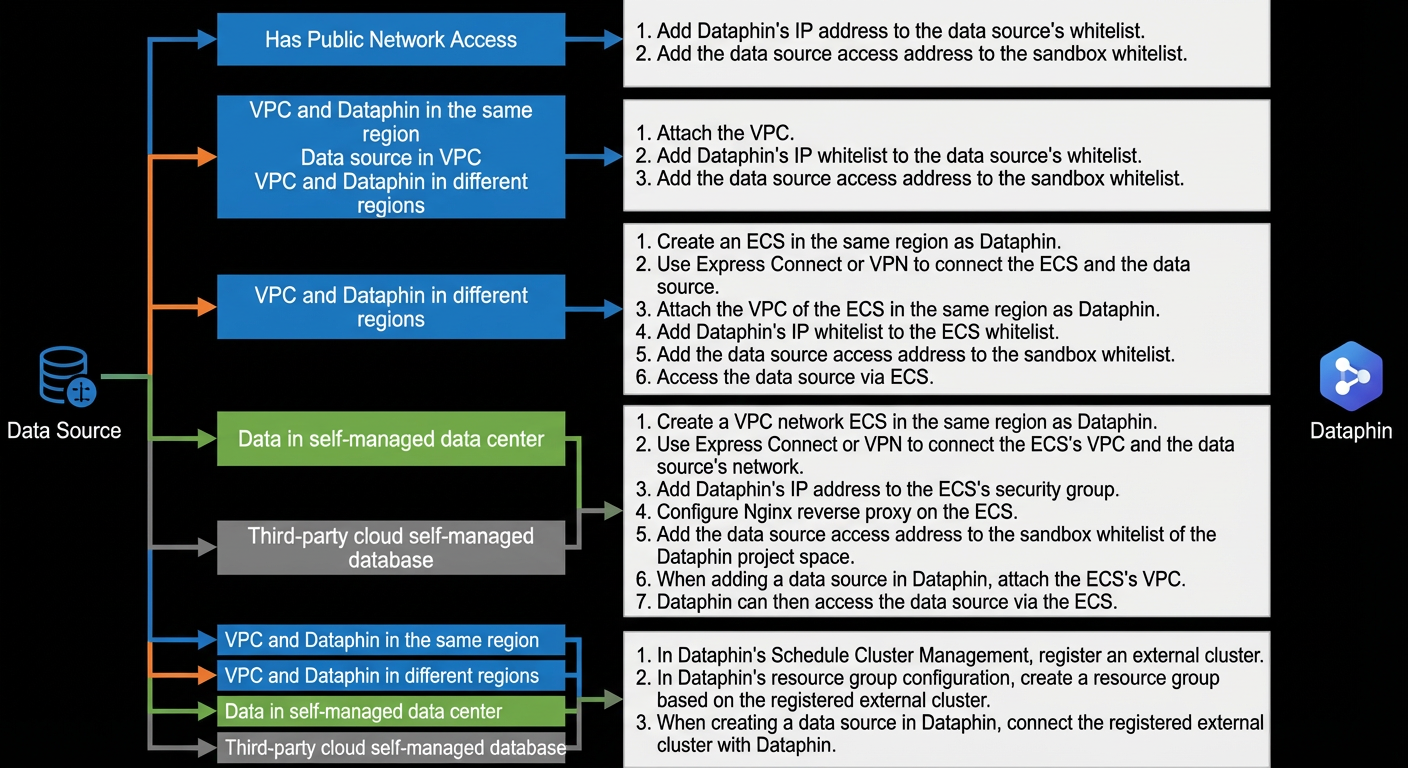
The following table provides instructions for each network connectivity solution.
Data source network environment | Network connectivity instructions |
The data source has public network access | Add the outbound IP addresses of Dataphin for the public network to the data source's whitelist. For more information, see Outbound IP addresses of Dataphin for the public network. To add the IP addresses of Dataphin to the whitelist of an ApsaraDB database, see Configure a data source whitelist. Add the data source endpoint to the sandbox whitelist of the Dataphin project. For more information, see Sandbox whitelist.
|
The data source is in a VPC in the same region as Dataphin | Solution 1: Use an ECS instance as a reverse proxy When you add the data source in Dataphin, attach the VPC of the data source. Add the outbound IP addresses of Dataphin for the VPC network to the data source's whitelist. For more information, see Outbound IP addresses of Dataphin for a VPC network. To add the IP addresses of Dataphin to the whitelist of an ApsaraDB database, see Configure a data source whitelist. Add the data source endpoint to the sandbox whitelist of the Dataphin project. For more information, see Sandbox whitelist.
Solution 2: Register an external cluster In Dataphin, go to Schedule Cluster Management and register an external cluster. In Dataphin's resource group configuration, create a resource group based on the registered external cluster. When you add the data source in Dataphin, select the registered external cluster for the connection.
|
The data source is in a VPC in a different region from Dataphin | Solution 1: Connect the two VPCs using Express Connect or VPN, then use an ECS instance as a reverse proxy. Create an ECS instance in a VPC in the same region as Dataphin. Use Express Connect or a VPN to connect the two VPCs: the VPC of the ECS instance and the VPC of the data source. When you add the data source in Dataphin, attach the VPC of the ECS instance. Add the outbound IP addresses of Dataphin for the VPC network to the security group of the ECS instance. For more information, see Outbound IP addresses of Dataphin for a VPC network. For more information about how to add a security group rule, see Add a security group rule. Add the data source endpoint to the sandbox whitelist of the Dataphin project. For more information, see Sandbox whitelist. Dataphin can then access the data source through the ECS instance.
Solution 2: Register an external cluster In Dataphin, go to Schedule Cluster Management and register an external cluster. In Dataphin's resource group configuration, create a resource group based on the registered external cluster. When you add the data source in Dataphin, select the registered external cluster for the connection.
|
The data source is in an IDC | Solution 1: Connect the networks using Express Connect or VPN, then use an ECS instance as a reverse proxy. Create an ECS instance in a VPC in the same region as Dataphin. Use Express Connect or a VPN to connect the VPC of the ECS instance to the network of the data source. Add the outbound IP addresses of Dataphin for the VPC network to the security group of the ECS instance. For more information, see Outbound IP addresses of Dataphin for a VPC network. For more information about how to add a security group rule, see Add a security group rule. Configure an Nginx reverse proxy on the ECS instance. Add the data source endpoint to the sandbox whitelist of the Dataphin project. For more information, see Sandbox whitelist. When you add the data source in Dataphin, attach the VPC of the ECS instance. Dataphin can then access the data source through the ECS instance.
Solution 2: Register an external cluster In Dataphin, go to Schedule Cluster Management and register an external cluster. In Dataphin's resource group configuration, create a resource group based on the registered external cluster. When you add the data source in Dataphin, select the registered external cluster for the connection.
|
Self-hosted data source on a third-party cloud |
Network connectivity FAQ
If a network connectivity test for a data source fails, check the following items:
Check whether the data source has started properly.
For example, for a MySQL data source, you can run the telnet 127.0.0.1 3306 command on the host machine to check whether the database port is open.
Dataphin cannot access the network where the data source is located. Ensure that the data source's network is connected to Alibaba Cloud.
The DNS cannot parse the domain name in the data source's endpoint. Ensure that the domain name can be parsed correctly.
The firewall of the data source's network blocks access from Dataphin. Add the outbound IP addresses of Dataphin for the VPC network and the public network to the data source's whitelist.
To add the IP addresses of Dataphin to the whitelist of an ApsaraDB database, see Configure a data source whitelist.
The port configuration for the data source is incorrect, or the required network port is not open. Ensure that the data source port is configured correctly and that the network port is open.
The version or type of the data source is incorrect. Ensure that you select the correct version and type.
The parameters in the data source endpoint are incorrect. Ensure that the endpoint is correct.