Review candidates
When an offline integration task or a Knowledge Graph parsing operator runs, the system performs disambiguation based on business identification rules configured for Knowledge Graph entities. If a computed result meets the matching threshold but not the automatic association threshold, the system identifies it as a suspected entity and adds it to the review pool. You must manually confirm these candidates before they are written to the graph space. This topic describes how to review candidates.
Permissions
Space administrators and modelers can view and review all candidates in the current graph space.
Business experts can view and review only the candidates assigned to them.
Procedure
From the top navigation bar of the Dataphin homepage, choose Knowledge Graph > Knowledge Management.
On the Knowledge Management tab, click the Review Candidates button to go to the Review Candidates page.
On the Review Candidates page, select a batch to review candidate entities and candidate relationships.
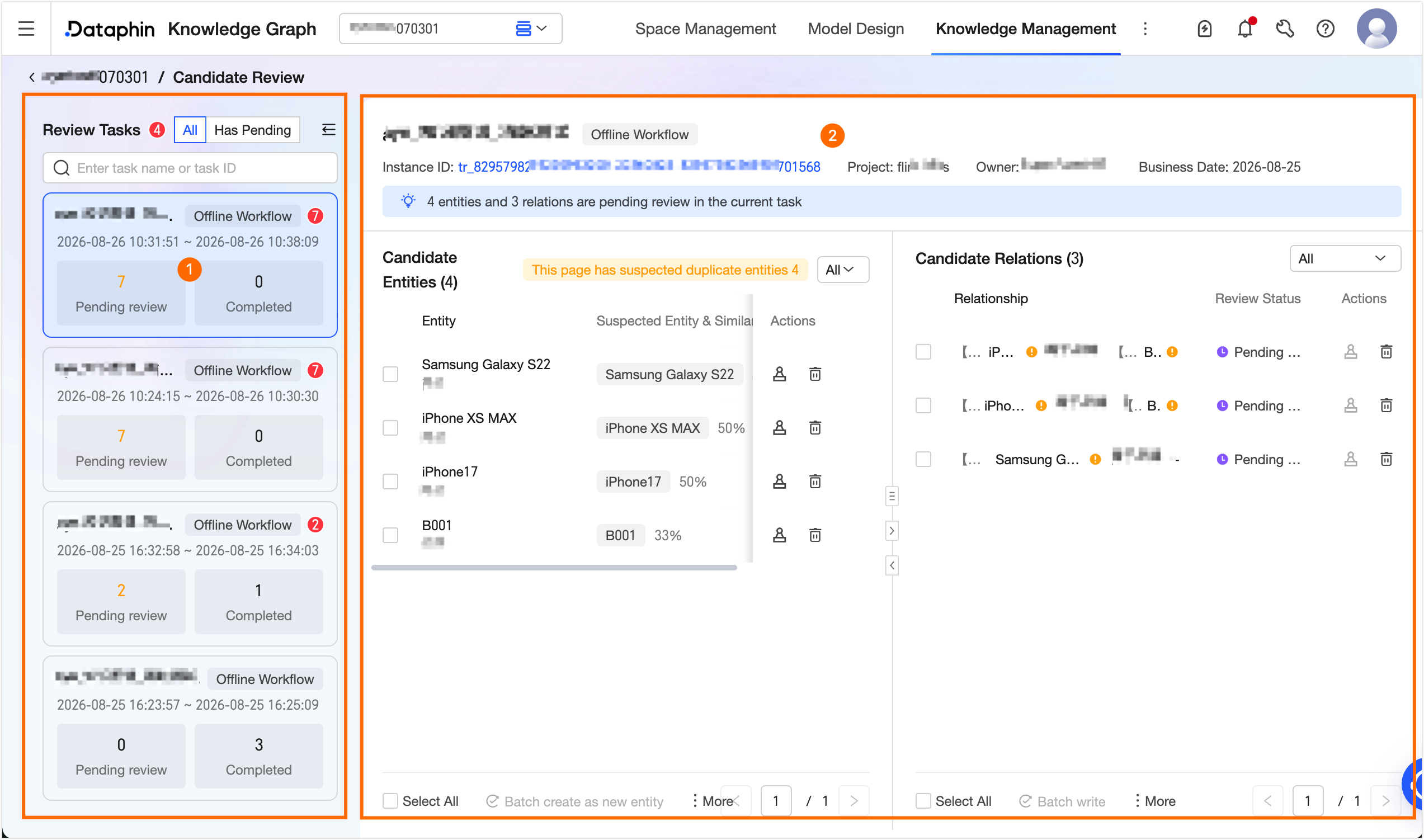
Area
Description
① Approval tasks
Each offline workflow instance or offline integration task instance corresponds to a review batch. After an instance reaches its final state (successful or failed), the corresponding batch no longer accepts new candidates.
Filter: You can perform a fuzzy search by task name or task ID, or filter by All or To Be Reviewed. When you select an approval task, the list on the right displays the candidate entities and candidate relationships for that batch.
Card information: Displays the source task name, source task type, time range, the number of candidates to be reviewed, and the number of processed candidates.
NoteIn the same batch, candidates with the same source file, source page number, entity type, and display name are considered duplicates. The system retains only the first candidate generated.
After the source instance is rerun, the system generates a new review batch and marks the rerun source. The original batch is retained. If the original batch still contains candidates in the To Be Reviewed state, the system automatically closes the original batch.
② Candidate entities and relationships
Displays the candidate entities and candidate relationships that require confirmation.
Basic information: Displays the source task name, source task type, task instance ID, project, owner, and business date.
Task instance ID: Click the ID to navigate to the Develop > Task O&M > Periodic Instance page. The page is automatically filtered to show the current task, where you can view more information.
Candidate entity list
You can filter entities by review status.
Displays the entity, suspected entity & similarity, and review status.
You can perform the following operations on an entity.
Review: This action is available when the review status is To Be Reviewed. You must manually confirm candidates identified as suspected entities. These are candidates whose computed result met the matching threshold but did not reach the automatic association threshold. For more information, see Entity Disambiguation Confirmation.
View: This action is available when the review status is Confirmed, Write Failed, or Deleted. This action lets you view the information of the entity or relationship written to the graph space.
Retry write/Batch retry write: This action is available when the review status is Write Failed. Retry writing entities or relationships that failed to write to the graph space due to issues such as a graph database write error or a vectorization failure caused by an insufficient Credit balance.
Restore: This action is available when the review status is Deleted. This action restores a deleted entity. After you restore it, its review status becomes To Be Reviewed.
Delete/Batch delete: This action is available when the review status is To Be Reviewed or Write Failed. This action deletes entities or relationships that do not meet your business expectations.
NoteYou can restore a deleted entity.
Batch create new entity: This action is available when the review status is To Be Reviewed. This action writes the selected entities to the graph space as new entities.
Batch associate suspected entity: This action is available when the review status is To Be Reviewed and the candidate has a suspected entity. This action merges the suspected entities into the current entity and writes it to the graph space.
NoteDuring bulk operations, the system automatically skips any candidate entities that do not meet the conditions for the selected operation.
The suspected entities and similarity values shown in the candidate entity list are the disambiguation results at the time the candidates are generated. When you perform a single-item or bulk review, the system recalculates the latest disambiguation results.
Candidate relationship list
You can filter relationships by review status.
Displays the source entity, relationship name, target entity, and review status for each relationship.
Review status: The status of a candidate relationship depends on the statuses of its source entity and target entity.
You can perform the following operations on a target relationship.
The Review, View, Retry write/Batch retry write, and Delete/Batch delete operations are the same as for entities.
Batch write: This action is available when the review status is To Be Reviewed. You can write a candidate relationship to the graph space only after both its source entity and target entity are in the Confirmed status.