Add an RDS for PostgreSQL data source
This topic describes how to add an RDS for PostgreSQL data source in DataV.
Prerequisites
Ensure that an RDS for PostgreSQL data source is available.Add a data source over an internal network
Log on to the DataV console.
On the My Data tab, select Data Source Management and click Add Data.
- From the Type list, select RDS for PostgreSQL.
- Select Internal Network and the region where the RDS instance is located.
- Select the network type for the internal database. The options are virtual private cloud (VPC) and classic network.
- Virtual Private Cloud
- You can turn on the VPC switch to enter VPC mode.
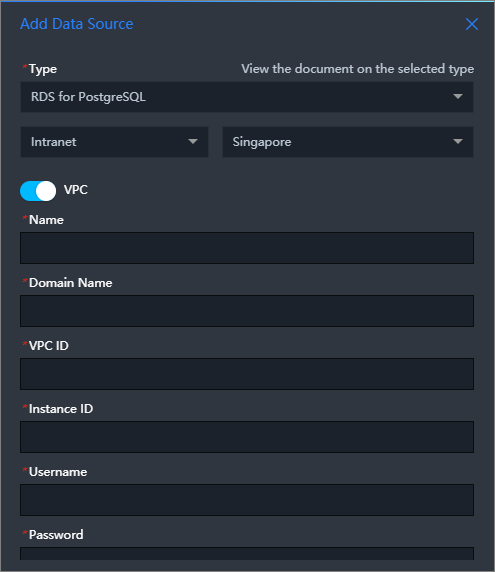
- Enter the database information. Note To create a database, see Manage databases.
Parameter Description Name The display name of the data source. You can enter any name. VPC ID The ID of the VPC instance. This is the VPC where your RDS for PostgreSQL instance is located. To obtain the ID, go to the RDS console. On the . 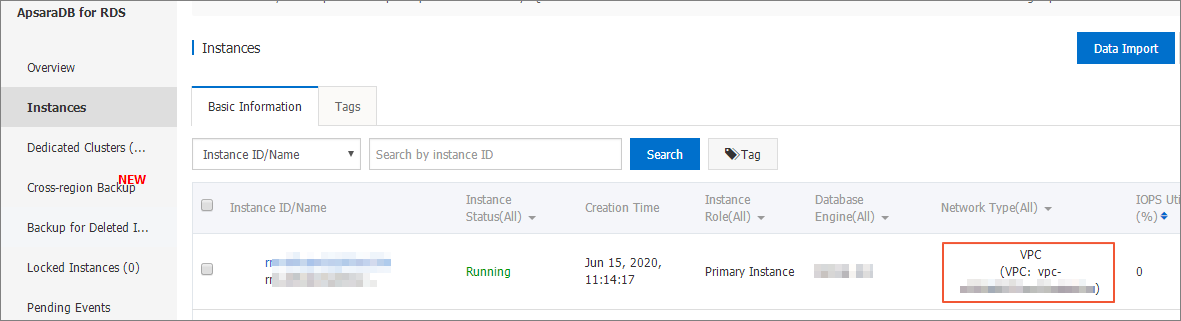
Instance ID The ID of the database instance in the VPC. You can find this ID on the instance's basic information page in the RDS console. Note You can typically find the VPC instance ID on the database instance's console page. However, the ID shown in the console may not be the one that DataV requires for VPC configuration. You must get the correct VPC instance ID using the database product's API. The ID is usually the `VpcCloudInstanceId` or `VpcInstanceId` in the instance details. For more information about the API operation to query instance details, see DescribeDBInstanceAttribute - Query instance details.Domain Name The endpoint used to connect to the database. Important This endpoint must be a domain name or IP address that the DataV server can access over the public network or an Alibaba Cloud internal network in certain regions.For example, for an Alibaba Cloud RDS for PostgreSQL instance on an internal network, the domain name might be pgm-bpxxxxxxxxxxxxxx15970.pg.rds.aliyuncs.com. You can find the domain name on the instance's basic information page in the RDS console.
Port The port used by the database. Username The username for logging on to the database. Password The password used to log on to the database. Database The name of the database. - After you enter the database information, the system automatically performs a connection test to verify that the database is accessible.
- You can turn on the VPC switch to enter VPC mode.
- Classic Network
- Turn off the VPC switch to enter classic network mode.
- Enter the database information.
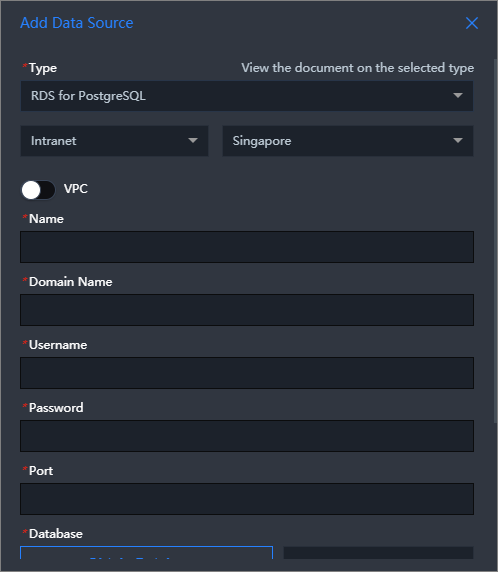 Note To create a database, see Manage databases.
Parameter Description Name The display name of the data source. You can enter any name. Domain Name The endpoint used to connect to the database. Important This endpoint must be a domain name or IP address that the DataV server can access over the public network or an Alibaba Cloud internal network in certain regions.For example, for an Alibaba Cloud RDS for PostgreSQL instance on an internal network, the domain name might be pgm-bpxxxxxxxxxxxxxx15970.pg.rds.aliyuncs.com. You can find the domain name on the instance's basic information page in the RDS console.
Port The port used by the database. Username The username for logging on to the database. Password The password to log on to the database. Database The name of the database. - After you enter the database information, the system automatically performs a connection test to verify that the database is accessible.
- Virtual Private Cloud
- After the connection test is successful, click OK to add the data source.
The new data source appears in the data source list.
Add a data source over the public network
Log on to the DataV console.
On the My Data tab, select Data Source Management and click Add Data.
- From the Type list, select RDS for PostgreSQL.
- Select Public Network as the network type.
For more information about how to set a public endpoint, see Set connection endpoints.
- Enter the database information.
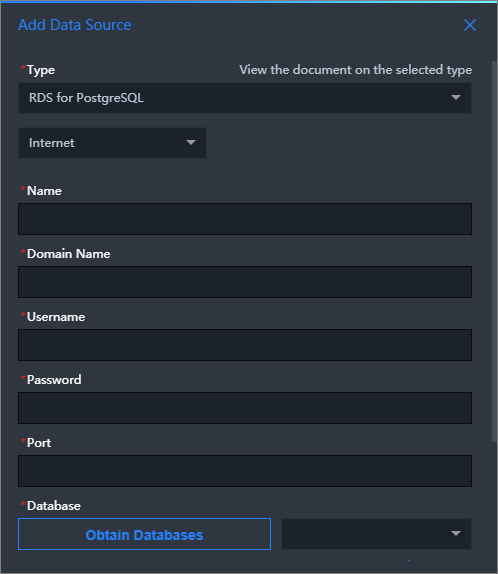
Parameter Description Name The display name of the data source. You can enter any name. Domain Name The endpoint used to connect to the database. Important This endpoint must be a domain name or IP address that the DataV server can access over the public network or an Alibaba Cloud internal network in certain regions.For example, for an Alibaba Cloud RDS for PostgreSQL instance on the public network, the domain name might be pgm-bpxxxxxxxxxxxxxxqo.pg.rds.aliyuncs.com. You can find the domain name on the instance's basic information page in the RDS console.
Port The port used by the database. Username The username for logging on to the database. Password The password to log on to the database. Database The name of the database. After you enter the database information, the system automatically performs a connection test to verify that the database is accessible.
- After the connection test is successful, click OK to add the data source.
The new data source appears in the data source list.