Directional light
The directional light is a layer in the 3D City Builder component that adjusts rendering effects by adding a directional light source. You can configure the style of the directional light, such as its color, intensity, and position. This topic describes the configuration items for the directional light layer.
In the layer list in the scene editor, click the Directional Light layer to open its configuration panel. In the panel, you can configure the style and data for the Directional Light layer.
This component is available only in DataV Professional Edition or later versions. To use this component, upgrade to the Professional Edition or a later version.
If Directional Light is not in the layer list, add the Directional Light layer. For more information, see Add a sub-widget.
Style panel
Avoid adding multiple directional lights. This can cause high performance overhead, which may lead to page stuttering or slow loading.
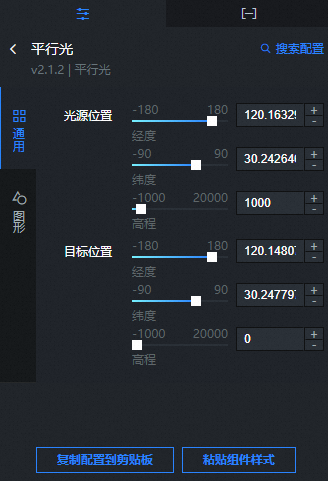
-
Search Configuration: To quickly find a specific configuration item, click on the Configuration panel in the upper right corner and enter the item's name in the Search Configuration field. The system utilizes a fuzzy match to assist in locating items. For more information, see search configuration items.
General
Parameter
Description
Light Source Position
Set the position of the light source.
Longitude: Drag the slider to set the longitude of the light source. The value ranges from -180 to 180.
Latitude: Drag the slider to set the latitude of the light source. The value ranges from -90 to 90.
Elevation: Drag the slider to set the height of the light source from the ground. The value ranges from -1000 to 20000.
Target position
Set the target position of the light.
Longitude: Drag the slider to set the longitude of the target position that the light source illuminates. The value ranges from -180 to 180.
Latitude: Drag the slider to set the latitude of the target position that the light source illuminates. The value ranges from -90 to 90.
Elevation: Drag the slider to set the height of the target position from the ground. The value ranges from -1000 to 20000.
Graphics
Parameter
Description
Light color
The color of the directional light. For more information, see Color picker.
Light intensity
Drag the slider to set the intensity coefficient of the directional light. The value ranges from 0 to 10.
Helper
Turn on the switch to show the directional light helper. Turn off the switch to hide the directional light helper.
Data panel
This layer does not require data configuration.
Blueprint interaction
In the scenario editor, click the
 icon to the right of Directional Light in the layer list.
Click the
 icon in the upper-left corner of the page.
On the Blueprint editor page, click the Directional Light layer in the Import Nodes pane. The configuration parameters for the directional light appear on the canvas, as shown in the following figure.
Event: None.
Action
Action
Description
Show component
Shows the component. No parameters are required.
Hide component
Hides the component. No parameters are required.