Release Dify instance resources
This topic describes how to release Dify instance resources.
Prerequisites
A Dify instance is deployed. For more information, see one-click deployment and manual deployment.
Usage notes
This operation releases only the computing resources of the Dify instance, not the dependent database instances. To release the database instances, see Release an ApsaraDB RDS for PostgreSQL instance, Release a Tair instance, and Release an AnalyticDB for PostgreSQL instance.
Procedure
Log in to DMS 5.0.
-
Move the pointer over the
 icon in the upper-left corner and choose . Note
If you use the DMS console in normal mode, choose in the top navigation bar.
-
Click the target workspace name.
In the navigation pane on the left, choose
 > Dify Resources.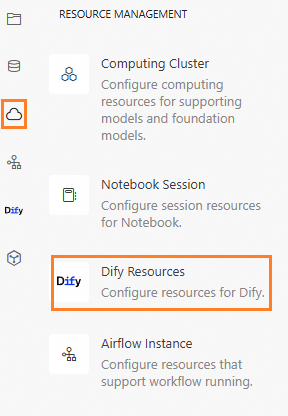
-
At the top of the page, click Release Computing Resources.
-
In the dialog box that appears, click Confirm.
Releasing the computing resources makes the Dify instance unavailable. Associated database instances and OSS resources are not released, and data stored in the databases is not deleted.
After the Dify resources are released, the status changes to Resources Released.